# Agent and locators (/docs/agent-and-locators)
Two ways to write a step. Locators name an element exactly; the agent takes a plain-English instruction. Use both in one test.
A danwo test drives your app in two ways. A **locator** finds one element the way a user names
it, like "the button called Pay". The **agent** takes an instruction in plain English, like "pay
with the saved card", and works out the clicks itself.
```ts title="tests/checkout.danwo.ts"
import { test } from "@danwo/sdk"
test("pays for a basket", async ({ app, screen, agent, expect }) => {
await app.open("/basket")
await screen.getByRole("button", { name: "Checkout" }).click()
await agent.act("pay with the test card 4242 4242 4242 4242")
await expect(screen.getByRole("heading", { name: "Thank you" })).toBeVisible()
})
```
The first and last steps use locators. The payment page in the middle belongs to another company
and changes often, so the agent handles it.
## When to use which [#when-to-use-which]
| Use a locator when… | Use the agent when… |
| ------------------------------------------- | ----------------------------------------------------------------------- |
| you can name the element: a button, a field | the step is easier to say than to pin down |
| the control is stable and yours | the page is someone else's, like a provider's checkout |
| you check an exact value: a total, a count | you check what the page _means_: "the order is confirmed" |
| you want no model calls, ever | a recording can do the replays (see [Replay cache](/docs/replay-cache)) |
Locators never call a model. Agent steps call one the first time, then replay from a recording.
## Find an element with a locator [#find-an-element-with-a-locator]
`screen` finds elements by what a user sees. Prefer these, in this order:
```ts title="tests/sign-in.danwo.ts"
import { test } from "@danwo/sdk"
test("signs in", async ({ app, screen }) => {
await app.open("/login")
await screen.getByLabel("Email").fill("ada@shop.test")
await screen.getByRole("button", { name: "Sign in" }).click()
await screen.getByText("Welcome back").waitFor()
})
```
| Finder | Finds |
| --------------------------- | -------------------------------------------- |
| `getByRole(role, { name })` | a button, link, heading or field by its name |
| `getByLabel(text)` | a field by its label |
| `getByText(text)` | an element by the text it shows |
| `getByPlaceholder(text)` | a field by its placeholder |
| `getByTestId(id)` | an element by its `data-testid` |
A string matches part of the name, ignoring case. Pass `{ exact: true }` for an exact match, or a
regular expression.
## Act on it [#act-on-it]
Once a finder has one element, call an action on it. Each action waits for the element to be ready
first.
| Action | What it does |
| --------------------- | ---------------------------------- |
| `click()` | clicks the element |
| `longPress()` | presses it and holds, then lets go |
| `fill(text)` | types into a field, replacing it |
| `press(key)` | presses a key, like `"Enter"` |
| `check()` | ticks a checkbox or radio |
| `selectOption(value)` | picks an option in a select |
| `hover()` | moves the pointer over it |
| `setInputFiles(path)` | attaches a file to a file input |
| `dragTo(target)` | drags it onto another element |
## Hold a press [#hold-a-press]
Some controls do something else when you hold them: a message that opens a menu, a card you
start dragging. `longPress()` presses the element, holds it, then lets go. It waits for the element
like `click()` does.
```ts title="tests/messages.danwo.ts"
import { test } from "@danwo/sdk"
test("opens a message's menu", async ({ app, screen, expect }) => {
await app.open("/messages")
await screen.getByText("See you at noon").longPress({ durationMs: 600 })
await expect(screen.getByRole("menuitem", { name: "Reply" })).toBeVisible()
})
```
| Option | What it does | Default |
| ------------ | ------------------------------------------- | ---------------------------- |
| `durationMs` | how long the press is held, in milliseconds | 800 |
| `force` | skips the readiness checks (web only) | `false` |
| `timeout` | how long to wait for the element | the session's action timeout |
On a web page the mouse goes down on the middle of the element. On a phone the finger does.
## When an action keeps waiting [#when-an-action-keeps-waiting]
Component libraries often draw a checkbox or radio over an invisible ``. `check()` and
`uncheck()` handle that for you: when the input's own label covers it, danwo clicks the label, as
a user would, and then checks that the input changed.
For another control a user can reach but an action keeps waiting on, such as a button that never
stops animating, pass `{ force: true }`. The action then skips its readiness checks and acts at
once.
```ts title="tests/install.danwo.ts · force"
await screen.getByRole("button", { name: "Start now" }).click({ force: true })
```
`force` also clicks a disabled or covered element, so the test can pass where a user is stuck. Use
it only for the one control that needs it.
## Narrow it to one element [#narrow-it-to-one-element]
An action needs exactly one match. When a finder matches several, narrow it:
| Narrow with | Keeps |
| ------------------------- | ---------------------------------------- |
| `.first()` | the first match |
| `.nth(i)` | the match at index `i`, counting from 0 |
| `.filter({ hasText })` | the matches that contain this text |
| `.filter({ hasNotText })` | the matches that don't contain this text |
| `.filter({ has })` | the matches with this locator inside |
| `.filter({ hasNot })` | the matches without this locator inside |
| another `getBy…` call | elements inside the matches |
| `.and(other)` | the matches the other locator finds too |
```ts title="tests/basket.danwo.ts · narrowing"
await screen.getByRole("listitem").filter({ hasText: "Socks" }).getByRole("button").click()
await screen.getByRole("row").nth(2).click()
await screen.getByRole("row").filter({ hasNotText: "Archived" }).first().click()
```
When a locator finds nothing, the error says how many elements each call left, so you can see
which call lost it:
```text
locator.click: getByRole("listitem").filter(hasText: "Kiwi") matched nothing within 10000 ms; by step: getByRole("listitem") 3, .filter(hasText: "Kiwi") 0
```
## Match one of two [#match-one-of-two]
`.or(other)` matches what either locator finds. Use it when the page shows one of two things,
such as a dialog that only appears sometimes:
```ts title="tests/checkout.danwo.ts · or"
const pay = screen.getByRole("button", { name: "Pay" })
const cookies = screen.getByRole("button", { name: "Accept cookies" })
await expect(pay.or(cookies).first()).toBeVisible()
if (await cookies.isVisible()) await cookies.click()
await pay.click()
```
Not sure a locator matches one element? Your coding agent can check it against the running app
with the `check_locator` MCP tool, which answers with the exact line to paste.
## Next [#next]
The agent's four steps, with an example of each.
Why agent steps cost nothing after the first run.
# Set up your agent (/docs/agent-setup)
Which files danwo writes for each coding agent, and how to add the skill and MCP server by hand.
`danwo init` sets up your agent for you. This page shows what it writes for each one, so you can
check it, commit it, or do it by hand.
## The quick way [#the-quick-way]
Pass the agents you use to `--skills`, or pick them when `danwo init` asks:
```sh
npx @danwo/cli init --skills claude,cursor,codex,copilot
```
Each agent gets two things: **the skill**, a folder of instructions it reads, and **the MCP
server**, an entry in its MCP config that starts `npx @danwo/cli mcp`. Running `init` again changes
nothing, and your agents' other MCP servers are kept.
## Each agent [#each-agent]
Claude Code reads the skill from `.claude/skills/danwo/` and the server from `.mcp.json`:
```json title=".mcp.json"
{
"mcpServers": {
"danwo": { "command": "npx", "args": ["@danwo/cli", "mcp"] }
}
}
```
`danwo init --skills claude` writes both. Open Claude Code in the project and approve the `danwo`
server when it asks.
Cursor reads the server from `.cursor/mcp.json`. The skill goes in the shared
`.agents/skills/danwo/` folder:
```json title=".cursor/mcp.json"
{
"mcpServers": {
"danwo": { "command": "npx", "args": ["@danwo/cli", "mcp"] }
}
}
```
`danwo init --skills cursor` writes both. Turn the `danwo` server on in Cursor's MCP settings.
Codex reads the server from `.codex/config.toml`, and the skill from `.agents/skills/danwo/`:
```toml title=".codex/config.toml"
[mcp_servers.danwo]
command = "npx"
args = ["@danwo/cli","mcp"]
```
`danwo init --skills codex` adds this table and keeps every other table in the file.
Copilot's agent mode in VS Code reads MCP servers from `.vscode/mcp.json`, under `servers`:
```json title=".vscode/mcp.json"
{
"servers": {
"danwo": { "type": "stdio", "command": "npx", "args": ["@danwo/cli", "mcp"] }
}
}
```
`danwo init --skills copilot` writes it, and the skill to `.agents/skills/danwo/`. Start the
`danwo` server from VS Code's MCP view, then use it in Copilot Chat's agent mode.
`danwo init` doesn't write Windsurf's config, which lives in your home folder. Add the server to
`~/.codeium/windsurf/mcp_config.json` yourself:
```json title="~/.codeium/windsurf/mcp_config.json"
{
"mcpServers": {
"danwo": { "command": "npx", "args": ["@danwo/cli", "mcp"] }
}
}
```
Run `danwo init --skills agents` for the skill in `.agents/skills/danwo/`. Then refresh the server
list in Windsurf's MCP settings.
Any agent that speaks MCP can use danwo. Start the server over stdio from the project folder:
```sh
npx @danwo/cli mcp
```
`danwo init --skills agents` puts the skill in `.agents/skills/danwo/`, the folder many agents
share. If yours reads instructions from elsewhere, point it at `.agents/skills/danwo/SKILL.md`.
## Where each file goes [#where-each-file-goes]
| Agent | Skill | MCP config | Written by `init` |
| ------------------------ | ---------------------- | ------------------------------------- | ----------------- |
| Claude Code | `.claude/skills/danwo` | `.mcp.json` | yes |
| Cursor | `.agents/skills/danwo` | `.cursor/mcp.json` | yes |
| Codex | `.agents/skills/danwo` | `.codex/config.toml` | yes |
| GitHub Copilot (VS Code) | `.agents/skills/danwo` | `.vscode/mcp.json` | yes |
| Windsurf | `.agents/skills/danwo` | `~/.codeium/windsurf/mcp_config.json` | skill only |
| Any other | `.agents/skills/danwo` | your agent's MCP config | skill only |
## Keep the skill current [#keep-the-skill-current]
The skill is copied from the `@danwo/skill` package. When you upgrade danwo, run `danwo init`
again to refresh it.
If you've edited your copy of `SKILL.md`, `init` keeps your version and says so (`kept`). Delete
it to take danwo's again.
## Check it works [#check-it-works]
Ask your agent:
```text
Use danwo to list this project's tests.
```
It should call the `list_tests` tool and answer with your test files. If it can't find the tool,
restart the agent so it reloads its MCP config.
## Next [#next]
Every tool your agent can call, and when it uses each.
Hand a failing test to your agent and get a verified fix.
# Agent steps (/docs/agent-steps)
The agent's four calls, act, assert, extract and waitFor, with examples, parameters and limits.
The `agent` fixture gives a test four calls. Each takes plain English. Each is checked, recorded
the first time it passes, and replayed with no model call after that.
```ts title="tests/upgrade.danwo.ts"
import { test } from "@danwo/sdk"
test("upgrades to Pro", async ({ app, agent }) => {
await app.open("/settings/billing")
await agent.act("upgrade the workspace to the Pro plan")
await agent.assert("the plan shows as Pro")
})
```
## Pick a model [#pick-a-model]
Agent steps need a `model` in your config. A model id goes through the Vercel AI Gateway, which
reads `AI_GATEWAY_API_KEY` from the environment:
```ts title="danwo.config.ts · the model"
model: "anthropic/claude-sonnet-5",
```
[`danwo init`](/docs/quickstart) can set up Anthropic, OpenAI, Google, OpenRouter or any
OpenAI-compatible server instead.
### How much of a page the model reads [#how-much-of-a-page-the-model-reads]
The model reads the page as text. A long page is cut to fit the model, so a small model still has
room for the instruction and its answer:
| Model's input window | Page text it reads, at most |
| --------------------------------------- | ---------------------------------------------- |
| 128k tokens or more, or a model unknown | 120 000 characters (about 30k tokens) |
| Smaller, such as 32k tokens | a quarter of it: 32 000 characters (8k tokens) |
| The smallest windows | 8 000 characters |
A step whose page was cut says so in its record, with how long the page was. If a step misses
something far down a long page, scroll or filter the page first.
## `act`: do something [#act-do-something]
`act` carries out an instruction on the page: clicks, typing, choosing, scrolling, across several
pages if needed.
```ts title="tests/sign-up.danwo.ts"
import { test, unique } from "@danwo/sdk"
test("signs up", async ({ app, agent, secret }) => {
await app.open("/")
await agent.act("sign up as {email} with the password {password}", {
params: { email: unique("ada@shop.test"), password: secret("password") },
})
})
```
Values in braces come from `params`:
- `unique(value)` gives a fresh value on every run, such as a new email address. A replay accepts
the new value.
- `secret(name)` passes a configured [secret](/docs/secrets). The model only ever sees the name.
## `assert`: check what the page means [#assert-check-what-the-page-means]
`assert` asks a judge whether a claim is true of the page right now. It throws when it isn't:
```ts title="tests/order.danwo.ts · assert"
await agent.assert("the order is confirmed and shows one item")
await agent.assert("the status says paid", { poll: true })
```
With `{ poll: true }`, the judge looks again until the claim holds or time runs out. Use it when
the page gets there on its own, like after a webhook.
On replay, `assert` waits for the text that proved the claim last time, with no model call. A
claim can stop holding while that text is still shown, such as "the total matches the items"
after a pricing change. For a claim like that, ask the judge on every run:
```ts title="tests/order.danwo.ts · a claim judged every run"
await agent.assert("the total matches the items in the cart", { replay: false })
```
It costs a judge call on every run, and fails under `--replay-only`.
## `extract`: read typed values [#extract-read-typed-values]
`extract` reads values off the page and checks them against a schema. Use it for numbers you then
compare with the backend:
```ts title="tests/balance.danwo.ts"
import { test, z } from "@danwo/sdk"
test("shows the balance", async ({ app, agent, expect }) => {
await app.open("/account")
const { balance } = await agent.extract("the account balance", z.object({ balance: z.number() }))
expect(balance).toBe(500)
})
```
The values come from the elements the model points at, read by the runner, not typed by the model.
## `waitFor`: wait for a state [#waitfor-wait-for-a-state]
`waitFor` waits until a condition holds, then returns:
```ts title="tests/order.danwo.ts · waitFor"
await agent.waitFor("the order shows as paid", { timeout: 20_000 })
```
On replay, it waits for the text that proved the condition last time, with no model call.
## Options [#options]
| Option | On | What it does | Default |
| --------- | --------------------- | ------------------------------------------------------------------- | ------------- |
| `params` | act, extract, waitFor | Values the instruction names in braces. | none |
| `files` | act | Files the step may upload, by name. | none |
| `budget` | act | Limits for the step: turns, model calls, cost, time. | the session's |
| `vision` | act, assert, extract | Whether the step may see a screenshot: `true`, `"auto"` or `false`. | `"auto"` |
| `time` | act | Lets the step move time forward, e.g. "wait until the trial ends". | `false` |
| `poll` | assert | Ask again until the claim holds. | off |
| `replay` | assert | `false` asks the judge on every run and keeps no recording. | `true` |
| `timeout` | waitFor | How long to wait, in milliseconds. | 30 000 |
With `vision: "auto"`, the agent is told when part of a page isn't in its text view, such as a
chart or an icon button with no name. It can then look at a screenshot. Those steps replay with no
model too.
## Icon buttons with no name [#icon-buttons-with-no-name]
A button that holds only an icon has no name for the agent to read. When the icon's markup names
it, such as a `lucide-trash` class or a `trash.svg` image, the agent's view shows the word:
```text title="the agent's view · a row with a delete icon"
- listitem [ref=e7]:
- text: Invoice 43
- generic [ref=e9] [cursor=pointer] [icon="trash"]
```
The agent clicks it, and the recording finds it again by its icon. An icon with no such markup is
left for a screenshot. Giving the button an `aria-label` is better still: people using a screen
reader need the name too.
## Next [#next]
How a recorded step replays, and what each outcome means.
Keep passwords and keys away from the model.
# Android builds (/docs/android-build)
Build an Expo app as a release APK that trusts danwo's proxy, and reuse it until its sources change.
An Android app trusts only the system's certificates unless its build says otherwise. danwo's
proxy has its own certificate, created for each run. `danwo build-android` builds your Expo app so
it trusts it.
## Build it [#build-it]
```sh
npx @danwo/cli build-android app
```
`app` is the folder of your Expo project. danwo:
1. runs `expo prebuild`;
2. adds a network security config that also trusts user-installed certificates, where danwo puts
each run's;
3. runs `gradlew assembleRelease` with `DANWO=1`, using Android Studio's JDK when `JAVA_HOME` is
unset.
The JavaScript is bundled into the APK, so no Metro server runs during tests. Gradle runs with
`--no-daemon` and compiles Kotlin in its own process, so the build leaves no Gradle or Kotlin
daemon running.
## Reuse it [#reuse-it]
The APK is kept under `/.danwo/builds/`, keyed by a hash of the app's sources. An
unchanged app isn't built again. Force a rebuild with `--force`.
## Build it from the config [#build-it-from-the-config]
`buildAndroid` from `@danwo/expo` does the same inside your environment, so a test run always has
a current build:
```ts title="build.ts"
import { buildAndroid } from "@danwo/expo"
export async function currentApk(): Promise {
const build = await buildAndroid({ project: "app" })
return build.apk
}
```
This build trusts user-installed certificates. Use it only for testing; ship your store builds
without it.
## Next [#next]
Install the build on the emulator and test it.
# Android tests (/docs/android-tests)
Bind an emulator to the run, then write the same locators, checks, agent steps and invariants as on the web.
An Android test reads like a web test. `screen` finds elements on the device's screen,
`expect` waits for checks, and an invariant compares your backend with Stripe. danwo boots the
emulator, routes its traffic through the proxy, and installs your build.
## A test on a device [#a-test-on-a-device]
```ts title="tests/buy-credits.danwo.ts"
import type { DeviceFixtures } from "@danwo/device"
import { type StripeFixtures, test as base } from "@danwo/sdk"
const test = base.extend()
test("buys 500 credits", async ({ screen, expect, device }) => {
await screen.getByTestId("buy").tap()
/* Checkout opens in a Custom Tab; the same locators read the web page. */
expect((await device.foreground()).browser).toBe(true)
await screen.getByLabel("Email").fill("buyer@example.com")
await screen.getByRole("button", { name: "Pay $5.00" }).tap()
await expect(screen.getByTestId("credits")).toHaveText("Credits: 500")
})
```
`getByTestId` matches React Native's `testID`. A Custom Tab, the in-app browser a checkout often
opens, is part of the screen.
Every tap waits for its element to be enabled, so a button that is greyed out while the app loads
is tapped once it turns on. Just before it presses, danwo reads the screen again and finds the
element there, so a form the keyboard slid up is tapped where it is now.
## Bind the emulator in the config [#bind-the-emulator-in-the-config]
`withAndroidDevice` wraps your environment and binds an emulator to it:
```ts title="danwo.config.ts · the device"
return withAndroidDevice(environment, {
avd: "danwo_spike",
worker: workerIndex,
snapshot: "danwo_clean",
app: { package: "com.danwo.shopmobile", apk: build.apk, scheme: "danwoshop" },
})
```
The full file, with the backend and Stripe behind the proxy, is in
[`examples/shop-mobile`](/docs/examples/shop-mobile). For each worker, danwo:
1. boots the AVD headless, or uses one that already runs;
2. runs `adb root` and puts the run's certificate in the trust store;
3. turns off animations, Chrome's first-run screens and the captive-portal probe;
4. routes the device's traffic through the proxy;
5. installs the APK.
| Option | What it does |
| ------------- | ------------------------------------------------------------------- |
| `avd` | the AVD to boot |
| `worker` | gives each worker its own emulator (console port 5554 + 2 × worker) |
| `snapshot` | boots from a saved AVD snapshot: seconds instead of a minute |
| `serial` | uses a device that already runs, as it is |
| `permissions` | runtime permissions to grant before each launch |
| `app.scheme` | the link scheme `app.open(path)` uses, as `://` |
Pass `blocked: ANDROID_BACKGROUND_HOSTS` from `@danwo/device` to your services. It blocks the
emulator's own background traffic (Chrome sync, Play services), so the matrix never faults it.
## What a test can do [#what-a-test-can-do]
| Fixture | On Android |
| ---------- | ------------------------------------------------------------------------------------------------------------------- |
| `screen` | `getByTestId`, `getByRole`, `getByLabel`, `getByText`; `tap`, `fill`, `check`, `press`, `selectOption`, `longPress` |
| `expect` | the same checks as the web, including `toHaveScreenshot` |
| `app.open` | opens a deep link; with no path, restarts the app |
| `device` | `foreground()`, `back()`, `openLink(url)`, `logs()`, `swipe()`, `dismissKeyboard()` |
| `agent` | `act`, `assert`, `extract`, `waitFor`, with device tools |
Every attempt starts the app afresh: its data cleared, its permissions granted.
## Swipe and put the keyboard away [#swipe-and-put-the-keyboard-away]
`device.swipe` drags one finger across the screen. A slow swipe turns a carousel's page or pulls a
list to refresh:
```ts title="tests/feed.danwo.ts"
import type { DeviceFixtures } from "@danwo/device"
import { test as base } from "@danwo/sdk"
const test = base.extend()
test("turns the carousel and refreshes the feed", async ({ screen, expect, device }) => {
/* The finger moves left, so the carousel shows its next page. */
await device.swipe({ direction: "left", durationMs: 600 })
await expect(screen.getByText("Page 2")).toBeVisible()
/* Put the keyboard away, then pull the list down to refresh it. */
await device.dismissKeyboard()
await device.swipe({ direction: "down", durationMs: 900 })
})
```
| Option | What it does | Default |
| ------------ | --------------------------------------------------------- | ---------------- |
| `direction` | the way the finger moves: `up`, `down`, `left` or `right` | |
| `within` | the box to swipe across, in screenshot pixels | the whole screen |
| `from`, `to` | the two points to swipe between, in place of `direction` | |
| `durationMs` | how long the finger takes | 300 |
`dismissKeyboard()` does nothing when no keyboard shows. To hold an element, call `longPress()`
on its locator, as on the web:
```ts title="tests/feed.danwo.ts · long press"
await screen.getByTestId("post").longPress({ durationMs: 900 })
```
It waits for the element to be enabled, like `tap()`, and holds for 800 ms by default. The agent
has the same gestures.
## The agent on a device [#the-agent-on-a-device]
Plain-English steps work too. The agent reads the screen as a list of elements and acts with
taps, typing, scrolls, swipes and long presses. It sees which elements are disabled, checked or
selected, such as the active tab:
```ts title="tests/agent-buy.danwo.ts"
import { test, z } from "@danwo/sdk"
test("buys 500 credits when asked in plain words", async ({ agent, screen, expect }) => {
const { credits } = await agent.extract("the credits balance", z.object({ credits: z.number() }))
await agent.act("Start buying 500 credits")
await agent.act("Pay for the credits with the email {email}", {
params: { email: "buyer@example.com" },
})
await expect(screen.getByTestId("credits")).toHaveText(`Credits: ${credits + 500}`)
})
```
The first run records each step. Later runs, and every matrix trial, replay them with no model
call. In the example shop, the recorded run made 6 model calls in about 17 seconds; the replay
made none, in about 6.
## Next [#next]
Run the matrix on two or three emulators at once.
When to use plain-English steps.
# Your app's data (/docs/app-data)
Read and seed your app's own database from a test, so invariants check what was saved and not only what the screen showed.
Your tests can query your app's database directly. A small helper runs SQL on the test database,
and you use it to check rows in an invariant, seed rows before a run and wait for rows a webhook
writes.
## Why read the database [#why-read-the-database]
An [invariant](/docs/invariants) is the rule the fault matrix checks after every trial. The screen
can say "Order placed" while the order row was never written, or was written twice. Only the
database knows what your app saved, so the strongest invariants compare its rows with what the
provider recorded.
```ts title="tests/one-order.danwo.ts"
import { test } from "@danwo/sdk"
import { sql } from "./db.ts"
test("places an order", async ({ app, screen }) => {
await app.open("/products/mug")
await screen.getByRole("button", { name: "Buy now" }).click()
}).invariant(async ({ expect }) => {
const orders = await sql("select id from orders where email = $1", ["ada@shop.test"])
expect(orders.length).toBeLessThanOrEqual(1)
})
```
## Write a query helper [#write-a-query-helper]
Put the helper in a file next to your tests. This one uses the `pg` driver and opens a connection
for each query:
```ts title="tests/db.ts"
import { Client, type QueryResultRow } from "pg"
export const TEST_DATABASE_URL =
process.env.TEST_DATABASE_URL ?? "postgres://postgres@127.0.0.1:5432/shop_test"
if (!new URL(TEST_DATABASE_URL).pathname.endsWith("_test"))
throw new Error(`not a test database: ${TEST_DATABASE_URL}`)
/** Runs one statement on the app's test database and returns its rows. */
export async function sql(
text: string,
values: readonly unknown[] = [],
): Promise {
const client = new Client({ connectionString: TEST_DATABASE_URL })
await client.connect()
try {
return (await client.query(text, [...values])).rows
} finally {
await client.end()
}
}
```
Install the driver with `npm install -D pg @types/pg`. A connection per query is slower than a
pool, but it never holds a connection that a [snapshot restore](#isolation-puts-the-rows-back)
has closed.
Point the helper at a database made for tests, never at production or a shared staging database.
Seeding empties tables, and the name check makes a wrong URL fail before the first query.
### Or use psql [#or-use-psql]
If your machine has `psql`, you can skip the driver. Send the SQL on standard input and pass each
value with `-v`, so psql quotes it for you:
```ts title="tests/psql.ts"
import { spawnSync } from "node:child_process"
const url = process.env.TEST_DATABASE_URL ?? "postgres://postgres@127.0.0.1:5432/shop_test"
/** Runs `text` with psql; `:'name'` in it reads `values.name`, quoted as a literal. */
export function psql(text: string, values: Readonly> = {}): string {
const vars = Object.entries(values).flatMap(([name, value]) => ["-v", `${name}=${value}`])
const result = spawnSync("psql", [url, "-v", "ON_ERROR_STOP=1", "-Atq", ...vars], {
input: text,
encoding: "utf8",
})
if (result.status !== 0) throw new Error(`psql failed: ${result.stderr}`)
return result.stdout.trim()
}
```
Call it as `psql("select count(*) from orders where email = :'email'", { email })`. It returns
psql's plain text: one row per line, columns split by `|`.
psql fills in variables only for SQL it reads from standard input or a file. With `-c`, a
`:'email'` is a syntax error.
## Keep values out of the SQL text [#keep-values-out-of-the-sql-text]
Pass every value as a parameter, never glue it into the string. A name with an apostrophe breaks a
glued query, and a hostile one runs as SQL.
```ts title="tests/db.ts · a parameter"
await sql("select status from orders where email = $1", [email])
```
```ts title="tests/db.ts · a glued value"
await sql(`select status from orders where email = '${email}'`)
```
Table and column names can't be parameters. Keep those as fixed text in your helpers.
## Check rows in an invariant [#check-rows-in-an-invariant]
The best invariant reads one fact from two sides. Here the shop's paid orders must match the
checkout sessions Stripe marked paid, whichever way the trial went:
```ts title="tests/checkout.danwo.ts"
import { type StripeFixtures, test as base } from "@danwo/sdk"
import { sql } from "./db.ts"
const test = base.extend()
test("pays for a mug", async ({ app, screen }) => {
await app.open("/products/mug")
await screen.getByRole("button", { name: "Buy now" }).click()
await screen.getByTestId("checkout-pay").click()
}).invariant(async ({ stripe, expect }) => {
const res = await stripe.fetch(
new Request("https://api.stripe.com/v1/checkout/sessions?payment_status=paid", {
headers: { authorization: "Bearer sk_test_any" },
}),
)
const { data } = (await res.json()) as { data: unknown[] }
const paid = await sql("select id from orders where status = $1", ["paid"])
expect(paid).toHaveLength(data.length)
expect(paid.length).toBeLessThanOrEqual(1)
})
```
A trial where the payment failed passes with zero on both sides. A trial where a retried webhook
marked two orders paid fails.
## Seed before a run [#seed-before-a-run]
Rows every test needs, like the products in the shop, go in at the top of `environment()`. That
runs once per worker, before the apps start:
```ts title="danwo.config.ts · seeding"
async environment() {
/* The last run's rows would end up in this run's snapshot. */
await sql("truncate orders, products restart identity cascade")
await sql("insert into products (sku, name, price_cents) values ($1, $2, $3)", ["mug", "Mug", 1200])
const postgres = await startPostgresProxy({ upstream: TEST_DATABASE_URL })
// start the stack with DATABASE_URL: postgres.url(TEST_DATABASE_URL), as on Databases
}
```
Empty the tables first. danwo keeps its snapshot after the stack starts, so anything left over
from the last run would be in every test's starting state.
## Seed for one session [#seed-for-one-session]
Rows that belong to one signed-in user go in that [session's](/docs/sessions) `setup`. danwo keeps
them in the session's own snapshot slot, beside its sign-in, when the environment sets
`snapshotSlots: true`:
```ts title="danwo.config.ts · a session"
sessions: {
"ada-with-address": {
async setup({ app, screen }) {
await sql(
"insert into addresses (email, line1, city) values ($1, $2, $3) on conflict do nothing",
["ada@shop.test", "12 Crescent Road", "London"],
)
await app.open("/login")
await screen.getByLabel("Email").fill("ada@shop.test")
await screen.getByRole("button", { name: "Sign in" }).click()
},
},
},
```
A test that names `ada-with-address` starts signed in with her address saved. A test without it
starts from the seeded state, with no address.
## Wait for rows written in the background [#wait-for-rows-written-in-the-background]
Before an invariant runs, danwo settles the stack. It waits until every webhook has been delivered
and every [background job](/docs/background-jobs) has finished. That covers most rows.
Some apps answer a webhook first and write the row a moment later. Then settling ends before the
row exists. Poll for it:
```ts title="tests/eventually.ts"
import { sql } from "./db.ts"
/** Waits up to `ms` for `text` to return a row, and returns the rows. */
export async function eventually(text: string, values: readonly unknown[] = [], ms = 10_000) {
const deadline = Date.now() + ms
for (;;) {
const rows = await sql(text, values)
if (rows.length > 0) return rows
if (Date.now() > deadline) throw new Error(`no rows within ${ms} ms: ${text}`)
await new Promise((resolve) => setTimeout(resolve, 100))
}
}
```
Use it in an invariant only for a row that must appear. A row that may rightly be missing, like an
order after a declined card, would wait out the whole timeout.
## Isolation puts the rows back [#isolation-puts-the-rows-back]
With a [snapshot](/docs/stack-databases) in your environment, every test starts from the seeded
rows. What one test writes is gone before the next, so an invariant counts only its own test's
orders. See [Isolation](/docs/isolation) for the slots that keep each session apart.
| Rows written in | Seen by |
| --------------------------------- | ------------------------------------------- |
| `environment()`, before the stack | every test |
| a session's `setup` | every test that uses that session |
| a test's body or invariant | that test only; the next restore removes it |
The `recreate` and `swap` strategies close every connection to the database while they restore.
That's why the helper above opens a fresh one for each query.
## Your reads skip the faults [#your-reads-skip-the-faults]
The fault matrix breaks your app's database calls through danwo's **data proxy**: a small server
on its own port that passes statements on to Postgres. Only connections made to the proxy's URL go
through it. Nothing reroutes other traffic to the database.
| Who connects | To | Recorded and faulted |
| -------------------------- | --------------------- | -------------------- |
| your app | `postgres.url(url)` | yes |
| your helper in a test | the test database URL | no |
| danwo's `postgresSnapshot` | the test database URL | no |
So point the helper at the real database URL, never the proxy's. A trial's fault stays armed until
the trial ends, invariant included. Through the proxy, your reads could be the ones faulted, and
the clean trial would list them among the test's statements for the matrix to plan faults on.
## Next [#next]
Wire the proxy and the snapshot into your stack.
Rules that hold whichever way a trial went.
What the matrix does to your app's statements.
# Background jobs (/docs/background-jobs)
Route your app's Inngest events through danwo, wait for the runs they start, and fault the sends.
Your API sends an event, and a background job does the slow part later: provisioning an account,
sending a receipt. `inngestService` routes those events through danwo, so a test can wait for the
jobs to finish and the matrix can break the sends.
## Add Inngest to the stack [#add-inngest-to-the-stack]
Give `stackEnvironment` an `inngestService`, and give every app that sends or serves Inngest
functions its `env`:
```ts title="danwo.config.ts"
import { defineConfig, inngestService, stackEnvironment } from "@danwo/sdk"
export default defineConfig({
testDir: "tests",
readiness: { mode: "page+backend", settle: true },
async environment() {
const inngest = await inngestService({
start: true,
apps: ["http://localhost:4100/api/inngest"],
})
return stackEnvironment({
services: [inngest],
apps: [
{
name: "api",
command: "pnpm start",
url: "http://localhost:4000",
dependsOn: ["worker"],
env: { ...inngest.env },
},
{
name: "worker",
command: "pnpm worker",
url: "http://localhost:4100",
ready: { log: "worker ready" },
env: { ...inngest.env },
},
],
})
},
})
```
`inngest.env` turns on Inngest's dev mode and points the SDK at `inngest.danwo.test`. The proxy
routes that host to the dev server, so every event a test sends is recorded.
## Use a dev server you already run [#use-a-dev-server-you-already-run]
Leave out `start` and danwo uses a dev server at `url`:
| Option | What it does | Default |
| ---------------------- | ------------------------------------------------------------------ | ----------------------- |
| `url` | where the dev server answers | `http://127.0.0.1:8288` |
| `start` | `true` runs `npx --yes inngest-cli dev`; a string is your command | off |
| `apps` | your apps' Inngest endpoints, which the dev server calls | none |
| `settleTimeoutMs` | how long `settle()` waits for runs to finish | 30 seconds |
| `retryIntervalSeconds` | with `start: true`, the wait between the attempts of a failed step | 1 second |
A dev server danwo starts gets free ports for its connect gateway as well as for `url`, so each
worker of a run can start its own.
## Wait for the jobs [#wait-for-the-jobs]
An invariant often checks what a job wrote. Call `settle()` first: it waits until every run the
test's events started has finished.
```ts title="tests/tasks.danwo.ts"
import { test as base, z } from "@danwo/sdk"
const test = base.extend<{
readonly apps: Readonly>
readonly settle: () => Promise
}>()
const Provisioned = z.array(z.string())
test("adds a task", async ({ app, screen, expect }) => {
await app.open("/")
await screen.getByRole("button", { name: "Add task" }).click()
await expect(screen.getByRole("status")).toHaveText("Task saved")
}).invariant(async ({ apps, settle, expect }) => {
await settle()
const provisioned = await fetch(`${apps.worker ?? ""}/provisioned`)
expect(Provisioned.parse(await provisioned.json())).toEqual(["Write the report"])
})
```
With `readiness: { settle: true }`, each step also waits for the runs it started. The flight
record lists every run under `inngest`, with its function, status and duration.
A run that fails for good starts its function's `onFailure` handler, and settling waits for that
too, so an invariant can check what the handler did.
## After time travel [#after-time-travel]
[`time.travel`](/docs/time-travel) moves your apps' clocks, and Inngest keeps up:
- **Cron functions.** Each one that falls due on the way runs once, at the new time, the way a
dev server left asleep catches up when it wakes. `settle()` waits for that run and for the runs
its events start.
- **Events.** An event your app sends after the jump runs at once. The SDK stamps it with the
app's clock, days ahead, and the dev server would otherwise hold it until real time caught up.
```ts title="tests/digest.danwo.ts · a time travel"
test("sends the digest at nine", async ({ app, screen, expect, time }) => {
await app.open("/digests/new")
// …schedule it for tomorrow at 09:00…
await time.travel({ days: 1 })
await app.open("/digests")
await expect(screen.getByRole("row", { name: /Weekly notes/ })).toContainText("Sent")
})
```
danwo runs a due cron function the way the dev server's Invoke button does, so the run's event is
`inngest/function.invoked`, with no data. The v4 SDK checks that event against the schemas of the
function's typed event triggers, so a cron function that has one needs an `invoke()` trigger too:
```ts title="worker/functions.ts · the scheduler"
import { cron, invoke } from "inngest"
inngest.createFunction(
{ id: "scheduler", triggers: [cron("0 * * * *"), DigestScheduled, invoke(z.object({}))] },
async ({ step }) => {
/* …find what is due, then fan it out… */
},
)
```
A run already asleep in `step.sleep` or `step.sleepUntil` still wakes at real time: the dev server
keeps its own clock. For work you schedule, store when it is due and let a cron function pick it
up, or start the job from a provider's webhook, such as Stripe's trial-ending notice.
## Break the sends [#break-the-sends]
`danwo matrix` faults each event your app sends during the test:
```text
status 500 on POST inngest.danwo.test/e/dev
reset-after on POST inngest.danwo.test/e/dev
delay 3000ms on POST inngest.danwo.test/e/dev
```
| Fault | What your app meets |
| -------------- | ------------------------------------------------------------------------------ |
| `status 500` | the dev server is down |
| `reset-after` | the event was accepted, but the answer was lost; a retrying app sends it twice |
| `delay 3000ms` | a slow send |
An app that sends the event once and gives up on a 500 loses the job:
```text
FAIL status 500 on POST inngest.danwo.test/e/dev
invariant: expected [] to deeply equal [ 'Write the report' ]
```
The fix is to retry the send, or to write the job to your own outbox table first and send it from
there.
## Fail one step from a test [#fail-one-step-from-a-test]
danwo faults what crosses its proxy, so a step fails when the provider call inside it does. To
make that happen once in a plain test, arm the fault on the `proxy` fixture:
```ts title="tests/digest.danwo.ts · one step failing"
test("a send that loses its answer is retried once", async ({ app, proxy, time, settle }) => {
// The first email is accepted, but the step never hears back, so Inngest retries it.
proxy.failNext((call) => call.host === "api.resend.com" && call.path === "/emails", {
kind: "reset-after",
})
// …schedule the digest, then travel to its send time…
await settle()
})
```
`failNext(match, fault, times)` faults the next `times` calls that `match` (default one), ahead
of anything the matrix planned, and is disarmed when the test ends. An invariant then checks the
retry did no double work: one email, one delivery row.
## Next [#next]
A frontend, an API and this worker, tested with a matrix.
Every fault the matrix can plan.
# CI and GitHub (/docs/ci)
Run danwo in GitHub Actions and get a check on every pull request, with each failing line annotated.
Run your tests and a fault matrix on every pull request. danwo reports back as a **GitHub check**,
with an annotation on each failing test line, and keeps one comment on the pull request up to date.
## The workflow [#the-workflow]
```yaml title=".github/workflows/danwo.yml"
name: danwo
on: [pull_request]
permissions:
checks: write
pull-requests: write
contents: read
jobs:
danwo:
runs-on: ubuntu-latest
steps:
- uses: actions/checkout@v4
- uses: actions/setup-node@v4
with: { node-version: 24 }
- run: npm ci
- run: npx @danwo/cli install-browser --with-deps --only-shell
- run: npx @danwo/cli test --reporter github
env:
GITHUB_TOKEN: ${{ github.token }}
- run: npx @danwo/cli matrix tests/checkout.danwo.ts --reporter github
if: ${{ !cancelled() }}
env:
GITHUB_TOKEN: ${{ github.token }}
- uses: actions/upload-artifact@v4
if: ${{ !cancelled() }}
with:
name: danwo-runs
path: .danwo/runs
```
`--reporter github` turns on the check, the [pull request comment](/docs/pr-comment) and the job
summary. The last step uploads the flight records, so you can open a failure's recording.
## What the check shows [#what-the-check-shows]
- pass and fail counts, and a row per failing test or fault;
- an annotation on each failing test line, in the pull request's **Files changed** tab;
- each failure's flight record, by its path in the uploaded artifact.
The same summary goes to the job summary page.
## Permissions [#permissions]
| Permission | Needed for | Without it |
| ---------------------- | --------------------------------- | ------------------------------------------------ |
| `checks: write` | the check run and its annotations | the reporter says so; the exit code is unchanged |
| `pull-requests: write` | the pull request comment | the reporter says so once; the check still runs |
| `contents: read` | checking out the code | the job can't start |
## CI defaults [#ci-defaults]
With `CI` set (every hosted CI sets it), or with `--ci`, `danwo test`:
- retries a failing test once;
- reads the replay cache without writing to it;
- refuses `.only`, with exit code 2 naming the file and line.
Your config's `retries` and `--retries` still win.
## Make no model calls [#make-no-model-calls]
A read-only cache still calls the model when a step has no recording. To make sure CI spends
nothing, run with `--replay-only`:
```sh
npx @danwo/cli test --replay-only
```
Each agent step must then replay from the cache. A step that can't fails the test instead of
calling the model:
```text
✗ tests/checkout.danwo.ts › pays for an order [Undecided]
REPLAY_MISSING: agent.act("pay for the order") has no recording that replays (none was recorded), and replay-only runs no model. Run the test without --replay-only to record it, check it, and commit the cache.
4 passed, 1 failed (1 undecided)
cache: 11 replayed · 0 relocated · 0 handed off · 1 missed
model: 0 calls (replay-only)
```
| A step with | Under `--replay-only` |
| ---------------------------------- | ----------------------------------- |
| a recording that replays | replays, as always |
| no recording | fails with `REPLAY_MISSING` |
| a stale recording | fails, naming what changed |
| a recording that no longer matches | fails, saying what stopped matching |
To make every run replay-only, set it in the config:
```ts title="danwo.config.ts · the cache"
cache: { dir: ".danwo-cache", replayOnly: true },
```
Record a failing step by running it locally without the flag, then commit the cache.
## Bound the run [#bound-the-run]
Two flags stop a run from starting new test files. Files already running finish:
| Flag | Stops starting files | Exit code |
| -------------------- | -------------------------------------- | ------------------------ |
| `--max-failures ` | once `n` tests failed | `1`, from the failures |
| `--max-duration ` | once the run has taken `t`, e.g. `20m` | `1`: files were left out |
Run `npx @danwo/cli doctor` as a first step to see what a run would trip on: Node, Chromium, the
config, the model's key. `--json` prints the checks for a script.
## Exit codes [#exit-codes]
| Code | Meaning |
| ----- | ---------------------------------------------------------- |
| `0` | everything passed |
| `1` | a test failed, or a run could not be judged |
| `2` | configuration problem |
| `3` | infrastructure: the browser, environment or model provider |
| `130` | interrupted |
## Keep CI cheap [#keep-ci-cheap]
Commit the replay cache (`cache.dir`). CI then replays recorded agent steps with no model calls,
so it needs a model key only when a recording is missing. With `--replay-only` it never needs one.
Run a narrowed matrix on pull requests with `--faults`, and the full matrix on a schedule.
## Next [#next]
One comment per pull request, kept up to date.
Split a big suite across machines.
Run only the tests a change can affect.
# Overview (/docs/coding-agents)
Your coding agent can write danwo tests, run them, read why they failed and fix the cause, through danwo's skill and MCP server.
danwo comes with everything a coding agent needs to work with it: a **skill** that teaches it how
danwo tests are written, and an **MCP server** that lets it run tests, drive your app and read
flight records. It works with Claude Code, Cursor, Codex, GitHub Copilot and any agent that reads
skills or speaks MCP.
## Why give your agent danwo [#why-give-your-agent-danwo]
An agent that writes code can now check its own work the way a user would. It can open your app,
click through a flow, see which provider calls happened behind it, and run the fault matrix. When a
test fails, it reads the same failure page you would, and fixes the cause.
## Set it up in one command [#set-it-up-in-one-command]
`danwo init` asks which agents you use and sets each one up:
```sh
npx @danwo/cli init
```
```text
Coding agents
created .claude/skills/danwo/SKILL.md
created .agents/skills/danwo/SKILL.md
created .mcp.json
created .cursor/mcp.json
created .vscode/mcp.json
created .codex/config.toml
```
[Set up your agent](/docs/agent-setup) shows each agent's files, and how to add one by hand.
## What your agent gets [#what-your-agent-gets]
| Piece | What it is | Where it lives |
| ----------------- | ---------------------------------------------------------------------------- | ----------------------------------------------------------- |
| The skill | How to write a danwo test, run the matrix, and debug a failure. | `.claude/skills/danwo`, `.agents/skills/danwo` |
| The MCP server | Tools to run tests, drive the app step by step, and read records. | `npx @danwo/cli mcp`, registered in your agent's MCP config |
| `danwo spec` | Every API, config option, fault and error code, generated from danwo's code. | the CLI, and the `danwo://spec` MCP resource |
| `danwo guide` | Task guides: first test, providers, matrix, debugging and more. | the CLI, and `danwo://guide/` |
| The failure pages | Each failed test as one page of evidence, ready to paste into a prompt. | `danwo show --format md`, the dashboard |
The [MCP tools](/docs/mcp-tools) page lists every tool and what it's for.
## Ask it to write a test [#ask-it-to-write-a-test]
With the MCP server connected, ask in plain words:
```text
Write a danwo test for buying 500 credits through Stripe Checkout,
then run the matrix on it.
```
The agent opens a session in danwo's browser, walks the flow, checks each locator, scaffolds the
test with an invariant, runs it, and fixes it until it passes. The server's `write-danwo-test`
prompt gives it those steps.
The agent never sees your secrets. It fills a password with `fill_secret` by the secret's name,
and every answer, screenshot and record is redacted.
## Next [#next]
Claude Code, Cursor, Codex, Copilot or Windsurf: what goes where.
From a red test to a fix your agent has verified.
# Common findings (/docs/common-findings)
The bugs the fault matrix finds most often, what each looks like, and how to fix it.
Most matrix failures come from a handful of patterns. Each one below shows the failing trial,
what went wrong, and the usual fix.
## A webhook handled twice [#a-webhook-handled-twice]
```text
FAIL duplicate on webhook checkout.session.completed
invariant: expected 1000 to be 500
```
**What happened.** Providers deliver webhooks **at least** once, so the same event can arrive
twice. Your handler granted the credits both times.
**The fix.** Store each event's id when you handle it, and skip an id you've seen:
```ts title="src/webhooks.ts"
const handled = new Set()
export function onCheckoutCompleted(event: { id: string }, grant: () => void): void {
if (handled.has(event.id)) return
handled.add(event.id)
grant()
}
```
In production, keep the ids in your database, in the same transaction as the work.
## A payment made twice [#a-payment-made-twice]
```text
FAIL double-submit on POST /buy
invariant: expected 2 to be 1
```
**What happened.** The user clicked **Pay** twice, or the page sent the request twice. Your app
created two payments.
**The fix.** Send Stripe an **idempotency key** that's the same for both requests, such as the
order id. Stripe returns the first payment instead of making a second one.
## An answer lost after the work was done [#an-answer-lost-after-the-work-was-done]
```text
FAIL reset-after on POST api.stripe.com/v1/payment_intents
invariant: expected 2 to be 1
```
**What happened.** Stripe took the payment, but the connection dropped before your app got the
answer. Your app retried, and paid again.
**The fix.** The same as a double submit: an idempotency key on every call that moves money, so
a retry is safe.
## A lost commit [#a-lost-commit]
```text
FAIL reset-after on COMMIT (postgres)
invariant: expected 0 to be 1
```
**What happened.** Postgres committed the order, but your app never heard back. It showed an
error, or tried again and created a second order.
**The fix.** After a lost commit, check whether the row exists before writing it again. Or make
the write idempotent with a unique key, such as an `ON CONFLICT` clause.
## A failure shown as success [#a-failure-shown-as-success]
```text
FAIL status 500 on POST api.resend.com/emails
invariant: expected 0 to be 1
```
**What happened.** Sending the confirmation email failed, but the page still said "Check your
inbox".
**The fix.** Treat the provider's error as an error: retry it in the background, or tell the
user it didn't go out.
## Next [#next]
Catch these with a rule about your backend.
Some of these, such as a missing idempotency key, are flagged on every run.
# Configuration (/docs/configuration)
A tour of danwo.config.ts, grouped by what each option is for.
`danwo.config.ts` default-exports one object. Every key is optional; `defineConfig` only types it.
```ts title="danwo.config.ts"
import { defineConfig, stripeEnvironment } from "@danwo/sdk"
export default defineConfig({
testDir: "tests",
workers: 2,
retries: 1,
model: "anthropic/claude-sonnet-5",
readiness: { mode: "page+backend", settle: true },
video: "retain-on-failure",
environment: () => stripeEnvironment(),
})
```
This page groups the options. [Reference: Config](/docs/reference/config) lists each one with its
type.
The config loads like a test file: Node removes its types and compiles nothing, so an `enum` or a
`namespace` won't load. [TypeScript in tests](/docs/typescript) lists what works, imports
included.
Types aren't checked either, so a misspelt key would do nothing. danwo warns about each key it
doesn't know, and suggests the one you likely meant:
```text
danwo: warning: unknown config key `retires` (did you mean `retries`?); danwo ignores it
```
## Finding and running tests [#finding-and-running-tests]
| Option | Default | What it does |
| ------------ | ------------------- | -------------------------------------------------------------- |
| `testDir` | the config's folder | where test files are found |
| `testMatch` | every `*.danwo.ts` | globs relative to `testDir` |
| `workers` | `1` | worker processes, each with its own environment |
| `splitFiles` | `false` | hand workers single tests, not whole files, where that is safe |
| `retries` | `0` | extra attempts for a failing test |
| `timeout` | `60_000` | one attempt's deadline, in milliseconds |
| `baseUrl` | none | the app's URL when no environment gives one |
### Split slow files across workers [#split-slow-files-across-workers]
A worker runs one test file at a time, so one long file can keep one worker busy while the others
sit idle. `splitFiles: true` (or `danwo test --split-files`) hands out single tests instead.
danwo only splits a file whose tests share nothing: no `beforeAll` or `afterAll`, and every test on
`isolation: "test"`. Other files still run whole. Each test loads its file again, so tests can't
pass values to each other through variables at the top of the file.
## What tests run against [#what-tests-run-against]
| Option | Default | What it does |
| ------------- | -------- | ----------------------------------------------------------------------------- |
| `environment` | none | starts the app, emulators and proxy, once per worker |
| `isolation` | `"test"` | reset to the seeds before every test, once per `"file"`, or `"none"` |
| `sessions` | none | sign-ins set up once per worker and reused ([Saved sessions](/docs/sessions)) |
| `secrets` | none | values the model never sees ([Secrets](/docs/secrets)) |
| `files` | none | files tests may upload, by name |
| `browser` | none | the browser's locale, time zone, size and more ([Web](/docs/web)) |
## Waiting [#waiting]
| Option | Default | What it does |
| ----------- | ----------------------------- | -------------------------------------------------------- |
| `readiness` | `"page+backend"` with a proxy | after each action, wait for the page and the app's calls |
| `appErrors` | `{ console: false }` | `console: true` also fails a step on console errors |
## The agent [#the-agent]
| Option | Default | What it does |
| ----------------- | --------------- | ------------------------------------------- |
| `model` | none | an AI SDK model, or a Vercel AI Gateway id |
| `judge` | `model` | the model `agent.assert` judges with |
| `judgeScreenshot` | `false` | show the judge a screenshot too |
| `vision` | `"auto"` | when the agent may see the page as an image |
| `budget` | 25 turns a step | limits on turns, calls, dollars and time |
## Replays [#replays]
| Option | Default | What it does |
| ------------ | -------------- | ------------------------------------------------------------- |
| `cache` | none: no cache | `{ dir }`, where the [replay cache](/docs/replay-cache) lives |
| `relocation` | `"similar-v1"` | find an element that moved, or `"exact"` never does |
| `effects` | `true` | a replayed step must change what its recording changed |
## Records and reports [#records-and-reports]
| Option | Default | What it does |
| ----------- | ------------------- | --------------------------------------------------------------------------------------- |
| `record` | `"always"`, 50 runs | a [flight record](/docs/flight-records) mode, or `{ mode, keepRuns }` to keep more runs |
| `video` | `"on"` | keep video with each record, `"retain-on-failure"`, or `"off"`; `{ mode, cursor }` too |
| `reporters` | none | e.g. `github()` from `@danwo/github` ([CI](/docs/ci)) |
| `lint` | on, never fails | [integration lint](/docs/integration-lint) levels and `failOn` |
| `impact` | none | rules for [changed tests](/docs/impact) |
## The fault matrix [#the-fault-matrix]
`matrix` holds the matrix's own settings:
| Option | Default | What it does |
| ---------------- | --------------------------------------------------------------------- | ---------------------------------------------------------- |
| `budget` | `40` | most faulted trials a matrix runs |
| `workers` | `workers`, else one per core (up to 8) | matrix worker processes |
| `races` | all on | double submits, early and reordered webhooks, slow retries |
| `outboundFaults` | each provider's own | the faults planned on each provider call |
| `webhookFaults` | the defaults | the faults planned on each webhook |
| `dataFaults` | the defaults | faults on the app's database and cache calls |
| `rerunInvalid` | `0` | reruns of a trial whose fault never fired |
| `checkPace` | 3× the clean run, at least 1 s; on a device 6 s, once the fault fired | how long a faulted run's checks wait |
See [Planning and budget](/docs/matrix-planning) for how the budget is spent.
## Next [#next]
Every option, with its type.
An `environment` for a real stack.
# Dashboard (/docs/dashboard)
Browse every run on your machine, see which tests break under which faults, and open any recording.
`danwo serve` opens a dashboard of your project's runs: every test, every matrix, every recording.
It reads what danwo already keeps in `.danwo`, on your machine. Nothing leaves it.
## Open it [#open-it]
```sh
npx @danwo/cli serve --open
```
```text
danwo dashboard for ~/code/shop
http://127.0.0.1:4310/
```
It finds the project from the nearest `danwo.config.ts`. It never writes to `.danwo`, so leave it
open while you run tests and reload a page to see new runs. `-p 0` picks any free port.
## The pages [#the-pages]
The sidebar holds every page. Collapse it to icons with `Cmd+B` (or `Ctrl+B`).
| Page | What it shows |
| -------- | ----------------------------------------------------------------------------------------- |
| Overview | pass rate, runs, failed tests and run time over 7, 30 or 90 days, and what's worth a look |
| Tests | every test with its latest result, pass rate and matrix verdict |
| Runs | every `danwo test` and `danwo matrix` run, filtered by status, kind and date |
| Matrix | each test's latest matrix verdict and the faults that broke it |
| Insights | flake rate, the slowest and costliest tests, the replay cache, lint findings |
| Impact | what each test touched: pages, providers, webhooks |
| Settings | the project folder, the config, and keyboard shortcuts |
## Overview [#overview]
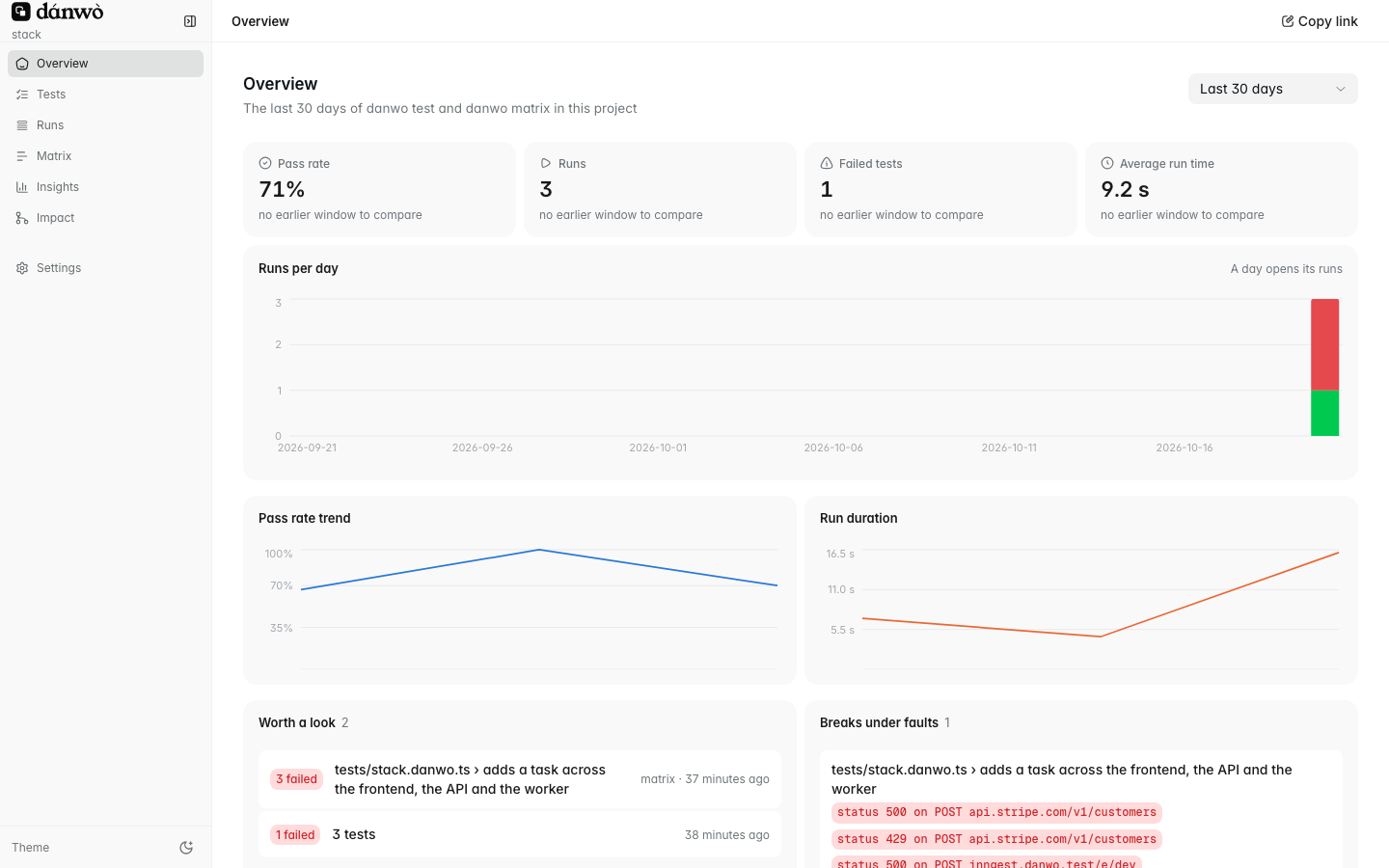
The four cards compare the chosen window with the one before. Click a day's bar to see its runs.
## Tests [#tests]
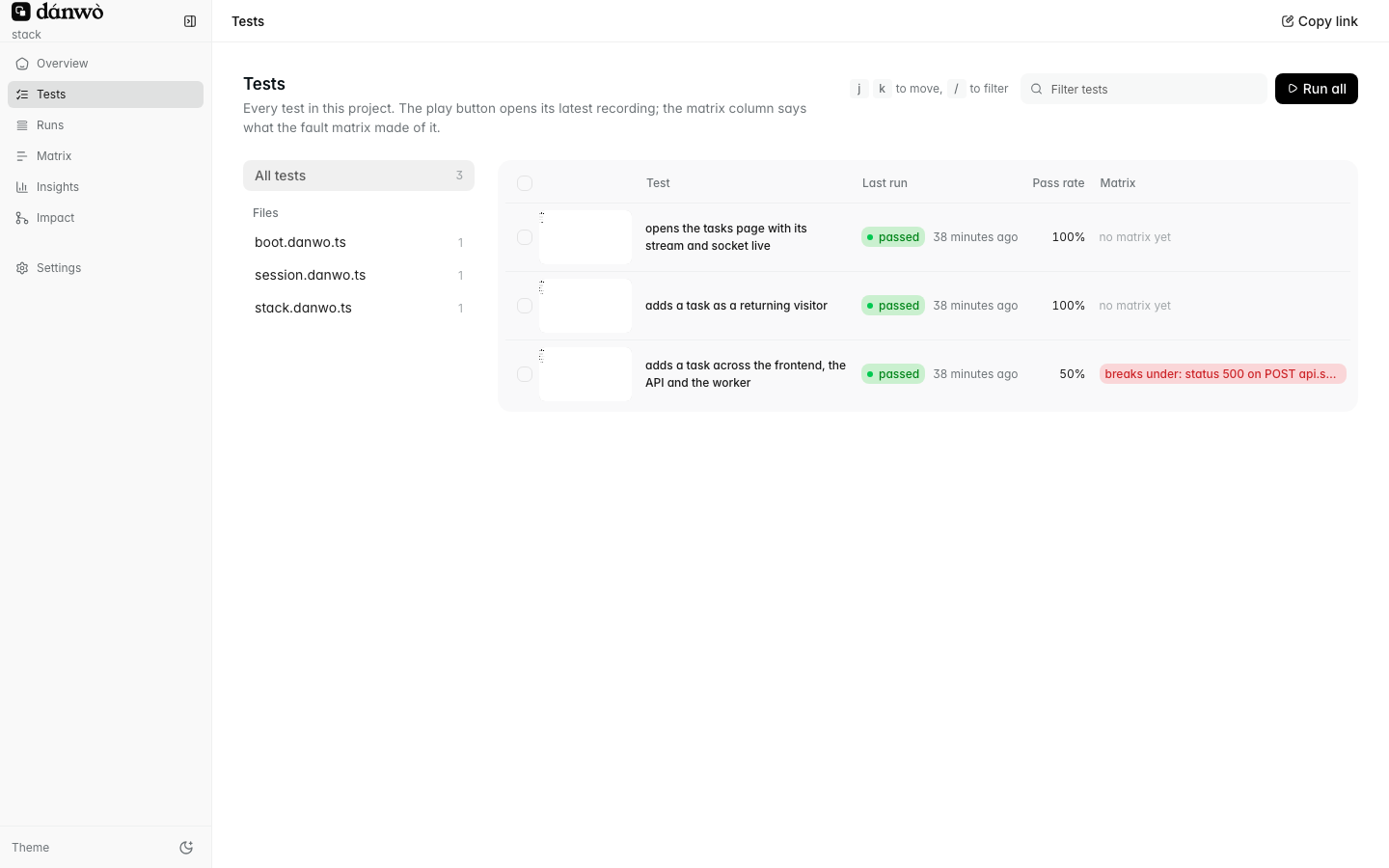
Each row shows the matrix's verdict: **breaks under** a fault, **held under all**, or no matrix yet.
**Run selected** and **Run all** start `danwo test` from the page.
## Runs [#runs]
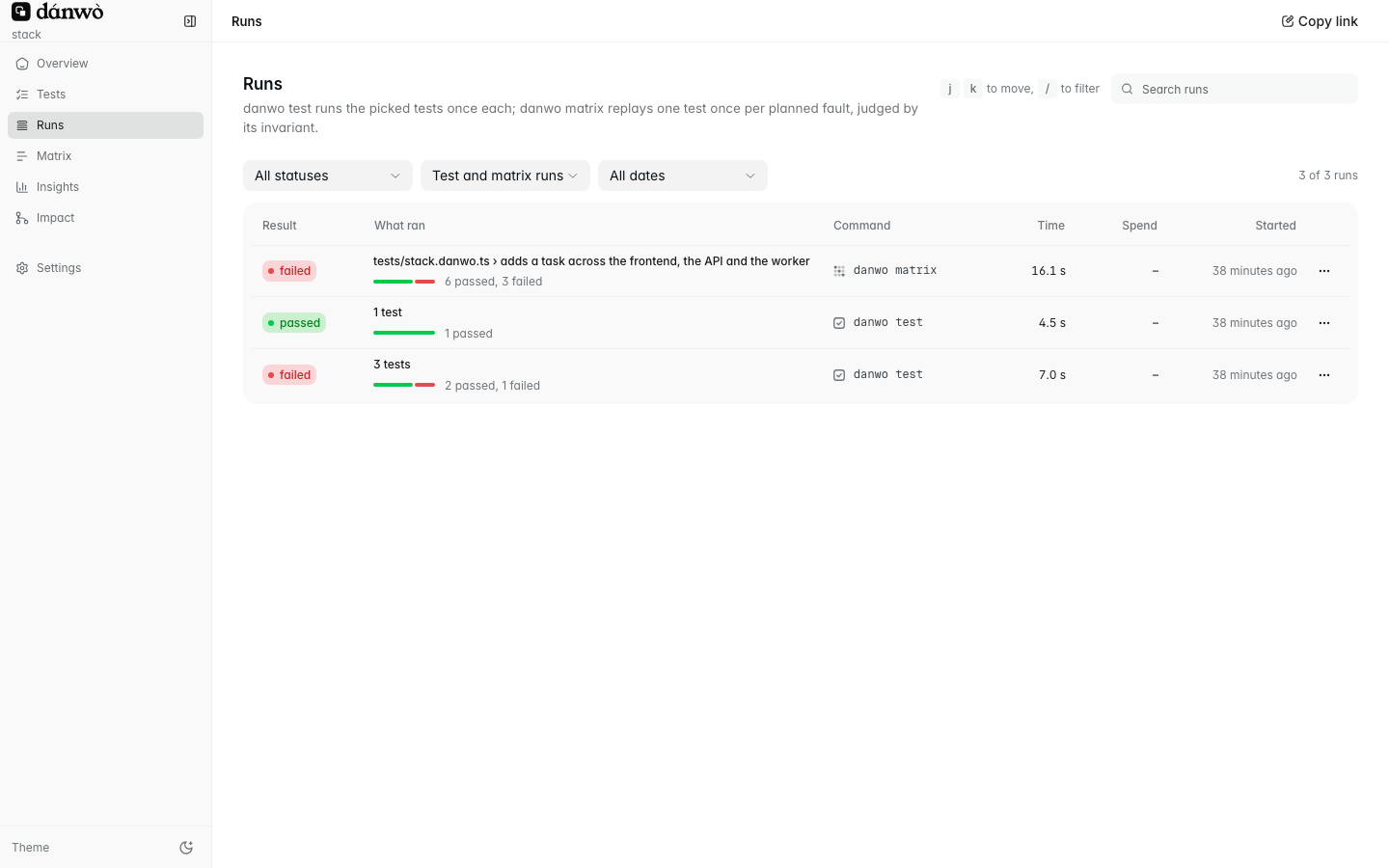
Filter by status, kind and date. A test run lists each test with its attempts; click one to open
its recording.
## A matrix run [#a-matrix-run]
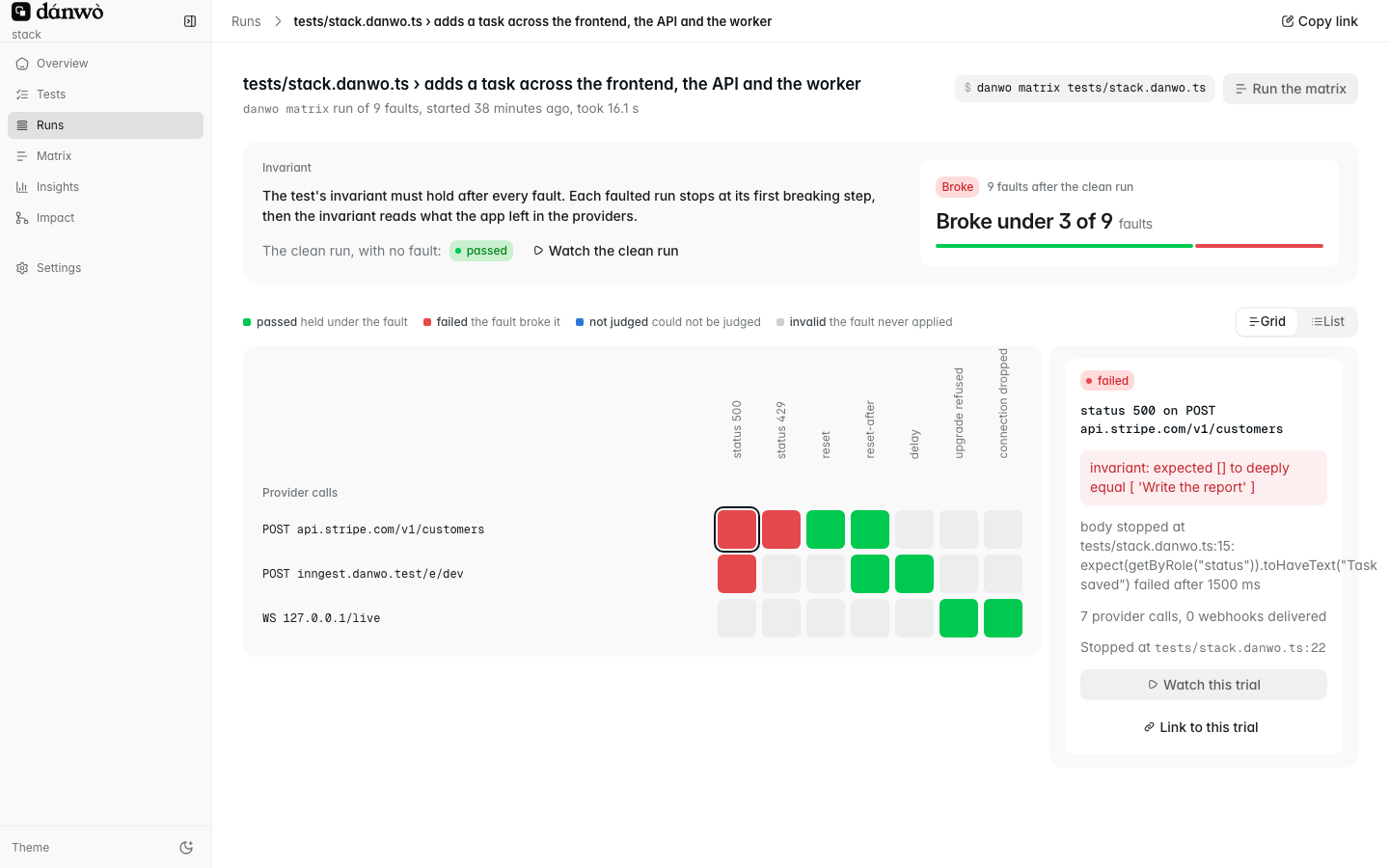
The grid has a row per call or webhook, and a column per fault kind. Red cells broke your invariant.
Click one to see why, then **Watch this trial** to open its recording.
## Insights [#insights]
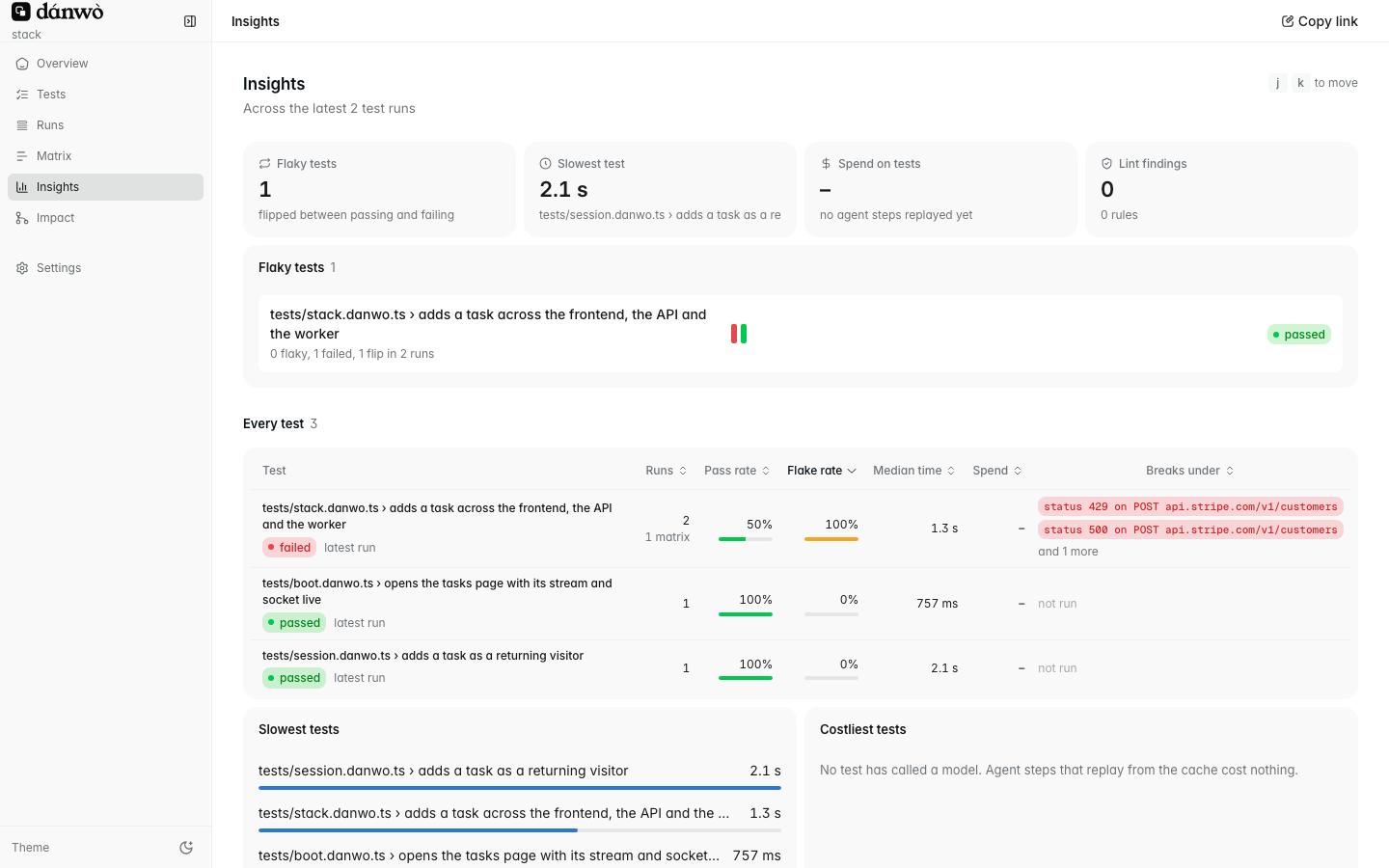
Sort the table by flake rate, median time or spend to find the tests worth fixing first.
## Every page has a link [#every-page-has-a-link]
Every page, filter and open recording has its own address. **Copy link** in the top bar copies it,
so you can send a teammate the exact trial you're looking at.
## Next [#next]
Watch a test, read its calls, copy a prompt to fix it.
Watch runs as they happen, and start them from the page.
# Database and cache (/docs/data-faults)
Put a fault proxy in front of your own Postgres and Redis, and let the matrix break the calls your tests make.
Providers aren't the only thing that fails. A COMMIT's reply gets lost, a transaction hits a
serialization failure, the database restarts, Redis runs out of memory. `danwo matrix` can break
your own Postgres and Redis calls too. Your app connects through a **fault proxy**, and the matrix
plans faults on the statements and commands your tests sent.
## Wire the proxies [#wire-the-proxies]
Start a proxy in front of each store, give your app the proxy's URL, and list the proxies under
`data`. Add a snapshot so every test starts from the same rows:
```ts title="danwo.config.ts"
import {
appEnvironment,
defineConfig,
postgresSnapshot,
postgresWorkerDatabase,
startPostgresProxy,
startRedisProxy,
stripeService,
} from "@danwo/sdk"
const REDIS_URL = process.env.REDIS_URL ?? ""
export default defineConfig({
testDir: "tests",
async environment({ workerIndex }) {
const url = await postgresWorkerDatabase(process.env.DATABASE_URL ?? "", workerIndex)
const postgres = await startPostgresProxy({ upstream: url })
const cache = await startRedisProxy({ upstream: REDIS_URL, service: "cache" })
const db = postgresSnapshot({ url })
const env = await appEnvironment({
app: {
command: "npm run dev",
url: "http://localhost:3000",
env: { DATABASE_URL: postgres.url(url), REDIS_URL: cache.url(REDIS_URL) },
},
services: [stripeService()],
})
return {
...env,
data: [postgres, cache],
async snapshot(slot) {
await env.snapshot?.(slot)
await db.snapshot(slot)
},
async restore(slot) {
await env.restore?.(slot)
await db.restore(slot)
},
async close() {
await env.close()
await Promise.all([postgres.close(), cache.close(), db.close()])
},
}
},
})
```
- `postgresWorkerDatabase` gives each worker its own copy of your database, so parallel tests
never share rows.
- `proxy.url(realUrl)` swaps in the proxy's host and port, and keeps the user, password and
database. Snapshots keep using the real URL.
- `service` names the proxy in fault labels. It defaults to `postgres` or `redis`.
## The faults [#the-faults]
Labels read ` on ()`:
| Fault | Example label | What your app sees |
| ---------------------------- | --------------------------------------------------- | --------------------------------------------------------- |
| `reset` | `reset on INSERT orders (postgres)` | the connection drops before the server sees the call |
| `reset-after` | `reset-after on COMMIT (postgres)` | the call runs, then the connection drops before the reply |
| `delay` | `delay 5000ms on UPDATE stock (postgres)` | the call arrives late, like a timeout |
| `serialization_failure` | `serialization_failure on UPDATE orders (postgres)` | SQLSTATE 40001 |
| `deadlock_detected` | `deadlock_detected on INSERT orders (postgres)` | SQLSTATE 40P01 |
| `down` | `down 3000ms on BEGIN (postgres)` | new connections are refused for 3 seconds |
| `too_many_connections` | `too_many_connections 3000ms on BEGIN (postgres)` | each new connection gets FATAL 53300 |
| `OOM`, `LOADING`, `READONLY` | `OOM on INCR rate:login:* (cache)` | a Redis error in place of the reply |
Faults are planned only on calls your test caused, never on the driver's housekeeping or on a
reset. Run only some with a filter:
```sh
npx @danwo/cli matrix --faults "COMMIT"
```
## What each call gets [#what-each-call-gets]
| Call | Faults |
| --------------------- | ------------------------------------------------------------------- |
| A Postgres write | reset, reset-after, delay, serialization_failure, deadlock_detected |
| A COMMIT | reset, reset-after, serialization_failure |
| A BEGIN | down, too_many_connections |
| A Redis write or EXEC | reset, reset-after, delay, OOM, READONLY |
| A Redis read | reset, LOADING |
Replace the list with `matrix.dataFaults: (call) => DataFault[]` in the config.
## What a correct app does [#what-a-correct-app-does]
| Fault | Handle it by |
| --------------------- | ------------------------------------------------------------------------------------------- |
| A lost COMMIT reply | giving the work a key and inserting with `ON CONFLICT (key) DO NOTHING`, so a retry is safe |
| 40001 or 40P01 | rolling back and running the whole transaction again, with backoff |
| Database down or full | retrying the connection for a few seconds, then saying so |
| Cache errors | choosing to fail open or closed. A rate limiter that fails open lets everyone through |
The lint rule `data/no-retry-on-serialization` flags a transaction given up after 40001 or 40P01.
## Limits [#limits]
- No TLS between your app and the store: Postgres with `sslmode=disable` or `prefer`, no
`rediss://`.
- Statements are classified from their SQL text. Unusual ones such as `CALL`, `DO` and `LOCK`
aren't faulted.
- MySQL isn't supported yet.
## Next [#next]
How snapshots give every test the same rows.
Risky usage danwo spots in every run.
# Debugging a failure (/docs/debugging)
Read a failed run's page from top to bottom, and know what each error code asks you to look at.
Every failed run keeps a [flight record](/docs/flight-records). Start from its **failure page**: the
error, the steps, the screen, and what happened behind it, in one place.
## Open the failure page [#open-the-failure-page]
```sh
npx @danwo/cli show --format md
```
It prints one page per failed test or matrix trial of the newest run. Pass a run id for an older
one.
```sh
npx @danwo/cli serve --open
```
Click the failed test. The video plays with the steps and provider calls moving along with it.
The `show_run` MCP tool with `format: "md"` returns the same page. See [Fix a
failure](/docs/fix-with-an-agent).
## Read it top to bottom [#read-it-top-to-bottom]
### The top: what failed, and where [#the-top-what-failed-and-where]
The test, the fault if a matrix trial, the error code, and the line the failure went through:
```text
fault: duplicate on webhook checkout.session.completed · failed · EXPECTATION_FAILED (test) · 2.7 s
**Error at tests/buy-credits.danwo.ts:19:**
invariant: expected 1000 to be 500 // Object.is equality
```
### The steps [#the-steps]
Each step with its status, its [cache](/docs/replay-cache) outcome, model calls, time and line:
```text
| 4 | getByRole("heading", name: "Thank you for your purchase") toBeVisible() | passed | … | tests/buy-credits.danwo.ts:15 |
| 5 | getByText(/^Credits: /) toHaveText("Credits: 500") | failed: EXPECTATION_FAILED | … | tests/buy-credits.danwo.ts:16 |
```
### The screen at failure [#the-screen-at-failure]
What the page showed, as an accessibility tree:
```text
- main:
- heading "Thank you for your purchase" [level=1]
- paragraph: "Credits: 1000"
```
### What was behind the page [#what-was-behind-the-page]
Console errors, failed or faulted provider calls, webhook deliveries, and each emulator's state at
the end. Here, the same webhook arrived twice and the app answered both:
```text
| topic | attempt | status | fault |
| checkout.session.completed | 1 | 200 | duplicate |
| checkout.session.completed | 1 | 200 | |
```
That's the bug: the app credited the account once per delivery.
## What the error code says to check [#what-the-error-code-says-to-check]
| Code | Look at |
| ------------------------------------------- | ----------------------------------------------------------------------- |
| `LOCATOR_NOT_FOUND`, `LOCATOR_AMBIGUOUS` | the screen at failure, and the nearest candidates it lists |
| `EXPECTATION_FAILED` | expected against received: is the app wrong, or the test? |
| `CLAIM_FAILED` | the judge's reason. The claim may be too strict. |
| `APP_ERROR` | your app's own 5xx or uncaught error: an app bug |
| `PROVIDER_ERROR` | the failed provider call, and whether your app recovered |
| `STALE_RECORDING`, `NOTHING_RECORDED` | run `danwo test` once to record, then the matrix |
| `AGENT_LOOPING`, `BUDGET_EXCEEDED` | a vague instruction or a changed page. Split the step, or use locators. |
| `MODEL_OUTPUT_INVALID`, `MODEL_UNAVAILABLE` | the model provider, not your app. Retry, or change model. |
| `MODEL_REFUSED` | the model declined the step. Reword it, or run it on another model. |
| `BROWSER_FAILED`, `ENVIRONMENT_FAILED` | the browser or the environment: app start-up, emulators, ports |
| `CONFIG_INVALID` | the config, or the call the message names |
`danwo spec --topic errors` lists every code with its exit code.
When a run fails before any test starts, `npx @danwo/cli doctor` checks the machine and the
config.
## Connection noise [#connection-noise]
A browser dropping a socket as a page closes (`ECONNRESET`, `EPIPE`, `socket hang up`) is expected,
so danwo doesn't print it. To see those lines while chasing a connection problem:
```sh
DANWO_DEBUG=proxy npx @danwo/cli test
```
Every other proxy error always prints.
## Next [#next]
Hand the failure page to your coding agent.
Everything a record keeps, and how to replay it.
# Email and 2FA codes (/docs/email-and-otp)
Read sign-in codes and magic links from the mail your app sent, type authenticator codes, and replay it all with no model.
Sign-up and sign-in often go through an inbox: a code to type, a magic link to click, a text
message. danwo reads them from the emulators your app sends through, so your test never polls a
real inbox.
## Tell danwo where mail lands [#tell-danwo-where-mail-lands]
A **mail source** tells danwo where your app's mail lands. `clerkService()` adds its own. For
the others, add the source to the environment's `mail`:
```ts title="danwo.config.ts"
import { appEnvironment, defineConfig, resendMail, resendService } from "@danwo/sdk"
export default defineConfig({
testDir: "tests",
async environment() {
const resend = resendService()
const env = await appEnvironment({
app: { command: "npm run dev", url: "http://localhost:3000" },
services: [resend],
})
return { ...env, mail: [...(env.mail ?? []), resendMail(resend.emulator)] }
},
})
```
Tests then get a `mail` fixture that reads every source.
| Source | What it reads |
| ----------------------- | ----------------------------------------------- |
| `resendMail(emulator)` | emails your app sent through Resend |
| `gmailMail(emulator)` | mail delivered to a Gmail mailbox |
| `outlookMail(emulator)` | mail delivered to an Outlook mailbox |
| `twilioSms(emulator)` | texts sent to phones; the address is the number |
| `clerkMail(emulator)` | Clerk's sign-in and sign-up codes |
## Type a code from an email [#type-a-code-from-an-email]
`mail.code(address)` waits for the newest email to that address and returns the code in it:
```ts title="tests/sign-in-code.danwo.ts"
import { test } from "@danwo/sdk"
test("signs in with an emailed code", async ({ app, screen, mail, expect }) => {
await app.open("/login")
await screen.getByLabel("Email").fill("ada@shop.test")
await screen.getByRole("button", { name: "Send code" }).click()
await screen.getByLabel("Code").fill(await mail.code("ada@shop.test"))
await expect(screen.getByRole("heading", { name: "Welcome" })).toBeVisible()
})
```
## Follow a magic link [#follow-a-magic-link]
`mail.link(address)` returns a link from the newest email. Pass `match` to pick one by its text:
```ts title="tests/magic-link.danwo.ts · the link"
await app.open(await mail.link("ada@shop.test", { match: "Sign in" }))
```
Or open the email itself in the browser, and click in it like a user: `await mail.open(address)`.
## Let the agent read the mail [#let-the-agent-read-the-mail]
The agent can read codes and links too. Its recording keeps **where** the value came from, never
the value, so a replay with a fresh address reads the new code:
```ts title="tests/sign-up.danwo.ts"
import { test, unique } from "@danwo/sdk"
test("signs up and confirms by email", async ({ app, agent }) => {
await app.open("/sign-up")
await agent.act("sign up as {email} and confirm with the emailed code", {
params: { email: unique("ada@shop.test") },
})
})
```
## Type an authenticator code [#type-an-authenticator-code]
For 2FA with an authenticator app, configure the base32 key your app showed at enrolment as a
`totp` secret:
```ts title="danwo.config.ts · the 2FA key"
secrets: { otpKey: { value: process.env.TOTP_KEY ?? "", purpose: "totp" } },
```
Filling it types the code for that moment. The key and the codes are redacted everywhere:
```ts title="tests/two-factor.danwo.ts · the code"
await screen.getByLabel("Authentication code").fill(secret("otpKey"))
```
`totp(key)` computes a code directly, when a test needs the number itself.
Codes are read from the emulators, so the same test replays on every run with no model call, even
though each run gets a new code.
## Next [#next]
Do the sign-in once per worker.
Keep passwords and 2FA keys out of every record.
# Seeding and state (/docs/emulator-state)
Start an emulator with the data your test needs, and read back what your app did at it.
An emulator starts empty. A **seed** gives it the data your test expects to find: a webhook
endpoint, a bucket, a user. After each test, danwo puts it back to that seed.
## Seed an emulator [#seed-an-emulator]
Pass `seed` to the service. Stripe's seed is a function, so it can use values known only once your
app runs, like its webhook URL:
```ts title="danwo.config.ts"
import { appEnvironment, defineConfig, s3Service, stripeService } from "@danwo/sdk"
const url = "http://localhost:3000"
export default defineConfig({
testDir: "tests",
environment: () =>
appEnvironment({
app: { command: "npm run dev", url },
services: [
stripeService({
seed: () => ({
webhookEndpoints: [
{
url: `${url}/api/webhooks/stripe`,
events: ["checkout.session.completed"],
secret: "whsec_test",
},
],
}),
}),
s3Service({ seed: { buckets: [{ name: "uploads" }] } }),
],
}),
})
```
Each provider page lists what its seed takes. See [Providers](/docs/providers).
## Read what your app did [#read-what-your-app-did]
Each emulator has a helper that reads its state in plain terms. Call it with the emulator's
fixture:
```ts title="tests/upload.danwo.ts"
import { type S3Fixtures, s3Objects, test as base } from "@danwo/sdk"
const test = base.extend()
test("uploads a receipt", async ({ app, screen, s3, expect }) => {
await app.open("/receipts")
await screen.getByLabel("Receipt").setInputFiles("fixtures/receipt.pdf")
await screen.getByRole("button", { name: "Upload" }).click()
expect(s3Objects(s3).list("uploads", "receipts/")).toHaveLength(1)
})
```
A few of the helpers:
| Fixture | Helper | Reads |
| -------- | -------------------------------- | -------------------------------------- |
| `resend` | `resendInbox(resend)` | emails your app sent |
| `s3` | `s3Objects(s3)` | buckets and objects |
| `slack` | `slackWorkspace(slack)` | messages your app posted |
| `twilio` | `twilioInbox(twilio)` | texts that reached phones |
| `github` | `githubRepo(github, "org/repo")` | issues, comments and check runs |
| `llm` | `llmCalls(llm)` | your app's calls to OpenAI, Anthropic… |
The [emulator helpers reference](/docs/reference/emulator-helpers) lists them all.
## Ask the API directly [#ask-the-api-directly]
Every emulator also takes requests through its fixture, the way your app would call the real API.
Use it when there's no helper for what you need:
```ts title="tests/charges.danwo.ts"
import { type StripeFixtures, test as base } from "@danwo/sdk"
const test = base.extend()
test("charges once", async ({ app, screen, stripe, expect }) => {
await app.open("/")
await screen.getByRole("button", { name: "Buy" }).click()
const res = await stripe.fetch(
new Request("https://api.stripe.com/v1/payment_intents", {
headers: { authorization: "Bearer sk_test_any" },
}),
)
const { data } = await res.json()
expect(data).toHaveLength(1)
})
```
## Act as someone outside your app [#act-as-someone-outside-your-app]
Some helpers act as a third party, so you can test what happens when something arrives from
outside:
```ts title="tests/inbound-sms.danwo.ts · a text arrives"
await twilioPhone(twilio).send("+15555550100", "+15555550199", "STOP")
```
That's a phone texting your app's number. Other helpers post a Slack message as a user, pay into a
virtual account, or revoke a sign-in.
State never leaks between tests. Every test starts from the seed, and so does every retry. See
[Isolation](/docs/isolation).
## Next [#next]
How every test starts from the seed, and when to share state.
Compare your app's state with the provider's after every trial.
# Emulators (/docs/emulators)
Local stand-ins for the services your app calls, answering on the real hostnames behind danwo's proxy, with no change to your code.
An **emulator** is a local copy of a service your app depends on, such as Stripe, Resend or Slack.
It answers the same API, sends the same webhooks and returns the same errors. Your app keeps
calling `api.stripe.com`; danwo's proxy makes sure the emulator answers.
## Why emulate instead of using a sandbox [#why-emulate-instead-of-using-a-sandbox]
A real test account is slow, shared and flaky, and it can't fail on demand. An emulator starts in
milliseconds, holds only what your test put there, and resets between tests. It can also answer a
500, drop a connection or send a webhook twice, which is how the
[fault matrix](/docs/fault-matrix) tests your app's error handling.
## Add one to your config [#add-one-to-your-config]
List the emulators you need under `services`. danwo starts them behind one proxy, then starts your
app through it:
```ts title="danwo.config.ts"
import { appEnvironment, defineConfig, resendService, stripeService } from "@danwo/sdk"
export default defineConfig({
testDir: "tests",
environment: () =>
appEnvironment({
app: { command: "npm run dev", url: "http://localhost:3000" },
services: [stripeService(), resendService()],
}),
})
```
Every provider page lists its service: see [Providers](/docs/providers).
## How the proxy reaches your app [#how-the-proxy-reaches-your-app]
danwo's **egress proxy** sits between your app and the internet. It starts your app with a few
environment variables:
| Variable | What it does |
| --------------------- | --------------------------------------------------------------- |
| `HTTPS_PROXY` | sends the app's outgoing calls through the proxy |
| `NODE_OPTIONS` | loads danwo's preload, so Node's own HTTP clients use the proxy |
| `NODE_EXTRA_CA_CERTS` | trusts the proxy's certificate for this run only |
The proxy answers emulated hosts itself, records every call, and blocks or passes through the rest.
Your app's code and keys don't change.
If you set `APP_URL` to test an app that's already running, that app wasn't started through the
proxy. Its calls go to the **real** services. Use it only with test keys.
## What an emulator gives your test [#what-an-emulator-gives-your-test]
Each emulator adds a **fixture** to your tests, named after it: `stripe`, `resend`, `slack`.
Through it, a test or an invariant reads what your app did:
```ts title="tests/welcome-email.danwo.ts"
import { type ResendFixtures, resendInbox, test as base } from "@danwo/sdk"
const test = base.extend()
test("sends a welcome email", async ({ app, screen, resend, expect }) => {
await app.open("/sign-up")
await screen.getByLabel("Email").fill("ada@shop.test")
await screen.getByRole("button", { name: "Create account" }).click()
expect(resendInbox(resend).latest("ada@shop.test")?.subject).toBe("Welcome to the shop")
})
```
[Seeding and state](/docs/emulator-state) shows how to start an emulator with data, and every
way to read it back.
## Is it accurate? [#is-it-accurate]
Every emulator is checked against the real API with **fidelity** suites: the same calls go to both,
and danwo compares the answers field by field. See [Fidelity](/docs/fidelity).
## Next [#next]
Start emulators with data, and read what your app did.
Every service danwo emulates.
# Fault kinds (/docs/fault-kinds)
Every kind of fault the matrix can inject, what it simulates, and what it catches.
Every trial injects one fault. A fault is named by a **label**: what happens, then where it
happens. For example, `status 500 on POST api.stripe.com/v1/checkout/sessions`.
## Provider calls [#provider-calls]
Faults on a call your app makes to Stripe, Resend, Slack or another provider:
| Fault | What happens | What it catches |
| -------------------------- | ------------------------------------------------------ | -------------------------------------------- |
| `status 500`, `status 503` | The provider fails. | Errors shown as success, missing retries. |
| `status 429` | The provider rate-limits the call. | Retries that hammer the API, or none at all. |
| `reset` | The connection drops before the provider answers. | Calls with no timeout or error handling. |
| `reset-after` | The provider **did** the work, but the answer is lost. | Retries that charge or send twice. |
| `delay ms` | The answer is slow. | Timeouts that are too short, or missing. |
Each provider's error bodies match what its own SDK expects, so your app's error handling runs
as it would in production.
## Model APIs [#model-apis]
Calls to OpenAI, Anthropic and the other model APIs can also get answers that go wrong. These
check what your app does when the model answers badly.
| Fault | What the model sends |
| --------------------- | ------------------------------------------ |
| `refusal` | a refusal instead of an answer |
| `empty-completion` | an answer with no text |
| `truncated` | an answer cut off at the token limit |
| `content-filter` | an answer stopped by the provider's filter |
| `malformed-tool-call` | a tool call whose arguments don't parse |
| `stream-cut` | a stream that stops halfway |
## Webhooks [#webhooks]
Faults on a webhook a provider sends your app:
| Fault | What happens | What it catches |
| ---------------- | -------------------------------------------- | ----------------------------------------------- |
| `duplicate` | The same webhook arrives twice. | Work done twice, such as credits granted twice. |
| `delay 600000ms` | It arrives ten minutes late. | Pages that assume the webhook came first. |
| `forged` | A webhook arrives with a bad signature. | Handlers that skip the signature check. |
| `stale 3600s` | A correctly signed webhook from an hour ago. | Handlers that accept replayed requests. |
## Races [#races]
Faults on timing, planned only where they can happen:
| Fault | What happens |
| ---------------------------- | ------------------------------------------------------------------------------ |
| `double-submit on POST /buy` | A form or request is sent twice at once. |
| `webhooks before redirect` | The provider's webhooks arrive before the browser returns to your app. |
| `reorder webhooks a, b` | Two webhooks arrive the other way round. |
| `slow-then-retry` | A payment call is slow; your app retries while the first one still succeeds. |
| `2 concurrent users` | The whole test runs as two users at once. Ask for it with `{ concurrent: 2 }`. |
## Database and cache [#database-and-cache]
With danwo's data proxies in front of your app's Postgres and Redis, the matrix also faults the
statements your test caused:
| Fault | What happens |
| ----------------------------------- | ------------------------------------------------------ |
| `reset-after on COMMIT` | The database committed, but your app never heard back. |
| `serialization_failure`, `deadlock` | Postgres asks your app to retry the transaction. |
| `down 3000ms` | The database is unreachable for three seconds. |
| `OOM`, `READONLY` | Redis refuses a write. |
See [Database and cache](/docs/data-faults) to set this up.
## Sockets and background jobs [#sockets-and-background-jobs]
| Fault | What happens |
| ------------------------------------------- | --------------------------------------- |
| `upgrade refused on WS …` | A WebSocket can't connect. |
| `connection dropped on WS …` | A connected WebSocket drops. |
| `status 500 on POST inngest.danwo.test/e/…` | A background job's event can't be sent. |
## Time [#time]
Faults don't move the clock. To test a trial that ends tomorrow or a token that expires, jump
time forward inside the test. See [Time travel](/docs/time-travel).
## Next [#next]
What these faults usually find, and the fixes.
Every provider's fault list, generated from the code.
# Overview (/docs/fault-matrix)
Replay one test under every fault it could meet, and check your app coped with each one.
The fault matrix replays a test once for each thing that could go wrong while it runs: a
declined card, a 500 from Stripe, a webhook that arrives twice, a button clicked twice. After
each replay, it checks a rule you wrote. You learn which failures your app survives before your
users find the ones it doesn't.
## Why you need it [#why-you-need-it]
A UI test checks the happy path. Real providers fail in small, ordinary ways. A webhook comes
twice. A response is lost after the payment went through. A user double-clicks **Pay**.
Each of those can leave your app wrong while the screen looks fine. The matrix makes each one
happen, on purpose, one at a time.
## How it works [#how-it-works]
1. **A clean run.** danwo runs your test once with nothing broken, and records every call,
webhook and database statement it caused.
2. **A plan.** For each of those, it lists the faults that could happen to it. Each fault becomes
a **trial**: one replay of the test with that one fault.
3. **The trials.** Each trial starts from the same clean state, replays your test's steps, and
injects its fault at the right moment.
4. **The verdict.** After each trial, danwo runs your test's **invariant**: a check that must
hold however the run went.
## A first matrix [#a-first-matrix]
Give a test an invariant. This one says the credits your app granted equal the credits Stripe
was paid for:
```ts title="tests/buy-credits.danwo.ts · the invariant"
}).invariant(async ({ app, stripe, expect }) => {
expect(await creditsGranted(app)).toBe(await creditsPaid(stripe))
})
```
Then run the matrix on that file:
```sh
npx @danwo/cli matrix tests/buy-credits.danwo.ts
```
```text
clean run passed; 18 faults planned
PASS status 500 on POST api.stripe.com/v1/checkout/sessions
FAIL duplicate on webhook checkout.session.completed
invariant: expected 1000 to be 500
faults: 17 passed, 1 failed
```
The failure is a real bug: a webhook delivered twice granted the credits twice.
## What each result means [#what-each-result-means]
| Result | Meaning |
| ------------ | ------------------------------------------------------------------------------------------------------------ |
| `PASS` | The invariant held under the fault. The test itself may have stopped early; that's fine. |
| `FAIL` | The invariant broke. The record shows where the test stopped and why. |
| `INVALID` | The fault never happened, because the app took another path. |
| `NOT JUDGED` | The trial was blocked, the test stopped before the fault could happen, or something outside your app failed. |
## Next [#next]
What to compare, and how to read each side.
Run every fault, a few, or one; locally or in CI.
The grid, a failed trial, and its recording.
Every kind of fault the matrix can inject.
# Fidelity test accounts (/docs/fidelity-accounts)
Sign a test account in once, so the Gmail, Calendar, Drive and Microsoft Graph fidelity suites can run against the real APIs.
The Google and Microsoft suites act as a person's account: they send mail, make events and upload
files. To run them live, you sign a test account in once with `danwo fidelity login`, and danwo
keeps its refresh token in `.env.fidelity`.
Offline, nothing is needed. The emulator plays the account, and the goldens come from what Google
and Microsoft publish: the Discovery documents for Gmail, Calendar and Drive, and Microsoft Graph's
OpenAPI description.
```sh
npx @danwo/cli fidelity login google
npx @danwo/cli fidelity google
```
## What the login does [#what-the-login-does]
It listens for the redirect on this machine, opens the provider's consent page, and exchanges the
code with PKCE. It shows the scopes it asks for before the browser opens:
```text
Signing a Google test account in for the fidelity suites. It is asked for:
openid
email
https://www.googleapis.com/auth/gmail.modify
https://www.googleapis.com/auth/calendar.events
https://www.googleapis.com/auth/calendar.calendarlist.readonly
https://www.googleapis.com/auth/drive.file
The consent page sends the browser back to http://127.0.0.1:8765/callback; the client must register it.
Sign in with a test account, not your own. If the browser does not open, go to:
https://accounts.google.com/o/oauth2/v2/auth?...
Saved DANWO_FIDELITY_GOOGLE_REFRESH_TOKEN in .env.fidelity for tester@gmail.com.
Granted: openid email https://www.googleapis.com/auth/gmail.modify ...
Run the live suite with: danwo fidelity google
```
The token itself is never printed. Only its line in `.env.fidelity` changes; the other lines,
comments and the file's `600` mode stay as they were.
| Option | Does | Default |
| ---------------------- | ------------------------------------------- | -------------------------------- |
| `--port ` | the port of the default redirect URI | `8765` |
| `--redirect-uri ` | a redirect URI the client already registers | `http://127.0.0.1:8765/callback` |
## Make a Google client [#make-a-google-client]
1. In the Google Cloud Console, pick a project and enable the Gmail, Calendar and Drive APIs.
2. Under **Google Auth Platform → Audience**, keep the app in **Testing** and add your test
account as a test user.
3. Under **Clients**, create a **Web application** client and register the redirect URI.
4. Put the client in `.env.fidelity`.
```sh title=".env.fidelity"
DANWO_FIDELITY_GOOGLE_CLIENT_ID=....apps.googleusercontent.com
DANWO_FIDELITY_GOOGLE_CLIENT_SECRET=...
```
Google expires the refresh tokens of an app in Testing after seven days. When a live run says the
token was refused, run the login again.
## Make a Microsoft client [#make-a-microsoft-client]
1. In the Azure portal, open **Microsoft Entra ID → App registrations** and register a new app.
For a personal test account, allow personal Microsoft accounts.
2. Add a **Web** platform redirect URI, the one the login uses.
3. Under **Certificates & secrets**, create a client secret and copy its value.
4. Add the delegated Graph permissions for mail, calendars and files.
```sh title=".env.fidelity"
DANWO_FIDELITY_MICROSOFT_CLIENT_ID=...
DANWO_FIDELITY_MICROSOFT_CLIENT_SECRET=...
DANWO_FIDELITY_MICROSOFT_TENANT_ID=common
```
## Reuse your app's OAuth client [#reuse-your-apps-oauth-client]
If your app already signs people in to Google or Microsoft, its client works too. Give danwo one
of the redirect URIs it registers, and danwo listens on that URI's host, port and path.
```sh title=".env.fidelity"
DANWO_FIDELITY_GOOGLE_REDIRECT_URI=http://localhost:3050/settings/integrations/google-verify
DANWO_FIDELITY_MICROSOFT_REDIRECT_URI=http://localhost:3050/settings/integrations/microsoft-verify
```
Stop your app's dev server first, since the login needs its port. If the port is busy it says so:
```text
danwo fidelity login: port 3050 on localhost is in use: stop the app on :3050 first (its dev server, most likely), then run the sign-in again
```
The URI must use `http` on `localhost` or `127.0.0.1`. The client must also allow the scopes the
login asks for.
## When it fails [#when-it-fails]
| Message | What to do |
| ------------------------------------------- | ----------------------------------------------------------------- |
| set the client id and secret | add the client to `.env.fidelity` |
| the token endpoint refused the redirect URI | register exactly the URI it names, or pass the registered one |
| no answer from the consent page | the browser never came back; check the redirect URI is registered |
| the sign-in was cancelled | you chose Cancel; run it again |
| gave no refresh token | remove the app's access from the account, then sign in again |
## Live runs stay in their lane [#live-runs-stay-in-their-lane]
- Everything a run makes is tagged `danwo-fidelity-`, and removed after each scenario.
- Mail goes only to the account's own address.
- Untagged mail, events and files are never touched. `--sweep` lists tagged leftovers.
A live run refuses an account that doesn't look personal, such as a work address. To run as one on
purpose, name it in `DANWO_FIDELITY_GOOGLE_ACCOUNT` or `DANWO_FIDELITY_MICROSOFT_ACCOUNT`.
## Next [#next]
How the suites compare the emulator with the real provider.
What a live run makes, and how it's removed.
# Cleaning up sandboxes (/docs/fidelity-cleanup)
How a live fidelity run tags what it makes, undoes it after each scenario, and sweeps up anything left behind.
A live fidelity run creates real objects in your sandboxes: customers, users, documents. danwo
tags each one and removes it when the scenario ends, so your sandbox stays as it was.
## Tagged [#tagged]
Everything a run makes carries `danwo-fidelity-`: in Stripe customer emails and product
names, Clerk addresses and organization names, Novu subscriber ids, Tiptap document names, Pusher
channels, Resend subjects and the payment references.
## Undone after each scenario [#undone-after-each-scenario]
Each create registers its undo in the run's **cleanup ledger**. After every scenario, passed,
failed or thrown, the ledger undoes in reverse order and retries each undo once. An answer that the
object is already gone counts as undone.
Ctrl-C undoes what the open scenarios made before danwo exits. Anything that couldn't be undone is
listed under **left behind** by kind and id, and fails the run.
`--keep` leaves everything in place so you can look at it, and lists it as kept.
## Sweep leftovers [#sweep-leftovers]
```sh
npx @danwo/cli fidelity --sweep stripe # list what earlier runs left
npx @danwo/cli fidelity --sweep stripe --yes # remove it
```
A sweep only removes what carries the tag. Look-alikes without one are listed for you to judge and
never touched.
## By provider [#by-provider]
| Provider | Undone after each scenario | Stays behind | Sweep |
| ----------- | ------------------------------------------------------------------------------ | ------------------------------------------------ | ------------------------------ |
| Stripe | customers deleted, subscriptions canceled, products archived, sessions expired | payment intents and refunds stay in test history | tagged customers and products |
| Clerk | users and organizations deleted, invitations and sessions revoked | nothing | tagged users and organizations |
| Novu | subscribers deleted | nothing | tagged subscribers |
| Tiptap | documents deleted | nothing | tagged documents |
| Paystack | nothing to undo | one abandoned test transaction per run | none |
| Flutterwave | nothing to undo | one tagged test payment link per run | none |
| Bachs | nothing to undo | one sandbox customer per run | none |
| Resend | nothing to undo | sent emails, all to `delivered@resend.dev` | none |
| Twilio | a full account's one real send, deleted once it settles | a trial account's send | none |
| S3 (Tigris) | every object under the run's prefix deleted, uploads aborted | nothing | none |
| Others | they only read | nothing | none |
## Next [#next]
Run the checks.
Every option in `danwo.config.ts`.
# Fidelity (/docs/fidelity)
Check that each emulator answers like the real provider, against the provider's own sandbox.
An emulator is only useful if it answers like the real thing. `danwo fidelity` runs the same
scenarios against danwo's emulator and the provider's sandbox, and compares the answers.
## What it compares [#what-it-compares]
The **shape** of each answer: status codes, error codes, and the JSON's keys, types, nesting and
fixed values. Ids, times, amounts and secrets never take part, so two runs a day apart still match.
## Run it [#run-it]
Without keys, it checks each emulator against the answers recorded from the sandbox:
```sh
npx @danwo/cli fidelity stripe resend --offline
```
```text
stripe (offline): 11 of 11 scenarios match
✓ customers: create, retrieve, update, delete
✓ customers: list pages, newest first
✓ errors: missing object, missing parameter, bad key (1 known)
✓ idempotency: replay and conflicting reuse
✓ products and prices: one-off and recurring
✓ payment intent: create, confirm, expand, refund
✓ checkout session: create, retrieve, expire (9 known)
✓ events: a created customer appears as customer.created
✓ setup intent: create and confirm with a test card
✓ subscriptions: trial, active, cancel at period end, cancel
✓ invoices: a subscription's first invoice, paid, and its list
resend (offline): 5 of 5 scenarios match
✓ emails: send and read back (1 known)
✓ emails: batch send
✓ emails: idempotent send
✓ errors: missing field, missing key
✓ domains: list
```
A difference prints with its scenario and step, as a missing field, an extra field, a type, status
or error-code mismatch, an ordering difference or a missing step. **known** counts differences
accepted on purpose, each with its reason in `fidelity/known-differences.json`.
## Against the sandbox [#against-the-sandbox]
With sandbox keys set, the same command calls the provider too:
| Command | Does |
| --------------------------------------- | ------------------------------------------------------ |
| `danwo fidelity` | every provider; live where keys are set |
| `danwo fidelity stripe resend` | some providers |
| `danwo fidelity stripe --update-golden` | records the sandbox's answers as the new golden |
| `danwo fidelity --from-openapi` | goldens from each provider's published API description |
| `danwo fidelity --offline` | never calls a sandbox, even with keys set |
## Keys [#keys]
Keys come from the environment, or from `.env.fidelity` and then `.env` at the repository root.
Git ignores both.
```sh title=".env.fidelity"
DANWO_FIDELITY_STRIPE_KEY=sk_test_...
DANWO_FIDELITY_RESEND_KEY=re_...
```
Only test and sandbox keys. A key that looks live, such as `sk_live_`, stops the run with
`CONFIG_INVALID`. Keys are never printed or written, and goldens hold structure only.
The model APIs (AI Gateway, Gemini, Perplexity, Bedrock) have no sandbox, so their keys are real.
With one set, a plain `danwo fidelity` runs that suite live, using the cheapest model and 20 output
tokens. Use `--offline` to stay off the network.
## Providers [#providers]
| Provider | Key |
| ------------------------------ | --------------------------------------------------------------------------------------------- |
| Stripe | `DANWO_FIDELITY_STRIPE_KEY` (`sk_test_` or `rk_test_`) |
| Resend | `DANWO_FIDELITY_RESEND_KEY`; sends only to `delivered@resend.dev` |
| S3 (Tigris) | `DANWO_FIDELITY_TIGRIS_ACCESS_KEY_ID`, `_SECRET_ACCESS_KEY`, `_BUCKET` (an empty test bucket) |
| Twilio | `DANWO_FIDELITY_TWILIO_ACCOUNT_SID` plus an API key or auth token |
| Paystack | `DANWO_FIDELITY_PAYSTACK_KEY` (`sk_test_`) |
| Flutterwave | `DANWO_FIDELITY_FLUTTERWAVE_KEY` (`FLWSECK_TEST-`) |
| Bachs | `DANWO_FIDELITY_BACHS_KEY` (`sk_sandbox_`) |
| Clerk | `DANWO_FIDELITY_CLERK_SECRET_KEY` and `_PUBLISHABLE_KEY` of a development instance |
| Pusher | `DANWO_FIDELITY_PUSHER_APP_ID`, `_KEY`, `_SECRET`, `_CLUSTER` (a test app) |
| Tiptap | `DANWO_FIDELITY_TIPTAP_APP_ID`, `_API_SECRET` |
| Slack, GitHub | `DANWO_FIDELITY_PUBLIC=1` (public calls only) |
| Google, Microsoft | a signed-in test account, from `danwo fidelity login` |
| Composio, Novu, Nylas, Nango | `DANWO_FIDELITY_PUBLIC=1`, plus an optional key |
| Unipile | `DANWO_FIDELITY_UNIPILE_DSN`, `_KEY` |
| AI Gateway, Gemini, Perplexity | `DANWO_FIDELITY_AI_GATEWAY_KEY`, `_GEMINI_KEY`, `_PERPLEXITY_KEY` |
| Bedrock | `DANWO_FIDELITY_BEDROCK_API_KEY` |
`npx @danwo/cli guide fidelity` lists each suite's scenarios and the optional keys.
The offline check runs in danwo's own test suite, so an emulator change that breaks fidelity fails
before it ships.
## Next [#next]
Sign a test account in for the Gmail, Calendar, Drive and Graph suites.
What a live run makes, and how it's removed.
Every emulator danwo runs.
# Fix a failure (/docs/fix-with-an-agent)
Hand a failing test to your coding agent with its failure page, and get back a fix it has checked with danwo.
When a test fails, danwo writes a **failure page**: the error, the step it stopped at, the screen,
and every provider call and webhook behind it. Give that page to your coding agent and it has
everything it needs to find the cause, fix it, and prove the fix.
## Start from the failure [#start-from-the-failure]
You can start from three places. Each gives the agent the same page.
Open the failed test in `danwo serve` and click **Copy prompt to fix**. You get the failure page,
with two lines on top asking the agent to find the cause and run the test again:
```text
The danwo test "tests/buy-credits.danwo.ts › buys 500 credits through Stripe Checkout"
failed. Its failure page follows: the error, the step it stopped at, the provider calls
and webhooks behind it, and the faults injected.
Find the cause. Change the app when the record shows a bug, and the test only when the
app's behaviour changed on purpose. Then run the test again with `danwo test`.
```
Paste it into your agent.
Print the newest run's failure pages as Markdown:
```sh
npx @danwo/cli show --format md
```
Copy the page for the failing test into your agent, or let the agent read it with the `show_run`
MCP tool.
danwo's comment on the pull request lists each failure with its error, failing step and record.
Paste a failure's section into your agent. For the whole page, download the run's records from
the CI artifact into `.danwo/runs/`, and the agent reads them with `show_run`.
## What the agent reads [#what-the-agent-reads]
Here is the top of a real failure page, from a matrix trial that sent Stripe's webhook twice:
```text
# ✗ tests/buy-credits.danwo.ts › buys 500 credits through Stripe Checkout
fault: duplicate on webhook checkout.session.completed · failed · EXPECTATION_FAILED (test) · 2.7 s
**Error at tests/buy-credits.danwo.ts:19:**
invariant: expected 1000 to be 500 // Object.is equality
## Webhook deliveries
| topic | attempt | status | fault |
| checkout.session.completed | 1 | 200 | duplicate |
| checkout.session.completed | 1 | 200 | |
```
The page shows the cause plainly: the same webhook arrived twice, and the app granted credits
both times.
## The agent fixes the cause [#the-agent-fixes-the-cause]
A good agent changes the app, not the test, when the record shows a bug. Here it makes the webhook
handler skip an event it has already seen:
```ts title="src/webhooks.ts · the fix"
if (await seen(event.id)) return new Response(null, { status: 200 })
await remember(event.id)
await grantCredits(session.metadata.user, 500)
```
## The agent proves the fix [#the-agent-proves-the-fix]
Then it runs what failed, with danwo's MCP tools or the CLI:
```sh
npx @danwo/cli matrix tests/buy-credits.danwo.ts --faults duplicate
```
```text
clean run passed; 1 faults planned from the 18 possible, narrowed to /duplicate/
PASS clean run
PASS duplicate on webhook checkout.session.completed
faults: 1 passed
```
Last, it runs the whole matrix and the test suite again, so the fix didn't break another path.
Ask for the proof explicitly: "fix it, then show me the matrix passing". The agent then reports
the danwo output, not just its own summary.
## When the test is the problem [#when-the-test-is-the-problem]
Sometimes the app changed on purpose: a button was renamed, a step moved. Then the agent updates
the test. It checks the new locator with `check_locator` before writing it, so the fixed test
matches exactly one element.
## Next [#next]
Read a failure page yourself, part by part.
The bugs the matrix finds most, and their fixes.
# Flight records (/docs/flight-records)
Every run keeps a record of what happened, on the screen and behind it, so you can replay a test without running it again.
A **flight record** is what danwo keeps of one test run: a video, every step, every call your app
made to a provider, every webhook, the database statements, and what each emulator held at the
end. You can replay it in the dashboard, read it as a failure page, or hand it to a coding agent.
## Where records live [#where-records-live]
Every `danwo test` and `danwo matrix` run writes a folder under `.danwo/runs/`. Each test, and each
matrix trial, gets a folder of its own:
```text
.danwo/runs/20261020-103017-e625/
report.html
tests-buy-credits-buys-500-credits-through-stripe-checkout/
clean/
record.json
timeline.jsonl
screenshots/
video/
duplicate-on-webhook-checkout-session-completed/
…
```
danwo keeps the latest 50 runs (`record.keepRuns`) and deletes older ones; see [what each run costs on disk](/docs/recordings).
## What a record holds [#what-a-record-holds]
| Part | What it shows |
| ---------------- | --------------------------------------------------------------------- |
| Steps | each action and check, its time, its replay outcome and model calls |
| Video | the screen, with every step, call and fault marked on its timeline |
| Screenshots | the screen after each step, and at a failure |
| Provider calls | every request through the proxy, with redacted headers and bodies |
| Webhooks | every delivery the emulators sent your app, and its answer |
| Database calls | the statements and commands, when your stores go through a data proxy |
| Emulator state | what each emulated service held when the test ended |
| Console | what the page logged, errors first |
| Integration lint | risky provider usage danwo spotted in the calls |
## Replay a record [#replay-a-record]
Open the dashboard and click a test:
```sh
npx @danwo/cli serve --open
```
The recording opens with the steps on the left and tabs on the right: **Replay**, **Console**,
**Network**, **Providers**, **Emulator state** and **Effects**. In Replay, each step has a **Go to**
button that jumps the video there, and a playhead moves along the provider calls as it plays.
A link to the exact moment works: `?t=12.5` opens the video 12.5 seconds in, and `#step-3` where
step 3 starts. Copy one into a bug report.
## Read it as a failure page [#read-it-as-a-failure-page]
For a failed run, the terminal prints a page per failure:
```sh
npx @danwo/cli show --format md
```
It's the same page the dashboard's **Copy prompt to fix** copies. [Debugging a
failure](/docs/debugging) walks through it part by part.
## Choose what to keep [#choose-what-to-keep]
By default danwo keeps every run, with video. Change it in the config, or for one run:
| Option | Values | Default |
| -------- | -------------------------------- | -------- |
| `record` | `always`, `on-failure`, `off` | `always` |
| `video` | `on`, `retain-on-failure`, `off` | `on` |
```sh
npx @danwo/cli test --record on-failure --video retain-on-failure
```
## Secrets are redacted [#secrets-are-redacted]
Records never hold a configured secret. Every value you list under `secrets` is removed from
calls, logs and pages, in every encoding, as are provider keys and tokens. Screenshots mask fields
that hold a secret.
Video shows the screen as it was. A field holding a secret shows as dots, but a secret your app
prints as text is on screen. For suites that do that, set `video: "off"`.
## Next [#next]
Read a failure page, top to bottom.
Every page and tab of `danwo serve`.
# Guides for agents (/docs/for-coding-agents)
danwo's guides for coding agents: the same knowledge as these docs, written densely, as raw markdown.
These docs are written for people. Coding agents get the same knowledge from danwo's **guides**:
short, dense markdown files with every option and rule, meant to be read in full by a model.
You don't need to read them yourself. They're listed here so you can see what your agent knows.
## How an agent gets them [#how-an-agent-gets-them]
| Way | What it gives the agent |
| --- | --- |
| The skill | `danwo init` installs danwo's skill, which tells your agent to read the guide for a task first. |
| `danwo guide ` | Prints one guide in the terminal. `danwo guide` lists them. |
| The MCP server | Serves the guides as resources, next to its tools. |
| [`/llms.txt`](/llms.txt) | An index of these docs and the guides. |
| [`/llms-full.txt`](/llms-full.txt) | Every docs page and every guide in one file. |
| Each docs page as `.md` | Add `.md` to a docs address for its markdown. |
See [Coding agents](/docs/coding-agents) to set up your agent.
## The guides [#the-guides]
Each link opens the guide's raw markdown.
| Guide | Topic |
| --- | --- |
| [CI, the GitHub check and the pull request comment](/guides/ci.md) | `ci` |
| [The dashboard](/guides/dashboard.md) | `dashboard` |
| [Debugging a failure](/guides/debugging.md) | `debugging` |
| [Email codes, magic links and 2FA](/guides/email-and-otp.md) | `email-and-otp` |
| [Checking the emulators against the real providers](/guides/fidelity.md) | `fidelity` |
| [Writing a first test](/guides/first-test.md) | `first-test` |
| [Faults in the app's own database and cache](/guides/infrastructure.md) | `infrastructure` |
| [Integration lint](/guides/lint.md) | `lint` |
| [Testing an app that calls a model](/guides/llm.md) | `llm` |
| [Locators or the agent](/guides/locators-vs-agent.md) | `locators-vs-agent` |
| [Invariants and the fault matrix](/guides/matrix.md) | `matrix` |
| [Mobile apps on Android and iOS](/guides/mobile.md) | `mobile` |
| [Using danwo from Playwright Test](/guides/playwright.md) | `playwright` |
| [Emulating a provider](/guides/providers.md) | `providers` |
| [Secrets](/guides/secrets.md) | `secrets` |
| [Saved sessions](/guides/sessions.md) | `sessions` |
| [Time travel](/guides/time.md) | `time` |
# Frontend and backend (/docs/frontend-and-backend)
A frontend and an API in separate apps, both started by danwo behind one proxy.
Your frontend and your API are separate apps: a React or Vue frontend and a Node API, perhaps
with a background worker. danwo starts all of them, in order, behind one proxy. You get the same
coverage as a [full-stack app](/docs/full-stack-local).
## Set it up [#set-it-up]
List each app with its start command and address. `dependsOn` says what must be up first, and
`env` hands one app another's address:
```ts title="danwo.config.ts"
import { clerkService, defineConfig, stackEnvironment, stripeService } from "@danwo/sdk"
export default defineConfig({
testDir: "tests",
environment: () =>
stackEnvironment({
baseUrl: "web",
services: [stripeService(), clerkService()],
apps: [
{
name: "api",
command: "npm run dev --prefix api",
url: "http://127.0.0.1:4000",
ready: { path: "/health" },
},
{
name: "web",
command: "npm run dev --prefix web",
url: "http://127.0.0.1:3000",
dependsOn: ["api"],
env: (urls) => ({ VITE_API_URL: urls.api ?? "" }),
},
],
}),
})
```
danwo starts the API and waits for `/health` to answer. Then it starts the web app, with
`VITE_API_URL` pointing at the API.
`baseUrl` names the app the browser opens. Without it, tests open the first app listed.
## What you get [#what-you-get]
- **Both sides of every provider emulated.** Give both apps the Clerk emulator's keys, and the
browser signs in with the emulator while the API checks the token against it. The two agree.
- **Faults on the frontend's calls to the API**, as well as on the API's calls to providers and
its database.
- **Background work.** Add [`inngestService()`](/docs/real-stacks) and `settle()` waits for jobs
the API started.
## Pitfalls [#pitfalls]
- **Ports.** Each app needs a fixed address, so run one worker per machine, or give each worker
its own ports.
- **Start-up time.** A large API can take a minute to boot. Raise `timeoutMs` on that app.
- **Calls that skip the proxy.** A Node WebSocket client that ignores proxy settings (the `ws`
package, for example) needs a proxy agent. Browser sockets always go through.
## Next [#next]
Readiness, background jobs, sockets and databases in depth.
When you can't run the backend yourself.
Pick a setup for each purpose.
# Frontend only (/docs/frontend-only)
You run the frontend; the API runs somewhere else. danwo covers the browser's side.
You work on the frontend, and the API runs elsewhere: a shared dev server, a staging API, or a
service another team owns. danwo starts your frontend and drives the browser. It sees every call
the browser makes, but nothing the remote API does.
## Set it up [#set-it-up]
Start the frontend behind danwo's proxy and point it at the remote API. Hosts with no emulator
pass through to the real thing:
```ts title="danwo.config.ts"
import { appEnvironment, defineConfig } from "@danwo/sdk"
export default defineConfig({
testDir: "tests",
environment: () =>
appEnvironment({
app: {
command: "npm run dev",
url: "http://localhost:3000",
env: { VITE_API_URL: "https://api.dev.example.com" },
},
services: [],
}),
})
```
`services` is empty here on purpose. Why is in the next section.
## Emulate a provider everywhere, or nowhere [#emulate-a-provider-everywhere-or-nowhere]
A provider must be the same on both sides. If the browser talks to an emulator and the remote API
talks to the real service, they won't agree:
| Provider | If you emulate it in the browser only |
| -------- | ----------------------------------------------------------------------------------------------------------------------- |
| Clerk | The browser gets a token the emulator signed. The remote API checks it with real Clerk and refuses it. |
| Stripe | The remote API creates a real payment; the browser's Stripe.js asks the emulator about it, which has never heard of it. |
| Webhooks | The real provider sends them to the remote API. danwo never sees them, so it can't fault them. |
So leave a provider out of `services` when the remote API also talks to it. Its calls pass
through to the real service. Use its test mode and test accounts.
Emulate a provider only when just the browser uses it, such as an upload that goes straight from
the browser to S3 with a presigned URL your frontend makes itself.
## What you get [#what-you-get]
- **UI tests, the agent, recordings and video.** All of it.
- **Faults on the browser's calls to the API.** The matrix can make the API answer 500, drop the
connection, or lose the answer after the server acted. That tests your frontend's error
handling. The last one really reaches the remote API, so use test accounts.
- **Clean state in the browser.** Cookies, storage and any emulators reset between tests.
## What you don't get [#what-you-dont-get]
- **The remote API's calls.** danwo can't emulate or fault what the remote server sends to Stripe
or its database.
- **Clean data on the server.** Tests that create records leave them there. Use unique names, or
clean up through the API.
- **Time travel on the server.** Only the page's clock moves.
A frontend team with no runnable backend could use an emulator of the API itself, built from its
OpenAPI description. That's planned; it isn't built yet.
## Next [#next]
If you can run the API locally, you get everything.
Testing a whole deployed environment.
Sign in once with a real test account, reuse it.
# Full-stack app (/docs/full-stack-local)
One app that serves both pages and API, started by danwo. Everything works.
Your app serves its pages and its API from one server: Next.js with API routes and server
actions, Remix, Nuxt, SvelteKit, or a plain Node server. danwo starts it, so every call it makes
goes through danwo's proxy. This is the setup with the most coverage.
## Set it up [#set-it-up]
Give danwo the command that starts your app and where it answers. List the services your app
calls:
```ts title="danwo.config.ts"
import { appEnvironment, defineConfig, resendService, stripeService } from "@danwo/sdk"
export default defineConfig({
testDir: "tests",
environment: () =>
appEnvironment({
app: { command: "npm run dev", url: "http://localhost:3000" },
services: [stripeService(), resendService()],
}),
})
```
danwo runs `npm run dev` with its proxy settings and a test certificate. When your server calls
`api.stripe.com`, the Stripe emulator answers. Your code doesn't change.
## What you get [#what-you-get]
| You can | How |
| --------------------------------------------- | ----------------------------------------------------------------------------- |
| Drive pages, with locators or the agent | [Agent and locators](/docs/agent-and-locators) |
| Emulate what the server and the browser call | the `services` list |
| Break any call, webhook or database statement | [`danwo matrix`](/docs/fault-matrix) |
| Start every test from clean state | [Isolation](/docs/isolation) |
| Move time forward | [Time travel](/docs/time-travel): the app's clock, the emulators', the page's |
## Next.js: routes, edge, middleware and server actions [#nextjs-routes-edge-middleware-and-server-actions]
We checked Next.js 16.4.2 under both `next dev` and `next start`. These all reached the Stripe
emulator through danwo's proxy:
| Where the call is made | `next dev` | `next start` |
| --------------------------------- | :--------: | :----------: |
| Route handler, Node runtime | ✓ | ✓ |
| Route handler, `runtime = "edge"` | ✓ | ✓ |
| Server component | ✓ | ✓ |
| Middleware | ✓ | ✓ |
The same app started without danwo reached the real Stripe from all four. Edge routes and
middleware work because, on your machine, Next.js runs them inside its own Node server process,
which danwo started.
Server actions run in that same server process, like server components, so their calls go
through the proxy too.
This holds when danwo starts the server on your machine. A deployment to an edge network (Vercel,
Netlify, Cloudflare) runs outside danwo: test it as [staging](/docs/staging).
## Pitfalls [#pitfalls]
- **A build that fetches during start-up.** Fonts or remote config fetched at build time go
through the proxy too. Pass `unmatched: "passthrough"` (the default) or add those hosts to
`allow` when you block the rest. The page's own images and fonts still load under block; see
[Outside hosts](/docs/outside-hosts).
- **A start script that sets `NODE_OPTIONS`.** danwo keeps its settings anyway, through a small
`node` wrapper on the app's `PATH`. See [Real stacks](/docs/real-stacks).
- **Other runtimes.** danwo covers Node and Bun servers. We haven't checked Deno, or
`wrangler dev` for Cloudflare Workers, yet.
## Next [#next]
A Stripe payment, checked from both sides.
When your frontend and API are separate apps.
Break every call your test makes, one at a time.
# Changed tests (/docs/impact)
Run only the tests a change can affect, and see why each one was picked.
`danwo test --changed` runs only the tests your change can affect. It knows what each test touched
in its last passing run, so a change to your webhook handler runs the tests that got that webhook,
and a change to the README runs nothing.
## Run it [#run-it]
```sh
npx @danwo/cli test --changed # uncommitted changes
npx @danwo/cli test --changed --since origin/main # everything since main
```
## How a test gets picked [#how-a-test-gets-picked]
A changed file picks a test when:
- it's the test file, or a file the test imports;
- a rule in your config maps it to a page, provider host, call or webhook the test touched.
A change nothing explains picks **every** test, so a lockfile or config change never skips one.
Markdown, plain text and `docs/` pick none.
## Map your source to what tests touch [#map-your-source-to-what-tests-touch]
Rules map globs to what a change there affects:
```ts title="danwo.config.ts"
import { defineConfig } from "@danwo/sdk"
export default defineConfig({
impact: {
rules: {
"src/webhooks.ts": ["webhook checkout.session.completed"],
"src/billing/**": ["api.stripe.com"],
"src/pages/checkout/**": ["/checkout"],
"src/server.ts": ["/"],
},
},
})
```
| Target | Picks the tests that |
| ------------------------------------------ | -------------------------------------- |
| `/checkout` | visited `/checkout` or a page under it |
| `/` | visited any page |
| `api.stripe.com` | called that host |
| `POST api.stripe.com/v1/checkout/sessions` | made that call |
| `webhook checkout.session.completed` | received that webhook |
A test with no data yet is picked by every rule that matches.
## See why [#see-why]
`danwo impact` prints what a change would pick, without running anything:
```sh
npx @danwo/cli impact src/webhooks.ts
```
```text
selected: 1 of 2 tests
tests/buy-credits.danwo.ts › buys 500 credits through Stripe Checkout
src/webhooks.ts (src/webhooks.ts) → webhook checkout.session.completed
matrix: danwo matrix tests/buy-credits.danwo.ts
```
The last line is the matrix for the picked tests, to run when the change touches payments.
```sh
npx @danwo/cli impact README.md
```
```text
ignored: README.md (no test depends on it)
selected: 0 of 2 tests
```
## Keep the index [#keep-the-index]
Each passing test writes what it touched to `.danwo/impact.json`. The file is sorted and has no
timestamps, so commit it: CI then picks tests from the same data you do.
| Option | Default |
| --------------- | -------------------------------------------------- |
| `impact.rules` | none: only test files and their imports pick tests |
| `impact.ignore` | `**/*.md`, `**/*.mdx`, `**/*.txt`, `docs/**` |
The **Impact** page in the [dashboard](/docs/dashboard) shows the same index.
## Next [#next]
Run changed tests on every pull request.
Every option in `danwo.config.ts`.
# Introduction (/docs)
danwo is an end-to-end testing framework for web and mobile apps. Test the UI, and add the backend when you need it.
danwo is an open-source end-to-end testing framework for web and mobile apps. A test opens your
app, clicks and types like a user, and checks what the screen shows. It runs in a browser, on
Android and on iOS.
```ts title="tests/sign-up.danwo.ts"
import { test } from "@danwo/sdk"
test("signs up", async ({ app, screen, expect }) => {
await app.open("/sign-up")
await screen.getByLabel("Email").fill("ada@example.com")
await screen.getByLabel("Password").fill("correct horse battery staple")
await screen.getByRole("button", { name: "Create account" }).click()
await expect(screen.getByRole("heading", { name: "Welcome, Ada" })).toBeVisible()
})
```
That is a whole test. danwo starts your app, opens a fresh browser and waits for each click to
settle, so there are no sleeps. It needs no providers, no API keys and no model.
## Add layers as you need them [#add-layers-as-you-need-them]
Everything past the first test is optional. Each layer adds to the one before, and you can stop at
any of them.
### 1. Locator tests [#1-locator-tests]
A **locator** finds an element the way a user names it: a button called "Pay", a field labelled
"Email". Locators never call a model. See [Agent and locators](/docs/agent-and-locators).
```ts title="tests/search.danwo.ts · a locator step"
await screen.getByRole("searchbox", { name: "Search" }).fill("blue mug")
await screen.getByRole("link", { name: "Blue mug" }).click()
await expect(screen.getByText("In stock")).toBeVisible()
```
### 2. Agent steps in plain English [#2-agent-steps-in-plain-english]
When a step is easier to say than to pin down, write it in English. The agent works it out once,
then danwo replays the recording with no model call. That goes for `assert`, `waitFor` and
`extract` too, not only actions. See [Agent steps](/docs/agent-steps).
```ts title="tests/checkout.danwo.ts · agent steps"
await agent.act("add two blue mugs to the basket and go to checkout")
await agent.assert("the basket shows two blue mugs")
await agent.waitFor("the delivery options have loaded")
```
### 3. Screenshots and visual comparison [#3-screenshots-and-visual-comparison]
`toHaveScreenshot` compares the page, or one element, with a baseline image kept next to the test.
Mask what changes on every run, like a clock. See [Visual comparison](/docs/visual-comparison).
```ts title="tests/home.danwo.ts · a visual check"
await expect(screen).toHaveScreenshot("home", { mask: [screen.getByTestId("clock")] })
```
Layers 1 to 3 are a complete end-to-end setup on their own: sign-up, log-in, search, forms and
checkout screens, on web and mobile, with video and a dashboard. [What you can
test](/docs/what-you-can-test) maps common journeys to the layer each needs.
## When the bugs live behind the screen [#when-the-bugs-live-behind-the-screen]
A screen can say "Thank you" while Stripe charged the card twice, or the receipt email never went
out. The next three layers check what a click did behind the page.
### 4. Emulated providers [#4-emulated-providers]
danwo starts your app behind an **egress proxy**, a proxy that every outgoing request goes
through. It answers Stripe, Clerk, Resend and about twenty more with local **emulators**. No
sandbox keys and no code changes. See [Emulators](/docs/emulators).
```ts title="danwo.config.ts · the environment"
environment: () => appEnvironment({ app, services: [stripeService(), resendService()] }),
```
### 5. Invariants [#5-invariants]
An **invariant** is a rule that must hold however the test went. It reads your database and the
emulator, and checks they agree. See [Writing invariants](/docs/invariants).
```ts title="tests/waitlist.danwo.ts · an invariant"
}).invariant(async ({ databaseUrl, resend, expect }) => {
expect(await sql(databaseUrl, "select id from signups where email = $1", [EMAIL])).toHaveLength(1)
expect(resendInbox(resend).list(EMAIL)).toHaveLength(1)
})
```
### 6. The fault matrix [#6-the-fault-matrix]
The [fault matrix](/docs/fault-matrix) replays a test once per thing that could go wrong: a
declined card, a 500, a duplicate webhook, a double-clicked button. The invariant judges each run.
```sh
npx @danwo/cli matrix tests/waitlist.danwo.ts
```
## How the backend layers fit [#how-the-backend-layers-fit]
Every run, at any layer, leaves a **flight record**: a video of the screen, every step and, with
the backend layers, every call, webhook and database statement. See [Flight
records](/docs/flight-records).
## Get started [#get-started]
Set danwo up and run your first UI test in a few minutes.
From a log-in to a payment charged once: which layer each needs.
When you're ready: check that a Stripe payment happens exactly once.
Local, staging or production: what works in each.
# Integration lint (/docs/integration-lint)
Every run is checked for risky provider usage, from the calls and webhooks danwo already saw, with nothing to write.
**Integration lint** reviews every run for mistakes that tests rarely catch: a secret key sent from
the browser, a payment trusted on its redirect, a retry that charges twice. It reads the calls and
webhooks danwo already recorded, so there's nothing to write.
## What you see [#what-you-see]
Findings print after `danwo test` and `danwo matrix`:
```text
integration lint: 2 errors, 1 warning
error secrets/key-in-browser the browser sent a server-only key (sk_test_…) to POST api.stripe.com/v1/customers
at tests/checkout.danwo.ts:9; Call the provider from your server with the secret key; …
```
They also go into the flight record, the failure page, GitHub check annotations and JUnit. A rule
runs only when the run used a provider it's about, so it stays quiet otherwise.
Some rules need a fault to see anything. The webhook signature and freshness rules, and
`payments/unconfirmed`, read `danwo matrix` trials that forged, aged or delayed a delivery. Run
the matrix on payment and webhook journeys to get them.
## The rules [#the-rules]
| Rule | Level | Flags |
| -------------------------------- | ------- | ---------------------------------------------------------------------- |
| `webhooks/accepts-forged` | error | a webhook signed with the wrong secret was accepted |
| `payments/unconfirmed` | error | value given after a hosted payment, with no verify call and no webhook |
| `resilience/duplicate-create` | error | a create retried without the first call's Idempotency-Key |
| `secrets/key-in-browser` | error | the browser sent a server-only key |
| `secrets/key-in-url` | error | a server-only key in a URL query string |
| `stripe/idempotency-key` | warning | a Stripe call that moves money, without an Idempotency-Key |
| `flutterwave/verify-transaction` | warning | a Flutterwave payment trusted without verifying the transaction |
| `webhooks/accepts-stale` | warning | a webhook with a signed timestamp too old to be fresh was accepted |
| `webhooks/rejects-valid` | warning | a correctly signed webhook was refused |
| `webhooks/slow-answer` | warning | a webhook answered slower than the provider waits |
| `resilience/retry-after-ignored` | warning | a 429 retried sooner than its Retry-After allowed |
| `oauth/missing-state` | warning | a sign-in started without a `state` parameter |
| `messages/duplicate-send` | warning | the same email, text or chat message sent twice for one action |
| `data/no-retry-on-serialization` | warning | a transaction given up after 40001 or 40P01 |
| `resilience/no-retry-on-read` | info | a read that failed transiently and wasn't tried again |
| `oauth/missing-pkce` | info | a sign-in started without PKCE |
| `secrets/publishable-on-server` | info | the server called a provider with a publishable key |
Each finding says how to fix it, and points at the test line where the call happened.
## Change levels [#change-levels]
```ts title="danwo.config.ts"
import { defineConfig } from "@danwo/sdk"
export default defineConfig({
testDir: "tests",
lint: {
rules: { "stripe/idempotency-key": "error", "resilience/no-retry-on-read": "off" },
failOn: "error",
},
})
```
| Setting | Values | Default |
| -------- | --------------------------------------------- | ----------------- |
| `rules` | each rule to `error`, `warn`, `info` or `off` | the levels above |
| `failOn` | `error`, `warning` | never fails a run |
Turn it off for one run with `--no-lint`, or for good with `lint: false`.
## Lint a past run [#lint-a-past-run]
`danwo lint` runs the current rules again over a run's flight records, without running anything:
```sh
npx @danwo/cli lint
```
```text
integration lint: no findings
```
Pass a run id to lint an older one. It needs the run's records, so it can't lint a run made with
`record: "off"`.
## Next [#next]
Where a finding shows on the failure page.
The faults the webhook rules need.
# Writing invariants (/docs/invariants)
An invariant is the rule the fault matrix checks after every trial. Write one by comparing your app with the provider.
An **invariant** is a check that must be true however a test went: whether the payment
succeeded, failed or was retried. You attach it to a test with `.invariant()`. The fault matrix
runs it after every trial.
## The shape of an invariant [#the-shape-of-an-invariant]
`.invariant()` takes a function with the same fixtures as the test. It runs after the test's
body, once background work like webhooks has finished:
```ts title="tests/buy-credits.danwo.ts"
import { type StripeFixtures, test as base } from "@danwo/sdk"
const test = base.extend()
test("buys 500 credits", async ({ app, screen, expect }) => {
await app.open("/")
await screen.getByRole("button", { name: "Buy 500 credits" }).click()
await screen.getByTestId("checkout-pay").click()
}).invariant(async ({ app, stripe, expect }) => {
const res = await stripe.fetch(
new Request("https://api.stripe.com/v1/checkout/sessions?payment_status=paid", {
headers: { authorization: "Bearer sk_test_any" },
}),
)
const { data } = await res.json()
const { credits } = await (await fetch(new URL("/api/credits", app.baseUrl))).json()
expect(credits).toBe(data.length * 500)
})
```
## Compare two sides [#compare-two-sides]
A good invariant reads the same fact from two places and checks they agree:
| Your app says | The provider says | Invariant |
| ---------------- | ----------------------------------- | --------------------- |
| credits granted | payments Stripe captured | equal |
| orders confirmed | confirmation emails Resend accepted | one email per order |
| replies posted | messages in the Slack channel | one reply per mention |
Read **your app's side** through its own API or database. Read **the provider's side** through
its emulator fixture.
To query your app's database from an invariant, see [Your app's data in tests](/docs/app-data).
## Reading the provider's side [#reading-the-providers-side]
Each emulator gives your test a fixture named after it. Ask it what your app did:
```ts title="tests/order-email.danwo.ts"
import { type ResendFixtures, resendInbox, test as base } from "@danwo/sdk"
const test = base.extend()
test("confirms the order by email", async ({ app, screen }) => {
await app.open("/checkout")
await screen.getByRole("button", { name: "Place order" }).click()
}).invariant(async ({ resend, expect }) => {
expect(resendInbox(resend).list("ada@example.com")).toHaveLength(1)
})
```
Every provider's page lists its fixture and helpers. See [Providers](/docs/providers).
## Rules of thumb [#rules-of-thumb]
- **Compare counts and totals, not the screen.** The screen may never load in a trial where a
call failed. The invariant still has to hold.
- **Allow a clean failure.** If the payment failed, zero credits and zero charges is correct.
Write the rule so both outcomes pass.
- **Never compare times or ids.** They change on every trial.
A test without an invariant can still go through the matrix. Then the test itself must pass under
every fault, which is a much stricter bar.
## Next [#next]
Run the matrix on a test with an invariant.
The bugs invariants catch most often, and the fixes.
# iOS builds (/docs/ios-build)
Build an Expo app as a Release iOS Simulator app, and reuse it until its sources change.
danwo tests a Release build of your app, with its JavaScript bundled in, so no Metro server runs
during tests. `danwo build-ios` makes that build for the Simulator, without code signing.
## Build it [#build-it]
```sh
npx @danwo/cli build-ios app
```
```text
built app/.danwo/builds/dd5eb4ac77e9aa9b.app in 111 s (log: app/.danwo/builds/build-ios.log)
```
`app` is the folder of your Expo project, which needs an `ios.bundleIdentifier` in its config.
danwo:
1. runs `expo prebuild --platform ios`, which also installs the CocoaPods;
2. lets the app make plain HTTP calls, which the proxy routes to your backend;
3. runs `xcodebuild` for the Simulator, Release, for this Mac's CPU only, unsigned.
HTTPS needs nothing in the build: danwo trusts its certificate in the simulator itself.
## Reuse it [#reuse-it]
The build is kept under `/.danwo/builds/`, keyed by a hash of the app's sources. An
unchanged app isn't built again. Force a rebuild with `--force`, and see the tools' output with
`--verbose`.
| Build | Time on an Apple silicon Mac |
| ------------------------- | ---------------------------- |
| first, with pods | about 2 minutes |
| after a JavaScript change | about 100 s |
| unchanged | instant: the kept build |
## Build it from the config [#build-it-from-the-config]
`buildIos` from `@danwo/expo` does the same inside your environment, so a test run always has a
current build:
```ts title="build.ts"
import { buildIos } from "@danwo/expo"
export async function currentApp(): Promise {
const build = await buildIos({ project: "app" })
return build.app
}
```
This build allows plain HTTP to any host. Use it only for testing; ship your store builds without
it.
## Close the in-app browser [#close-the-in-app-browser]
On Android, a Custom Tab closes when Checkout links back to the app. On iOS, a Safari view stays
over the app until the app closes it. Close it when the link arrives:
```tsx title="App.tsx · closing the Safari view"
useEffect(() => {
if (Platform.OS === "ios" && returned?.startsWith("danwoshop://"))
WebBrowser.dismissBrowser().catch(() => undefined)
}, [returned])
```
`openAuthSessionAsync` closes itself, but iOS first asks the user to allow the sign-in, and the
test taps **Continue** like a person would.
## Next [#next]
Install the build on a simulator and test it.
# iOS setup (/docs/ios-setup)
Get a Mac ready to test a React Native or Expo app on an iOS Simulator with danwo.
danwo runs the same tests, invariants and fault matrix against a React Native or Expo app on an
iOS Simulator. The app's calls, and the checkout page it opens, go through danwo's proxy, so
Stripe and the rest are emulated there too. This page gets the Mac ready.
## What you need [#what-you-need]
| Need | Why |
| -------------- | --------------------------------------------------------------- |
| a Mac | the iOS Simulator only runs on macOS |
| Xcode | it brings the Simulator, `simctl` and the compiler for your app |
| an iOS runtime | the iOS version the simulator runs; Xcode installs one |
| CocoaPods | only to build an Expo app (`danwo build-ios`) |
No simulator needs to exist: danwo creates its own the first time, an iPhone on the newest iOS
you have, and keeps it for later runs.
## Get Xcode ready [#get-xcode-ready]
### Install Xcode [#install-xcode]
Install it from the App Store and open it once, so it finishes installing its components.
### Point the tools at it [#point-the-tools-at-it]
The command-line tools alone have no Simulator. Select the full Xcode:
```sh
sudo xcode-select -s /Applications/Xcode.app
```
### Add an iOS runtime [#add-an-ios-runtime]
In Xcode, open **Settings → Components** and install an iOS Simulator runtime if none is listed.
## Check the Mac [#check-the-mac]
```sh
npx @danwo/cli device doctor --platform ios
```
```text
ok Xcode: Xcode 26.6, Build version 17F113 (/Applications/Xcode.app/Contents/Developer)
ok simctl: xcrun simctl
ok iOS runtimes: iOS 18.6, iOS 26.5
ok simulators: danwo creates "danwo iPhone" (iPhone 17 Pro, iOS 26.5) on first use
ok CocoaPods: 1.17.0
```
Without `--platform`, the doctor checks Android and iOS, and passes when either is ready.
## How the network is bound [#how-the-network-is-bound]
A simulator shares the Mac's network, but keeps its own proxy setting in memory. danwo sets that
setting for its simulator only, and trusts the run's certificate in the simulator's keychain. The
Mac's own network settings are never touched.
| What | Reaches the proxy |
| ------------------------- | ---------------------------------------------------------- |
| the app's own calls | yes: `fetch`, `URLSession` and libraries built on them |
| a Safari view | yes, the checkout page `WebBrowser.openBrowserAsync` opens |
| a sign-in session | yes, `ASWebAuthenticationSession` (`openAuthSessionAsync`) |
| other simulators, the Mac | no: they keep their own settings |
Apps that pin their TLS certificates ignore danwo's certificate, so their calls can't be emulated.
Turn pinning off in the build you test.
## What works on iOS today [#what-works-on-ios-today]
| Works | Not yet |
| --------------------------------------------- | --------------------------------------------------- |
| locators, `expect`, screenshots, the agent | `getByRole("heading")`: iOS reports no heading role |
| Safari views and sign-in sessions | physical iPhones, and keys other than Enter |
| the fault matrix, on one simulator or several | reading mail from a test, saved sessions |
| films of each attempt, the app's log | moving the device's own clock |
## Next [#next]
Build your Expo app for the Simulator.
The config and what a test can do on a simulator.
# iOS tests (/docs/ios-tests)
Bind an iOS Simulator to the run, then run the same tests, agent steps, invariants and matrix as on Android.
An iOS test is the same file as an Android test. `screen` finds elements on the simulator's
screen, `expect` waits for checks, and an invariant compares your backend with Stripe. danwo boots
the simulator, routes its traffic through the proxy, and installs your build.
## A test on a simulator [#a-test-on-a-simulator]
```ts title="tests/buy-credits.danwo.ts"
import type { DeviceFixtures } from "@danwo/device"
import { type StripeFixtures, test as base } from "@danwo/sdk"
const test = base.extend()
test("buys 500 credits", async ({ screen, expect, device }) => {
await screen.getByTestId("buy").tap()
/* Checkout opens in a Safari view; the same locators read the web page. */
expect((await device.foreground()).browser).toBe(true)
await screen.getByLabel("Email").fill("buyer@example.com")
await screen.getByRole("button", { name: "Pay $5.00" }).tap()
await expect(screen.getByTestId("credits")).toHaveText("Credits: 500")
})
```
`getByTestId` matches React Native's `testID`, which iOS reports as the accessibility identifier.
A tap the keyboard covers, such as **Pay** under a field just filled, puts the keyboard away first.
As on Android, a tap waits for its element to be enabled and finds it again on the latest screen.
## Bind the simulator in the config [#bind-the-simulator-in-the-config]
`withIosDevice` wraps your environment and binds a simulator to it:
```ts title="danwo.config.ts · the device"
return withIosDevice(environment, {
worker: workerIndex,
app: { bundleId: "com.danwo.shopmobile", app: build.app, scheme: "danwoshop" },
})
```
The full file, which runs on Android or iOS by `DANWO_PLATFORM`, is in
[`examples/shop-mobile`](/docs/examples/shop-mobile). For each worker, danwo:
1. finds its simulator by name, or creates it, and boots it headless;
2. trusts the run's certificate in the simulator's keychain;
3. sets the simulator's own proxy to danwo's;
4. installs the `.app`.
| Option | What it does |
| ----------------- | -------------------------------------------------------------------- |
| `name` | the simulator's name; default `danwo iPhone` |
| `runtime` | the iOS to create it on: `iOS 26.5`, `26.5` or an identifier |
| `deviceType` | the device to create: `iPhone 17 Pro`; default the newest iPhone Pro |
| `udid` | uses a simulator that already exists, as it is |
| `worker` | gives each worker its own simulator: `danwo iPhone 2`, and so on |
| `remove` | deletes a simulator this run created when it closes |
| `app.launchArgs` | arguments the app is launched with |
| `app.env` | environment the app is launched with |
| `app.permissions` | `simctl privacy` services to grant before each launch |
Pass `blocked: IOS_BACKGROUND_HOSTS` from `@danwo/device` to your services. It blocks the
simulator's own background traffic (Safari's safe browsing, Apple's services), so the matrix never
faults it.
## Run it [#run-it]
```sh
DANWO_PLATFORM=ios npx @danwo/cli test
```
```text
✓ tests/agent-buy.danwo.ts › buys 500 credits when asked in plain words 35842 ms, worker 0
✓ tests/buy-credits.danwo.ts › buys 500 credits through Stripe Checkout in the in-app browser 11239 ms, worker 0
2 passed
cache: 3 replayed · 0 relocated · 0 handed off · 0 missed
```
Every attempt starts the app afresh: it is stopped, its data container emptied, and launched
again. Agent steps record per platform, so steps recorded on Android don't replay on iOS: record
them once on each.
## What a test can do [#what-a-test-can-do]
| Fixture | On iOS |
| ---------- | ----------------------------------------------------------------------------------------------- |
| `screen` | `getByTestId`, `getByLabel`, `getByText`, `getByRole` (no headings); `tap`, `fill`, `longPress` |
| `expect` | the same checks as the web, including `toHaveScreenshot` |
| `app.open` | opens a deep link; with no path, restarts the app |
| `device` | `foreground()`, `back()`, `openLink(url)`, `logs()`, `swipe()`, `dismissKeyboard()` |
| `agent` | `act`, `assert`, `extract`, `waitFor`, with device tools |
`back()` taps the screen's own back or close control, since an iPhone has no Back button.
`swipe()` takes the same options as on [Android](/docs/android-tests#swipe-and-put-the-keyboard-away).
## Run the matrix on several simulators [#run-the-matrix-on-several-simulators]
`iosWorkers` picks a worker count from the Mac: a simulator takes about 2 GB and two cores.
```sh
DANWO_PLATFORM=ios npx @danwo/cli matrix tests/buy-credits.danwo.ts --workers 2
```
The example shop's matrix, on a 12-core, 32 GB Apple silicon Mac:
| Matrix | Simulators | Wall time | Median trial |
| ------------------------------ | ---------- | --------- | ------------ |
| `buy-credits`, 23 runs | 1 | 370 s | 13.4 s |
| `agent-buy`, 23 runs, replayed | 2 | 298 s | 13.4 s |
## Next [#next]
What the Mac needs, and how the network is bound.
The same tests on an Android emulator.
# Isolation (/docs/isolation)
Every test, and every retry, starts from the same seeded state, so no test depends on another one.
**Isolation** means each test starts from a clean slate: the emulators back at their seeds, no
queued webhooks, the clock at now. A test never sees what the test before it left behind, so tests
pass in any order and a retry runs exactly like the first attempt.
## What's reset before each test [#whats-reset-before-each-test]
| Part | Reset to |
| ---------------------- | ----------------------------------------------------------- |
| Every emulator | its seed: customers, mail, sign-ins, connected accounts |
| Webhooks and the proxy | empty queues, an empty call log |
| The clock | now, after any time travel |
| Your data stores | their snapshot, when you give one (Postgres, SQLite, Redis) |
| The browser | a fresh context: no cookies, no storage |
It's fast: restoring four emulators takes about a tenth of a millisecond, and a test-sized
Postgres database tens of milliseconds.
## Saved sessions keep their sign-in [#saved-sessions-keep-their-sign-in]
A [saved session](/docs/sessions) signs a user in once per worker. danwo keeps a snapshot of the
state right after that sign-in, next to the clean one:
A test that uses `ada` starts signed in as Ada, without signing in again. A test that uses no
session starts signed out, even if it runs right after one that used Ada.
## Share state when you mean to [#share-state-when-you-mean-to]
Some files are a story, where each test builds on the last. Set `isolation` for that file:
```ts title="tests/onboarding.danwo.ts"
import { test } from "@danwo/sdk"
test.use({ isolation: "file" })
test("creates a workspace", async ({ app, screen }) => {
await app.open("/onboarding")
await screen.getByLabel("Workspace name").fill("Acme")
await screen.getByRole("button", { name: "Create" }).click()
})
test("invites a teammate to it", async ({ app, screen }) => {
await app.open("/settings/members")
await screen.getByLabel("Email").fill("bob@acme.test")
await screen.getByRole("button", { name: "Invite" }).click()
})
```
| Value | What it does |
| -------- | ------------------------------------------------------------ |
| `"test"` | Default. Every test and retry starts from the seeded state. |
| `"file"` | Resets once per file. The file's tests build on one another. |
| `"none"` | Never resets. State carries from file to file in a worker. |
Set it for the whole project with `isolation` in `danwo.config.ts`, or per file or describe
block with `test.use({ isolation })`.
## Reset your app's own memory [#reset-your-apps-own-memory]
danwo resets the emulators, the clock and the stores you give it. It can't reach into your app's
memory. If your app caches things in memory, give it a test-only reset endpoint, and call it from
the environment's `restore`:
```ts title="danwo.config.ts"
import { appEnvironment, defineConfig, stripeService } from "@danwo/sdk"
const url = "http://localhost:3000"
export default defineConfig({
testDir: "tests",
async environment() {
const env = await appEnvironment({
app: { command: "npm run dev", url, env: { APP_TEST_RESET: "1" } },
services: [stripeService()],
})
return {
...env,
async restore(slot) {
await env.restore?.(slot)
await fetch(new URL("/__test/reset", url), { method: "POST" })
},
}
},
})
```
Only turn the reset endpoint on in tests. Here the app enables it when `APP_TEST_RESET` is set,
which danwo passes to the app it starts and nowhere else.
## Parallel workers never share [#parallel-workers-never-share]
Each worker has its own app, emulators and proxy. Two workers never see each other's state, so
`workers: 4` is safe without any changes to your tests.
## Next [#next]
Sign in once per worker, and start tests already signed in.
Snapshot your Postgres or Redis, and fault it in the matrix.
# Live runs and reruns (/docs/live-runs)
Watch tests and matrix trials stream into the dashboard as they run, and start, rerun or cancel runs from the page.
While a run is going, the dashboard shows it live. You can also start runs from the page: rerun
what failed, run one test, or run the matrix for a test.
## Watch a run as it happens [#watch-a-run-as-it-happens]
Start a run as usual:
```sh
npx @danwo/cli test
```
Open **Runs**. The run shows under **Running now**, and its page fills in as it goes: tests and
trials as they start and finish, each step, the calls, webhooks and faults behind it, the elapsed
time and the model spend. The browser tab's title and icon show whether it's passing.
A run started from a terminal shows up too.
## Start a run from the page [#start-a-run-from-the-page]
| Where | Button | Runs |
| ----------------- | ----------------------------- | ---------------------------------------------------- |
| a test run | **Rerun failed** | the run's failed tests |
| a test's row | **Rerun** | that test |
| Tests | **Run selected**, **Run all** | the tests you picked, or all of them |
| Matrix, or a test | **Run the matrix** | its matrix, optionally only faults matching a filter |
| a running run | **Cancel** | stops it |
The dashboard runs danwo's CLI with fixed arguments, for tests your project lists. It runs one at
a time; more requests wait in a queue.
## Next [#next]
Open what a run recorded.
Every page of the dashboard.
# Planning and budget (/docs/matrix-planning)
How danwo picks which faults to run, how to preview the plan, and how to run more or fewer.
A real app's test can make hundreds of calls and thousands of database statements. Faulting
every one would take hours. So danwo **plans**: it picks the faults most likely to find a bug,
and stops at a **budget** of 40 trials.
## Preview the plan [#preview-the-plan]
`--plan` runs the clean trial, prints what it would run, and stops:
```sh
npx @danwo/cli matrix tests/buy-credits.danwo.ts --plan
```
```text
clean run passed; 18 faults planned
status 500 on POST api.stripe.com/v1/checkout/sessions
reset-after on POST api.stripe.com/v1/checkout/sessions
duplicate on webhook checkout.session.completed
forged on webhook checkout.session.completed
double-submit on POST /buy
…
about 13–24 s for 18 trials on 2 workers
```
Use it before a long run, or to check a fault you expect is in the plan.
The time is a range built from the clean trial's own phases. Each trial pays a restore of the
starting state (or a reset, when nothing is snapshotted), then the browser, the body and the
close. A delay fault adds its delay, up to how long a check waits for it. A fault that breaks the
run, like a reset or a 500, can end its body early, which is why the low end is lower.
## Only the test's body [#only-the-tests-body]
Faults land only in the test's **body**: the code inside `test(…)`. Everything before it is
**setup** and gets no faults:
- signing in with a saved session,
- fixtures,
- `beforeEach` hooks.
Setup is still part of every trial. It just runs cleanly.
## How a big plan is cut down [#how-a-big-plan-is-cut-down]
A plan that fits the budget runs whole. When it doesn't, danwo narrows it in this order, the same
way every time:
| Step | What goes |
| --------------------- | ------------------------------------------------------------------------- |
| 1. Background work | Health checks, metrics, static files, token refreshes. |
| 2. Repeats | A call or statement repeated in the body is faulted only the first time. |
| 3. Lesser fault kinds | Each call keeps its most telling faults, such as a 5xx and a lost answer. |
| 4. Over the budget | Races and webhooks are kept first, then writes, then sockets, then reads. |
The run tells you what it left out:
```text
1999 of 2039 possible faults left out: 1608 on setup, 278 on repeats of a route or statement,
71 lesser fault kinds, 42 over the budget
```
## Run more, or fewer [#run-more-or-fewer]
| Option | What it does |
| -------------------- | -------------------------------------------------------------------------------------- |
| `--budget ` | A different budget, such as `--budget 100`. Set it for a project with `matrix.budget`. |
| `--all` | Every fault on the body, with no budget. |
| `--thorough` | Every fault kind on each call, not only the most telling ones. |
| `--every-occurrence` | Faults on every repeat of a call, not only the first. |
| `--include-setup` | Faults on the setup too, such as signing in. |
```sh
npx @danwo/cli matrix tests/checkout.danwo.ts --budget 100 --thorough
```
Run the default plan on every pull request. Save `--all` and `--thorough` for a nightly run.
## Next [#next]
What each kind of fault does.
Every option of `danwo matrix`.
# Reading results (/docs/matrix-results)
Find the failed trials in the dashboard, and see what each fault did to your app.
The terminal tells you which trials failed. The dashboard shows you why: the fault, the moment
it hit, and what your app did next.
## Open the matrix run [#open-the-matrix-run]
```sh
npx @danwo/cli serve --open
```
Go to **Runs** and pick the `danwo matrix` run, or open **Matrix** to see every test's latest
result.
## The grid [#the-grid]
The run's page is a grid. Each **row** is something the clean run did: a call to Stripe, a
webhook, a form post. Each **column** is a kind of fault. Each cell is one trial.
| Colour | Meaning |
| ------ | ------------------------------------------------ |
| Green | The invariant held. |
| Red | The invariant broke. This is a bug. |
| Blue | Not judged: the trial couldn't run to a verdict. |
| Grey | Invalid: the fault never happened in that trial. |
| Empty | No such fault for that call. |
Prefer a list? Switch the view from **Grid** to **List**.
## Open a failed trial [#open-a-failed-trial]
Click a red cell. A card shows:
- **The fault**, such as `duplicate on webhook checkout.session.completed`.
- **What the invariant said**, such as `expected 1000 to be 500`.
- **Where the test stopped**, with the file and line.
Click **Open the flight record** to watch the trial.
## Watch what happened [#watch-what-happened]
The recording opens in two panes. On the left are the test's steps. On the right:
| Tab | What you see |
| ------------------ | ---------------------------------------------------- |
| **Replay** | The video, with a marker where the fault hit. |
| **Providers** | Every call and webhook, with the faulted one marked. |
| **Effects** | What changed behind the app after each step. |
| **Emulator state** | What each provider held when the trial ended. |
| **Matrix** | The other trials of the same run. |
For the duplicate webhook above, **Providers** shows `checkout.session.completed` delivered
twice, and **Effects** shows the credits going up twice.
## Hand it to your coding agent [#hand-it-to-your-coding-agent]
**Copy prompt to fix** copies the failure, the fault and the relevant calls as a prompt. Paste
it into Claude Code, Cursor or Codex.
## Next [#next]
The usual failures, and how to fix each.
The rest of the dashboard.
# MCP tools (/docs/mcp-tools)
Every tool, resource and prompt danwo's MCP server gives a coding agent, and what each is for.
danwo's MCP server is what your agent calls to work with your project. Start it with
`npx @danwo/cli mcp`; [Set up your agent](/docs/agent-setup) registers it for you. This page lists
everything it offers.
## Run and explain tests [#run-and-explain-tests]
The tools an agent uses most. They work on the project's tests as `danwo test` would:
| Tool | What it does |
| ----------------- | -------------------------------------------------------------------------------------------------------------- |
| `list_tests` | Lists the tests by file, with skip/only, and whether each has an invariant. |
| `run_tests` | Runs all tests, or some by file, grep or name, and reports each failure's step, error and record. |
| `run_matrix` | Runs the [fault matrix](/docs/fault-matrix) on one test: a clean run, then a run per fault, judged. |
| `show_run` | Explains a recorded run: the error, the steps, console errors, provider calls and webhooks. |
| `read_screenshot` | Returns a screenshot from a flight record: the screen at failure, or after a step. |
| `scaffold_test` | Writes a new `*.danwo.ts` file: the page it opens, its steps, and an invariant stub. |
| `inspect_page` | Opens one page of your app through the project's environment and returns its accessibility tree and its calls. |
Pass `format: "md"` to `show_run` to get the same failure page `danwo show --format md` prints.
## Drive the app step by step [#drive-the-app-step-by-step]
A **session** is your app opened in danwo's browser, with its emulators and proxy, for the agent
to explore before it writes a test. Every action answers with the page as it is now:
| Tool | What it does |
| ---------------------------------------------------- | --------------------------------------------------------------------------------------------- |
| `open_session`, `close_session` | Starts the app, emulators and browser (or a device), or stops them. |
| `navigate` | Goes to a path or URL, or back, forward, reload. |
| `click`, `hover`, `fill`, `press`, `select`, `check` | Acts on an element, by a ref from the last snapshot or by a locator. |
| `fill_secret` | Fills a field with a configured secret by name. The value never appears anywhere. |
| `upload` | Puts files into a file input, or the file picker a button opens. Up to 10 MB a call. |
| `drag` | Drags an element (`target`) and drops it on another (`to`), such as a card onto a column. |
| `tabs`, `switch_tab`, `close_tab` | Lists the open tabs, moves actions to another, or closes one. |
| `dialog` | Answers the alert, confirm or prompt the page has open: OK or Cancel, with text for a prompt. |
| `snapshot`, `screenshot` | The page as an accessibility tree with refs, or as an image with secrets masked. |
| `check_locator` | Checks a locator matches exactly one element, and returns the line to paste. |
| `start_recording`, `stop_recording` | Records the session's screenshots, and video when no secret was filled. |
### Find an element inside another [#find-an-element-inside-another]
A target is a ref from the last snapshot, or a locator as a test writes it. When one locator
matches several elements, chain it inside the part of the page that holds the one you want:
```ts title="target · fragment"
getByRole("region", { name: "Cart" }).getByRole("button", { name: "Remove" })
```
A chain can also narrow what it found:
| Link | What it keeps |
| ------------------------- | ------------------------------------ |
| `.getBy…(…)` | Matches inside each element so far. |
| `.filter({ hasText: … })` | The elements that contain this text. |
| `.first()`, `.last()` | The first or last element. |
| `.nth(n)` | The element at index `n`, from 0. |
`check_locator` takes chains too. When a chain matches nothing, it names the first link after
which nothing matched, so you know which part to fix.
### Click with keys held, twice or with the right button [#click-with-keys-held-twice-or-with-the-right-button]
`click` takes three options beyond its target:
| Option | What it does | Default |
| ----------- | -------------------------------------------------------------- | -------- |
| `modifiers` | Keys held during the click: `Shift`, `Alt`, `Meta`, `Control`. | none |
| `button` | `right` opens a context menu; `middle` is the wheel button. | `"left"` |
| `double` | `true` double-clicks, such as to edit a cell or select a word. | `false` |
`ControlOrMeta` is Meta on macOS and Control elsewhere. Use it to add an item to a selection or
open a link in a new tab, so the same step works on every machine.
### Follow a new tab [#follow-a-new-tab]
When the app opens a tab, such as a popup or a link to a new window, actions go to it straight
away. The answer says so:
```text
clicked screen.getByRole("link", { name: "Open receipt" })
tab: 2 of 2 (actions now go to it)
url: http://localhost:3000/receipt/42
```
`tabs` lists every open tab by number. `switch_tab` moves back to one, and `close_tab` closes one,
or the active tab without a number. When the active tab closes, the newest one left takes over.
### Answer a dialog [#answer-a-dialog]
A dialog is the box `alert`, `confirm` or `prompt` opens. It blocks the page until someone answers
it, so danwo holds it open and the answer tells your agent:
```text
a confirm dialog is open: "Empty the basket?"
the page waits for an answer: dialog with accept: true (OK) or false (Cancel)
```
Call `dialog` with `accept: true` for OK or `false` for Cancel.
Add `text` to type into a prompt; without it, the prompt keeps its default. The click that opened
the dialog then finishes, and the answer shows what changed. Until then, every other page tool
says the dialog is open.
### Upload a file [#upload-a-file]
`upload` takes a list of files. Give each one in whichever form you have it:
| Form | What it is |
| ------------------ | --------------------------------------------------------- |
| `{ path }` | A file in your project, relative to the project folder. |
| `{ file }` | A file your config offers tests by name, under `files`. |
| `{ name, text }` | A file the agent writes on the spot, such as a small CSV. |
| `{ name, base64 }` | Any other bytes, such as an image. |
```json title="upload · arguments"
{
"session": "s1",
"target": "getByLabel(\"Receipt\")",
"files": [{ "path": "fixtures/receipt.pdf" }, { "name": "notes.csv", "text": "item,qty\noats,2" }]
}
```
A test uploads by name only, so a recording never holds a path. Add the file under `files` in
`danwo.config.ts`, then call `setInputFiles("receipt")`. An empty list clears the input.
## Drive a mobile app [#drive-a-mobile-app]
A **device session** drives your app on the Android emulator or iOS Simulator your config's
environment sets up, in place of a browser. Open one with `device: true`:
```json title="open_session · arguments"
{ "device": true }
```
The app starts afresh, and the answer is its screen. It reads like a page's tree, with a line
that says what is in front:
```text
session s1 is open.
device: iOS Simulator
in front: the app com.danwo.shopmobile
- heading "Danwo Shop" [ref=e2]
- text "Credits: 0" [testId=credits] [ref=e3]
- button "Buy 500 credits" [testId=buy] [ref=e4]
```
The same tools work, the way a person uses a phone:
| Tool | On a device |
| --------------------------- | ------------------------------------------------------------------- |
| `click` | Taps the element. |
| `fill`, `fill_secret` | Types into a field, replacing what it holds. |
| `check` | Taps a switch or checkbox, unless it already shows that state. |
| `press` | Taps the target, then presses the key. iOS has Enter only. |
| `navigate` | Opens a path by the app's link scheme, a full URL, or goes `back`. |
| `back` | Goes back: Android's Back button, or the screen's back control. |
| `scroll` | Scrolls the screen, or one list, up, down, left or right. |
| `swipe` | Swipes a finger across the screen or an element, for `duration_ms`. |
| `long_press` | Presses and holds an element. |
| `dismiss_keyboard` | Puts the on-screen keyboard away. |
| `tap_at` | Taps a point, in screenshot pixels, for what the tree can't show. |
| `screenshot` | The screen, with password and secret fields painted over. |
| `snapshot`, `check_locator` | The screen's tree, and locators checked against it. |
Locators take the same chains as on a page. Tools only a browser has, such as `hover` or `drag`,
answer with an error that says so. When the app opens a browser, such as a checkout page, the
answer's `in front` line names it and its URL.
Before each action, danwo reads the screen again. If the element a ref names has moved or gone,
nothing is tapped: the answer says so and shows the screen as it is now, with fresh refs.
## Look behind the app [#look-behind-the-app]
These show what the app did at its providers during a session. They're how an agent finds the
right invariant:
| Tool | What it does |
| ------------------ | -------------------------------------------------------------------------------------------- |
| `exchanges` | The calls the app and browser made through danwo's proxy since the last look. |
| `deliver_webhooks` | Delivers the webhooks the emulators have queued, then lists the deliveries. |
| `emulator_state` | What each emulated service holds now: Stripe objects, sent mail, Slack messages, S3 objects. |
| `inject_fault` | Arms one fault, named as the matrix names it, to fire on the next matching call or delivery. |
| `clear_faults` | Disarms the faults that haven't fired yet. |
## Resources and the prompt [#resources-and-the-prompt]
The server also offers **resources** your agent can read, and one **prompt**:
| Name | What it is |
| ----------------------- | ------------------------------------------------------------------------------ |
| `danwo://config` | Where tests live, how the app runs, the model, and your secrets' names. |
| `danwo://runs/latest` | The newest run, with its failures explained. |
| `danwo://spec` | Every API, option, fault label and error code, generated from danwo's code. |
| `danwo://guide/` | A task guide, such as `first-test`, `matrix` or `debugging`. |
| `write-danwo-test` | A prompt: inspect the app, scaffold a test, run it and fix it until it passes. |
Secrets stay hidden from the agent everywhere: answers, screenshots, recordings and records are
all redacted. A video can't mask a typed secret, so `start_recording` refuses video once one is
filled.
## Next [#next]
Watch these tools work together on a failing test.
The fault names `inject_fault` and the matrix understand.
# Android setup (/docs/mobile)
Get this machine ready to test a React Native or Expo app on an Android emulator with danwo.
danwo runs the same tests, invariants and fault matrix against a React Native or Expo app on an
Android emulator. The app's calls go through danwo's proxy, so Stripe and the rest are emulated
there too. This page gets the machine ready.
## What you need [#what-you-need]
| Need | Why |
| ------------------------------ | ---------------------------------------------------------------------------- |
| Android Studio | it brings the Android SDK (`adb`, the emulator) and a JDK |
| a **Google APIs** system image | danwo needs root to trust its certificate; Play Store images can't be rooted |
| an AVD | the virtual device danwo boots |
## Create the emulator [#create-the-emulator]
### Install Android Studio [#install-android-studio]
Install it, open it once, and let it download the SDK.
### Add a Google APIs image [#add-a-google-apis-image]
In **Device Manager**, create a device and pick a system image whose target says **Google APIs**,
not Google Play. On Apple silicon use `arm64-v8a`; on Intel and Linux, `x86_64`:
```text
system-images;android-34;google_apis;arm64-v8a
```
### Name the AVD [#name-the-avd]
Give it a short name, such as `danwo_spike`. Your config refers to it by that name.
## Check the machine [#check-the-machine]
```sh
npx @danwo/cli device doctor --platform android
```
```text
ok Android SDK: ~/Library/Android/sdk
ok adb: ~/Library/Android/sdk/platform-tools/adb
ok emulator: ~/Library/Android/sdk/emulator/emulator
ok system images: rootable: system-images/android-34/google_apis/arm64-v8a
ok AVD danwo_spike: system-images/android-34/google_apis/arm64-v8a
ok JDK: /Applications/Android Studio.app/Contents/jbr/Contents/Home
```
Each line is `ok`, `warn` or a failure with what to do. It also warns about an emulator left with a
proxy setting from an earlier run, and about images missing their files.
Apps that pin their TLS certificates ignore danwo's certificate, so their calls can't be emulated.
Turn pinning off in the build you test.
## What works on Android today [#what-works-on-android-today]
| Works | Not yet |
| -------------------------------------------- | ----------------------------------------------- |
| locators, `expect`, screenshots, the agent | `hover`, `setInputFiles`, `dragTo` |
| Custom Tabs (a web checkout inside the app) | reading mail from a test, saved sessions |
| the fault matrix, on one emulator or several | Flutter apps (their accessibility tree is thin) |
| time travel for your services and backend | moving the device's own clock |
## Next [#next]
Build your Expo app so it trusts danwo's proxy.
The config and what a test can do on a device.
The same tests on an iOS Simulator.
# The Node preload (/docs/node-preload)
How danwo routes a Node app's calls through its proxy without code changes, and what to do when a start script gets in the way.
Your app calls `api.stripe.com` and gets danwo's emulator, without a line of code changed. For a
Node app, a small **preload** does that: a module Node loads before your app starts, which sends
every outgoing HTTP call through danwo's proxy and trusts its certificate.
## How it gets in [#how-it-gets-in]
danwo adds the preload to `NODE_OPTIONS` in each app's environment, together with the proxy's
address and the run's CA certificate. Calls made with Node's own HTTP clients, axios and most SDKs
then go through the proxy. That includes clients that build their own agent:
| Client | Routed |
| ------------------------------------------ | ---------------------------------------------------------- |
| `fetch`, `http`, `https` | ✓ |
| Stripe's client with its own `https.Agent` | ✓ |
| axios with a custom agent | ✓ |
| `fetch` with an undici `Agent` | ✓ |
| a server-side WebSocket client | only with a proxy agent ([why](/docs/sockets-and-streams)) |
## Your app's Node version [#your-apps-node-version]
danwo itself needs Node 24. Your app can run on an older Node: a package pinned by volta, mise or
asdf, a script that calls a specific `node`, or a Docker image. The preload routes **Node 20 and
later**. Newer Nodes do part of the work themselves, and the preload does the rest:
| Node running the app | Who routes `fetch` | Who routes `http`, `https` and their agents |
| ------------------------------------- | ------------------ | -------------------------------------------- |
| 24.5 and later, 22.21 and later on 22 | Node | Node, with the preload's help for SDK agents |
| 24.0 to 24.4 | Node | the preload |
| 20, 22.0 to 22.20, 23 | the preload | the preload |
| 18 and older | not supported | not supported |
Where Node can't route a call, the preload opens the tunnel through the proxy itself and follows
`NO_PROXY` as Node does.
### The check at start [#the-check-at-start]
Before your app's code runs, the preload calls a probe host that only danwo's proxy answers, with
`fetch`, an `https.Agent` and an `http.Agent`. A process counts as routed only when all three reach
the proxy. If one misses, the process says so on stderr, naming its pid, its Node version and what
to do:
```text title="stderr · a process that misses the proxy"
danwo: process 41872 runs Node v22.18.0, and its calls do not go through danwo's proxy
(fetch (ENOTFOUND) missed it): they would reach the real providers. …
```
What danwo does next depends on the run:
| Run settings | A process that misses the proxy |
| ----------------------------------------- | ------------------------------------------------------- |
| `unmatched: "block"` or `secrets: "fail"` | stops at start, and danwo refuses the run with its name |
| anything else | keeps running; danwo warns and adds it to the run notes |
The usual cause is a `NO_PROXY` that names every host (`*`) or the providers' hosts.
## When a start script sets `NODE_OPTIONS` [#when-a-start-script-sets-node_options]
Many start scripts set `NODE_OPTIONS` themselves:
```json title="package.json · a start script"
{ "scripts": { "start": "NODE_OPTIONS=--max-old-space-size=8192 nest start" } }
```
That replaces danwo's value, and the preload is lost. danwo handles it for you: it puts a small
`node` shim first on each app's `PATH`, which loads the preload whatever `NODE_OPTIONS` says. Your
script keeps its own flags too.
A `NODE_OPTIONS` you set in an app's `env` in the config is joined with danwo's, not replaced:
```ts title="danwo.config.ts · joined flags"
{ name: "api", command: "pnpm start", url: "http://localhost:4000",
env: { NODE_OPTIONS: "--max-old-space-size=4096" } }
```
## When a process still escapes [#when-a-process-still-escapes]
Each process the preload is in leaves a heartbeat. After the apps start, danwo warns about any Node
process of an app that runs without it, and says how to fix it. The usual causes:
| Cause | Fix |
| ---------------------------------------------------------- | ------------------------------------------------------- |
| the script runs Node by an absolute path (`/usr/bin/node`) | call `node` from `PATH` |
| the app spawns Node with a clean environment | pass `process.env` to the child |
| the shim is off (`nodeShim: false`) | turn it back on, or set `NODE_OPTIONS` in `env` instead |
| the app runs Node 18 or older | run it on Node 20 or later |
A process without the preload calls the real hosts, and `unmatched: "block"` can't stop it: its
calls never reach the proxy.
## Next [#next]
What happens to calls no emulator answers.
What danwo stops when a run ends.
# Outside hosts (/docs/outside-hosts)
Decide what happens to calls no emulator answers, keep analytics out of your runs, and catch live keys before they leak.
danwo emulates the providers you list. Your app may call other hosts too: a search service, a
logo API, an analytics tracker. You decide what happens to those calls, so a test run never
sends real data out by accident.
## Pass through or block [#pass-through-or-block]
`unmatched` sets what happens to hosts no service answers:
| `unmatched` | Calls to unemulated hosts | Use it when |
| ----------------------- | ------------------------- | --------------------------- |
| `passthrough` (default) | go to the real host | you're starting out |
| `block` | get a 502 from the proxy | you want the run sealed off |
```ts title="danwo.config.ts"
import { appEnvironment, defineConfig, stripeService } from "@danwo/sdk"
export default defineConfig({
testDir: "tests",
environment: () =>
appEnvironment({
app: { command: "npm run dev", url: "http://localhost:3000" },
services: [stripeService()],
unmatched: "block",
allow: ["fonts.googleapis.com"],
}),
})
```
Start with `block`. A 502 in the flight record names every host your app needs, so you know what
to emulate, allow or start locally.
## What still passes under block [#what-still-passes-under-block]
Blocking stops your app's calls to the real world. It doesn't stop the page from showing a logo
from a CDN. Under `block`, these still go through:
| Call | Under `block` |
| ------------------------------------------------------- | ---------------------------- |
| to this machine (`localhost`, `127.0.0.1`, `::1`) | passes |
| to a host in `allow` | passes |
| a page's image, font, stylesheet, video, audio or track | passes, recorded as an asset |
| a page's script, frame, worker, or `fetch()` | 502 |
| a server's own call, or any call that isn't a GET | 502 |
| to a telemetry host or a host in `blocked` | 502, even for an image |
The browser says what each request loads, so danwo can tell a logo from a data call to the same
host. A script is never let through: it runs code that calls on.
## Missing images or fonts in a recording [#missing-images-or-fonts-in-a-recording]
Images and fonts go missing when you set `assets: "block"`, which refuses page assets too, or when
the page loads them with `fetch()`. Either way, the run names the hosts once at the end:
```text
Blocked hosts the pages tried to load: cdn.sanity.io (19 images), api.example.com (2 requests).
Add the ones the app needs to `allow`, or set `assets: "passthrough"` for images and fonts.
```
The same line is a note on the attempt's flight record, so it shows in the dashboard too. Allow
the hosts the page needs, or go back to the default:
```ts title="danwo.config.ts (fragment)"
appEnvironment({
app: { command: "npm run dev", url: "http://localhost:3000" },
unmatched: "block",
assets: "passthrough",
allow: ["cdn.sanity.io"],
})
```
## This machine always passes [#this-machine-always-passes]
Calls to this machine (`localhost`, `127.0.0.1`, `::1`) always go through, even when other hosts
are blocked. That's where your other apps, the Inngest dev server and your databases answer.
If nothing listens on the port, the call gets a 502 that says so:
```text
nothing is listening on 127.0.0.1:8108; start that service or route the host
```
That usually means a service your app needs, such as a search server, isn't running.
## Allow and block by name [#allow-and-block-by-name]
| Option | What it does |
| ----------- | ----------------------------------------------------------------------------------- |
| `allow` | hosts that always pass, even under `block` |
| `blocked` | hosts that always get 502, even under `passthrough`; beats `allow` and this machine |
| `telemetry` | `block` (default) or `passthrough` for analytics hosts |
| `assets` | `passthrough` (default) or `block` for a page's images, fonts and media under block |
## Analytics and telemetry stay out [#analytics-and-telemetry-stay-out]
PostHog, Sentry, Segment, Amplitude, Datadog, hosted trace backends, Google Analytics and the like
are blocked by default. A test run sends them no real data, and your flight records stay free of
their noise. Set `telemetry: "passthrough"` to let them through.
## Live keys are caught [#live-keys-are-caught]
With hosts passing through, a live-looking key for a provider the run doesn't emulate would reach
the real provider. When a [stack](/docs/stack-environment) starts, danwo looks for them:
- `sk_live_…`, OpenAI and Anthropic keys, AWS access keys and similar;
- in an app's environment, or a `.env` file in its folder that the run doesn't override.
Each one is a warning naming the variable and the file, never the value.
| `secrets` (stack option) | Live-looking key found |
| ------------------------ | -------------------------------- |
| `warn` (default) | a warning per key |
| `fail` | the environment refuses to start |
| `ignore` | nothing |
## Next [#next]
How Node apps are routed through the proxy without code changes.
The providers danwo emulates, and how.
# Parallel emulators (/docs/parallel-emulators)
Give each worker its own Android emulator, sized to what this machine can run.
A matrix runs your test many times. On Android each run needs an emulator, so more emulators means
a faster matrix, up to what the machine can hold.
## Size the workers [#size-the-workers]
`androidWorkers` picks a worker count from the machine:
```ts title="danwo.config.ts"
import { androidWorkers } from "@danwo/device"
import { defineConfig } from "@danwo/sdk"
export default defineConfig({
testDir: "tests",
workers: androidWorkers({ avd: "danwo_spike" }),
})
```
An emulator takes its AVD's memory plus about a gigabyte, and two cores. `androidWorkers` allows as
many as half the memory and half the cores fit, at most three by default (`max`). On a machine
already busy past its cores, it allows one.
Give each worker its own emulator with `worker: workerIndex` in `withAndroidDevice`. Every boot is
read-only, so several emulators share one AVD and its snapshots.
## How much faster [#how-much-faster]
The example shop's matrix of 29 runs, on a 12-core, 32 GB Apple silicon machine:
| Emulators | Wall time | Median trial |
| --------- | --------- | ------------ |
| 1 | 160 s | 4.6 s |
| 2 | 103 s | 5.6 s |
| 3 | 95 s | 7.1 s |
Two emulators are the sweet spot there. A third mostly slows each trial down.
## Override it [#override-it]
```sh
npx @danwo/cli matrix tests/buy-credits.danwo.ts --workers 2
```
## In CI [#in-ci]
| Runner | Needs |
| ------ | -------------------------------------------------- |
| Linux | KVM (`/dev/kvm`) and an `x86_64` Google APIs image |
| macOS | Apple silicon runs `arm64-v8a` images |
Create the AVD with `avdmanager`, and save a snapshot so each worker boots in seconds.
## Next [#next]
Run tests and the matrix on every pull request.
Keep a matrix to the trials that matter.
# Playwright Test (/docs/playwright)
Keep your Playwright tests and add danwo's emulators, invariants and fault matrix to them.
Already have a Playwright suite? You don't have to rewrite it. `@danwo/playwright` runs your
Playwright tests behind danwo's proxy and emulators, adds invariants, and runs the fault matrix
over a Playwright test.
## Install it [#install-it]
```sh
npm install -D @danwo/playwright
```
It works with `@playwright/test` 1.60 or newer, so you keep the version you have. The browser is
your own Playwright's, launched behind danwo's proxy. Install it the way you already do, with
`npx playwright install chromium`.
## Point Playwright at your danwo config [#point-playwright-at-your-danwo-config]
```ts title="playwright.config.ts"
import type { DanwoWorkerFixtures } from "@danwo/playwright"
import { defineConfig } from "@playwright/test"
export default defineConfig>({
use: { danwoConfig: "./danwo.config.ts" },
})
```
Each Playwright worker starts the danwo config's `environment()` once. The browser runs behind its
proxy, and `baseURL` comes from it.
## Write the test [#write-the-test]
Import `testWith` from `@danwo/playwright` and use it in place of Playwright's test function.
Everything Playwright gives you still works, plus a fixture named `danwo`:
```ts title="tests/checkout.spec.ts"
import { expect, testWith } from "@danwo/playwright"
import type { StripeFixtures } from "@danwo/sdk"
const test = testWith()
test("buys credits", async ({ page, danwo }) => {
await page.goto("/")
await page.getByRole("button", { name: "Buy 500 credits" }).click()
await page.getByTestId("checkout-pay").click()
await danwo.settle()
await expect(page.getByText("Credits: 500")).toBeVisible()
})
```
`danwo.settle()` waits until Stripe's webhook has reached your app.
## Add an invariant [#add-an-invariant]
`test.invariant` runs after every test in the file (or the describe block):
```ts title="tests/checkout.spec.ts · invariant"
test.invariant(async ({ danwo, baseURL }) => {
const paid = await danwo.stripe.fetch(
new Request("https://api.stripe.com/v1/checkout/sessions?payment_status=paid"),
)
const { data } = await paid.json()
const granted = await (await fetch(`${baseURL}/api/credits`)).json()
expect(granted.credits).toBe(data.length * 500)
})
```
## What `danwo` holds [#what-danwo-holds]
| Member | What it does |
| --------------- | -------------------------------------------------- |
| `danwo.stripe`… | the environment's fixtures, by name |
| `settle()` | waits for webhooks and the backend |
| `exchanges()` | the calls recorded so far |
| `deliveries()` | the webhooks delivered so far |
| `inject(label)` | faults the next call or webhook matching the label |
| `clearFaults()` | removes injected faults |
A failed test gets a **danwo flight record** attachment next to Playwright's trace.
## Run the matrix [#run-the-matrix]
```sh
npx @danwo/playwright matrix tests/checkout.spec.ts
```
```text
clean run passed; 15 of 15 planned faults to run
PASS duplicate on webhook checkout.session.completed
PASS reset-after on POST api.stripe.com/v1/checkout/sessions
faults: 15 passed
```
Narrow it with `--grep` (the test) and `--faults` (the fault labels).
## Next [#next]
What the matrix does and how to read it.
A complete project to run.
# Pull request comment (/docs/pr-comment)
One comment on each pull request, edited by every run, with each test, each failure and what the matrix found.
On a pull request, danwo's GitHub reporter posts **one** comment and edits it on every later run.
The conversation never fills with copies, and the comment always shows the latest commit.
## Turn it on [#turn-it-on]
It's on whenever the GitHub reporter runs on a `pull_request` event and the token may write to pull
requests:
```sh
npx @danwo/cli test --reporter github
```
The workflow needs `pull-requests: write`. See [CI and GitHub](/docs/ci).
## What it shows [#what-it-shows]
| Part | What's in it |
| ---------------- | -------------------------------------------------------------------------------------------------------------------- |
| the headline | passed, failed, flaky and not judged; duration, model spend and commit |
| a row per test | its duration and retries, failures first |
| each failure | folded: the failing step, the error and its class, the last provider calls and any faults in them, its flight record |
| flaky tests | folded away |
| each matrix test | whether its invariant held under every fault, and a row per fault that broke it |
Set `DANWO_REPORT_URL` to where you publish the report or dashboard, and each test name links
there.
## How runs share it [#how-runs-share-it]
- A run replaces its own section and keeps the others for the same commit. A `danwo test` run and a
`danwo matrix` run both show.
- A section from an older commit is dropped.
- A [shard](/docs/shards) leaves the comment alone; `danwo merge-reports` posts the whole run once.
- The comment stays under GitHub's size limit. A long one is cut between entries, with a note.
## Turn it off [#turn-it-off]
| Way | Scope |
| --------------------------------------------- | ----------- |
| `--no-pr-comment` | one command |
| `DANWO_PR_COMMENT=off` | the job |
| `github({ prComment: false })` in `reporters` | the project |
The check run stays either way.
## Next [#next]
The workflow file and the check.
Split a suite and post one combined result.
# Processes (/docs/processes)
danwo stops everything it starts, when a run passes, fails, is interrupted or is killed. Here's how, and what your app should do.
A run starts browsers, workers, your apps and their children. When it ends, nothing it started is
left running, whether it passed, failed, was interrupted with Ctrl-C or was killed outright.
## What danwo cleans up [#what-danwo-cleans-up]
| Started by danwo | Stopped when |
| ----------------------------------- | --------------------------------------- |
| your apps and everything they spawn | the worker ends |
| test workers | the run ends, or their parent goes away |
| browsers and their contexts | each test ends |
| emulators and the proxy | the worker ends |
## How an app is stopped [#how-an-app-is-stopped]
Each app's command runs as the leader of its own **process group**. A dev command often starts the
real server as its child, and stopping the group stops both:
1. the group gets `SIGTERM`;
2. five seconds later, anything still running gets `SIGKILL`.
The same happens on Ctrl-C, `SIGTERM` or `SIGHUP`. If the worker itself is killed, a small guardian
process notices and ends what the worker owned.
Windows has no process groups, so there danwo ends the app's whole process tree with
`taskkill /T /F`. There is no guardian on Windows: a worker killed outright can leave its app
running.
Have your app exit on `SIGTERM`: close its server and database pool, then exit. It will stop in
well under five seconds.
## Start your own processes the same way [#start-your-own-processes-the-same-way]
An environment that starts a process itself, such as a search server or a mock service, should use
`spawnOwned`. It takes the same arguments as Node's `spawn` and gives the child a `stop()`:
```ts title="search.ts"
import { spawnOwned } from "@danwo/sdk"
export async function startSearch(): Promise<() => Promise> {
const search = spawnOwned(
"typesense-server",
["--data-dir", "/tmp/search", "--api-key", "test"],
{
stdio: "inherit",
},
)
return async () => {
await search.stop()
}
}
```
The child gets the same treatment as your apps: its own group, `SIGTERM` then `SIGKILL`, and the
guardian if the worker dies.
## Next [#next]
Start your apps with stackEnvironment.
Put Postgres and Redis behind danwo.
# Production (/docs/production)
A short smoke test after each deploy, with a dedicated test account. Never the matrix.
On production, danwo checks that your main pages work after a deploy. It drives a real browser
against the live site and records what it saw. It emulates nothing and breaks nothing: production
is for smoke tests only.
## Set it up [#set-it-up]
Point danwo at the live site with `baseUrl`, and no environment. With no environment there's no
proxy, so nothing can be faulted by accident:
```ts title="danwo.production.config.ts"
import { defineConfig } from "@danwo/sdk"
export default defineConfig({
testDir: "tests/smoke",
baseUrl: "https://example.com",
})
```
Keep smoke tests in their own folder, and keep them short: the home page loads, a test user can
sign in, the main page they need shows.
```ts title="tests/smoke/home.danwo.ts"
import { test } from "@danwo/sdk"
test("the home page loads", async ({ app, screen, expect }) => {
await app.open("/")
await expect(screen.getByRole("link", { name: "Sign in" })).toBeVisible()
})
```
```sh
npx @danwo/cli test --config danwo.production.config.ts
```
## Rules for production [#rules-for-production]
- **Read, don't write.** Don't buy, send or delete anything a real customer would see.
- **Use a dedicated test account,** created for this, with its password in
[secrets](/docs/secrets).
- **Never run `danwo matrix` here.** It refuses anyway: with no environment, there's no proxy to
put faults in.
- **No emulators.** Production must talk to the real services.
## Running it on a schedule [#running-it-on-a-schedule]
danwo doesn't have scheduled monitoring yet. Run the smoke tests from your CI after each deploy,
or on a timer in your CI's scheduler.
## Next [#next]
The full flows, with real sandboxes, before you release.
Run tests on every deploy and post the results.
Where production fits next to the others.
# Quickstart (/docs/quickstart)
Set danwo up in your project, write a UI test, run it, and watch it in the dashboard.
This page takes you from nothing to a passing UI test you can watch back, in about five minutes.
The short path is three commands and one test file, with no providers, keys or model.
You need Node.js 22.22.3 or a later 22, or 24.11.1 or newer, and an app you can start with a
command, such as `npm run dev`. On any other Node, danwo stops and says which version it found.
The app itself can run on Node 20 or later ([the app's Node](/docs/node-preload#your-apps-node-version)).
### Run `danwo init` [#run-danwo-init]
In your app's folder:
```sh
npx @danwo/cli init
```
```sh
pnpm dlx @danwo/cli init
```
```sh
bunx @danwo/cli init
```
It looks at your project first: the package manager, the framework, the command that starts
your app, and the services your code uses. Then it asks four things:
| Question | For a UI-only start | What it means |
| --------------------------------------- | ----------------------- | -------------------------------------------------------------- |
| What should tests drive? | **Web** (or **Mobile**) | A browser, an Android app, both, or only your app's API. |
| Which model should agent steps use? | **None** | The AI that runs plain-English steps. You can add one later. |
| Which providers should danwo emulate? | untick them all | Services found in your code (Stripe, Resend…) come pre-ticked. |
| Which coding agents should learn danwo? | any | Claude Code, Cursor or Codex get danwo's skill and MCP server. |
To skip the questions, pass the answers:
```sh
npx @danwo/cli init --yes --engine web --model-source none --providers none
```
When it's done, it shows what it wrote:
```text
Files
created danwo.config.ts
created tests/example.danwo.ts
updated package.json (adds test:danwo)
created .gitignore (.danwo/)
```
It also installs `@danwo/cli` and `@danwo/sdk`, and the Chromium build danwo drives. With a model
picked, it adds the model's key to `.env.example` too.
On a new machine, or after `--skip-install`, install the browser yourself:
```sh
npx @danwo/cli install-browser
```
On Linux, add `--with-deps` for the system libraries.
In a monorepo, run init in the app's own folder. It finds the workspace (pnpm, npm, Yarn or Bun)
and adds the packages to the app's `package.json` with the workspace's package manager.
### Write a UI test [#write-a-ui-test]
Add a test that does what a user does. Change the page, the labels and the text to match your
app:
```ts title="tests/sign-up.danwo.ts"
import { test } from "@danwo/sdk"
test("signs up", async ({ app, screen, expect }) => {
await app.open("/sign-up")
await screen.getByLabel("Email").fill("ada@example.com")
await screen.getByLabel("Password").fill("correct horse battery staple")
await screen.getByRole("button", { name: "Create account" }).click()
await expect(screen.getByRole("heading", { name: "Welcome, Ada" })).toBeVisible()
})
```
A test gets **fixtures**: ready-made objects passed in by name. `app` is your running app,
`screen` finds things on the page, and `expect` checks them. Checks wait for the page, so you
never write sleeps. [Agent and locators](/docs/agent-and-locators) lists every way to find an
element.
### Run it [#run-it]
```sh
npm run test:danwo
```
danwo starts your app, opens a fresh browser and runs every test in `tests/`:
```text
Running 2 tests with 1 worker
✓ tests/example.danwo.ts › the home page opens 812 ms, worker 0
✓ tests/sign-up.danwo.ts › signs up 1.4 s, worker 0
2 passed
report: .danwo/runs/20261020-091203-ab12/report.html
```
`tests/example.danwo.ts` is the test init wrote: it checks that your home page answers and opens.
### Watch it in the dashboard [#watch-it-in-the-dashboard]
```sh
npx @danwo/cli serve --open
```
The dashboard opens at `http://127.0.0.1:4310`. Click a test to open its recording:
- **Replay:** a video of the run, with a jump to each step.
- **Console** and **Network:** what the page logged and requested.
That's a complete end-to-end setup. Everything below is optional.
## Read the config [#read-the-config]
`danwo.config.ts` says how to start your app. danwo runs your dev command itself, so it can put
the app behind its proxy:
```ts title="danwo.config.ts"
import { appEnvironment, defineConfig } from "@danwo/sdk"
const app = process.env.APP_URL ?? {
command: "npm run dev",
url: "http://localhost:3000",
}
export default defineConfig({
testDir: "tests",
workers: 1,
timeout: 60_000,
readiness: { mode: "page+backend", settle: true },
environment: () => appEnvironment({ app, services: [] }),
})
```
`readiness` tells danwo to wait after each click until the page has settled **and** the calls it
caused have finished. `services` is empty: no provider is emulated yet.
## Later: write steps in plain English [#later-write-steps-in-plain-english]
Add a model to the config, and the `agent` fixture runs steps in plain English. Each is recorded
the first time it passes, then replayed with no model call:
```ts title="danwo.config.ts · the model"
model: "anthropic/claude-sonnet-5",
```
The key goes in `.env`, as `.env.example` shows. See [Agent steps](/docs/agent-steps).
## Later: emulate your providers [#later-emulate-your-providers]
When your app calls Stripe, Resend or Clerk, list them in `services`. The proxy then answers
those hostnames with local emulators, with no sandbox keys and no code changes:
```ts title="danwo.config.ts · the environment"
environment: () => appEnvironment({ app, services: [stripeService(), resendService()] }),
```
The dashboard's **Providers** tab then shows every call your app made to them. [Test a
provider](/docs/test-a-provider) walks through a first check behind the screen.
Setting `APP_URL` tests an app that's already running. That app wasn't started behind danwo's
proxy, so its calls go to the **real** Stripe and Resend. Use it only with test keys. [Where danwo
runs](/docs/where-danwo-runs) explains what works in each setup.
## Next [#next]
Common journeys and deep checks, and the layer each needs.
Write steps with exact locators, or in plain English.
Compare a page with a baseline image.
Pay with Stripe in a test, and check the charge happened once.
# Reading failures (/docs/reading-failures)
Every failed test gets a verdict that says whose failure it was, the app's, the test's, the environment's or danwo's, and the evidence behind it.
Every failed test gets a **verdict**: whose failure it was, how sure danwo is, and the evidence
that decided it. The terminal, the dashboard, the pull request comment and the GitHub check all
show it.
## Why it helps [#why-it-helps]
A red test only says something went wrong. The verdict says who should act: fix the app, fix the
test, fix the setup, or report a bug in danwo. You stop opening every recording to find out.
```text
✗ tests/checkout.danwo.ts › pays [App bug]
EXPECTATION_FAILED: expected "Thanks for your order" to be visible
why: the app answered POST localhost:3000/api/checkout with 500, then EXPECTATION_FAILED
record: .danwo/runs/20261020-101500-3f2a/tests-checkout-pays/attempt-1
3 passed, 2 failed (1 app bug · 1 test issue)
```
## The verdicts [#the-verdicts]
| Verdict | What it means | Decided by |
| ----------- | -------------------------------------------------- | ----------------------------------------------------------------------------------------------------------------------------------------------------------------------------------- |
| App bug | the test caught the app misbehaving | a check that failed after the app answered with a 5xx, threw an uncaught page error or stopped; a provider failure it did not recover from; a matrix check that broke under a fault |
| Test issue | the test broke or went stale while the app behaved | the test's own code threw; a locator matched nothing on a page with no app errors; a saved session's setup failed; the config is invalid |
| Environment | the run never got to test the app | the environment, browser or model was unavailable, a key was missing, or the app did not start |
| danwo bug | danwo itself crashed | a `TypeError` or similar thrown inside danwo's own code |
| Undecided | nothing points either way yet | the run was stopped, blocked or inconclusive, or ran past its deadline with no app errors |
## How sure it is [#how-sure-it-is]
Each verdict is **certain** or **likely**. Certain means the evidence names the cause: a 500 on a
form your test just submitted, a stack frame in your test file. Likely means it points that way: a
missing element on a healthy page usually means a stale locator, but the app may also have stopped
rendering it.
The dashboard marks a likely verdict with a question mark, and the terminal and GitHub add
"(likely)".
## Which 5xx it names [#which-5xx-it-names]
A page often makes a failing request that has nothing to do with the test. So the verdict looks
at the work that failed: the steps since the last check that passed. It picks the 5xx this way:
| Rule | Why |
| ------------------------------------------------------------------ | --------------------------------------------- |
| Skip a route that also failed in runs that passed | it fails either way, so it isn't the cause |
| Skip a call that failed because danwo blocked one of its own calls | the run cut the app off; the app didn't break |
| Prefer a write (a POST, PUT or DELETE) during the failing work | a broken write is the likeliest cause |
| Then the latest call closest to the failing step | it's nearest to what went wrong |
Only a 5xx on a write during the failing work makes an app bug **certain**. Any other 5xx, and an
uncaught page error, makes it **likely**.
Calls an emulator answered and calls a fault broke don't count as the app's own errors. Only your
app's unfaulted 5xx answers do.
## When it can't tell [#when-it-cant-tell]
Some failures are **undecided** because the evidence points both ways:
| Failure | Why it's undecided |
| ------------------------------------------------------- | ------------------------------------------------------ |
| A check fails after an agent step the model carried out | the model may have said it did the step when it didn't |
| An `agent.assert` fails with no app error while it ran | the judge may be too strict, or the app wrong |
A replayed agent step doesn't count: its actions are known. Open the recording's calls to see what
the model really did.
## Where it shows [#where-it-shows]
| Place | What you see |
| ----------------- | ----------------------------------------------------------------------------------- |
| Terminal | the summary line split by verdict; each failure's header tagged, with a `why:` line |
| Dashboard | a badge on failed rows and in a recording's header, the reason in its tooltip |
| Dashboard filters | **Whose failure** on Runs and Tests narrows to one verdict |
| Run page | the Failed card split, such as "1 app bug · 1 test issue" |
| Pull request | the headline split, and each failure's verdict and reason |
| GitHub check | a **Whose** column in the failures table |
## Hand it to a coding agent [#hand-it-to-a-coding-agent]
**Copy prompt to fix**, in a [recording](/docs/recordings), starts with the verdict and what it
asks for: fix the app for an app bug, fix the test for a test issue, fix neither for a danwo bug.
The failure page under `.danwo/runs/` opens with the same lines.
## Next [#next]
Open a failure's video, steps and provider calls.
Filter runs and tests by whose failure they had.
See the verdicts where your team reviews.
# When you need it (/docs/real-stacks)
Test an app that is more than one process, a frontend, an API and a worker, with every outside call emulated.
Most apps are more than one process. A frontend calls an API, the API hands slow work to a
background worker, and all three talk to Stripe, a database and a job queue. danwo can start the
whole stack, put every process behind its proxy, and test it end to end.
## When you need it [#when-you-need-it]
Use the setup that matches what your app is:
| Your app | Use |
| ---------------------------------------------- | -------------------------------------------------------------- |
| One process with a dev command (`npm run dev`) | [`appEnvironment`](/docs/quickstart), what `danwo init` writes |
| A frontend, an API, workers | [`stackEnvironment`](/docs/stack-environment) |
| Background jobs on Inngest | [`inngestService`](/docs/background-jobs) |
| Its own Postgres or Redis | [data proxies](/docs/stack-databases) |
You can mix them: a stack with an Inngest worker and a Postgres database is one config.
## How it fits together [#how-it-fits-together]
1. **danwo starts every app** in the order you give, each with its own command and folder.
2. **Each app is pointed at the proxy.** Their calls to `api.stripe.com` or `api.clerk.com` reach
emulators. Your code doesn't change.
3. **Local services stay local.** The apps reach each other, the Inngest dev server and your
databases on this machine as usual.
4. **Everything is recorded.** Every app's calls, webhooks, sockets and log lines go into the test's
flight record.
## A small stack [#a-small-stack]
Here is a frontend that calls an API, with Stripe emulated and every other outside host blocked:
```ts title="danwo.config.ts"
import { defineConfig, stackEnvironment, stripeService } from "@danwo/sdk"
export default defineConfig({
testDir: "tests",
readiness: { mode: "page+backend", settle: true },
environment: () =>
stackEnvironment({
unmatched: "block",
services: [stripeService()],
apps: [
{
name: "web",
command: "npm run dev",
cwd: "apps/web",
url: "http://localhost:3000",
dependsOn: ["api"],
env: ({ api }) => ({ VITE_API_URL: api ?? "" }),
},
{
name: "api",
command: "npm start",
cwd: "apps/api",
url: "http://localhost:4000",
ready: { path: "/health" },
},
],
}),
})
```
danwo starts the API first and waits until `/health` answers. Then it starts the web app, with the
API's address in `VITE_API_URL`. The browser opens the first app in the list, the web app.
Tests stay the same. A test opens pages and clicks buttons as before; the stack runs underneath.
## Next [#next]
Every option an app takes: start order, readiness and wiring.
Wait for Inngest runs, and fault the events that start them.
A frontend, an API and a worker, tested end to end with a matrix.
# Recordings (/docs/recordings)
Every test's flight record in the dashboard, its video, steps, console, network and every provider call, and a prompt to fix it.
Every test keeps a **flight record**: a video, each step, the page's console and network, and every
call and webhook behind it. In the dashboard it opens over the page you came from.
## Open one [#open-one]
Click a test, a run's row or a matrix cell. The recording opens on top, and Esc closes it.

On the left are the steps. Each has **Go to**, which moves the video to that step. Under them are
the error, where the test stopped, the faults and any lint findings.
## Follow a popup [#follow-a-popup]
When the app opens a popup or a new tab, such as a provider's "Connect your account" page, danwo
films it as a tab of its own (`video/tab-2.webm`) and records which tab each step ran in. While
the video plays, the player switches to the tab the step is running in and keeps playing there.
- The scrubber and the steps mark **Popup opened: accounts.example.com** where it opened, and
**Back to the app** where it closed.
- Steps that ran in the popup have a **popup** badge.
- **Go to** shows that step's tab.
- The clock reads from the first video, so a step's time is the same in every tab.
- The **Tab** buttons still switch tabs by hand.
## See what each step did [#see-what-each-step-did]
In the video, a cursor moves to each element before the test acts on it. A box outlines the
element, a ripple shows a click, and a **typing** badge shows a fill. This includes the agent's
actions.
The cursor never shows in a compared screenshot or in one the model reads. It is drawn only while
video is on, and adds about 0.2 s to each action. To turn it off:
```ts title="danwo.config.ts · no cursor"
video: { mode: "on", cursor: false },
```
## Read the checks [#read-the-checks]
After the steps comes **Checks**: what ran once the browser was done. First, the wait for
background work, such as webhooks and Inngest runs, with how long it took and what it waited for.
Then each check your invariant made, with a ✓ or ✗.
```ts title="tests/checkout.danwo.ts (fragment)"
}).invariant(async ({ app, stripe, expect }) => {
expect(await grantedCredits(app.baseUrl, "u1"), "credits granted").toBe(500)
})
```
This check shows as `expect(credits granted).toBe(500)` with the value it got. When it fails, it
shows what it wanted too. Give a check a message, as above, so its row reads well.
## Skip the idle tail [#skip-the-idle-tail]
The browser sits still while danwo waits and checks. The scrubber shades these stretches as
"settling" and "checks", each with a **Go to** button. The video plays through them at 4× by
default; turn off **Idle at 4×** to watch them at normal speed.
## The tabs [#the-tabs]
| Tab | What it shows |
| -------------- | ------------------------------------------------------------------------------------ |
| Replay | the video, with steps, faults, settling and checks marked on the scrubber |
| Console | the page's console, filtered by level |
| Network | the page's own requests |
| Providers | a waterfall of steps, provider calls, webhooks and faults; then the calls as a table |
| Emulator state | what each emulator held when the test ended |
| Effects | what each step was expected to change, and what it did |
| Matrix | on a trial: the fault it ran under, and its verdict |
## Read the calls behind a step [#read-the-calls-behind-a-step]
The **Providers** tab lines up every call with the step that caused it:

Click a call to see its request and response. Secrets are redacted before the record is written,
so they never reach the page.
## Copy a prompt to fix it [#copy-a-prompt-to-fix-it]
**Copy prompt to fix** copies the failure as a prompt for a coding agent: what failed, where, the
calls and faults around it. The menu next to it copies the same page as Markdown.
## Link to a moment [#link-to-a-moment]
| Address part | Opens |
| ----------------- | ----------------------------- |
| `?open=` | that recording |
| `&pane=providers` | that tab |
| `&t=12.5` | the video 12.5 seconds in |
| `#step-3` | the video where step 3 starts |
## What's kept [#whats-kept]
| Setting | Kept |
| ---------------------------- | ------------------------------------------- |
| `record: "always"` (default) | every run's flight record |
| `record: "on-failure"` | only failed runs' |
| `record: { keepRuns: 50 }` | how many of the newest runs keep recordings |
| `video: "on"` (default) | a video with every record |
| `video: "retain-on-failure"` | videos of runs that didn't pass |
| `video: "off"` | no video |
| `video: { cursor: false }` | video without the cursor and click marks |
Older runs' recordings are deleted as each run finishes. `danwo test --keep-runs 200` keeps more
for one run. The run summaries the dashboard lists stay longer (200 runs), so an old run's row
reads **recording deleted** and its Watch button is turned off.
## When a video or screenshot is missing [#when-a-video-or-screenshot-is-missing]
A record that lacks a video or a screenshot says why, in its `missing` list. The Replay pane and
the HTML report show it as **Video not saved: …**:
| Cause | What happened |
| --------- | --------------------------------------------------------------------- |
| `failed` | the browser or the disk failed to save it (`ENOSPC`, a browser crash) |
| `secret` | a secret danwo knows showed on the page as text, so it wasn't kept |
| `closed` | the tab had closed before its step's screenshot |
| `setting` | `video: "off"` or `"retain-on-failure"` left it out |
When a run loses a video or screenshot it asked for (`failed`, or a video withheld for a secret),
the summary ends with one warning line:
```text
danwo: 1 video was not saved (the run's result stands): tests/pay.danwo.ts › pays, the video of tab 1: saving it failed: ENOSPC: no space left on device, write. Each record's `missing` says why.
```
The run still passes or fails on what the app did. A full disk shouldn't turn a green run red.
## How much disk it takes [#how-much-disk-it-takes]
A browser test's video is usually 50 to 250 KB. A run's folder, with its videos, screenshots and
records, is typically under 1 MB for a small suite and grows with the number of tests. Fifty runs
of a 20-test suite come to tens of megabytes. Mobile screen recordings are larger; turn video to
`"retain-on-failure"` to keep only the ones you'll watch.
```ts title="danwo.config.ts · recordings"
record: { mode: "always", keepRuns: 100 },
video: "retain-on-failure",
```
Video shows the screen as it was. Fields holding a secret show as dots, but a secret your app
prints as text is on screen. Use `video: "off"` for suites that show one.
## Next [#next]
Watch a run as it happens.
Make sense of a matrix trial.
# Replay cache (/docs/replay-cache)
Agent steps are recorded the first time they pass and replayed after that, with no model calls.
The **replay cache** keeps a recording of every agent step that passed. The next run replays that
recording instead of asking the model, so reruns are fast, free and give the same answer every
time.
## How a step is recorded [#how-a-step-is-recorded]
The first time an `agent.act` passes, danwo keeps what the model did. It keeps each element it
acted on, described by what it is (its role, name, label and text), not by its position. It also
keeps what the step changed, on the page and behind it.
On the next run, danwo finds each element again by that description and repeats the actions.
A new recording is kept only once a check after it passes, such as an `expect` on the page it led
to. If the test fails before any check confirms the step, the recording is dropped, so a step that
went wrong never becomes the recording.
The changes it keeps leave out text that differs on every run, so a replay doesn't wait for it:
| Left out | For example |
| ----------------------------- | --------------------------------------------------- |
| Times, dates, relative times | `3pm`, `Oct 20`, `7 sec. ago` |
| Durations | `321ms`, `Took 1.2s` |
| Result counts and ranges | `Showing 1 to 9 of 9 results`, `3 records imported` |
| Badges that are only a number | `11`, `99+` |
| Route announcers | Next.js reading out the new page's title |
The page a step ends on is kept with its ids taken out, so `/projects/PROJ-016` and
`/projects/PROJ-017` count as the same page. A [`unique()`](/docs/agent-steps) value in the path,
such as a new company's name, is filled in with this run's value.
The other agent steps are recorded too:
| Step | What's recorded | What the replay does |
| --------------- | --------------------------------------------------- | -------------------------------------- |
| `agent.assert` | A short text on the page that shows the claim holds | Waits for that text to be shown |
| `agent.waitFor` | The same, for the condition | Waits for that text to be shown |
| `agent.extract` | The elements each value was read from | Reads them again and checks the schema |
A count with no text that states it, such as the number of cards on a board, is recorded as the
kind of element counted. The replay counts them again.
## Steps that mean a position [#steps-that-mean-a-position]
A replay finds an element by what it is, not where it sits. So "open the first invoice" is
recorded as "open Invoice 42", and still opens Invoice 42 after a newer invoice moves to the top.
When the position is the point, find it with a locator and leave the rest to the agent:
```ts title="tests/invoices.danwo.ts · a position"
await screen.getByRole("row").nth(1).click()
await agent.act("download the invoice as a PDF")
```
When the item is the point, name it in `params`, as in `"open the invoice {number}"`. Either way,
the test says what it means, and the replay can't quietly pick another row.
## Read the cache line [#read-the-cache-line]
Every run with agent steps prints a `cache:` line, counting what each step came to:
```text
cache: 12 replayed · 1 relocated · 1 handed off · 0 missed
```
| Outcome | What happened |
| ------------ | --------------------------------------------------------------------- |
| `replayed` | The recording replayed as recorded, with no model. |
| `relocated` | It replayed, but an element was found somewhere other than recorded. |
| `handed-off` | The replay stopped matching, so the model took the step over. |
| `missed` | There was no recording, so the model ran. |
| `stale` | A recording of this step exists under another key, so it wasn't used. |
| `diverged` | Under strict replay, the recording no longer replays. |
| `off` | The session has no cache. |
A `handed-off` step is recorded afresh once it passes, so the next run replays again.
When steps made new recordings, the line also says what became of them:
```text
cache: 3 replayed · 0 relocated · 0 handed off · 2 missed · 1 recorded · 1 not kept: the test failed
```
| Note | What it means |
| ------------------------------------ | -------------------------------------------------------- |
| `recorded` | The new recording was kept. The next run replays it. |
| `not kept: the test failed` | A step failed before any check confirmed this one. |
| `not kept: no check after it passed` | Nothing confirmed the step worked. Add a check after it. |
A step that wasn't kept asks the model again on the next run.
## When you change the model [#when-you-change-the-model]
Each recording keeps the name of the model that made it. Changing `model` in your config doesn't
throw recordings away: steps still replay with no model call. The cache line says the new model
didn't run for them:
```text
cache: 4 replayed · 0 relocated · 0 handed off · 0 missed · recorded with openai/gpt-5-mini (4 steps), running anthropic/claude-sonnet-5
```
To try the new model on those steps, clear the cache with `danwo cache clear` and run again.
## Why a step was re-asked [#why-a-step-was-re-asked]
A step is handed back to the model only when its recording stopped matching the page. The failure
page and the report say what stopped matching, next to the outcome:
```text
| 3 | assign Review Q3 plan to Bob | passed | handed-off: action 4 (click): getByRole("option", name: "Bob Babbage") is no longer on the page |
| 4 | Bob is assigned to Review Q3 plan | passed | handed-off: "Assigned: Bob Babbage" was not shown within 5000 ms |
```
| Reason | What changed |
| ------------------------------- | ------------------------------------------------------------------ |
| `… is no longer on the page` | The element was renamed or removed. |
| `… matches 2 elements` | The description now fits more than one element. |
| `effect: expected …, saw none` | Every action ran, but the change it made last time didn't happen. |
| `"…" was not shown within … ms` | The text that proved a claim or a wait isn't on the page any more. |
A reason that names a real change in your app means the replay caught it. The model's new run is
recorded once it passes. A change on the page is waited for up to the action timeout, so a page
slowed by load still gets there. A provider call that background work makes, such as a queued
job sending a notification, is waited for up to 10 seconds before it counts as missing. A recording waits for
the backend to go still before it keeps a step's calls, so a call the step set off that lands just
after it (an email sent once a model's answer was saved) is kept too, and a quicker replay that
makes it within the step still matches.
## When a recording goes stale [#when-a-recording-goes-stale]
A step's recording is keyed by its instruction and its options. Change the instruction, its
`params` names, or the page it starts on, and the old recording no longer applies:
```text
cache: 3 replayed · 0 relocated · 0 handed off · 0 missed · 1 stale
```
Rerun the test to record the new version. The failure page names what changed.
The step's position in the test isn't part of the key, so adding a step before it changes
nothing. The same instruction twice in one test, such as two `click Continue` steps, is recorded
twice, once for each time it appears. A test that runs the same steps as different users should
name the user in `params`, as in `{ persona: "admin" }`.
## Replay in CI [#replay-in-ci]
Commit the cache folder, set by `cache.dir` in your config, so CI replays with no model calls:
```ts title="danwo.config.ts · the cache"
cache: { dir: ".danwo-cache" },
```
In CI the cache is read-only: steps replay from it, but nothing new is written, so CI leaves the
cache as you committed it. A step that misses there calls the model on every run. Rerun it
locally, check it, and commit the new recording.
To fail such a step instead of calling the model, run `danwo test --replay-only`. A step with no
recording that replays then fails with `REPLAY_MISSING`, and the run makes no model calls.
A claim with no recorded proof, such as one that something is absent, fails too. See
[CI and GitHub](/docs/ci) to turn it on in the config.
## Manage recordings [#manage-recordings]
```sh
npx @danwo/cli cache ls
npx @danwo/cli cache stats
npx @danwo/cli cache clear
```
`ls` lists the recordings, `stats` counts them by outcome, and `clear` deletes them so every step
records afresh.
## Next [#next]
The four calls that are recorded and replayed.
Run tests on every pull request with the cache committed.
# Running it (/docs/run-the-matrix)
Run the fault matrix on a test, a chosen set of faults, or a single fault.
You run the fault matrix on one test file at a time. It takes the test, runs it cleanly, then
replays it once per planned fault, in parallel.
## Run every planned fault [#run-every-planned-fault]
```sh
npx @danwo/cli matrix tests/buy-credits.danwo.ts
```
Each line is one trial:
```text
clean run passed; 18 faults planned
PASS clean run
PASS status 500 on POST api.stripe.com/v1/checkout/sessions
PASS reset on POST api.stripe.com/v1/checkout/sessions
FAIL duplicate on webhook checkout.session.completed
body stopped at tests/buy-credits.danwo.ts:16: expect(getByText(/^Credits: /)).toHaveText("Credits: 500") failed after 1500 ms
invariant: expected 1000 to be 500
record: .danwo/runs/20261020-083010-21a4/…/duplicate-on-webhook-checkout-session-completed
PASS double-submit on POST /buy
POST /buy sent twice at once: 303 and 303
faults: 17 passed, 1 failed
19 runs in 47 s
```
A failed trial shows three lines: where the test stopped, what the invariant said, and where its
recording is.
## Run only some faults [#run-only-some-faults]
Each trial has a **label**, such as `duplicate on webhook checkout.session.completed`. Pick
trials by label with `--faults`, which takes a regular expression:
```sh
npx @danwo/cli matrix tests/buy-credits.danwo.ts --faults "^duplicate"
```
This is how you rerun the one trial that failed while you fix it.
## Pick a test in a file [#pick-a-test-in-a-file]
When a file has several tests, choose one with `--grep`:
```sh
npx @danwo/cli matrix tests/checkout.danwo.ts --grep "pays with a saved card"
```
## Options [#options]
| Option | What it does | Default |
| -------------------- | -------------------------------------------------------------------- | ----------------------- |
| `--faults ` | Run only the faults whose labels match. | all planned |
| `--grep ` | Choose the test when the file has several. | the only test |
| `--workers ` | How many trials run at once. | one per core, at most 8 |
| `--max-failures ` | Stop starting trials after this many failed. | no limit |
| `--plan` | Show what would run, and how long it would take, without running it. | off |
| `--budget ` | Run at most this many trials. | 40 |
| `--video ` | Keep video: `on`, `retain-on-failure` or `off`. | `on` |
The full list is in the [CLI reference](/docs/reference/cli).
## In CI [#in-ci]
Add the GitHub reporter. Each matrix run becomes a check on the pull request, plus a section in
danwo's pull request comment:
```sh
npx @danwo/cli matrix tests/buy-credits.danwo.ts --reporter github
```
The matrix needs an environment that can reset between trials. `appEnvironment` and the provider
environments (`stripeEnvironment` and the rest) already can.
## Next [#next]
Open a failed trial and see what went wrong.
How danwo chooses which faults to run.
# Secrets (/docs/secrets)
Configure passwords, keys and codes by name. Tests and the agent use the name; the value never reaches the model, a record or a report.
A **secret** is a value your tests type but nobody should see: a password, an API key, a 2FA key.
You configure it once by name. Tests fill it with `secret(name)`, and danwo keeps the value out of
everything it writes or sends to a model.
## Configure a secret [#configure-a-secret]
List secrets in `danwo.config.ts`. Read their values from the environment, not from the file:
```ts title="danwo.config.ts"
import { defineConfig } from "@danwo/sdk"
export default defineConfig({
testDir: "tests",
secrets: {
password: { value: process.env.APP_PASSWORD ?? "", purpose: "password" },
apiKey: process.env.APP_API_KEY ?? "",
},
})
```
A plain value is a generic secret. Give a `purpose` to say what the secret is for.
## Fill it in a test [#fill-it-in-a-test]
Pass `secret(name)` wherever you would pass the value:
```ts title="tests/sign-in.danwo.ts"
import { test } from "@danwo/sdk"
test("signs in", async ({ app, screen, secret }) => {
await app.open("/login")
await screen.getByLabel("Email").fill("ada@shop.test")
await screen.getByLabel("Password").fill(secret("password"))
await screen.getByRole("button", { name: "Sign in" }).click()
})
```
## Give it to the agent [#give-it-to-the-agent]
The agent takes secrets as `params`. It only ever sees the name `{password}`:
```ts title="tests/sign-in.danwo.ts · with the agent"
await agent.act("sign in as ada@shop.test with {password}", {
params: { password: secret("password") },
})
```
When the step replays, danwo fills the value again. No model is involved.
## Where a secret may go [#where-a-secret-may-go]
A secret only goes into a field its purpose allows. Anything else is refused with
`SECRET_REFUSED`, so a password never lands in a search box by mistake:
| Purpose | Fields it can fill |
| -------------------------- | --------------------------------- |
| `password` | password inputs |
| `otp`, `totp` | one-time-code and text inputs |
| `generic-secret` (default) | any field except a password input |
Set `fields: "any"`, or a list such as `["text", "other"]`, on a secret to override it.
## What's redacted [#whats-redacted]
| Place | What happens |
| ---------------------------------------------- | ----------------------------------------- |
| Flight records, the HTML report, failure pages | every secret's value is removed |
| The terminal, results, JUnit and run history | the same, in each test's error |
| The PR comment, job summary and GitHub check | the same |
| Apps' startup output | the config's secret values are removed |
| Screenshots | fields that hold a secret are masked |
| Video | not kept once a secret shows on the page |
| Provider keys and tokens | removed even if you didn't configure them |
danwo also removes a secret's encoded forms: URL-encoded, base64, HTML-escaped and other-case.
Video can't mask text. When a secret danwo knows shows as text, it drops that run's video and the
record says why. A secret it doesn't know stays on screen, so turn video off for that suite with
`video: "off"`.
## Next [#next]
Read sign-in codes from mail, and type authenticator codes.
Sign in once, and start every test already signed in.
# Saved sessions (/docs/sessions)
Sign in once per worker, and start every test that needs it already signed in.
Most tests start with a signed-in user. Signing in on every test is slow, and it isn't what those
tests are about. A **saved session** signs in once per worker, keeps the result, and starts each
test that names it already signed in.
## Define a session [#define-a-session]
Add it to `danwo.config.ts`. `setup` signs in, and `check` (optional) confirms a kept sign-in still
works:
```ts title="danwo.config.ts"
import { defineConfig } from "@danwo/sdk"
export default defineConfig({
testDir: "tests",
secrets: { password: { value: process.env.APP_PASSWORD ?? "", purpose: "password" } },
sessions: {
ada: {
async setup({ app, screen, secret }) {
await app.open("/login")
await screen.getByLabel("Email").fill("ada@shop.test")
await screen.getByLabel("Password").fill(secret("password"))
await screen.getByRole("button", { name: "Sign in" }).click()
},
async check({ app, screen, expect }) {
await app.open("/account")
await expect(screen.getByRole("heading", { name: "Account" })).toBeVisible()
},
},
},
})
```
The setup gets the same fixtures a test does, `mail` and `agent` included, so an emailed code or an
agent step works in it too.
A setup can also seed rows for its user. See [Your app's data in tests](/docs/app-data#seed-for-one-session).
## Use it [#use-it]
```ts title="tests/account.danwo.ts"
import { test } from "@danwo/sdk"
test.use({ session: "ada" })
test("shows the order history", async ({ app, screen, expect }) => {
await app.open("/account/orders")
await expect(screen.getByRole("heading", { name: "Your orders" })).toBeVisible()
})
```
```ts title="tests/basket.danwo.ts"
import { test } from "@danwo/sdk"
test("keeps the basket after sign-in", { session: "ada" }, async ({ app, screen, expect }) => {
await app.open("/basket")
await expect(screen.getByText("Your basket is empty")).toBeVisible()
})
```
Opt a test out with `{ session: false }`. A file can also define a session of its own, with
`test.session(name, setup)`.
## What's kept [#whats-kept]
| Part | Kept how |
| ------------------ | -------------------------------------------------------------------------------------- |
| Browser state | cookies, localStorage and IndexedDB, loaded into each test's fresh browser |
| The backend's side | the user and session in the emulators and your database, in a snapshot slot of its own |
| Flight records | never hold the browser state |
Each session has its own [snapshot slot](/docs/isolation), so a test that uses no session still
starts signed out, even right after one that used Ada.
## When it runs again [#when-it-runs-again]
- The first test that names the session runs its setup.
- When `check` throws, the session is set up again.
- A full reset drops every kept session.
- In `danwo matrix`, `--include-setup` signs in afresh for every trial, so faults reach the
sign-in too.
## When setup fails [#when-setup-fails]
A setup that throws fails every test that uses the session, with `SESSION_SETUP_FAILED` and the
setup's own error. It's reported once, pointing at the setup's line, and not run again for each
test.
## Next [#next]
Open another user's browser in the same test.
Sign in with an emailed code or an authenticator.
# Shards and JUnit (/docs/shards)
Split a big suite across machines, join the results, and report to any CI with JUnit.
A suite that takes too long on one machine can run across several. Each machine runs a share of
the test files, and one job joins the results.
## Split the suite [#split-the-suite]
`--shard 2/4` runs the second of four shares. Each share is every fourth test file, so the four
machines together run them all.
```yaml title=".github/workflows/danwo.yml · the shards"
strategy:
matrix:
shard: [1, 2, 3, 4]
steps:
- run: npx @danwo/cli test --shard ${{ matrix.shard }}/4
- uses: actions/upload-artifact@v4
with: { name: "results-${{ matrix.shard }}", path: .danwo/results }
```
Each shard keeps its results in `.danwo/results/`. A shard posts no pull request comment.
## Join the results [#join-the-results]
In a later job, download every `results-*` artifact into `.danwo/results`, then merge:
```yaml title=".github/workflows/danwo.yml · the merge"
- uses: actions/download-artifact@v4
with: { pattern: "results-*", path: .danwo/results, merge-multiple: true }
- run: npx @danwo/cli merge-reports --reporter github
env:
GITHUB_TOKEN: ${{ github.token }}
```
`merge-reports` posts one check and one comment for the whole run.
## Rerun what failed [#rerun-what-failed]
`--last-failed` runs only what failed in the latest run, and merges into it:
```sh
npx @danwo/cli test --last-failed
```
A test that failed before and passes now is reported once, as **flaky**. A test that fails and
then passes on a retry in the same run is flaky too: it passes the run, and the summary and the
check say so.
## JUnit for other CIs [#junit-for-other-cis]
```sh
npx @danwo/cli test --reporter junit
```
That writes `.danwo/junit.xml`, which GitLab, Jenkins, CircleCI and Buildkite read.
## Stop early [#stop-early]
`--max-failures 5` starts no new test file once five tests have failed.
## Next [#next]
Run only the tests a change can affect.
Browse every run on your machine.
# WebSockets and SSE (/docs/sockets-and-streams)
Live updates over WebSockets and server-sent events go through danwo's proxy, are recorded, and can be broken on purpose.
Live features run on long-lived connections: a WebSocket for a chat or a board, server-sent events
(SSE) for a progress feed. Both go through danwo's proxy like any other call. They are recorded,
they never hold a test up, and the matrix can drop them.
## What you need to do [#what-you-need-to-do]
Nothing, for the browser. A page's WebSockets and event streams always go through the proxy.
```ts title="tests/live.danwo.ts"
import { test } from "@danwo/sdk"
test("the board updates live", async ({ app, screen, expect }) => {
await app.open("/")
await expect(screen.getByText("live: connected")).toBeVisible()
})
```
## Where each socket goes [#where-each-socket-goes]
| The socket is to… | danwo |
| --------------------------------------- | ------------------------------------------ |
| this machine (`localhost`, `127.0.0.1`) | passes it on |
| a host that passes through | passes it on |
| an emulated provider (Pusher, Tiptap…) | sends it to the emulator's socket endpoint |
| an emulated provider with no socket API | refuses the upgrade with 501 |
| a blocked host | refuses the upgrade with 403 |
Each socket is in the flight record under `sockets`, with how many frames went each way and their
sizes. The frames themselves are never kept.
## Streams don't hold tests up [#streams-dont-hold-tests-up]
After each action danwo waits for the page and the backend to settle. A response that streams for
as long as the page listens (SSE, NDJSON) would never settle, so danwo records it once its headers
arrive and stops waiting for it.
## Break a socket [#break-a-socket]
`danwo matrix` tries every socket the clean run opened twice more:
```text
PASS upgrade refused on WS 127.0.0.1/live
body stopped at tests/stack.danwo.ts:13: expect(getByText("live: pong")).toBeVisible() failed after 1500 ms
PASS connection dropped on WS 127.0.0.1/live
```
| Fault | What your app meets |
| -------------------- | ---------------------------------------------- |
| `upgrade refused` | the socket never opens |
| `connection dropped` | it opens, then drops; a good client reconnects |
A trial can pass even though the body stopped: the invariant decided the app's state was still
right. When a test opens a [second person's browser](/docs/sessions), socket faults are planned
per person, such as `connection dropped on WS 127.0.0.1/live for bob`.
## Server-side sockets need a proxy agent [#server-side-sockets-need-a-proxy-agent]
Node doesn't send WebSockets through an HTTP proxy on its own. A WebSocket client in your **server**
(the `ws` package, for example) reaches danwo's proxy only when you give it a proxy agent. HTTP
calls from Node don't need this: danwo's [preload](/docs/node-preload) routes those.
Without a proxy agent, a server-side socket goes straight to the real host, and danwo can't see or
fault it.
## Next [#next]
Which hosts pass through and which are blocked.
The realtime provider danwo emulates, socket and all.
# Databases (/docs/stack-databases)
Put your app's Postgres and Redis behind danwo, so every test starts from clean data and the matrix can fault the statements.
Your stack has its own database and cache. Put them behind danwo and you get two things: every
test starts from the same rows, and `danwo matrix` can break the statements your app sends, such as
a `COMMIT` whose reply is lost.
## The two pieces [#the-two-pieces]
| Piece | What it does |
| ---------------------------------------------------------- | ---------------------------------------------------------------------------- |
| a **data proxy** (`startPostgresProxy`, `startRedisProxy`) | sits between your app and the server, records each statement, injects faults |
| a **snapshot** (`postgresSnapshot`, `redisSnapshot`) | keeps the database's state and puts it back before each test |
Your app connects to the proxy instead of the server. Snapshots talk to the server directly.
To read or seed rows from your tests, see [Your app's data in tests](/docs/app-data).
## Wire Postgres into a stack [#wire-postgres-into-a-stack]
Give each worker its own database, put a proxy in front of it, and hand the app the proxy's URL:
```ts title="danwo.config.ts"
import {
defineConfig,
postgresSnapshot,
postgresWorkerDatabase,
stackEnvironment,
startPostgresProxy,
stripeService,
} from "@danwo/sdk"
export default defineConfig({
testDir: "tests",
async environment({ workerIndex }) {
const url = await postgresWorkerDatabase(process.env.DATABASE_URL ?? "", workerIndex)
const postgres = await startPostgresProxy({ upstream: url })
const db = postgresSnapshot({ url, strategy: "rows" })
const stack = await stackEnvironment({
services: [stripeService()],
apps: [
{
name: "api",
command: "pnpm start",
url: "http://localhost:4000",
env: { DATABASE_URL: postgres.url(url) },
},
],
})
return {
...stack,
data: [postgres],
snapshotSlots: true,
async snapshot(slot) {
await stack.snapshot?.(slot)
await db.snapshot(slot)
},
async restore(slot) {
await stack.restore?.(slot)
await db.restore(slot)
},
async close() {
await stack.close?.()
await db.close()
await postgres.close()
},
}
},
})
```
Three things happen here:
- `postgresWorkerDatabase` copies your migrated base database into `_w0`, `_w1`…, so
parallel workers never share rows. Migrate and seed the base first.
- `postgres.url(url)` swaps in the proxy's host and port and keeps the user, password and
database.
- `snapshot` and `restore` pass each **slot** on, so a signed-in session's rows are kept apart from
the seeded rows. See [Isolation](/docs/isolation).
## Pick a snapshot strategy [#pick-a-snapshot-strategy]
| `strategy` | How a restore works | Pick it when |
| -------------------- | ----------------------------------------------------- | --------------------------------------------------------- |
| `recreate` (default) | moves the database aside and copies the snapshot back | most apps; tens of milliseconds for a test-sized database |
| `swap` | keeps a spare copy ready, so a restore is two renames | a large database or long trials |
| `rows` | copies every table's rows back in one transaction | your app's pool treats a closed connection as fatal |
`recreate` and `swap` close the app's connections while they restore. Many ORMs handle that, but
some pools crash on it. `rows` closes nothing, so it's the safe choice for those, at the cost of
speed on big databases.
`postgresSnapshot` needs a role that may create databases, and Postgres 14 or later.
## Add Redis [#add-redis]
A cache goes the same way:
```ts title="danwo.config.ts · Redis"
const cache = await startRedisProxy({ upstream: process.env.REDIS_URL ?? "", service: "cache" })
const kept = redisSnapshot({ url: process.env.REDIS_URL ?? "" })
// give the app REDIS_URL: cache.url(process.env.REDIS_URL ?? ""), list it under data,
// and call kept.snapshot(slot) and kept.restore(slot) beside db's
```
## What the matrix can then do [#what-the-matrix-can-then-do]
With the proxy in `data`, `danwo matrix` plans faults on the statements your test caused:
```text
reset-after on INSERT tasks (postgres)
serialization_failure on INSERT tasks (postgres)
reset-after on COMMIT (postgres)
```
[Database and cache](/docs/data-faults) lists every fault and what a correct app does about each.
## Next [#next]
Every data fault, and how to handle it.
A whole stack tested end to end.
# Several apps (/docs/stack-environment)
Start a frontend, an API and workers together with stackEnvironment, in order, wired to each other, behind one proxy.
`stackEnvironment` starts several apps for each worker: a frontend, the API it calls, background
workers, a local dev server. It puts them all behind one proxy and stops them when the run ends.
## List the apps [#list-the-apps]
Each app is a command danwo runs, the address it answers on, and a name:
```ts title="danwo.config.ts"
import { defineConfig, stackEnvironment, stripeService } from "@danwo/sdk"
export default defineConfig({
testDir: "tests",
environment: () =>
stackEnvironment({
services: [stripeService()],
apps: [
{ name: "web", command: "pnpm dev", cwd: "apps/web", url: "http://localhost:3000" },
{ name: "api", command: "pnpm start", cwd: "apps/api", url: "http://localhost:4000" },
],
}),
})
```
The command runs in a shell, in `cwd`, with `PORT` set to the port of its `url`. It inherits the
proxy's environment, so its calls to Stripe reach the emulator.
## Start them in order [#start-them-in-order]
An API usually needs its worker up first, and a frontend needs the API. Say so with `dependsOn`:
```ts title="danwo.config.ts · start order"
apps: [
{ name: "web", command: "pnpm dev", url: "http://localhost:3000", dependsOn: ["api"] },
{ name: "api", command: "pnpm start", url: "http://localhost:4000", dependsOn: ["worker"] },
{ name: "worker", command: "pnpm worker", url: "http://localhost:4100" },
]
```
danwo starts `worker`, then `api`, then `web`. Apps with nothing between them start together. A
cycle, or a name that isn't in the list, fails with an error naming it.
## Say when an app is ready [#say-when-an-app-is-ready]
By default an app is ready when its `url` answers. Change that with `ready`:
| `ready` | Ready when | Use it for |
| ------------------------- | ----------------------------------------------- | ---------------------------- |
| left out | `url` answers any HTTP request | most servers |
| `{ path: "/health" }` | that path answers | an app with a health check |
| `{ log: "worker ready" }` | that text (or a `RegExp`) appears in its output | a worker that serves nothing |
| `{ exit: true }` | its command exits with code 0 | `docker compose up --wait` |
An app has two minutes to be ready, for a dev server's first build. Change it with `timeoutMs`.
If it isn't ready by then, the error ends with the last lines it printed, or says it printed
nothing.
## Start containers with a command that returns [#start-containers-with-a-command-that-returns]
`docker compose up --wait` starts its containers, waits until they are healthy and then exits.
Give it `ready: { exit: true }`, and a `stop` command, since the containers outlive it:
```ts title="danwo.config.ts · containers"
{
name: "db",
command: "docker compose up --wait --wait-timeout 60",
stop: "docker compose down",
url: "http://localhost:5432",
ready: { exit: true },
}
```
Its exit doesn't count as the app going down. danwo runs `stop` when the run ends, and also when
the app fails to start. Every command gets an empty stdin, so nothing waits on a prompt.
`--wait` alone waits forever on a container that never turns healthy. Add `--wait-timeout`, so
compose says which container it was.
## Keep the runner's secrets from the app [#keep-the-runners-secrets-from-the-app]
By default an app inherits danwo's whole environment, so its own variables (a `DATABASE_URL`, a
`.env` you exported) just work. So do the runner's: a CI token, or danwo's own model key. Set
`inheritEnv` to keep those out:
```ts title="danwo.config.ts · what the app inherits"
{
name: "web",
command: "pnpm dev",
url: "http://localhost:3000",
inheritEnv: ["DATABASE_URL", "NEXT_PUBLIC_*"],
env: { STRIPE_SECRET_KEY: "sk_test_danwo" },
}
```
| `inheritEnv` | The app inherits |
| ---------------- | -------------------------------------------------------------------- |
| `true` (default) | everything danwo's process has |
| `false` | only what a shell needs: `PATH`, `HOME`, the temp folder, the locale |
| a list of names | that, plus the names listed; `NEXT_PUBLIC_*` matches a prefix |
danwo's proxy variables and the app's own `env` always go on top.
The default is convenient, and it is a trade-off. Whatever your CI exports (`GITHUB_TOKEN`, cloud
keys, `AI_GATEWAY_API_KEY`) reaches the app under test, which may log it or send it on. Records
hide only the secrets danwo knows. On shared CI, prefer `inheritEnv: false` and name what the app
needs.
## Wire one app to another [#wire-one-app-to-another]
`env` adds variables to an app's environment. Make it a function and it receives every app's
address by name:
```ts title="danwo.config.ts · wiring"
{
name: "web",
command: "pnpm dev",
url: "http://localhost:3000",
dependsOn: ["api"],
env: ({ api }) => ({ VITE_API_URL: api ?? "" }),
}
```
The frontend now calls the API that this worker started, not one on a fixed port. A
`NODE_OPTIONS` you set here is joined with danwo's, not replaced.
## Choose the page the browser opens [#choose-the-page-the-browser-opens]
The browser opens the **first** app's address. Name another with `baseUrl`:
```ts title="danwo.config.ts · the page to open"
stackEnvironment({ baseUrl: "web", apps: [api, web] })
```
Tests get every app's address as the `apps` fixture, so an invariant can ask the API directly:
```ts title="tests/tasks.danwo.ts"
import { test as base } from "@danwo/sdk"
const test = base.extend<{ readonly apps: Readonly> }>()
test("adds a task", async ({ app, screen, expect }) => {
await app.open("/")
await screen.getByRole("button", { name: "Add task" }).click()
await expect(screen.getByRole("status")).toHaveText("Task saved")
}).invariant(async ({ apps, expect }) => {
const tasks = await fetch(`${apps.api ?? ""}/tasks`)
expect(tasks.status).toBe(200)
})
```
## When an app fails to start [#when-an-app-fails-to-start]
The test file fails with the app's name, why it stopped, and the last lines of its output. The
run exits with code 2:
```text
✗ tests/tasks.danwo.ts: worker 0 failed to start: Error: api: it exited with code 1 before http://localhost:4000 answered
Error [ERR_MODULE_NOT_FOUND]: Cannot find module '…/apps/api/dist/main.js'
```
What each app printed while it started is kept in `.danwo/runs//environment-.json`,
apart from the tests' own records.
## Options [#options]
| Option | What it does | Default |
| ------------------------------- | -------------------------------------------------------------------- | ---------------------------------------- |
| `apps` | the apps to start | required |
| `services` | the emulators behind the proxy (`stripeService()`, `clerkService()`) | none |
| `baseUrl` | the name of the app the browser opens | the first app |
| `unmatched` | what happens to hosts no service answers: `passthrough` or `block` | `passthrough` |
| `allow`, `blocked`, `telemetry` | which outside hosts pass or are refused | see [Outside hosts](/docs/outside-hosts) |
| `assets` | whether a page's images and fonts still load under `block` | `passthrough` |
| `secrets` | live-looking keys an app would use: `warn`, `fail` or `ignore` | `warn` |
| `nodeShim` | keep danwo's preload even when a script sets `NODE_OPTIONS` | `true` |
## Next [#next]
Add an Inngest worker and wait for its runs.
Block, allow or pass through the hosts danwo doesn't emulate.
What danwo stops when a run ends, and how.
# A worked example (/docs/stack-example)
A frontend, an API and a background worker, started together, tested end to end, then broken with the fault matrix.
This page puts the Real stacks pages together. The app is a task list:
- **web**, the page you click, which calls the API and shows live updates over a WebSocket;
- **api**, which saves a task, creates a Stripe customer for it and sends an Inngest event;
- **worker**, an Inngest function that provisions each new task.
## The config [#the-config]
```ts title="danwo.config.ts"
import { defineConfig, inngestService, stackEnvironment, stripeService } from "@danwo/sdk"
export default defineConfig({
testDir: "tests",
readiness: { mode: "page+backend", settle: true },
async environment() {
const inngest = await inngestService({
start: true,
apps: ["http://localhost:4100/api/inngest"],
})
return stackEnvironment({
unmatched: "block",
services: [stripeService(), inngest],
apps: [
{
name: "web",
command: "pnpm --filter web start",
url: "http://localhost:3000",
dependsOn: ["api"],
env: ({ api }) => ({ VITE_API_URL: api ?? "" }),
},
{
name: "api",
command: "pnpm --filter api start",
url: "http://localhost:4000",
dependsOn: ["worker"],
env: { ...inngest.env, STRIPE_SECRET_KEY: "sk_test_tasks" },
},
{
name: "worker",
command: "pnpm --filter worker start",
url: "http://localhost:4100",
ready: { log: "worker ready" },
env: { ...inngest.env },
},
],
})
},
})
```
The start order is `worker`, then `api`, then `web`. Every outside host is blocked except Stripe,
which is emulated, and Inngest, which runs locally.
## The test [#the-test]
The body adds a task in the browser. The **invariant**, a check that runs after the test, waits for
the background job and asks the worker what it provisioned:
```ts title="tests/tasks.danwo.ts"
import { test as base, z } from "@danwo/sdk"
const test = base.extend<{
readonly apps: Readonly>
readonly settle: () => Promise
}>()
const Provisioned = z.array(z.string())
test("adds a task across the frontend, the API and the worker", async ({ app, screen, expect }) => {
await app.open("/")
await expect(screen.getByText("live: pong")).toBeVisible()
await screen.getByRole("button", { name: "Add task" }).click()
await expect(screen.getByRole("status")).toHaveText("Task saved")
}).invariant(async ({ apps, settle, expect }) => {
await settle()
const provisioned = await fetch(`${apps.worker ?? ""}/provisioned`)
expect(Provisioned.parse(await provisioned.json())).toEqual(["Write the report"])
})
```
## Run it [#run-it]
```sh
npx @danwo/cli test tests/tasks.danwo.ts
```
```text
Running 1 test with 1 worker
✓ tests/tasks.danwo.ts › adds a task across the frontend, the API and the worker 1445 ms, worker 0
1 passed
```
The recording's **Providers** tab shows the Stripe call, the Inngest event and the WebSocket,
each tagged with the app that made it.
## Plan the matrix [#plan-the-matrix]
Ask what the matrix would try before running it:
```sh
npx @danwo/cli matrix tests/tasks.danwo.ts --plan
```
```text
clean run passed; 9 faults planned
status 500 on POST api.stripe.com/v1/customers
status 429 on POST api.stripe.com/v1/customers
reset on POST api.stripe.com/v1/customers
reset-after on POST api.stripe.com/v1/customers
status 500 on POST inngest.danwo.test/e/dev
reset-after on POST inngest.danwo.test/e/dev
delay 3000ms on POST inngest.danwo.test/e/dev
upgrade refused on WS 127.0.0.1/live
connection dropped on WS 127.0.0.1/live
about 30–50 s for 9 trials on 8 workers
```
Faults land on every layer: Stripe, the job queue and the live socket.
## Run it and read what broke [#run-it-and-read-what-broke]
```sh
npx @danwo/cli matrix tests/tasks.danwo.ts
```
```text
FAIL status 500 on POST api.stripe.com/v1/customers
body stopped at tests/tasks.danwo.ts:14: expect(getByRole("status")).toHaveText("Task saved") failed after 1500 ms
invariant: expected [] to deeply equal [ 'Write the report' ]
FAIL status 429 on POST api.stripe.com/v1/customers
invariant: expected [] to deeply equal [ 'Write the report' ]
PASS reset on POST api.stripe.com/v1/customers
PASS reset-after on POST api.stripe.com/v1/customers
FAIL status 500 on POST inngest.danwo.test/e/dev
invariant: expected [] to deeply equal [ 'Write the report' ]
PASS reset-after on POST inngest.danwo.test/e/dev
PASS delay 3000ms on POST inngest.danwo.test/e/dev
PASS upgrade refused on WS 127.0.0.1/live
PASS connection dropped on WS 127.0.0.1/live
faults: 6 passed, 3 failed
10 runs in 16 s
```
Three real bugs:
| Trial | What happened | Fix |
| ------------------------- | ----------------------------------------- | ---------------------------------------------------- |
| Stripe answers 500 or 429 | the API gave up, the task was never saved | retry Stripe with backoff; Stripe asks for it on 429 |
| Inngest answers 500 | the task was saved, but the job never ran | retry the send, or send from an outbox table |
The socket faults passed: the page reconnected on its own.
## Next [#next]
Open a failed trial's recording and see why.
Run the same matrix on every pull request.
# Staging (/docs/staging)
Test the real deployment, with your providers' real sandboxes, before you release.
Staging is your app as it really runs: deployed, with its own database and your providers' test
accounts. danwo drives the browser against it. It can't emulate anything there, but it still
records every run and can break the browser's own calls.
## Set it up [#set-it-up]
Give danwo the staging address instead of a start command. danwo still puts its proxy in front of
the browser, so it records the browser's calls:
```ts title="danwo.staging.config.ts"
import { appEnvironment, defineConfig } from "@danwo/sdk"
export default defineConfig({
testDir: "tests",
environment: () => appEnvironment({ app: "https://staging.example.com" }),
})
```
Run it with that config:
```sh
npx @danwo/cli test --config danwo.staging.config.ts
```
## Use real test accounts [#use-real-test-accounts]
Nothing is emulated, so your app talks to the real services. Make sure each one is in test mode:
- **Payments:** Stripe test mode, Paystack and Flutterwave test keys, and their test cards.
- **Sign-in:** a development Clerk or Auth0 instance, with test users for your tests.
- **Email and SMS:** a sandbox domain or test numbers, so nothing reaches a real person.
Sign in once and reuse it with [saved sessions](/docs/sessions), with the passwords in
[secrets](/docs/secrets), never in the test.
## What danwo still adds [#what-danwo-still-adds]
- **Tests in plain English or with locators,** on the real deployment.
- **Recordings and video** of every run, with the browser's calls and console.
- **Faults on the browser's calls.** The matrix can make the staging API fail from the browser's
point of view. Every fault still hits a real, shared server, so run it with test accounts and
narrow it with `--faults`.
## What it can't do [#what-it-cant-do]
| On staging | Why |
| ---------------------------------------- | ---------------------------------------------- |
| Emulate providers | The server calls them directly, outside danwo. |
| Fault the server's calls or its database | danwo doesn't see them. |
| Reset data between tests | Staging's database is shared and persistent. |
| Move the server's clock | Only the page's clock moves. |
Tests on staging change real, shared data. Write them to create their own records with unique
names, and to tidy up after themselves.
## Next [#next]
A smoke test after each deploy.
Sign in with a test account once, per worker.
Where staging fits next to local runs.
# Test a provider (/docs/test-a-provider)
Pay through Stripe in a test, check the charge happened exactly once, then try to break it.
This page builds on the [Quickstart](/docs/quickstart). Your app sells credits through Stripe
Checkout. You'll write a test that buys them, then check the result in two places: what your
app shows, and what Stripe recorded.
## Seed the webhook [#seed-the-webhook]
When a payment completes, Stripe sends your app a **webhook**: an HTTP request saying what
happened. Your app grants the credits when it arrives.
Tell danwo's Stripe emulator where to send it. Add a `seed` to `stripeService`:
```ts title="danwo.config.ts"
import { appEnvironment, defineConfig, stripeService } from "@danwo/sdk"
const url = "http://localhost:3000"
export default defineConfig({
testDir: "tests",
workers: 1,
readiness: { mode: "page+backend", settle: true },
environment: () =>
appEnvironment({
app: { command: "npm run dev", url, env: { STRIPE_WEBHOOK_SECRET: "whsec_test" } },
services: [
stripeService({
seed: () => ({
webhookEndpoints: [
{
url: `${url}/api/webhooks/stripe`,
events: ["checkout.session.completed"],
secret: "whsec_test",
},
],
}),
}),
],
}),
})
```
The emulator signs each webhook with `secret`, exactly as Stripe would. Your app checks the
signature with the same secret, so the app's `env` gets it too.
Keep your app's own `sk_test_` key. The emulator accepts any test key, and your app's code doesn't
change.
## Write the test [#write-the-test]
The test clicks **Buy**, pays on Stripe's Checkout page, and checks the credits:
```ts title="tests/buy-credits.danwo.ts · the body"
test("buys 500 credits", async ({ app, screen, expect }) => {
await app.open("/")
await screen.getByRole("button", { name: "Buy 500 credits" }).click()
await screen.getByTestId("checkout-pay").click()
await expect(screen.getByText("Credits: 500")).toBeVisible()
})
```
`checkout-pay` is the **Pay** button on the emulator's Checkout page. After the click, danwo
waits for Stripe's webhook to reach your app before the next check. That's what
`readiness: { settle: true }` in the config does.
## Check Stripe agrees [#check-stripe-agrees]
The screen says 500 credits. But was the card charged once, or twice? Add an **invariant**: a
check that runs after the test and compares your app with the provider.
```ts title="tests/buy-credits.danwo.ts"
import { type StripeFixtures, test as base } from "@danwo/sdk"
const test = base.extend()
test("buys 500 credits", async ({ app, screen, expect }) => {
await app.open("/")
await screen.getByRole("button", { name: "Buy 500 credits" }).click()
await screen.getByTestId("checkout-pay").click()
await expect(screen.getByText("Credits: 500")).toBeVisible()
}).invariant(async ({ app, stripe, expect }) => {
const paid = await stripe.fetch(
new Request("https://api.stripe.com/v1/checkout/sessions?payment_status=paid", {
headers: { authorization: "Bearer sk_test_any" },
}),
)
const { data } = await paid.json()
const granted = await fetch(new URL("/api/credits", app.baseUrl))
const { credits } = await granted.json()
expect(credits).toBe(data.length * 500)
})
```
Three things are new here:
- `base.extend()` gives the test a `stripe` fixture: the Stripe emulator.
- `stripe.fetch` asks the emulator what happened, using Stripe's own API.
- The invariant reads your app's side too (`/api/credits`), and says the two must match.
## Run it [#run-it]
```sh
npm run test:danwo
```
```text
✓ tests/buy-credits.danwo.ts › buys 500 credits 6681 ms, worker 0
1 passed
```
Open the recording with `npx @danwo/cli serve --open`. The **Providers** tab shows the Checkout
calls, and the `checkout.session.completed` webhook your app received.
## Try to break it [#try-to-break-it]
A passing test only proves the happy path. Run the **fault matrix** on it:
```sh
npx @danwo/cli matrix tests/buy-credits.danwo.ts
```
danwo runs the test once cleanly, then once per fault it could meet, and checks your invariant
after each one. This app handles almost everything, but not a webhook that arrives twice:
```text
PASS status 500 on POST api.stripe.com/v1/checkout/sessions
PASS reset-after on POST checkout.stripe.com/checkout/:id/complete
FAIL duplicate on webhook checkout.session.completed
invariant: expected 1000 to be 500
PASS double-submit on POST /buy
faults: 17 passed, 1 failed
```
Stripe really does deliver webhooks more than once. This app granted the credits twice. The fix
is to remember each event's id and ignore one you've already handled.
## Next [#next]
How the matrix works, and how to read what it found.
What to compare, and how to read each side.
Everything the Stripe emulator covers.
# Time travel (/docs/time-travel)
Jump days ahead in a test, so trials end, subscriptions renew, retries run and tokens expire in seconds.
A trial that ends in 14 days, a renewal next month, a link that expires in an hour: you can't wait
for those in a test. `time.travel` jumps ahead, and everything that falls due on the way runs, in
order.
## Jump ahead [#jump-ahead]
```ts title="tests/trial.danwo.ts"
import { type StripeFixtures, test as base } from "@danwo/sdk"
const test = base.extend()
test("a trial turns into a paid plan", async ({ app, screen, expect, time, settle }) => {
await app.open("/")
await screen.getByRole("button", { name: "Start 14-day trial" }).click()
await time.travel({ days: 15 })
await settle()
await app.open("/account")
await expect(screen.getByRole("status")).toHaveText("Plan: active")
})
```
`settle()` delivers anything still pending, such as the webhooks the renewal sent.
| Call | What it does |
| ------------------- | -------------------------------------------------------------------- |
| `time.travel(span)` | moves forward by `{ days, hours, minutes, seconds }` or milliseconds |
| `time.set(date)` | moves forward to a moment |
| `time.now()` | the time everything is at now |
Time only moves forward. Each jump is a step in the flight record.
A date or time without an offset, such as `time.set("2031-07-04T09:30")`, is read in the page's
[time zone](/docs/web) when your config sets one. Otherwise it's read in the zone of the machine
running the tests.
## Three clocks move together [#three-clocks-move-together]
| Clock | What happens |
| ---------------- | --------------------------------------------------------------------------------------- |
| Your app's | its `Date` runs ahead by the offset. Your code doesn't change. |
| Every emulator's | renewals, retries, expiries and scheduled messages run in order, each with its webhooks |
| The page's | the browser's `Date` jumps too |
## An offset, not frozen time [#an-offset-not-frozen-time]
Only `Date` jumps. Timers and `performance.now()` keep running on real time, because sockets,
retries, database pools and animations rely on real durations. Freezing them would break your app
in ways real users never see. An offset changes **what** time it is, never how fast it passes.
Cookies still expire by the browser's real clock. When your page writes one with an `expires` date
from its travelled clock, danwo moves that date back by the offset, so a page that deletes a cookie
by dating it in the past still deletes it.
## Faults after a jump [#faults-after-a-jump]
`danwo matrix` plans faults on the webhooks that fall due after a jump, like any others. A
duplicated `invoice.paid` after the trial ends, or a late renewal webhook, is judged by your
[invariant](/docs/invariants).
## Let the agent wait [#let-the-agent-wait]
Give the agent `{ time: true }` and it can travel too. Each jump is recorded, so a replay travels
the same way with no model:
```ts title="tests/trial.danwo.ts · the agent waits"
await agent.act("wait until the trial has ended", { time: true })
```
## What moves [#what-moves]
| Setup | Moves |
| --------------------------------- | ---------------------------------------------------------- |
| Node apps | everything, through the preload in `NODE_OPTIONS` |
| Bun apps | everything, through `BUN_OPTIONS` |
| Apps in other languages | the page and the emulators, not the app's own `Date` |
| An environment you built yourself | only the app and page clocks, unless it passes on `travel` |
Time stays where a test left it for the rest of that worker. `danwo matrix` restores every trial,
so each one starts at real time.
## Next [#next]
Fault your own Postgres and Redis in the matrix.
Every fault danwo plans, and how to filter them.
# A second person (/docs/two-people)
Open another user's browser in the same test, for chat, sharing and anything one person sees another do.
Some features need two people: a teammate sees a message the moment it's posted, an invite
arrives, a shared document updates. `users.open(name)` opens another person's browser beside the
test's own, so one test covers both sides.
## Open a second browser [#open-a-second-browser]
```ts title="tests/chat.danwo.ts"
import { test } from "@danwo/sdk"
test("a teammate sees a post the moment it is made", async ({ app, screen, expect, users }) => {
const bob = await users.open("bob", { session: "bob" })
await bob.app.open("/")
await app.open("/")
await screen.getByRole("textbox", { name: "Message" }).fill("Lunch at noon")
await screen.getByRole("button", { name: "Post" }).click()
await bob.expect(bob.screen.getByText("Lunch at noon")).toBeVisible()
})
```
`bob` has the same fixtures a test does, each scoped to that browser:
| On `bob` | Works like |
| ----------------- | ----------------------------------- |
| `app`, `screen` | the test's own, in Bob's browser |
| `expect`, `agent` | checks and agent steps on his pages |
| `mail`, `secret` | his mail and the run's secrets |
Pass `{ session }` to start Bob from a [saved session](/docs/sessions). Leave it out to start
signed out.
## What both browsers share [#what-both-browsers-share]
| Shared | Separate |
| ----------------------------------- | ----------------------------------- |
| the proxy and every emulator | cookies, storage and tabs |
| the clock: `time.travel` moves both | their video and steps in the record |
| your app and its database | the session each one starts from |
A name is up to 40 letters, digits, dots, underscores or dashes, and each name opens once per
test. Call `bob.close()` to close that browser early. Every browser closes when the test ends.
## In the record [#in-the-record]
The flight record tags each step, call, socket and console line with its person. Each person
gets their own video, so the player shows `bob · tab 1` beside `you · tab 1`. **Go to** on Bob's
step switches to that video.
## In the matrix [#in-the-matrix]
A socket Bob's browser opened is faulted for Bob alone. Run only those trials with a filter:
```sh
npx @danwo/cli matrix tests/chat.danwo.ts --faults "for bob"
```
The trial reads like `connection dropped on WS / for bob`.
`users.open` isn't supported on Android yet. It fails with `CONFIG_INVALID`.
## Next [#next]
Start each person already signed in.
Move every browser and emulator forward together.
# TypeScript in tests (/docs/typescript)
What test and config files may contain, since danwo runs them with Node's own type stripping.
danwo runs your test files and `danwo.config.ts` as TypeScript with no build step. Node removes
the types as it loads each file. Nothing is compiled, so a few TypeScript features that need
compiling don't load.
Most tests never meet this. You'll see it when you move a suite over from a tool that compiled
your tests, or import a helper written for a bundler.
## What works [#what-works]
Types, interfaces, generics, `as` casts, `satisfies` and type-only imports all load as they are:
```ts title="tests/cart.danwo.ts"
import { test } from "@danwo/sdk"
type Plan = "free" | "pro"
const PLANS = { free: 0, pro: 500 } as const satisfies Record
test("shows the pro plan", async ({ app, screen, expect }) => {
await app.open("/pricing")
await expect(screen.getByText(`${PLANS.pro} credits`)).toBeVisible()
})
```
## Imports [#imports]
danwo resolves imports the way a TypeScript project expects, on top of what Node does:
| Import | Loads |
| --------------------------------------- | ----------------------------------------------- |
| `./helpers/cart.ts` | the file, as Node does |
| `./helpers/cart` or `./helpers/cart.js` | `cart.ts`, or `cart/index.ts` |
| `@/helpers/cart` | the file your `tsconfig.json` `paths` map it to |
| `@danwo/sdk` | an installed package, as Node does |
Aliases come from the nearest `tsconfig.json` above the importing file, and from the configs it
extends by a relative path. They apply to your own files, not to installed packages.
## What does not load [#what-does-not-load]
These need compiling, so the file stops loading. Write the plain form instead:
| Not supported | Write instead |
| ------------------------------------- | ----------------------------------------------------------------- |
| `enum Plan { Free, Pro }` | `const Plan = { Free: "free", Pro: "pro" } as const` |
| `constructor(private cart: Cart) {}` | declare `cart` in the class body and assign it in the constructor |
| `namespace Shop { … }` | export the values from the module itself |
| `value` | `value as Cart` |
| `import x = require("x")`, `export =` | `import` and `export` |
| decorators | a plain function call |
The same applies to every file a test or the config imports, except installed packages.
## When a file doesn't load [#when-a-file-doesnt-load]
danwo names the file and line, what isn't supported, and what to write. The run exits with code 2
before any test starts:
```text
danwo: tests/helpers/plans.ts:3: an `enum` cannot load in the test file tests/cart.danwo.ts or a
file it imports. danwo runs TypeScript with Node's type stripping, which removes types and
compiles nothing. Instead, use a plain object with `as const` …
```
Type errors never stop a run: types are removed, not checked. Run `tsc --noEmit` in CI to check
your tests against danwo's types.
## Next [#next]
Every part of `danwo.config.ts`, grouped by what it's for.
What each error code means and where to look.
# Visual comparison (/docs/visual-comparison)
Compare the page, or one element, with a baseline image, on web, Android and iOS. Mask what changes, set how strict, update baselines.
`toHaveScreenshot` takes a picture of the page or of one element and compares it with a
**baseline**: an image of how it looked last time, kept next to your tests. The first run writes
the baseline. Every run after that fails when the picture changes.
Use it for what a text check misses: a broken layout, a missing icon, the wrong colour.
```ts title="tests/home.danwo.ts"
import { test } from "@danwo/sdk"
test("the home page looks right", async ({ app, screen, expect }) => {
await app.open("/")
await expect(screen).toHaveScreenshot("home")
await expect(screen.getByRole("navigation")).toHaveScreenshot("menu")
})
```
`expect(screen)` pictures the visible page. `expect(locator)` pictures one element alone.
## Where baselines live [#where-baselines-live]
Baselines go in a `__screenshots__` folder beside the test file, one folder per test. The name you
pass becomes the file name:
```text
tests/
home.danwo.ts
__screenshots__/
home.danwo.ts/
the-home-page-looks-right/
home.png
menu.png
```
Commit the folder with your tests. Without a name, checks are numbered in order:
`screenshot-1.png`, `screenshot-2.png`.
## The first run [#the-first-run]
When a baseline is missing, danwo waits until two pictures in a row are the same, so the page has
stopped moving, and writes it. The step passes and its record notes `baseline written: home`.
On the web, danwo stops animations and hides the text caret before each picture, so the same
page gives the same image.
## When the picture changes [#when-the-picture-changes]
danwo keeps taking pictures until one matches or the assertion's timeout runs out. Then the test
fails with how much changed:
```text
✗ tests/home.danwo.ts › the home page looks right
SCREENSHOT_MISMATCH: expect(page).toHaveScreenshot("home") failed: 3104 pixels (0.42%) differ
```
The run's report shows three images for that step: the baseline, the new picture, and a diff that
marks the pixels that changed. A picture of a different size always fails, with both sizes.
## Update baselines [#update-baselines]
When the change is the one you meant, rewrite the baselines with `--update-snapshots`, or `-u`:
```sh
npx @danwo/cli test tests/home.danwo.ts -u
```
It rewrites every baseline the picked tests check, so name a file or use `--grep` to keep it to
the ones you changed. Then review the new images in your diff and commit them.
## Mask what changes on every run [#mask-what-changes-on-every-run]
A clock, an avatar or a random greeting differs on every run. `mask` paints those elements over in
both images, so they don't count:
```ts title="tests/dashboard.danwo.ts · masks"
await expect(screen).toHaveScreenshot("dashboard", {
mask: [screen.getByTestId("clock"), screen.getByRole("img", { name: "Avatar" })],
})
```
Masks are locators from the same `screen`.
## Set how strict it is [#set-how-strict-it-is]
By default not one pixel may differ. Loosen it when the page has small rendering noise:
```ts title="tests/chart.danwo.ts · a looser check"
await expect(screen.getByTestId("chart")).toHaveScreenshot("chart", {
maxDiffPixelRatio: 0.01,
threshold: 0.3,
})
```
| Option | What it does | Default |
| ------------------- | ------------------------------------------------------------------- | --------------------- |
| `mask` | Elements painted over in both images | none |
| `maxDiffPixelRatio` | Share of pixels allowed to differ, from 0 to 1 | `0` |
| `threshold` | How different one pixel's colour may be before it counts, 0 to 1 | `0.2` |
| `animations` | `"allow"` keeps animations running while the picture is taken (web) | `"disabled"` |
| `timeout` | Milliseconds to keep trying for a match | the assertion timeout |
`expect(...).not.toHaveScreenshot` isn't supported.
## On Android and iOS [#on-android-and-ios]
Device tests use the same check. `expect(screen)` pictures the whole screen without the status
bar, since its clock changes on every run. An element's picture is its box cut from the screen.
```ts title="tests/wallet.danwo.ts"
import type { DeviceFixtures } from "@danwo/device"
import { test as base } from "@danwo/sdk"
const test = base.extend()
test("the wallet looks right", async ({ screen, expect }) => {
await screen.getByText("Wallet").tap()
await expect(screen.getByTestId("balance-card")).toHaveScreenshot("balance-card")
})
```
Password fields are always painted over, so a typed password never lands in a baseline. The
options work as on the web, except `animations`.
## In CI and with `--replay-only` [#in-ci-and-with---replay-only]
A visual check never calls a model, so it runs the same under `--replay-only` and in CI as on
your laptop. A test that mixes agent steps and visual checks replays its steps from the cache, then
compares the pictures.
Some things to know for CI:
- **A missing baseline is written, not failed**, in CI too. Commit baselines, so CI compares
rather than writes.
- **Take baselines where CI runs.** Fonts and anti-aliasing differ between operating systems, so
a baseline from a Mac can differ from a picture taken on Linux. Generate them on the same OS
and browser, or loosen `threshold`.
- **A failed comparison is retried** with the rest of the test when CI's one retry is on.
## Next [#next]
The locators that `mask` and element pictures take.
Run the suite in CI with no model calls.
Find the failed step in a run's report.
# Web (/docs/web)
danwo drives your web app in a real Chromium browser, behind its proxy, with locators, an agent and a recording of every test.
On the web, danwo opens your app in Chromium and clicks through it like a user. The browser runs
behind danwo's proxy, so every request the page makes, and every call your server makes, is
recorded and can be faulted.
## A web test [#a-web-test]
```ts title="tests/storefront.danwo.ts"
import { test } from "@danwo/sdk"
test("shows the credits offer", async ({ app, screen, expect }) => {
await app.open("/")
await expect(screen.getByRole("button", { name: "Buy 500 credits" })).toBeVisible()
})
```
`app.open("/")` loads your app's address plus the path. `screen` finds elements the way a person
names them, and `expect` waits until a check holds.
## What a test gets [#what-a-test-gets]
| Fixture | What it is |
| -------- | ---------------------------------------------------------------------- |
| `app` | your app: `open(path)` and `baseUrl` |
| `screen` | finds elements: `getByRole`, `getByLabel`, `getByText`, `getByTestId`… |
| `expect` | checks that wait: `toBeVisible`, `toHaveText`, `toHaveScreenshot`… |
| `agent` | plain-English steps: `act`, `assert`, `extract`, `waitFor` |
| `users` | another person's browser in the same test |
| `time` | moves the app's clock forward |
| `mail` | reads the emails and codes your app sent |
[Agent and locators](/docs/agent-and-locators) explains when to use each style.
## Each test gets a fresh browser [#each-test-gets-a-fresh-browser]
Every test, and every retry, opens a new browser context: no cookies, no storage, nothing left from
the test before. To start signed in, use a [saved session](/docs/sessions), which signs in once
per worker and reuses the browser state.
## Set the browser's language, time zone and size [#set-the-browsers-language-time-zone-and-size]
`browser.contextOptions` in your config sets up every browser a run opens. That covers each test,
each saved session's sign-in, each other person a test opens, and the MCP server's sessions:
```ts title="danwo.config.ts · the browser"
browser: {
contextOptions: {
locale: "de-DE",
timezoneId: "Europe/Berlin",
colorScheme: "dark",
reducedMotion: "reduce",
viewport: { width: 1440, height: 900 },
},
},
```
| Option | What it does | Default |
| ------------------ | --------------------------------------------------------------- | --------------- |
| `locale` | the browser's language: `navigator.language`, `Accept-Language` | the system's |
| `timezoneId` | the page's time zone, such as `America/New_York` | the system's |
| `colorScheme` | what `prefers-color-scheme` answers: `light`, `dark` | `light` |
| `reducedMotion` | `reduce` asks the page to cut its animations | `no-preference` |
| `viewport` | the page's size in pixels; `null` uses the window's size | 1280 × 720 |
| `httpCredentials` | a user name and password for a site behind HTTP sign-in | none |
| `extraHTTPHeaders` | headers sent with every request, to every host | none |
danwo checks these when the config loads. A misspelt key or a time zone that doesn't exist fails
the run with `CONFIG_INVALID`, naming the key.
With `timezoneId` set, `time.set("2031-07-04T09:30")` means 9:30 in that zone, as the page shows
it. A time with an offset or a `Z` means the same moment anywhere.
`extraHTTPHeaders` go to every host the page calls, Stripe.js and other providers included, so put
nothing there those hosts shouldn't see. Give `httpCredentials` an `origin` to send them to your
app alone, and read the password from the environment, not the config file.
## The page waits for your backend [#the-page-waits-for-your-backend]
After each action danwo waits for the page to settle. A page that shows it is loading doesn't
count as settled: an element marked `aria-busy`, a progress bar with no value, or a status that
says "Loading". That wait stops after 3 seconds. With an environment, danwo also waits until
nothing your app started is still in flight at the proxy:
| `readiness` | Waits for |
| -------------- | ------------------------------------------------------------------------------------ |
| `page+backend` | the page, the backend's calls, and the page again if they ran (default with a proxy) |
| `page` | the page alone |
| `off` | nothing |
Add `settle: true` to also wait for webhooks to be delivered and background jobs to finish:
```ts title="danwo.config.ts · readiness"
readiness: { mode: "page+backend", settle: true },
```
## What's recorded [#whats-recorded]
Every test keeps a flight record: a video of the tab, each step with a screenshot, the page's
console and network, and every provider call and webhook behind it. Open it with
`npx @danwo/cli serve --open`. See [Recordings](/docs/recordings).
## Next [#next]
Exact steps, plain-English steps, or both.
Already have Playwright tests? Add danwo to them.
The same tests on a mobile app.
# What you can test (/docs/what-you-can-test)
From a log-in to a payment charged exactly once, which of danwo's layers each kind of test needs.
danwo tests the journeys every app has, and the checks behind the screen that most test suites
can't reach. This page lists both, with the layer each one needs and where to read more.
## The layers [#the-layers]
Each layer is optional and adds to the ones before it. The [Introduction](/docs) shows each in a
few lines.
| Layer | What it adds | Needs |
| -------------------- | ------------------------------------------------------------- | --------------------------- |
| 1. Locators | Steps that name an element: a button, a field, a heading | nothing |
| 2. Agent steps | Steps in plain English, recorded once, replayed with no model | a model, for the first run |
| 3. Visual comparison | The page or an element compared with a baseline image | nothing |
| 4. Emulated services | Stripe, Clerk, Resend and more, answered locally | a service in your config |
| 5. Invariants | A rule that reads your database and the provider | layer 4, usually |
| 6. Fault matrix | The test replayed once per thing that could go wrong | an invariant to judge it by |
Layers 1 to 3 are a complete end-to-end setup on their own.
## Journeys on the screen [#journeys-on-the-screen]
These need layers 1 to 3 only. No providers, no keys.
| You want to test | Layer | See |
| ----------------------------------------------- | ------ | ------------------------------------------------------------------ |
| Sign up and log in with a password | 1 | [Agent and locators](/docs/agent-and-locators) |
| Start every test already signed in | 1 | [Saved sessions](/docs/sessions) |
| Navigate: menus, links, pages opened by address | 1 | [Web](/docs/web) |
| Search and filter a list | 1 or 2 | [Agent and locators](/docs/agent-and-locators) |
| A form: required fields, errors, a success note | 1 | [Agent and locators](/docs/agent-and-locators) |
| The checkout screens: basket, totals, address | 1 or 2 | [Agent steps](/docs/agent-steps) |
| A page that should look the same as last time | 3 | [Visual comparison](/docs/visual-comparison) |
| Two people: a chat, an invite, a shared doc | 1 | [A second person](/docs/two-people) |
| A flow on Android or iOS | 1 or 2 | [Android tests](/docs/android-tests), [iOS tests](/docs/ios-tests) |
| A page you test in staging or production | 1 or 2 | [Where danwo runs](/docs/where-danwo-runs) |
| A step that is hard to pin with a locator | 2 | [Agent steps](/docs/agent-steps) |
| An existing Playwright test | any | [Playwright Test](/docs/playwright) |
Agent steps call a model on their first run only. After that they replay from the [replay
cache](/docs/replay-cache), and `--replay-only` makes sure CI never calls a model.
## Flows that go through a provider [#flows-that-go-through-a-provider]
These add an emulated service, so the test runs with no sandbox account and no real keys.
| You want to test | Layer | See |
| ------------------------------------------------ | ----- | ---------------------------------------------- |
| Sign in with an emailed code or a magic link | 4 | [Email and 2FA codes](/docs/email-and-otp) |
| Sign in with Clerk, Google or GitHub | 4 | [Login with Clerk](/docs/examples/clerk-login) |
| Pay with Stripe Checkout or card fields | 4 | [Test a provider](/docs/test-a-provider) |
| A trial that ends, a subscription that renews | 4 | [Time travel](/docs/time-travel) |
| Background jobs that run after a click | 4 | [Background jobs](/docs/background-jobs) |
| An AI feature, with the model's answers scripted | 4 | [AI chat with tools](/docs/examples/ai-chat) |
| An upload that goes straight to S3 | 4 | [S3](/docs/providers/s3) |
## Checks behind the screen [#checks-behind-the-screen]
These are the bugs a passing screen hides. They need an invariant, and the fault matrix to find
the runs where it breaks.
| You want to know | Layer | See |
| -------------------------------------------- | ----- | ------------------------------------------------------------------------ |
| The card was charged once, not twice | 5, 6 | [A payment made twice](/docs/common-findings#a-payment-made-twice) |
| One welcome email went out, not none or two | 5, 6 | [Next.js waitlist](/docs/examples/with-next) |
| A webhook that arrives twice is handled once | 5, 6 | [A webhook handled twice](/docs/common-findings#a-webhook-handled-twice) |
| The app recovers when a provider answers 500 | 6 | [Fault kinds](/docs/fault-kinds) |
| A double-clicked button makes one order | 5, 6 | [Fault kinds](/docs/fault-kinds#races) |
| Your data agrees with the provider's | 5 | [Writing invariants](/docs/invariants) |
| A lost database commit doesn't lose an order | 5, 6 | [A lost commit](/docs/common-findings#a-lost-commit) |
## Next [#next]
Set danwo up and run your first UI test.
The two ways to write a step, and when to use each.
Your first check behind the screen: one Stripe payment.
# Overview (/docs/where-danwo-runs)
What danwo can emulate and break depends on where your app runs. One rule decides it.
danwo can test an app on your laptop, a deployed staging site, or production. What it can do
there depends on one thing: whether the app's traffic goes through **danwo's proxy**, the local
server danwo puts between your app and the internet.
## The one rule [#the-one-rule]
danwo can only emulate and break what passes through its proxy.
Three things go through the proxy:
- **The browser or Android device danwo drives.** Always.
- **Apps danwo starts.** When your config gives a start command (`npm run dev`), danwo runs it
with its proxy settings, so every call the app makes reaches the proxy. No code changes.
- **Databases behind danwo's data proxies.** Postgres and Redis, when your config puts them
there.
Everything else is outside: a staging server, a remote API, the real Stripe it calls. danwo
can't see those calls, so it can't emulate or break them.
## What works where [#what-works-where]
UI tests, agent steps, visual comparison and recordings work in every setup. The columns after
those only matter once you add the backend layer: emulated providers, faults and invariants.
| Setup | UI tests and agent | Recording and video | Server-side providers emulated | Browser-side providers emulated | Provider and webhook faults | Frontend→API faults | Database faults | Isolation and reset |
| -------------------------------------------------------------- | :----------------: | :-----------------: | :----------------------------: | :-----------------------------: | :-------------------------: | :-----------------: | :-------------: | :-----------------: |
| [Full-stack app, run locally](/docs/full-stack-local) | ✓ | ✓ | ✓ | ✓ | ✓ | ✓ | ✓¹ | ✓ |
| [Frontend and backend, both local](/docs/frontend-and-backend) | ✓ | ✓ | ✓ | ✓ | ✓ | ✓ | ✓¹ | ✓ |
| [Frontend only, against a remote API](/docs/frontend-only) | ✓ | ✓ | ✗ | partial² | partial³ | ✓ | ✗ | partial⁴ |
| [A deployed staging environment](/docs/staging) | ✓ | ✓ | ✗ | ✗ | ✗ | partial⁵ | ✗ | partial⁴ |
| [Production](/docs/production) | smoke only | ✓ | ✗ | ✗ | ✗ | ✗ | ✗ | ✗ |
| Mobile app (Android) | ✓ | ✓ | as its backend | ✓ | as its backend | ✓ | as its backend | as its backend |
1. When the database sits behind one of danwo's [data proxies](/docs/data-faults).
2. Only providers the remote API doesn't also talk to. See the [one-provider rule](/docs/frontend-only#emulate-a-provider-everywhere-or-nowhere).
3. Faults on the browser's own calls to emulated providers. Webhooks go to the remote API, which danwo can't see.
4. The browser and any emulators reset between tests. The remote backend's data doesn't.
5. Possible, but every fault hits a real shared server. Use test accounts.
A mobile app goes through the proxy itself (danwo sets the emulator's proxy). Its backend is
whichever row above matches it: run it locally for the full set, or point at staging.
## Which one is for you [#which-one-is-for-you]
- **On every pull request:** run your app locally, as a [full-stack app](/docs/full-stack-local)
or a [frontend and backend](/docs/frontend-and-backend) pair. You get everything.
- **Before a release:** [staging](/docs/staging), with your providers' real sandboxes.
- **After a deploy:** a short [smoke test on production](/docs/production).
[Which should I use?](/docs/which-setup) walks through the choice.
## Next [#next]
Next.js, Remix, Nuxt or SvelteKit, started by danwo.
Several apps behind one proxy, wired together.
A few questions, and a setup for each purpose.
# Which should I use? (/docs/which-setup)
A few questions to find your setup, and which one to use for each purpose.
Most teams use more than one setup: local runs on every pull request, staging before a release,
and a smoke test after each deploy. Answer these questions to find the setup for what you're
doing now.
## Find your setup [#find-your-setup]
### Is it production? [#is-it-production]
Use a [smoke test on production](/docs/production): a few short checks, a test account, no
matrix.
### Is it a deployed environment, such as staging? [#is-it-a-deployed-environment-such-as-staging]
Use [staging](/docs/staging), with your providers' real test accounts.
### Can you start the backend on your machine? [#can-you-start-the-backend-on-your-machine]
- **One app serves pages and API** (Next.js, Remix, Nuxt, SvelteKit): use a
[full-stack app](/docs/full-stack-local).
- **Separate frontend and API:** use [frontend and backend](/docs/frontend-and-backend).
### You can only run the frontend? [#you-can-only-run-the-frontend]
Use [frontend only](/docs/frontend-only), against a remote API. Emulate only what the browser
alone uses.
## By purpose [#by-purpose]
| Purpose | Setup | Why |
| ------------------------------------------ | ---------------------------------------------------------------------------------------------- | -------------------------------------------------------------- |
| Every pull request, in CI | [Full-stack app](/docs/full-stack-local) or [frontend and backend](/docs/frontend-and-backend) | Everything emulated and breakable, the same result every time. |
| Finding the bugs only failures cause | the same, with [`danwo matrix`](/docs/fault-matrix) | The matrix needs the calls to go through danwo. |
| Before a release | [Staging](/docs/staging), with real sandboxes | Checks the real deployment and real provider configuration. |
| After a deploy | [Production](/docs/production), smoke tests only | Confirms the live site works, without touching real data. |
| A frontend team without a runnable backend | [Frontend only](/docs/frontend-only) | Covers the browser's side today. |
For frontend teams, an emulator of your own API built from its OpenAPI description is planned. It
isn't built yet.
## Next [#next]
The one rule, and the full table.
Set up a local run in five minutes.
# Why danwo (/docs/why-danwo)
danwo does everything you expect of an end-to-end test, then checks what the button did behind the screen.
danwo does what you expect of an end-to-end framework: locators, plain-English agent steps that
replay with no model calls, and visual comparison, on web, Android and iOS. For sign-up, log-in,
search and checkout screens, that is all you need.
Where it goes further is behind the screen. A page can say "Thank you" while Stripe charged the
card twice, or a webhook that arrived twice granted the credits twice. danwo is built to answer
those questions too, when your app has them.
## What is different [#what-is-different]
| | danwo | Typical end-to-end tools |
| ---------------------------------------- | ------------------------------------------------------------------------ | ------------------------------------------ |
| Drives the UI with locators and an agent | Yes, on web, Android and iOS | Yes |
| Replays with no model calls | Yes: verified steps are cached as locators | Sometimes |
| Visual comparison | Baselines, masks and thresholds, on web and devices | Often |
| Third-party providers | Emulated, with real hostnames, state and signed webhooks | Real sandboxes, or mocks in the app's code |
| Judges the backend | Invariants over provider calls, webhooks and data | Pixels and DOM |
| Fault injection | A matrix planned from what the run called | No |
| Races and data faults | Double-submits, concurrent users, Postgres and Redis faults, time travel | No |
| Record of a failure | Steps, provider waterfall, effects diff, emulator state | Video and DOM |
| Where it runs | Your laptop and your CI, with your data | Often a hosted service |
## The ideas behind it [#the-ideas-behind-it]
**No app code changes.** The app runs as it does in production, pointed at an egress proxy by
environment variables. The proxy sends provider hostnames to danwo's emulators and everything else
where it was going. There are no test doubles to keep in sync with the code.
**Emulators, not mocks.** Each emulator keeps state across calls, signs its webhooks the way the
provider does, and answers with the error shapes the provider's SDK parses. `danwo fidelity` checks
them against the real APIs, so an emulator that drifts fails a check instead of passing your tests.
**Invariants judge the run, not the script.** A test's body says how a user gets somewhere; its
invariant says what must be true afterwards, whichever way the run went. That is what lets one
test be replayed under dozens of faults and still give a meaningful answer for each.
**Deterministic by default.** The agent's choices are recorded the first time and replayed after,
the emulators run on a clock danwo controls, and faults are applied one at a time. A failure under
a fault reproduces every time, which is what makes it worth fixing.
# AI chat with tools (/docs/examples/ai-chat)
A support assistant on Next.js and the AI SDK: it streams answers through the Vercel AI Gateway, looks orders up and opens tickets in Postgres, and emails a copy through Resend, tested against scripted and faulted model answers with no model key.
A support assistant on Next.js and the AI SDK: it streams answers through the Vercel AI Gateway, looks orders up and opens tickets in Postgres, and emails a copy through Resend, tested against scripted and faulted model answers with no model key. [See it on GitHub](https://github.com/carbonmeai/danwo/tree/main/examples/ai-chat).
## What it shows [#what-it-shows]
- The app's model played by danwo's emulator: every answer scripted per test, tool calls included, so the tests are exact and need no key
- Model faults on cue: three rate limits then an answer, a refusal, a malformed tool call, with `llmScripts`
- A matrix over every way a model call fails (429, 5xx, a lost answer, a refusal, an empty or cut-off answer, a content filter, a malformed tool call, a broken stream), Resend errors and the app's SQL
- Invariants over Postgres, the Resend emulator and the page: one ticket per request, one email per ticket, tool writes only with valid arguments, the saved conversation the same as the one shown
- danwo's agent driving the chat, replayed from its cache with no model calls on the second run
## Stack [#stack]
**Emulates:** [Model APIs](/docs/providers/model-apis), [Resend](/docs/providers/resend). **Runs on:** A Next.js app in Chromium, with the model emulated and Postgres in Docker.
## Run it [#run-it]
Copy [`examples/ai-chat`](https://github.com/carbonmeai/danwo/tree/main/examples/ai-chat) anywhere, then from its folder:
```sh
npm install
npx @danwo/cli test
```
Its scripts:
```sh
npm run dev # next dev
npm run build # next build
npm run start # next start
npm run typecheck # tsc --noEmit
npm run test # danwo test
npm run test:agentic # danwo test tests/agentic.danwo.ts
npm run matrix # danwo matrix tests/deterministic.danwo.ts --grep "opens a ticket for a broken mug" --thorough --budget 60
npm run matrix:plan # danwo matrix tests/deterministic.danwo.ts --grep "opens a ticket for a broken mug" --thorough --budget 60 --plan
npm run matrix:order # danwo matrix tests/deterministic.danwo.ts --grep "looks up an order" --thorough --budget 60
npm run serve # danwo serve
```
Its README says what else it needs and what the last full matrix found.
Until the danwo version it pins is on npm, install it from a local build instead: from the repository's root, `bun run release --pack`, then `node examples/link.ts ai-chat`, which installs a copy and prints where it is.
[Scripting replies](/docs/providers/model-scripts) explains what this example leans on.
## The test [#the-test]
```ts title="tests/deterministic.danwo.ts"
import { llmCalls, llmScripts, resendInbox } from "@danwo/sdk"
import { BUSY } from "../lib/errors.ts"
import { ticketSubject } from "../lib/mail.ts"
import {
BROKEN_MUG,
ORDER_ANSWER,
ORDER_QUESTION,
TICKET_ANSWER,
TOOL_FAILED_ANSWER,
} from "./scripts.ts"
import {
ask,
noteFor,
settled,
shownMessages,
storedMessages,
supportHeld,
test,
tickets,
} from "./support.ts"
test("looks up an order", async ({ app, screen, expect, llm, databaseUrl }) => {
await app.open("/")
await ask(screen, ORDER_QUESTION)
/* The status comes from Postgres, through the tool; the sentence under it from the model. */
await expect(screen.getByTestId("order-card")).toContainText("Order 1043")
await expect(screen.getByTestId("order-status")).toHaveText("shipped")
await expect(screen.getByTestId("message-text").last()).toHaveText(ORDER_ANSWER)
/* One call asked for the order, one answered from it; both were offered both tools. */
const calls = llmCalls(llm).all()
expect(calls.map((call) => call.script)).toEqual([
"look order 1043 up",
"say where order 1043 is",
])
expect(calls[0]?.tools).toEqual(["lookupOrder", "createTicket"])
expect(await shownMessages(screen)).toEqual(await storedMessages(databaseUrl))
}).invariant(supportHeld)
test("opens a ticket for a broken mug", async ({ app, screen, expect, resend, databaseUrl }) => {
await app.open("/")
await ask(screen, BROKEN_MUG)
await expect(screen.getByTestId("ticket-card")).toContainText("Ticket opened")
await expect(screen.getByTestId("ticket-number")).toHaveText("T-0001")
await expect(screen.getByTestId("message-text").last()).toHaveText(TICKET_ANSWER)
/* One ticket in Postgres, and one email to the customer about it in the Resend emulator. */
const opened = await tickets(databaseUrl)
expect(
opened.map(({ order_number, reason, email }) => ({ order_number, reason, email })),
).toEqual([{ order_number: "1042", reason: "damaged", email: "ada@example.com" }])
expect(
resendInbox(resend)
.list("ada@example.com")
.map((sent) => sent.subject),
).toEqual([ticketSubject("T-0001")])
}).invariant(supportHeld)
test("streams the answer in as it is written", async ({ app, screen, expect, llm }) => {
const story =
"Every mug is thrown by hand in our studio, glazed twice and fired at high temperature, so no two are quite alike. They are dishwasher safe, but a gentle hand wash keeps the glaze bright for years."
llmScripts(llm).add({ match: { user: /tell me about your mugs/i }, reply: { text: story } })
await app.open("/")
await ask(screen, "Tell me about your mugs")
await settled(screen, expect)
const answer = screen.getByTestId("message").last()
await expect(answer.getByTestId("message-text")).toHaveText(story)
await expect(answer).toHaveAttribute("data-outcome", "answered")
/* The page redrew the answer word by word as it streamed in, not once at the end. */
expect(Number(await answer.getAttribute("data-updates"))).toBeGreaterThan(10)
expect(llmCalls(llm).last()?.stream).toBe(true)
})
test("shows a retry message when the model is rate-limited, and the retry works", async ({
app,
screen,
expect,
llm,
databaseUrl,
}) => {
/*
* The AI SDK tries each call three times (it retries twice, after the gateway's Retry-After),
* so three rate limits run it out; the fourth call, after Retry, answers.
*/
llmScripts(llm).add({
match: { user: /has order 1051 shipped/i },
reply: [
{ error: "rate-limit" },
{ error: "rate-limit" },
{ error: "rate-limit" },
{ text: "Not yet: your tide print is still being made. We'll email you when it ships." },
],
})
await app.open("/")
await ask(screen, "Has order 1051 shipped yet?")
await expect(screen.getByRole("alert").filter({ hasText: BUSY })).toBeVisible()
expect(
llmCalls(llm)
.all()
.map((call) => call.reply.error),
).toEqual(["rate-limit", "rate-limit", "rate-limit"])
await screen.getByRole("button", { name: "Retry" }).click()
await expect(screen.getByTestId("message-text").last()).toHaveText(/still being made/)
await expect(screen.getByRole("alert").filter({ hasText: BUSY })).toHaveCount(0)
expect(await shownMessages(screen)).toEqual(await storedMessages(databaseUrl))
}).invariant(supportHeld)
test("rejects a malformed tool call without writing anything", async ({
app,
screen,
expect,
llm,
resend,
databaseUrl,
}) => {
/* The model calls createTicket with a number for the order, a reason that isn't one, no summary. */
llmScripts(llm).add({
match: { user: /torn pages/i, toolResult: false },
reply: {
toolCalls: [
{ name: "createTicket", arguments: { orderNumber: 1043, reason: "torn", summary: "" } },
],
},
})
await app.open("/")
await ask(screen, "The notebook in order 1043 came with torn pages")
await settled(screen, expect)
/* The AI SDK refused the call before it ran: no ticket, no email. */
expect(await tickets(databaseUrl)).toEqual([])
expect(resendInbox(resend).list("ada@example.com")).toEqual([])
await expect(screen.getByTestId("tool-error")).toContainText("nothing was saved")
/* The seed's script for a failed tool answers the turn after: the model doesn't claim a ticket. */
await expect(screen.getByTestId("message-text").last()).toHaveText(TOOL_FAILED_ANSWER)
}).invariant(supportHeld)
test("shows a refusal as a refusal", async ({ app, screen, expect, llm }) => {
llmScripts(llm).add({
match: { user: /write my essay/i },
reply: { refusal: "I can't help with that request." },
})
await app.open("/")
await ask(screen, "Can you write my essay on the history of ceramics?")
const answer = screen.getByTestId("message").last()
await expect(answer.getByTestId("message-text")).toHaveText("I can't help with that request.")
await expect(answer.getByTestId("message-note")).toHaveText(noteFor("refused"))
await expect(answer).toHaveAttribute("data-outcome", "refused")
})
test("regenerates an answer", async ({ app, screen, expect, llm, databaseUrl }) => {
llmScripts(llm).add({
match: { user: /returns policy/i },
reply: [
{ text: "You can return anything within 30 days." },
{ text: "Returns are free within 30 days of delivery: just reply to your order email." },
],
})
await app.open("/")
await ask(screen, "What's your returns policy?")
await expect(screen.getByTestId("message-text").last()).toHaveText(/within 30 days\.$/)
await screen.getByRole("button", { name: "Regenerate" }).click()
await expect(screen.getByTestId("message-text").last()).toHaveText(/free within 30 days/)
/* The new answer took the old one's place, on the page and in Postgres. */
expect(await shownMessages(screen)).toEqual([
{ role: "user", text: "What's your returns policy?", outcome: null },
{
role: "assistant",
text: "Returns are free within 30 days of delivery: just reply to your order email.",
outcome: "answered",
},
])
expect(await storedMessages(databaseUrl)).toEqual(await shownMessages(screen))
}).invariant(supportHeld)
```
# Login with Better Auth (/docs/examples/better-auth)
Self-hosted sign-in with Better Auth: a Vite and React app on a Hono API and Postgres, with emailed codes through Resend, Google and GitHub sign-in, a password with a confirmed email, linked accounts and signed-in devices.
Self-hosted sign-in with Better Auth: a Vite and React app on a Hono API and Postgres, with emailed codes through Resend, Google and GitHub sign-in, a password with a confirmed email, linked accounts and signed-in devices. [See it on GitHub](https://github.com/carbonmeai/danwo/tree/main/examples/better-auth).
## What it shows [#what-it-shows]
- Better Auth's own sessions, accounts and codes in your Postgres, read by invariants: one user per person, one account per provider link, signed-out sessions gone, one email per code
- Emailed codes read with `mail.code`, Google's and GitHub's consent screens with no real app, a confirmation link read with `mail.link`, and a second browser signed out from the first
- Brute force refused: a fourth code request in five minutes gets a 429, three wrong guesses kill the code, and `time.travel` expires it
- `danwo matrix` faulting Resend, GitHub's token endpoint and Better Auth's own SQL, with `BETTER_AUTH_BUG` switches that turn a safeguard off
## Stack [#stack]
**Emulates:** [Resend](/docs/providers/resend), [Google](/docs/providers/google), [GitHub](/docs/providers/github). **Runs on:** A Vite and React app served by a Hono API in Chromium, with Postgres in Docker.
## Run it [#run-it]
Copy [`examples/better-auth`](https://github.com/carbonmeai/danwo/tree/main/examples/better-auth) anywhere, then from its folder:
```sh
npm install
npx @danwo/cli test
```
Its scripts:
```sh
npm run dev # vite web
npm run dev:api # node --watch api/server.ts
npm run build # vite build web
npm run start # node api/server.ts
npm run migrate # node api/migrate.ts
npm run typecheck # tsc --noEmit && tsc --noEmit -p web
npm run test # danwo test
npm run test:agentic # danwo test tests/agentic.danwo.ts
npm run matrix # danwo matrix tests/deterministic.danwo.ts --grep "signs up with an emailed code"
npm run matrix:plan # danwo matrix tests/deterministic.danwo.ts --grep "signs up with an emailed code" --plan
npm run matrix:link # danwo matrix tests/deterministic.danwo.ts --grep "links GitHub"
npm run matrix:password # danwo matrix tests/deterministic.danwo.ts --grep "signs up with a password"
npm run serve # danwo serve
```
Its README says what else it needs and what the last full matrix found.
Until the danwo version it pins is on npm, install it from a local build instead: from the repository's root, `bun run release --pack`, then `node examples/link.ts better-auth`, which installs a copy and prints where it is.
[Email and 2FA codes](/docs/email-and-otp) explains what this example leans on.
## The test [#the-test]
```ts title="tests/deterministic.danwo.ts"
import { resendInbox } from "@danwo/sdk"
import { sql } from "./db.ts"
import {
accountsHold,
ADA,
askForCode,
CODE_SUBJECT,
KAI,
LIN,
links,
sessionsOf,
signIn,
test,
users,
} from "./harbor.ts"
/** Someone new to Harbor, who signs up with an emailed code. */
const GRACE = "grace@harbor.test"
/** Someone new to Harbor, who signs up with a password. */
const MAE = { email: "mae@harbor.test", name: "Mae Jemison", password: "endeavour-1992" } as const
test("signs up with an emailed code", async ({ app, screen, mail, expect }) => {
await signIn({ app, screen, mail, expect }, GRACE)
await expect(screen.getByTestId("signed-in-as")).toHaveText(GRACE)
await expect(screen.getByTestId("ways-to-sign-in")).toHaveText("Emailed code")
}).invariant(async (fixtures) => {
await accountsHold(fixtures)
/* However far the sign-up got, it never made a second Ada, or anyone but Grace. */
const emails = (await users(fixtures.databaseUrl)).map((user) => user.email)
fixtures.expect(emails.filter((email) => email !== GRACE)).toEqual([ADA.email])
})
test("signs in with an emailed code", async ({ app, screen, mail, expect, databaseUrl }) => {
await signIn({ app, screen, mail, expect }, ADA.email)
await expect(screen.getByRole("heading", { name: "Welcome, Ada" })).toBeVisible()
expect(await sessionsOf(databaseUrl, ADA.email)).toHaveLength(1)
}).invariant(async (fixtures) => {
await accountsHold(fixtures)
fixtures.expect(await users(fixtures.databaseUrl)).toEqual([{ id: ADA.id, email: ADA.email }])
})
test("signs in with Google on Google's own page", async ({ app, screen, expect }) => {
await app.open("/sign-in")
await screen.getByRole("button", { name: "Continue with Google" }).click()
/* Google's account chooser, served by the Google emulator: no Google app, no real account. */
await expect(screen.getByText("Choose an account")).toBeVisible()
await screen.getByRole("button", { name: `Continue as ${LIN.name}` }).click()
await expect(screen.getByRole("heading", { name: "Welcome, Lin" })).toBeVisible()
await expect(screen.getByTestId("ways-to-sign-in")).toHaveText("Emailed code, Google")
}).invariant(async (fixtures) => {
await accountsHold(fixtures)
fixtures.expect(await links(fixtures.databaseUrl)).toEqual([`${LIN.email} google`])
})
test("signs in with GitHub on GitHub's own page", async ({ app, screen, expect }) => {
await app.open("/sign-in")
await screen.getByRole("button", { name: "Continue with GitHub" }).click()
await expect(screen.getByRole("heading", { name: /Authorize Harbor/ })).toBeVisible()
await screen.getByRole("button", { name: `Continue as ${KAI.name}` }).click()
await expect(screen.getByRole("heading", { name: "Welcome, Kai" })).toBeVisible()
await expect(screen.getByTestId("signed-in-as")).toHaveText(KAI.email)
}).invariant(async (fixtures) => {
await accountsHold(fixtures)
fixtures.expect(await links(fixtures.databaseUrl)).toEqual([`${KAI.email} github`])
})
test("joins Ada's Google sign-in to the account she already has", async ({
app,
screen,
expect,
}) => {
await app.open("/sign-in")
await screen.getByRole("button", { name: "Continue with Google" }).click()
await screen.getByRole("button", { name: `Continue as ${ADA.name}` }).click()
await expect(screen.getByRole("heading", { name: "Welcome, Ada" })).toBeVisible()
await expect(screen.getByTestId("ways-to-sign-in")).toHaveText("Emailed code, Google")
}).invariant(async (fixtures) => {
await accountsHold(fixtures)
/* Google vouches for the address, so Better Auth links it to Ada's row: no second Ada. */
fixtures.expect(await users(fixtures.databaseUrl)).toEqual([{ id: ADA.id, email: ADA.email }])
})
test(
"links GitHub from the settings page, then signs in with it",
{ session: "signed-in-ada" },
async ({ app, screen, expect }) => {
await app.open("/settings")
await screen.getByRole("button", { name: "Link GitHub" }).click()
await screen.getByRole("button", { name: `Continue as ${ADA.name}` }).click()
await expect(screen.getByRole("status")).toHaveText(
"GitHub is linked. You can sign in with it now.",
)
await expect(screen.getByRole("list", { name: "Linked accounts" })).toContainText("GitHub")
await expect(screen.getByRole("button", { name: "Link GitHub" })).toBeHidden()
/* Her GitHub account has another address, yet signing in with it is Ada's account. */
await screen.getByRole("button", { name: "Sign out of this device" }).click()
await screen.getByRole("button", { name: "Continue with GitHub" }).click()
await screen.getByRole("button", { name: `Continue as ${ADA.name}` }).click()
await expect(screen.getByRole("heading", { name: "Welcome, Ada" })).toBeVisible()
await expect(screen.getByTestId("signed-in-as")).toHaveText(ADA.email)
},
).invariant(async (fixtures) => {
await accountsHold(fixtures)
fixtures.expect(await users(fixtures.databaseUrl)).toEqual([{ id: ADA.id, email: ADA.email }])
/* However far the link got: GitHub is Ada's, once, or not linked yet. */
const linked = await links(fixtures.databaseUrl)
fixtures.expect([[], [`${ADA.email} github`]]).toContainEqual(linked)
})
test("signs up with a password and confirms by email", async ({ app, screen, mail, expect }) => {
await app.open("/sign-up")
await screen.getByLabel("Name").fill(MAE.name)
await screen.getByLabel("Email address").fill(MAE.email)
await screen.getByLabel("Password").fill(MAE.password)
await screen.getByRole("button", { name: "Create account" }).click()
await expect(screen.getByRole("heading", { name: "Confirm your email" })).toBeVisible()
/* Until she confirms, the password doesn't sign her in. */
await app.open("/sign-in")
await screen.getByRole("button", { name: "Sign in with a password instead" }).click()
await screen.getByLabel("Email address").fill(MAE.email)
await screen.getByLabel("Password").fill(MAE.password)
await screen.getByRole("button", { name: "Sign in", exact: true }).click()
await expect(screen.getByRole("alert")).toHaveText(/Confirm your email first/)
await app.open(await mail.link(MAE.email, { match: "verify-email" }))
await expect(screen.getByRole("heading", { name: "Welcome, Mae" })).toBeVisible()
await expect(screen.getByTestId("ways-to-sign-in")).toHaveText("Emailed code, Password")
}).invariant(async (fixtures) => {
await accountsHold(fixtures)
const mae = await sql<{ emailVerified: boolean }>(
fixtures.databaseUrl,
`select "emailVerified" from "user" where email = $1`,
[MAE.email],
)
fixtures.expect(mae.length, "at most one Mae").toBeLessThanOrEqual(1)
})
test("refuses a wrong code", async ({ app, screen, mail, expect }) => {
await askForCode({ app, screen, mail, expect }, ADA.email)
const code = await mail.code(ADA.email)
await screen.getByLabel("Code").fill(code === "000000" ? "111111" : "000000")
await screen.getByRole("button", { name: "Sign in", exact: true }).click()
await expect(screen.getByRole("alert")).toHaveText(/That code isn't right/)
await expect(screen.getByRole("heading", { name: "Check your email" })).toBeVisible()
}).invariant(accountsHold)
test("stops a code working after three wrong guesses", async ({
app,
screen,
mail,
expect,
databaseUrl,
}) => {
await askForCode({ app, screen, mail, expect }, ADA.email)
const code = await mail.code(ADA.email)
const wrong = code === "000000" ? "111111" : "000000"
for (let guess = 0; guess < 3; guess++) {
await screen.getByLabel("Code").fill(wrong)
await screen.getByRole("button", { name: "Sign in", exact: true }).click()
await expect(screen.getByRole("alert")).toHaveText(/That code isn't right/)
}
/* Now even the right code is refused: guessing a million codes three at a time gets nowhere. */
await screen.getByLabel("Code").fill(code)
await screen.getByRole("button", { name: "Sign in", exact: true }).click()
await expect(screen.getByRole("alert")).toHaveText(/Too many wrong codes/)
expect(await sessionsOf(databaseUrl, ADA.email)).toEqual([])
})
test("refuses a code once it has expired", async ({ app, screen, mail, expect, time }) => {
await askForCode({ app, screen, mail, expect }, ADA.email)
const code = await mail.code(ADA.email)
/* Harbor's codes last five minutes. */
await time.travel({ minutes: 6 })
await screen.getByLabel("Code").fill(code)
await screen.getByRole("button", { name: "Sign in", exact: true }).click()
await expect(screen.getByRole("alert")).toHaveText(/That code has expired/)
}).invariant(accountsHold)
test("turns away a fourth code request within five minutes", async ({
app,
screen,
mail,
expect,
}) => {
await askForCode({ app, screen, mail, expect }, ADA.email)
for (let again = 0; again < 2; again++) {
await screen.getByRole("button", { name: "Send a new code" }).click()
await expect(screen.getByRole("status")).toHaveText(/We sent a new code/)
}
await screen.getByRole("button", { name: "Send a new code" }).click()
await expect(screen.getByRole("alert")).toHaveText(/Too many tries/)
}).invariant(async (fixtures) => {
await accountsHold(fixtures)
const codes = resendInbox(fixtures.resend)
.list(ADA.email)
.filter((email) => email.subject === CODE_SUBJECT)
/* Three requests let through, three emails; the fourth sent nothing. */
fixtures.expect(codes).toHaveLength(3)
})
test("signs out", { session: "signed-in-ada" }, async ({ app, screen, expect }) => {
await app.open("/dashboard")
await expect(screen.getByRole("heading", { name: "Welcome, Ada" })).toBeVisible()
await screen.getByRole("button", { name: "Sign out", exact: true }).click()
await expect(screen.getByRole("heading", { name: "Sign in to Harbor" })).toBeVisible()
/* The dashboard and settings send a signed-out visitor to sign in. */
await app.open("/settings")
await expect(screen.getByRole("heading", { name: "Sign in to Harbor" })).toBeVisible()
}).invariant(async ({ databaseUrl, expect }) => {
expect(await sessionsOf(databaseUrl, ADA.email), "Ada's session is gone").toEqual([])
})
test(
"signs out every other device",
{ session: "signed-in-ada" },
async ({ app, screen, expect, users: people }) => {
/* Ada signs in on her phone too: a second browser, and a second session. */
const phone = await people.open("phone")
await signIn(phone, ADA.email)
await app.open("/settings")
const devices = screen.getByRole("list", { name: "Signed-in devices" })
await expect(devices.getByRole("listitem")).toHaveCount(2)
await screen.getByRole("button", { name: "Sign out other devices" }).click()
await expect(screen.getByRole("status")).toHaveText("Signed out 1 other device.")
await expect(devices.getByRole("listitem")).toHaveCount(1)
await expect(devices).toContainText("This device")
/* The phone is signed out the next time it asks; this browser is not. */
await phone.app.open("/dashboard")
await phone
.expect(phone.screen.getByRole("heading", { name: "Sign in to Harbor" }))
.toBeVisible()
await app.open("/dashboard")
await expect(screen.getByRole("heading", { name: "Welcome, Ada" })).toBeVisible()
},
).invariant(async ({ databaseUrl, expect }) => {
expect(
await sessionsOf(databaseUrl, ADA.email),
"only this browser's session is left",
).toHaveLength(1)
})
```
# Login with Clerk (/docs/examples/clerk-login)
Signing in with Clerk on Next.js: Clerk's own components for sign-up and sign-in by emailed code or Google, organizations and invitations, and the app's users in Postgres from Clerk's webhooks.
Signing in with Clerk on Next.js: Clerk's own components for sign-up and sign-in by emailed code or Google, organizations and invitations, and the app's users in Postgres from Clerk's webhooks. [See it on GitHub](https://github.com/carbonmeai/danwo/tree/main/examples/clerk-login).
## What it shows [#what-it-shows]
- The real ``, ``, `` and `` against danwo's Clerk emulator: emailed codes, Google's consent screen, invitations
- A second person in a second browser: Bob opens the invitation email and joins Ada's organization
- Invariants that read Clerk and Postgres: one app user per Clerk user, the same memberships on both sides, every unsigned webhook refused
- `danwo matrix` faulting Clerk's Backend API, its webhooks (duplicate, late, forged, stale) and the app's SQL, with `CLERK_LOGIN_BUG` switches that turn a safeguard off
## Stack [#stack]
**Emulates:** [Clerk](/docs/providers/clerk), [Google](/docs/providers/google). **Runs on:** A Next.js app and the real ClerkJS in Chromium, with Postgres in Docker.
## Run it [#run-it]
Copy [`examples/clerk-login`](https://github.com/carbonmeai/danwo/tree/main/examples/clerk-login) anywhere, then from its folder:
```sh
npm install
npx @danwo/cli test
```
Its scripts:
```sh
npm run dev # next dev
npm run build # next build
npm run start # next start
npm run typecheck # tsc --noEmit
npm run test # danwo test
npm run test:agentic # danwo test tests/agentic.danwo.ts
npm run matrix # danwo matrix tests/deterministic.danwo.ts --grep "signs up with an emailed code"
npm run matrix:plan # danwo matrix tests/deterministic.danwo.ts --grep "signs up with an emailed code" --plan
npm run matrix:invite # danwo matrix tests/deterministic.danwo.ts --grep "invites Bob"
npm run serve # danwo serve
```
Its README says what else it needs and what the last full matrix found.
Until the danwo version it pins is on npm, install it from a local build instead: from the repository's root, `bun run release --pack`, then `node examples/link.ts clerk-login`, which installs a copy and prints where it is.
[Clerk](/docs/providers/clerk) explains what this example leans on.
## The test [#the-test]
```ts title="tests/deterministic.danwo.ts"
import { clerkInstance } from "@danwo/sdk"
import {
accountsAgree,
invitedOnce,
ADA,
ADA_IDS,
ADAS_ORG,
LIN,
oneAppUserPerClerkUser,
signIn,
test,
} from "./lumen.ts"
/** Someone new to Lumen, who signs up in the first test. */
const GRACE = { email: "grace@lumen.test", firstName: "Grace", lastName: "Hopper" } as const
/** Who Ada invites. */
const BOB = "bob@lumen.test"
test("signs up with an emailed code", async ({ app, screen, mail, expect }) => {
await app.open("/sign-up")
await screen.getByLabel("First name").fill(GRACE.firstName)
await screen.getByLabel("Last name").fill(GRACE.lastName)
await screen.getByLabel("Email address").fill(GRACE.email)
await screen.getByRole("button", { name: "Continue", exact: true }).click()
/* Clerk emails a six-digit code; typing the last digit sends it. */
await screen.getByLabel("Enter verification code").fill(await mail.code(GRACE.email))
await expect(screen.getByRole("heading", { name: "Welcome, Grace" })).toBeVisible()
/* The app's own row comes from Clerk's `user.created` webhook, before or after the redirect. */
await expect(screen.getByRole("status")).toContainText(
`Lumen has your account for ${GRACE.email}`,
)
}).invariant(accountsAgree)
test("signs in with an emailed code", async ({ app, screen, mail, expect }) => {
await signIn({ app, screen, mail, expect }, ADA.email)
await expect(screen.getByRole("status")).toContainText(`Lumen has your account for ${ADA.email}`)
await screen
.getByRole("navigation", { name: "Main" })
.getByRole("link", { name: "Profile" })
.click()
await expect(screen.getByTestId("profile-name")).toHaveText("Ada Lovelace")
await expect(screen.getByTestId("profile-clerk-user-id")).toHaveText(ADA_IDS.user)
}).invariant(accountsAgree)
test("signs in with Google on Google's own page", async ({ app, screen, expect }) => {
await app.open("/sign-in")
await screen.getByRole("button", { name: /Continue with Google/ }).click()
/* Google's account chooser, served by the Google emulator: no Google app, no real account. */
await expect(screen.getByText("Choose an account")).toBeVisible()
await screen.getByRole("button", { name: `Continue as ${LIN.name}` }).click()
await expect(screen.getByRole("heading", { name: "Welcome, Lin" })).toBeVisible()
await screen
.getByRole("navigation", { name: "Main" })
.getByRole("link", { name: "Profile" })
.click()
await expect(screen.getByTestId("profile-signs-in-with")).toHaveText("Google, or an emailed code")
}).invariant(async (fixtures) => {
await accountsAgree(fixtures)
fixtures.expect(clerkInstance(fixtures.clerk).user(LIN.email)?.first_name).toBe("Lin")
})
test("sends a signed-out visitor from the dashboard to sign in", async ({
app,
screen,
expect,
}) => {
await app.open("/dashboard")
await expect(screen.getByRole("heading", { name: /Sign in to/ })).toBeVisible()
await app.open("/organization")
await expect(screen.getByRole("heading", { name: /Sign in to/ })).toBeVisible()
})
test("signs out", { session: "signed-in-ada" }, async ({ app, screen, expect }) => {
await app.open("/dashboard")
await expect(screen.getByRole("heading", { name: "Welcome, Ada" })).toBeVisible()
await screen.getByRole("button", { name: "Open user menu" }).click()
await screen
.getByRole("dialog", { name: "Account panel" })
.getByRole("button", { name: "Sign out" })
.click()
await expect(screen.getByRole("heading", { name: /Sign in to/ })).toBeVisible()
/* The server sees no one, and the browser kept no session cookie for it to see. */
await app.open("/api/me")
await expect(screen.getByText(/"userId":null/)).toBeVisible()
await expect(screen.getByText(/"sessionCookie":false/)).toBeVisible()
}).invariant(async ({ clerk, expect }) => {
const live = clerkInstance(clerk)
.sessions(ADA.email)
.filter((session) => session.status === "active")
expect(live, "Ada has no session left in Clerk").toEqual([])
})
test(
"creates an organization and invites Bob, who joins from the email",
{ session: "signed-in-ada" },
async ({ app, screen, expect, mail, users }) => {
await app.open("/organization")
await screen.getByLabel("Organization name").fill("Lumen Labs")
await screen.getByRole("button", { name: "Create organization" }).click()
await expect(screen.getByRole("heading", { name: "Lumen Labs" })).toBeVisible()
await screen.getByLabel("Email address").fill(BOB)
await screen.getByRole("button", { name: "Send invitation" }).click()
await expect(screen.getByRole("status")).toHaveText(`Invitation sent to ${BOB}.`)
await expect(screen.getByRole("list", { name: "Pending invitations" })).toContainText(BOB)
/*
* Bob, in a browser of his own, opens the link in Clerk's email. The ticket in it vouches for
* his address, so Clerk's signs him up and into Lumen Labs with no code to type.
*/
const bob = await users.open("bob")
await bob.app.open(await mail.link(BOB, { match: "ticket" }))
await bob.expect(bob.screen.getByRole("heading", { name: `Welcome, ${BOB}` })).toBeVisible()
/* Back in Ada's browser, Bob is a member, in Clerk and in Lumen's own records. */
await app.open("/organization")
await screen
.getByRole("navigation", { name: "Your organizations" })
.getByRole("link", { name: "Lumen Labs" })
.click()
const row = screen.getByRole("row", { name: new RegExp(BOB) })
await expect(row).toContainText("Member")
await expect(row).toContainText("Yes")
},
).invariant(async (fixtures) => {
await accountsAgree(fixtures)
await invitedOnce(fixtures, { organization: "Lumen Labs", invitee: BOB })
})
test("refuses a wrong code", async ({ app, screen, expect }) => {
await app.open("/sign-in")
await screen.getByLabel("Email address").fill(ADA.email)
await screen.getByRole("button", { name: "Continue", exact: true }).click()
await screen.getByLabel("Enter verification code").fill("000000")
await expect(screen.getByRole("paragraph").filter({ hasText: "Incorrect code" })).toBeVisible()
await expect(screen.getByRole("heading", { name: /Check your email/ })).toBeVisible()
})
test("refuses a code once it has expired", async ({ app, screen, mail, expect, time }) => {
await app.open("/sign-in")
await screen.getByLabel("Email address").fill(ADA.email)
await screen.getByRole("button", { name: "Continue", exact: true }).click()
const code = await mail.code(ADA.email)
/* Clerk's codes last ten minutes. */
await time.travel({ minutes: 11 })
await screen.getByLabel("Enter verification code").fill(code)
await expect(screen.getByRole("paragraph").filter({ hasText: /expired/i })).toBeVisible()
await expect(screen.getByRole("heading", { name: /Check your email/ })).toBeVisible()
}).invariant(oneAppUserPerClerkUser)
/** The ids the seed gave Ada's organization, which the app's database was seeded with too. */
test(
"shows Ada's seeded organization",
{ session: "ada-org-owner" },
async ({ app, screen, expect }) => {
await app.open("/organization")
await expect(screen.getByRole("heading", { name: ADAS_ORG.name })).toBeVisible()
await expect(screen.getByRole("row", { name: new RegExp(ADA.email) })).toContainText("Admin")
},
).invariant(accountsAgree)
```
# Commerce (/docs/examples/commerce)
A small shop selling mugs, notebooks and prints: a Next.js storefront and admin, a Hono API on Postgres, and Stripe Checkout, Resend receipts and S3 pictures.
A small shop selling mugs, notebooks and prints: a Next.js storefront and admin, a Hono API on Postgres, and Stripe Checkout, Resend receipts and S3 pictures. [See it on GitHub](https://github.com/carbonmeai/danwo/tree/main/examples/commerce).
## What it shows [#what-it-shows]
- A whole stack behind one proxy: Stripe Checkout and its webhooks, Resend receipts and S3 pictures, all emulated
- Invariants that read the shop's database against Stripe and Resend: one order per payment, stock taken once, one receipt per order
- `danwo matrix` faulting Stripe, Resend, S3, the webhooks and Postgres itself (86 trials), and the shop surviving every one
- `COMMERCE_BUG` switches that turn one safeguard off, so you can watch the matrix catch it
## Stack [#stack]
**Emulates:** [Stripe](/docs/providers/stripe), [Resend](/docs/providers/resend), [S3 and Tigris](/docs/providers/s3). **Runs on:** A Next.js storefront and a Hono API in Chromium, with Postgres in Docker.
## Run it [#run-it]
Copy [`examples/commerce`](https://github.com/carbonmeai/danwo/tree/main/examples/commerce) anywhere, then from its folder:
```sh
npm install
npx @danwo/cli test
```
Its scripts:
```sh
npm run build # next build web
npm run typecheck # tsc --noEmit && tsc --noEmit -p web
npm run test # danwo test
npm run test:agentic # danwo test tests/agentic.danwo.ts
npm run matrix # danwo matrix tests/deterministic.danwo.ts --grep "pays for a mug"
npm run matrix:plan # danwo matrix tests/deterministic.danwo.ts --grep "pays for a mug" --plan
npm run matrix:refund # danwo matrix tests/deterministic.danwo.ts --grep "refunds an order"
npm run serve # danwo serve
```
Its README says what else it needs and what the last full matrix found.
Until the danwo version it pins is on npm, install it from a local build instead: from the repository's root, `bun run release --pack`, then `node examples/link.ts commerce`, which installs a copy and prints where it is.
[Real stacks](/docs/real-stacks) explains what this example leans on.
## The test [#the-test]
```ts title="tests/deterministic.danwo.ts"
import { resendInbox, test as base } from "@danwo/sdk"
import {
CUSTOMER,
DECLINED_CARD,
expectBooksBalance,
expectOneSessionPerCart,
pay,
type ShopFixtures,
} from "./shop.ts"
const test = base.extend()
test("browses the shop and fills a cart", async ({ app, screen, expect }) => {
await app.open("/")
await expect(screen.getByRole("heading", { name: "Things for slow mornings" })).toBeVisible()
await expect(screen.getByRole("link", { name: /Tide print/ })).toContainText("Sold out")
await screen.getByRole("link", { name: "Mugs", exact: true }).click()
await expect(screen.getByRole("link", { name: /Hills print/ })).toBeHidden()
await screen.getByRole("link", { name: /Speckled mug/ }).click()
await expect(screen.getByRole("heading", { name: "Speckled mug" })).toBeVisible()
await expect(screen.getByRole("img", { name: "Speckled mug" })).toBeVisible()
await screen.getByLabel("Quantity").selectOption("2")
await screen.getByRole("button", { name: "Add to cart" }).click()
await expect(screen.getByTestId("cart-total")).toHaveText("$36.00")
await expect(screen.getByRole("link", { name: "Cart, 2 items" })).toBeVisible()
}).invariant(async (fixtures) => {
// A full cart is not an order: nothing is paid, so nothing is owed.
await expectBooksBalance(fixtures)
fixtures.expect(await fixtures.sql("select id from orders")).toHaveLength(0)
})
test("pays for a mug through Stripe Checkout", async ({ app, screen, expect }) => {
await pay({ app, screen, expect }, { product: "little-mug", email: "sam@paperandclay.test" })
await expect(screen.getByRole("heading", { name: "Thank you for your order" })).toBeVisible()
await expect(screen.getByTestId("order-total")).toHaveText("$14.00")
await expect(screen.getByRole("link", { name: "Cart, 0 items" })).toBeVisible()
}).invariant(async (fixtures) => {
await expectBooksBalance(fixtures)
await expectOneSessionPerCart(fixtures)
})
test("a declined card shows Stripe's error and places no order", async ({
app,
screen,
expect,
}) => {
await pay(
{ app, screen, expect },
{ product: "hills-print", email: "kit@paperandclay.test", card: DECLINED_CARD },
)
await expect(screen.getByRole("alert")).toHaveText("Your card was declined.")
await app.open("/orders?email=kit%40paperandclay.test")
await expect(screen.getByText("No orders yet")).toBeVisible()
}).invariant(async (fixtures) => {
await expectBooksBalance(fixtures)
fixtures.expect(await fixtures.sql("select id from orders")).toHaveLength(0)
fixtures.expect(resendInbox(fixtures.resend).list("kit@paperandclay.test")).toHaveLength(0)
})
test(
"refunds an order from the admin",
{ session: "returning-customer" },
async ({ app, screen, expect }) => {
await app.open("/admin/orders")
await expect(screen.getByRole("row", { name: new RegExp(CUSTOMER) })).toContainText("Paid")
await screen.getByRole("button", { name: /^Refund order PC-/ }).click()
await expect(screen.getByRole("status")).toContainText("was refunded")
await expect(screen.getByRole("row", { name: new RegExp(CUSTOMER) })).toContainText("Refunded")
},
).invariant(async (fixtures) => {
await expectBooksBalance(fixtures)
})
```
# Example projects (/docs/examples)
Small apps with a real backend and emulated providers, each tested end to end by danwo with no real keys.
Each example is a small app with a backend, at least one emulated provider, an invariant that reads the database and the provider, and a fault matrix. None needs a real key or an account.
## Starters [#starters]
Standalone projects you can copy out of the repository. Each installs danwo from npm.
}>
A support assistant on Next.js and the AI SDK: it streams answers through the Vercel AI Gateway, looks orders up and opens tickets in Postgres, and emails a copy through Resend, tested against scripted and faulted model answers with no model key.
**Emulates:** [Model APIs](/docs/providers/model-apis), [Resend](/docs/providers/resend) · [Details](/docs/examples/ai-chat) · [Source](https://github.com/carbonmeai/danwo/tree/main/examples/ai-chat)
}>
Self-hosted sign-in with Better Auth: a Vite and React app on a Hono API and Postgres, with emailed codes through Resend, Google and GitHub sign-in, a password with a confirmed email, linked accounts and signed-in devices.
**Emulates:** [Resend](/docs/providers/resend), [Google](/docs/providers/google), [GitHub](/docs/providers/github) · [Details](/docs/examples/better-auth) · [Source](https://github.com/carbonmeai/danwo/tree/main/examples/better-auth)
}>
Signing in with Clerk on Next.js: Clerk's own components for sign-up and sign-in by emailed code or Google, organizations and invitations, and the app's users in Postgres from Clerk's webhooks.
**Emulates:** [Clerk](/docs/providers/clerk), [Google](/docs/providers/google) · [Details](/docs/examples/clerk-login) · [Source](https://github.com/carbonmeai/danwo/tree/main/examples/clerk-login)
}>
A small shop selling mugs, notebooks and prints: a Next.js storefront and admin, a Hono API on Postgres, and Stripe Checkout, Resend receipts and S3 pictures.
**Emulates:** [Stripe](/docs/providers/stripe), [Resend](/docs/providers/resend), [S3 and Tigris](/docs/providers/s3) · [Details](/docs/examples/commerce) · [Source](https://github.com/carbonmeai/danwo/tree/main/examples/commerce)
}>
A team digest sent by background jobs on Inngest: a React page, a Hono API on Postgres, and a worker whose cron, fan-out, retries and onFailure send through Resend and bill through Stripe.
**Emulates:** [Resend](/docs/providers/resend), [Stripe](/docs/providers/stripe) · [Details](/docs/examples/jobs) · [Source](https://github.com/carbonmeai/danwo/tree/main/examples/jobs)
}>
Relay, a team-notes app: workspaces on Clerk organizations, a Stripe trial and billing, Slack and Google Calendar connected by OAuth, live notes over Pusher, and Inngest jobs that send email through Resend.
**Emulates:** [Clerk](/docs/providers/clerk), [Stripe](/docs/providers/stripe), [Slack](/docs/providers/slack), [Google](/docs/providers/google), [Pusher](/docs/providers/pusher), [Resend](/docs/providers/resend) · [Details](/docs/examples/saas) · [Source](https://github.com/carbonmeai/danwo/tree/main/examples/saas)
}>
A waitlist on Next.js: the form saves an email to Postgres and sends a welcome email through Resend.
**Emulates:** [Resend](/docs/providers/resend) · [Details](/docs/examples/with-next) · [Source](https://github.com/carbonmeai/danwo/tree/main/examples/with-next)
## The repository's own [#the-repositorys-own]
Workspaces of the danwo repository, which its CI tests on every pull request.
}>
A small app that sells credits through Stripe Checkout; danwo tests itself against it.
**Emulates:** [Stripe](/docs/providers/stripe) · [Details](/docs/examples/shop) · [Source](https://github.com/carbonmeai/danwo/tree/main/examples/shop)
}>
An Expo app that buys credits through Stripe Checkout in a Custom Tab or a Safari view; danwo tests it on an Android emulator or an iOS Simulator.
**Emulates:** [Stripe](/docs/providers/stripe) · [Details](/docs/examples/shop-mobile) · [Source](https://github.com/carbonmeai/danwo/tree/main/examples/shop-mobile)
}>
The shop's purchase test written for Playwright Test, with danwo's emulators, invariant and fault matrix.
**Emulates:** [Stripe](/docs/providers/stripe) · [Details](/docs/examples/shop-playwright) · [Source](https://github.com/carbonmeai/danwo/tree/main/examples/shop-playwright)
## Run a starter [#run-a-starter]
Copy the folder, install, and run its tests. Each starter's page says what it needs, such as Docker:
```sh
cd with-next
npm install
npx @danwo/cli test
```
## Run one of the repository's own [#run-one-of-the-repositorys-own]
Install once at the root of the repository, then run its scripts from its folder:
```sh
bun install
cd examples/shop
bun run test:e2e
```
# Background jobs (/docs/examples/jobs)
A team digest sent by background jobs on Inngest: a React page, a Hono API on Postgres, and a worker whose cron, fan-out, retries and onFailure send through Resend and bill through Stripe.
A team digest sent by background jobs on Inngest: a React page, a Hono API on Postgres, and a worker whose cron, fan-out, retries and onFailure send through Resend and bill through Stripe. [See it on GitHub](https://github.com/carbonmeai/danwo/tree/main/examples/jobs).
## What it shows [#what-it-shows]
- Background jobs on the real Inngest dev server: `settle()` waits for every run, its fan-out, retries and `onFailure` handler included
- `time.travel` to a digest's send time runs the hourly cron, which fans out one `digest/send-one` per subscriber in batches
- Invariants that read Postgres against Resend and Stripe: one email per subscriber per digest, one invoice item per batch, and every failed copy told to its owner
- `danwo matrix` faulting the event sends, Resend, Stripe and the jobs' own SQL (58 trials), and `JOBS_BUG` switches that turn off the idempotency keys or the steps
## Stack [#stack]
**Emulates:** [Resend](/docs/providers/resend), [Stripe](/docs/providers/stripe). **Runs on:** A Vite page, a Hono API and an Inngest worker in Chromium, with the Inngest dev server and Postgres in Docker.
## Run it [#run-it]
Copy [`examples/jobs`](https://github.com/carbonmeai/danwo/tree/main/examples/jobs) anywhere, then from its folder:
```sh
npm install
npx @danwo/cli test
```
Its scripts:
```sh
npm run build # vite build web
npm run typecheck # tsc --noEmit && tsc --noEmit -p web
npm run test # danwo test
npm run test:agentic # danwo test tests/agentic.danwo.ts
npm run matrix # danwo matrix tests/deterministic.danwo.ts --grep "sends a scheduled digest"
npm run matrix:plan # danwo matrix tests/deterministic.danwo.ts --grep "sends a scheduled digest" --plan
npm run serve # danwo serve
```
Its README says what else it needs and what the last full matrix found.
Until the danwo version it pins is on npm, install it from a local build instead: from the repository's root, `bun run release --pack`, then `node examples/link.ts jobs`, which installs a copy and prints where it is.
[Background jobs](/docs/background-jobs) explains what this example leans on.
## The test [#the-test]
```ts title="tests/deterministic.danwo.ts"
import { resendInbox } from "@danwo/sdk"
import {
expectDigestsDelivered,
OWNER,
scheduleAndArrive,
subscriberRow,
TEAM,
test,
writeDigest,
} from "./digests.ts"
test("sends a scheduled digest to every subscriber once", async ({ app, screen, expect, time }) => {
await writeDigest({ app, screen, expect }, { title: "Friday notes", subscribers: TEAM })
await scheduleAndArrive({ screen, expect, time })
await expect(screen.getByTestId("digest-status")).toHaveText("Sent")
for (const person of TEAM) await expect(subscriberRow(screen, person.email)).toContainText("Sent")
await expect(screen.getByTestId("charge")).toHaveText(/Batch 1: 3 emails, \$0\.06/)
}).invariant(expectDigestsDelivered)
test("retries a send whose answer was lost, and still sends one email", async ({
app,
screen,
expect,
time,
proxy,
}) => {
/* Resend takes the first email, but the step never hears back, so Inngest runs it again. */
proxy.failNext((call) => call.host === "api.resend.com" && call.path === "/emails", {
kind: "reset-after",
})
await writeDigest({ app, screen, expect }, { title: "Release notes", subscribers: TEAM })
await scheduleAndArrive({ screen, expect, time })
await expect(screen.getByTestId("digest-status")).toHaveText("Sent")
await expect(screen.getByRole("row", { name: /Retried/ })).toContainText("Send one")
await expect(screen.getByRole("row", { name: /Sent to .* 2 Completed/ })).toBeVisible()
}).invariant(expectDigestsDelivered)
test("bills a batch once when Stripe's answer is lost", async ({
app,
screen,
expect,
time,
proxy,
}) => {
/* Stripe makes the invoice item, but the step never hears back, so Inngest runs it again. */
proxy.failNext((call) => call.host === "api.stripe.com" && call.path === "/v1/invoiceitems", {
kind: "reset-after",
})
await writeDigest({ app, screen, expect }, { title: "Usage report", subscribers: TEAM })
await scheduleAndArrive({ screen, expect, time })
await expect(screen.getByTestId("charge")).toHaveCount(1)
await expect(screen.getByTestId("charge")).toHaveText(/Batch 1: 3 emails, \$0\.06/)
}).invariant(expectDigestsDelivered)
test("a send that fails for good marks the copy failed and tells the owner", async ({
app,
screen,
expect,
time,
resend,
}) => {
/* The browser takes an address with no dot in its domain; Resend does not. */
const typo = { name: "Kim", email: "kim@northwind" }
await writeDigest(
{ app, screen, expect },
{ title: "Team update", subscribers: [...TEAM.slice(0, 1), typo] },
)
await scheduleAndArrive({ screen, expect, time })
await expect(screen.getByTestId("digest-status")).toHaveText("Sent with failures")
await expect(subscriberRow(screen, typo.email)).toContainText("Failed")
await expect(screen.getByRole("row", { name: /Send one: on failure/ })).toContainText(
`Told ${OWNER}`,
)
const [notice] = resendInbox(resend).list(OWNER)
expect(notice?.subject).toBe('Couldn\'t deliver "Team update" to kim@northwind')
expect(notice?.text).toContain("Invalid `to` field")
}).invariant(expectDigestsDelivered)
test("the digests page shows how each send went", async ({ app, screen, expect, time }) => {
await writeDigest(
{ app, screen, expect },
{ title: "Monday plan", subscribers: TEAM.slice(0, 2) },
)
await scheduleAndArrive({ screen, expect, time })
await writeDigest({ app, screen, expect }, { title: "Next week", subscribers: TEAM.slice(2) })
await screen.getByRole("button", { name: "Schedule" }).click()
await expect(screen.getByRole("status")).toContainText("Scheduled for")
await app.open("/")
await expect(screen.getByRole("row", { name: /Monday plan/ })).toContainText("Sent")
await expect(screen.getByRole("row", { name: /Next week/ })).toContainText("Scheduled")
}).invariant(expectDigestsDelivered)
```
# SaaS with integrations (/docs/examples/saas)
Relay, a team-notes app: workspaces on Clerk organizations, a Stripe trial and billing, Slack and Google Calendar connected by OAuth, live notes over Pusher, and Inngest jobs that send email through Resend.
Relay, a team-notes app: workspaces on Clerk organizations, a Stripe trial and billing, Slack and Google Calendar connected by OAuth, live notes over Pusher, and Inngest jobs that send email through Resend. [See it on GitHub](https://github.com/carbonmeai/danwo/tree/main/examples/saas).
## What it shows [#what-it-shows]
- Onboarding that makes one workspace, one Clerk organization, one Stripe customer and one trialing subscription, however Clerk and Stripe fail on the way (102 trials)
- Time travel through a trial: Stripe's trial_will_end on day 11 and the first invoice on day 14 start Inngest jobs, and the app's status matches Stripe's
- A note posted to Slack exactly once under Slack 429s, 5xx and lost answers, and seen live by a teammate in a second browser
- `SAAS_BUG` switches that turn one safeguard off, so you can watch the matrix catch it
## Stack [#stack]
**Emulates:** [Clerk](/docs/providers/clerk), [Stripe](/docs/providers/stripe), [Slack](/docs/providers/slack), [Google](/docs/providers/google), [Pusher](/docs/providers/pusher), [Resend](/docs/providers/resend). **Runs on:** A TanStack Start app, a Hono API, an Inngest worker and the Inngest dev server, with Postgres in Docker.
## Run it [#run-it]
Copy [`examples/saas`](https://github.com/carbonmeai/danwo/tree/main/examples/saas) anywhere, then from its folder:
```sh
npm install
npx @danwo/cli test
```
Its scripts:
```sh
npm run build # vite build web
npm run typecheck # tsc --noEmit && tsc --noEmit -p web
npm run test # danwo test
npm run test:agentic # danwo test tests/agentic.danwo.ts
npm run matrix # danwo matrix tests/notes.danwo.ts --grep "posts a published note"
npm run matrix:plan # danwo matrix tests/notes.danwo.ts --grep "posts a published note" --plan
npm run matrix:onboarding # danwo matrix tests/onboarding.danwo.ts --grep "signs up and starts a trial"
npm run matrix:billing # danwo matrix tests/billing.danwo.ts --grep "the trial ends"
npm run serve # danwo serve
```
Its README says what else it needs and what the last full matrix found.
Until the danwo version it pins is on npm, install it from a local build instead: from the repository's root, `bun run release --pack`, then `node examples/link.ts saas`, which installs a copy and prints where it is.
[Background jobs](/docs/background-jobs) explains what this example leans on.
## The test [#the-test]
```ts title="tests/notes.danwo.ts"
/**
* Notes: publishing one posts it to the workspace's Slack channel once (a background job on
* Inngest), and a teammate with the workspace open sees it arrive live (Pusher).
*/
import { resendInbox, slackWorkspace, test as base } from "@danwo/sdk"
import {
ADA,
BOB,
clerkMembers,
clerkOrganizations,
expectPostedOnce,
expectWelcomedOnce,
openSection,
type RelayFixtures,
signUp,
WORKSPACE,
writeNote,
} from "./relay.ts"
const test = base.extend()
test(
"posts a published note to Slack once",
{ session: "owner-with-slack" },
async ({ app, screen, expect, mail, slack, settle }) => {
await app.open("/")
await writeNote(
{ app, screen, expect, mail },
{ title: "Weekly update", body: "Billing shipped. Next: the calendar sync." },
)
await settle()
const [message] = slackWorkspace(slack).messages("#product")
expect(message?.text).toContain("*Weekly update* by Ada Lovelace")
},
).invariant(async (fixtures) => {
await expectPostedOnce(fixtures)
fixtures.expect(await fixtures.sql("select id from notes"), "one note saved").toHaveLength(1)
})
test(
"keeps a draft out of Slack until it is published",
{ session: "owner-with-slack" },
async ({ app, screen, expect, mail, slack, settle }) => {
await app.open("/")
await writeNote(
{ app, screen, expect, mail },
{ title: "Pricing ideas", body: "Rough.", draft: true },
)
await settle()
expect(slackWorkspace(slack).messages("#product")).toHaveLength(0)
await screen
.getByRole("article", { name: "Pricing ideas" })
.getByRole("button", { name: "Publish" })
.click()
await expect(
screen.getByRole("article", { name: "Pricing ideas" }).getByText("Published"),
).toBeVisible()
await settle()
expect(slackWorkspace(slack).messages("#product")).toHaveLength(1)
},
).invariant(expectPostedOnce)
test(
"a teammate sees a published note live",
{ session: "owner-in-workspace" },
async ({ app, screen, expect, mail, users }) => {
await app.open("/")
await openSection({ app, screen, expect, mail }, "Settings")
await screen.getByRole("link", { name: "Members" }).click()
await screen.getByLabel("Email address").fill(BOB.email)
await screen.getByRole("button", { name: "Send invite" }).click()
await expect(screen.getByRole("status")).toHaveText(`Invitation sent to ${BOB.email}.`)
/* Bob signs up in his own browser and accepts; the front door finds his invitation. */
const bob = await users.open("bob")
await signUp(bob, BOB)
await bob.expect(bob.screen.getByRole("heading", { name: `Join ${WORKSPACE}` })).toBeVisible()
await bob.screen.getByRole("button", { name: "Accept the invitation" }).click()
await bob.expect(bob.screen.getByRole("heading", { level: 1, name: "Notes" })).toBeVisible()
await openSection({ app, screen, expect, mail }, "Notes")
await writeNote(
{ app, screen, expect, mail },
{ title: "Q4 roadmap", body: "1. Calendar sync\n2. Mobile app" },
)
/* No reload: the note reaches Bob's open page over Pusher. */
await bob.expect(bob.screen.getByRole("article", { name: "Q4 roadmap" })).toBeVisible()
await bob
.expect(bob.screen.getByRole("status"))
.toHaveText(`${ADA.name} published “Q4 roadmap”`)
},
).invariant(async (fixtures) => {
const { sql, clerk, resend, expect } = fixtures
const [org] = await clerkOrganizations(clerk)
const members = await sql<{ email: string; role: string }>(
"select u.email, m.role from members m join users u on u.id = m.user_id order by u.email",
)
expect(members, "Ada and Bob are members").toEqual([
{ email: ADA.email, role: "org:admin" },
{ email: BOB.email, role: "org:member" },
])
expect(
clerkMembers(clerk, org?.id ?? "").toSorted((a, b) =>
(a.email ?? "").localeCompare(b.email ?? ""),
),
"and so are they in the Clerk organization",
).toEqual(members)
expect(
resendInbox(resend)
.list(BOB.email)
.filter((email) => email.subject.includes(`invited you to ${WORKSPACE}`)),
"one invitation email",
).toHaveLength(1)
await expectWelcomedOnce(fixtures)
})
```
# Shop on Android and iOS (/docs/examples/shop-mobile)
An Expo app that buys credits through Stripe Checkout in a Custom Tab or a Safari view; danwo tests it on an Android emulator or an iOS Simulator.
An Expo app that buys credits through Stripe Checkout in a Custom Tab or a Safari view; danwo tests it on an Android emulator or an iOS Simulator. [See it on GitHub](https://github.com/carbonmeai/danwo/tree/main/examples/shop-mobile).
## What it shows [#what-it-shows]
- The same Stripe emulator behind an Android emulator bound to danwo's proxy
- Checkout in a Custom Tab, or a Safari view on iOS, read with the same locators as the app
- The same tests on an iOS Simulator with `DANWO_PLATFORM=ios`
- Agent steps recorded once and replayed with no model
- Parallel emulators, one per worker
## Stack [#stack]
**Emulates:** [Stripe](/docs/providers/stripe). **Runs on:** An Expo app on an Android emulator or an iOS Simulator.
## Run it [#run-it]
From `examples/shop-mobile`, after `bun install` at the repository's root:
```sh
bun run build:android # danwo build-android app
bun run build:ios # danwo build-ios app
bun run test:e2e # danwo test
bun run test:ios # DANWO_PLATFORM=ios danwo test
bun run matrix # danwo matrix tests/buy-credits.danwo.ts
bun run matrix:ios # DANWO_PLATFORM=ios danwo matrix tests/buy-credits.danwo.ts
```
[Mobile](/docs/mobile) explains what this example leans on.
## The test [#the-test]
```ts title="tests/buy-credits.danwo.ts"
import type { DeviceFixtures } from "@danwo/device"
import { type StripeFixtures, test as base } from "@danwo/sdk"
import { grantedCredits, paidCredits } from "../../shop/src/ledger.ts"
const test = base.extend()
test("buys 500 credits through Stripe Checkout in the in-app browser", async ({
screen,
expect,
device,
}) => {
/* By its text: iOS's driver reports no heading role. */
await expect(screen.getByText("Danwo Shop")).toBeVisible()
await expect(screen.getByTestId("credits")).toHaveText(/^Credits: \d+$/)
/* The worker's shop keeps its credits from test to test; this purchase adds 500. */
const before = Number((await screen.getByTestId("credits").innerText()).replace(/\D/g, ""))
await screen.getByTestId("buy").tap()
/* Checkout opens over the app (a Custom Tab, or a Safari view on iOS); the same locators read the page. */
await expect(screen.getByText("Pay danwo")).toBeVisible()
expect((await device.foreground()).browser).toBe(true)
await screen.getByLabel("Email").fill("buyer@example.com")
/* Paying calls Stripe; readiness waits for the call and plays the webhook it causes. */
await screen.getByRole("button", { name: "Pay $5.00" }).tap()
/* Checkout returns to the app through `danwoshop://done`. */
await expect(screen.getByTestId("status")).toHaveText("Thanks for your order")
await expect(screen.getByTestId("credits")).toHaveText(`Credits: ${before + 500}`)
}).invariant(async ({ app, stripe, expect }) => {
/* However the purchase went on the device, credits match the paid Checkout Sessions. */
const paid = await paidCredits(stripe, "u1")
expect(await grantedCredits(app.baseUrl, "u1")).toBe(paid)
})
```
# Shop with Playwright (/docs/examples/shop-playwright)
The shop's purchase test written for Playwright Test, with danwo's emulators, invariant and fault matrix.
The shop's purchase test written for Playwright Test, with danwo's emulators, invariant and fault matrix. [See it on GitHub](https://github.com/carbonmeai/danwo/tree/main/examples/shop-playwright).
## What it shows [#what-it-shows]
- An existing Playwright test given danwo's emulators and flight record
- The invariant declared with `test.invariant`
- `danwo-playwright matrix` running the fault matrix over a Playwright test
## Stack [#stack]
**Emulates:** [Stripe](/docs/providers/stripe). **Runs on:** Playwright Test in Chromium.
## Run it [#run-it]
From `examples/shop-playwright`, after `bun install` at the repository's root:
```sh
bun run test:e2e # playwright test
bun run matrix # danwo-playwright matrix tests/buy-credits.spec.ts
```
[Playwright Test](/docs/playwright) explains what this example leans on.
## The test [#the-test]
```ts title="tests/buy-credits.spec.ts"
import { expect, testWith } from "@danwo/playwright"
import type { StripeFixtures } from "@danwo/sdk"
import { grantedCredits, paidCredits } from "../../shop/src/ledger.ts"
const test = testWith()
// Whichever way the purchase went, the shop grants exactly the credits Stripe was paid for.
test.invariant(async ({ danwo, baseURL }) => {
expect(await grantedCredits(baseURL ?? "", "u1")).toBe(await paidCredits(danwo.stripe, "u1"))
})
test("buys 500 credits through Stripe Checkout", async ({ page, danwo }) => {
await page.goto("/")
await page.getByRole("button", { name: "Buy 500 credits" }).click()
await expect(page.getByTestId("checkout-total")).toContainText("$5.00")
await page.getByTestId("checkout-pay").click()
await expect(page.getByRole("heading", { name: "Thank you for your purchase" })).toBeVisible()
// Credits arrive by webhook; play the deliveries on the emulator's clock.
await danwo.settle()
await expect(page.getByText(/^Credits: /)).toHaveText("Credits: 500")
})
```
# Shop (/docs/examples/shop)
A small app that sells credits through Stripe Checkout; danwo tests itself against it.
A small app that sells credits through Stripe Checkout; danwo tests itself against it. [See it on GitHub](https://github.com/carbonmeai/danwo/tree/main/examples/shop).
## What it shows [#what-it-shows]
- Stripe Checkout and its webhook through the Stripe emulator, with no app code changes
- An invariant: the credits granted equal the credits Stripe was paid for
- `danwo matrix` breaking the purchase with a duplicated webhook
- Snapshots and restores between matrix runs, so no run restarts the app
## Stack [#stack]
**Emulates:** [Stripe](/docs/providers/stripe). **Runs on:** A Node web app in Chromium.
## Run it [#run-it]
From `examples/shop`, after `bun install` at the repository's root:
```sh
bun run start # node src/server.ts
bun run test:e2e # danwo test
bun run matrix # danwo matrix tests/buy-credits.danwo.ts
```
[Fault matrix](/docs/fault-matrix) explains what this example leans on.
## The test [#the-test]
```ts title="tests/buy-credits.danwo.ts"
import { type StripeFixtures, test as base } from "@danwo/sdk"
import { grantedCredits, paidCredits } from "../src/ledger.ts"
const test = base.extend()
test("buys 500 credits through Stripe Checkout", async ({ app, screen, expect }) => {
await app.open("/")
await screen.getByRole("button", { name: "Buy 500 credits" }).click()
await expect(screen.getByTestId("checkout-total")).toContainText("$5.00")
/* Paying calls Stripe; readiness waits for the call and plays the webhook it causes. */
await screen.getByTestId("checkout-pay").click()
await expect(screen.getByRole("heading", { name: "Thank you for your purchase" })).toBeVisible()
await expect(screen.getByText(/^Credits: /)).toHaveText("Credits: 500")
}).invariant(async ({ app, stripe, expect }) => {
// Whichever way the purchase went, the shop grants exactly the credits Stripe was paid for.
expect(await grantedCredits(app.baseUrl, "u1")).toBe(await paidCredits(stripe, "u1"))
})
```
# Next.js waitlist (/docs/examples/with-next)
A waitlist on Next.js: the form saves an email to Postgres and sends a welcome email through Resend.
A waitlist on Next.js: the form saves an email to Postgres and sends a welcome email through Resend. [See it on GitHub](https://github.com/carbonmeai/danwo/tree/main/examples/with-next).
## What it shows [#what-it-shows]
- An invariant that reads both sides: exactly one row in Postgres and exactly one welcome email in the Resend emulator
- `danwo matrix` faulting Resend (429, 500, a lost answer), the app's own SQL through the data proxy, and a double submit
- A Postgres snapshot per worker, restored before every test and trial, with no app restart
## Stack [#stack]
**Emulates:** [Resend](/docs/providers/resend). **Runs on:** A Next.js app in Chromium, with Postgres in Docker.
## Run it [#run-it]
Copy [`examples/with-next`](https://github.com/carbonmeai/danwo/tree/main/examples/with-next) anywhere, then from its folder:
```sh
npm install
npx @danwo/cli test
```
Its scripts:
```sh
npm run dev # next dev
npm run build # next build
npm run start # next start
npm run test:e2e # danwo test
npm run matrix # danwo matrix tests/deterministic.danwo.ts --grep "joins the waitlist"
npm run serve # danwo serve
```
Its README says what else it needs and what the last full matrix found.
Until the danwo version it pins is on npm, install it from a local build instead: from the repository's root, `bun run release --pack`, then `node examples/link.ts with-next`, which installs a copy and prints where it is.
[Your app's data in tests](/docs/app-data) explains what this example leans on.
## The test [#the-test]
```ts title="tests/deterministic.danwo.ts"
import { joinedOnce, test } from "./waitlist.ts"
const EMAIL = "ada@lumen.example"
test("shows the waitlist form", async ({ app, screen, expect }) => {
await app.open("/")
await expect(screen.getByRole("heading", { name: "Join the waitlist" })).toBeVisible()
await expect(screen.getByLabel("Work email")).toBeVisible()
})
test("asks for a valid email", async ({ app, screen, expect }) => {
await app.open("/")
await screen.getByLabel("Work email").fill("ada")
await screen.getByRole("button", { name: "Join the waitlist" }).click()
/* Next.js renders its own empty role=alert (the route announcer), so pick ours by its text. */
await expect(
screen.getByRole("alert").filter({ hasText: "Enter a valid email address." }),
).toBeVisible()
})
test("joins the waitlist", async ({ app, screen, expect }) => {
await app.open("/")
await screen.getByLabel("Work email").fill(EMAIL)
/* Joining saves the row and calls Resend; readiness waits for both before the next line. */
await screen.getByRole("button", { name: "Join the waitlist" }).click()
await expect(screen.getByRole("status")).toContainText("You're on the list")
await expect(screen.getByTestId("waitlist-count")).toHaveText("1")
}).invariant((fixtures) => joinedOnce({ ...fixtures, email: EMAIL }))
```
# Auth0 (/docs/providers/auth0)
Auth0's Universal Login with sign-up, MFA and social connections, the authentication API's grants, and the Management API v2, on your tenant's own domain.
danwo's Auth0 emulator answers your tenant's own domain. The browser logs in, signs up and
passes MFA on Universal Login. Your server uses the authentication API and the Management API,
through Auth0's SDKs or plain OpenID Connect.
## Set up [#set-up]
Add `auth0Service` with a tenant, your application and a user:
```ts title="danwo.config.ts"
import { appEnvironment, auth0Service, defineConfig } from "@danwo/sdk"
const url = "http://localhost:3000"
const domain = "my-app.us.auth0.com"
const client = { client_id: "danwo-client", client_secret: "danwo-client-secret" }
export default defineConfig({
testDir: "tests",
environment: () =>
appEnvironment({
app: {
command: "npm run dev",
url,
env: {
AUTH0_DOMAIN: domain,
AUTH0_CLIENT_ID: client.client_id,
AUTH0_CLIENT_SECRET: client.client_secret,
},
},
services: [
auth0Service({
seed: {
tenants: [
{
domain,
clients: [
{
...client,
name: "My app",
app_type: "regular_web",
callbacks: [`${url}/auth/callback`],
allowed_logout_urls: [url],
},
],
users: [{ email: "ada@example.com", password: "correct-horse-battery" }],
},
],
},
}),
],
}),
})
```
## Seed it [#seed-it]
Each tenant takes:
| Field | What it seeds |
| ---------------------------------- | ----------------------------------------------------------------------------------- |
| `domain`, `custom_domains` | Where the tenant answers. |
| `clients` | Applications: type, callbacks, logout URLs, grant types, refresh-token rotation. |
| `apis` | APIs by identifier, with scopes, RBAC, permissions in the token and token lifetime. |
| `roles` | Roles and their permissions. |
| `organizations` | Organizations users can belong to. |
| `users` | Users with a password, metadata, roles, organizations, an MFA secret or `blocked`. |
| `connections` | Social logins on the login page: `google-oauth2`, `github` or `windowslive`. |
| `post_login_claims`, `roles_claim` | Claims added to tokens, as an Action would add them. |
## Use it in a test [#use-it-in-a-test]
Log in on Universal Login, then check the tenant recorded it:
```ts title="tests/login.danwo.ts"
import { type Auth0Fixtures, auth0Tenant, test as base } from "@danwo/sdk"
const test = base.extend()
test("logs in with a password", async ({ app, screen, expect, auth0 }) => {
await app.open("/")
await screen.getByRole("link", { name: "Log in" }).click()
await screen.getByLabel("Email address").fill("ada@example.com")
await screen.getByLabel("Password").fill("correct-horse-battery")
await screen.getByRole("button", { name: "Continue" }).click()
await expect(screen.getByText("Signed in as ada@example.com")).toBeVisible()
const [login] = auth0Tenant(auth0).logins("ada@example.com")
expect(login?.mfa).toBe(false)
})
```
| `auth0Tenant(auth0)` | What it's for |
| ------------------------ | ------------------------------------------------------- |
| `users()`, `user(email)` | The tenant's users. |
| `logins(email)` | Each login, with its method and whether MFA was passed. |
| `liveRefreshTokens()` | How many refresh tokens still work. |
| `emails(to)` | The verification emails the tenant sent. |
| `block(email)` | Block a user mid-test. |
For a user seeded with an `mfa_secret`, type `auth0OtpAt(secret, new Date())` into "Enter your
one-time code".
## What's covered [#whats-covered]
| Area | Covered |
| ------------------ | ----------------------------------------------------------------------------------------------- |
| Universal Login | Log in, sign up, MFA with a one-time code, email verification, social logins. |
| Authentication API | Authorization code with PKCE, refresh, client credentials, password, revoke, user info, logout. |
| OpenID Connect | Discovery, signing keys, and tokens with your claims. |
| Management API v2 | Users, roles and permissions, organizations, blocks, verification emails. |
## Faults [#faults]
| Call | Faults the matrix tries |
| ---------------------------- | --------------------------------------------------------------------------------------------------------------------------- |
| `POST /oauth/token` | 429, 500, 503, a 10-second delay, connection reset, answer lost after Auth0 issued the token, a 403 `invalid_grant` refresh |
| `GET /.well-known/jwks.json` | 5xx and a connection reset, so you can show your app fails closed |
| `GET /userinfo` | 429, 500, connection reset |
| The Management API | 429 with `x-ratelimit-reset`, 5xx, a delay, connection reset, and an answer lost after a write |
The Universal Login pages themselves are left alone, so the browser always reaches them.
## Fidelity [#fidelity]
**Not checked live yet.** There's no Auth0 suite; the emulator follows Auth0's documented
answers.
## Not covered yet [#not-covered-yet]
- Actions, Rules and Hooks: use `post_login_claims` for claims
- Passwordless email and SMS
- Enterprise connections (SAML, Active Directory)
- Webhooks: Auth0 sends none, and log streams aren't emulated
## Next [#next]
Another hosted sign-in, with webhooks and a Frontend API.
Log in once and reuse the session across tests.
# AWS through MiniStack (/docs/providers/aws)
Every other AWS service your app calls, from SQS to DynamoDB, forwarded by danwo's proxy to MiniStack, a local AWS emulator, with resets, recording and faults on top.
danwo doesn't emulate AWS itself, apart from S3 and the Bedrock runtime. Every other call your
app makes to an AWS host is forwarded by danwo's proxy to [MiniStack](https://ministack.org), an
open-source local AWS emulator. Your app keeps its AWS SDK and its real hostnames.
## How it works [#how-it-works]
The proxy picks a route by hostname, and the most specific one wins:
| Calls to | Go to |
| ------------------------------------------- | ------------------------------------------------------------------------------------- |
| S3, when `s3Service` runs | [danwo's S3 emulator](/docs/providers/s3), with signature checks and presigned URLs. |
| The Bedrock runtime, when `llmService` runs | [danwo's model API emulator](/docs/providers/model-providers), answered from scripts. |
| Every other AWS host | MiniStack, with the original `Host` header kept. |
MiniStack reads the service and region from the host and the request, as AWS does. So a call to
the SQS host in `us-east-1` reaches MiniStack's SQS, and your app's code doesn't change.
## Set up [#set-up]
There are two ways to run MiniStack. With `docker: true`, danwo starts a container for each
worker and removes it when the worker stops:
```ts title="danwo.config.ts"
import { appEnvironment, awsService, defineConfig } from "@danwo/sdk"
export default defineConfig({
testDir: "tests",
environment: () =>
appEnvironment({
app: {
command: "npm run dev",
url: "http://localhost:3000",
env: { AWS_ACCESS_KEY_ID: "test", AWS_SECRET_ACCESS_KEY: "test", AWS_REGION: "us-east-1" },
},
services: [awsService({ docker: true })],
}),
})
```
Or point `endpoint` at a MiniStack or LocalStack you already run:
```ts title="danwo.config.ts · your own MiniStack"
awsService({ endpoint: "http://127.0.0.1:4566" })
```
For a test of AWS alone, with no app to start, `awsEnvironment()` takes the same options and
starts MiniStack behind a proxy of its own.
| Option | What it does |
| ---------- | ----------------------------------------------------------------------------------------------------------------- |
| `docker` | Start a MiniStack container per worker, removed on close. `true` runs the pinned image; `{ image }` runs another. |
| `endpoint` | A MiniStack or LocalStack you run; `http://127.0.0.1:4566` by default. Ignored with `docker`. |
| `hosts` | The hosts sent to MiniStack; every `*.amazonaws.com` by default. |
| `reset` | Wipe MiniStack's state on every reset; on by default. |
`docker: true` needs Docker on the machine, and waits for MiniStack's health check before the
first test. The pinned image is MiniStack 1.5.28, exported as `MINISTACK_IMAGE`.
## What the app gets [#what-the-app-gets]
danwo doesn't hand the app AWS credentials. MiniStack doesn't check them, so any value works, but
the AWS SDK still wants some:
| Variable | Set by | Holds |
| -------------------------------------------- | ------ | ---------------------------------------------------------- |
| `HTTPS_PROXY`, `HTTP_PROXY` | danwo | The proxy every call goes through. |
| `NODE_EXTRA_CA_CERTS` | danwo | The proxy's certificate, so HTTPS to AWS hosts is trusted. |
| `NODE_OPTIONS` | danwo | danwo's preload, for the clock and the proxy. |
| `AWS_ACCESS_KEY_ID`, `AWS_SECRET_ACCESS_KEY` | You | Any value, such as `test`. |
| `AWS_REGION` | You | The region your app calls. |
Don't set `AWS_ENDPOINT_URL`: the app should call the real hosts, so the proxy sees each call.
## Seed it [#seed-it]
MiniStack has no seed in danwo's config, and a reset wipes it. Create queues, tables and buckets
from the test, against `aws.endpoint`, as the example below does.
## Supported services [#supported-services]
MiniStack 1.5.28 reports these services as available. The ones marked are those danwo's own
tests run against it.
| Group | Services |
| -------------------- | -------------------------------------------------------------------------------------------- |
| Messaging | SQS (tested), SNS, EventBridge, EventBridge Pipes and Scheduler, Kinesis, Firehose, MQ, MSK |
| Data | DynamoDB and its streams, RDS and RDS Data, Aurora DSQL, DocumentDB, ElastiCache, OpenSearch |
| Storage | S3 (tested, when danwo's S3 emulator isn't running), EFS, S3 Tables, ECR, Backup |
| Compute | Lambda, ECS, EKS, EC2, Batch, Step Functions, Auto Scaling, Elastic Load Balancing, EMR |
| Identity and secrets | IAM, STS, Cognito, KMS, Secrets Manager, ACM, Systems Manager |
| Email and APIs | SES, API Gateway, AppSync, CloudFront, Route 53, WAF |
| Operations | CloudWatch and its logs, CloudFormation, CloudTrail, Config, Organizations |
| AI and more | Bedrock and its agents, Transcribe, Translate, Location, IoT, Glue, Athena |
How fully each one behaves is MiniStack's to say; see its own documentation. Bedrock runtime
calls go to danwo's model API emulator instead, when it runs.
## What danwo adds [#what-danwo-adds]
| On top of MiniStack | What it means |
| ------------------- | ------------------------------------------------------------------------------------------------------------ |
| Routing | The app calls real AWS hosts; nothing in its config points at MiniStack. |
| Recording | Every AWS call goes through the proxy, so it's in the proxy log and the flight record. |
| Resets | A reset wipes MiniStack, so a test that needs a clean start gets one. |
| Isolation | With `docker: true`, each worker has its own MiniStack, so one worker's reset never touches another's state. |
| Faults | The [fault matrix](/docs/fault-matrix) plans failures on every AWS call. |
The reset is global to one MiniStack. With a shared `endpoint` and several workers, turn `reset`
off or use `docker: true`. See [Isolation](/docs/isolation) for when resets run.
## Use it in a test [#use-it-in-a-test]
An app that reads a report from DynamoDB and queues its export on SQS. A reset wipes MiniStack,
so the test makes the table, the queue and the report first, then asks SQS what was queued:
```ts title="tests/export.danwo.ts"
import { type AwsFixtures, test as base } from "@danwo/sdk"
const test = base.extend()
/** Calls one of MiniStack's JSON APIs directly; it doesn't check signatures. */
async function call(endpoint: string, target: string, body: unknown): Promise {
const answer = await fetch(endpoint, {
method: "POST",
headers: { "content-type": "application/x-amz-json-1.0", "x-amz-target": target },
body: JSON.stringify(body),
})
return answer.json()
}
test("queues the export of a stored report", async ({ app, screen, expect, aws }) => {
await call(aws.endpoint, "DynamoDB_20120810.CreateTable", {
TableName: "reports",
KeySchema: [{ AttributeName: "id", KeyType: "HASH" }],
AttributeDefinitions: [{ AttributeName: "id", AttributeType: "S" }],
BillingMode: "PAY_PER_REQUEST",
})
await call(aws.endpoint, "AmazonSQS.CreateQueue", { QueueName: "exports" })
await call(aws.endpoint, "DynamoDB_20120810.PutItem", {
TableName: "reports",
Item: { id: { S: "report-7" }, title: { S: "October sales" } },
})
await app.open("/reports/report-7")
await expect(screen.getByText("October sales")).toBeVisible()
await screen.getByRole("button", { name: "Export" }).click()
await expect(screen.getByText("Export queued")).toBeVisible()
const queued = (await call(aws.endpoint, "AmazonSQS.ReceiveMessage", {
QueueUrl: `${aws.endpoint}/000000000000/exports`,
MaxNumberOfMessages: 10,
})) as { Messages?: { Body: string }[] }
expect(queued.Messages?.map((message) => message.Body)).toEqual(["report-7"])
})
```
Every call the app made, to the DynamoDB host and the SQS host, is in the proxy log as routed.
Then run the matrix on it:
```sh
danwo matrix tests/export.danwo.ts
```
It replays the test with each AWS call failing in turn. A lost `SendMessage` answer is the one to
watch: does the app retry and queue the export twice?
## Faults [#faults]
AWS calls get the plain faults the matrix gives any routed host:
| Call | Faults the matrix tries |
| ------------------------------------------ | -------------------------------------------------------- |
| A `POST`, `PUT` or `DELETE` to an AWS host | 500, connection reset, answer lost after MiniStack acted |
| A `GET` or `HEAD` | 500, connection reset |
SQS and DynamoDB send reads as `POST` too, so their reads also get the lost answer.
## Fidelity [#fidelity]
**Not checked by danwo.** There's no fidelity suite for MiniStack; how closely it follows AWS is
MiniStack's. danwo's own S3 emulator has [its own suite](/docs/providers/s3#fidelity).
## Not covered yet [#not-covered-yet]
- IAM: MiniStack runs with auth off, so a missing permission never fails
- AWS-shaped faults, such as SQS throttling or DynamoDB's throughput errors
- Services MiniStack lacks, and parts of the ones it has
- Seeding MiniStack from danwo's config
## Next [#next]
danwo's own S3 emulator, with signatures and presigned URLs.
Run your app, its database and AWS together.
# Bachs (/docs/providers/bachs)
Bachs checkout sessions, subscriptions, card recovery, refunds and payouts on its sandbox and live hosts, settling on the emulator's clock.
danwo's Bachs emulator answers Bachs's live and sandbox APIs, its hosted checkout and overlay
script, the card recovery page and the customer portal. Payments settle, subscriptions renew and
payouts complete on the emulator's clock.
## Set up [#set-up]
Add `bachsService`. A well-formed key is accepted: `sk_sandbox_…` on the sandbox host and
`sk_live_…` on the live one, as Bachs checks them, so your app keeps its own key.
```ts title="danwo.config.ts"
import { appEnvironment, bachsService, defineConfig } from "@danwo/sdk"
const url = "http://localhost:3000"
export default defineConfig({
testDir: "tests",
readiness: { mode: "page+backend", settle: true },
environment: () =>
appEnvironment({
app: { command: "npm run dev", url },
services: [
bachsService({
seed: {
products: [
{
id: "prod_pro",
name: "Pro",
price: { currency: "USD", amount: "29.00" },
billing_cycle: { interval: "month", frequency: 1 },
},
],
webhookEndpoints: [
{
url: `${url}/api/webhooks/bachs`,
events: ["checkout.completed", "invoice.paid", "invoice.payment_failed"],
secret: "whsec_danwo",
},
],
},
}),
],
}),
})
```
## Seed it [#seed-it]
| Field | What it seeds |
| ------------------ | -------------------------------------------------------------------------------------- |
| `products` | One-off or recurring products, with a price per currency, a billing cycle and a trial. |
| `customers` | Customers, with your own ids if you give them. |
| `webhookEndpoints` | Where events go, which ones, and the signing secret. |
| `balances` | Balances by currency, for payouts. |
| `destinations` | Payout destinations; `fails: true` makes payouts to one fail. |
| `recovery` | What the card recovery page does when a customer updates a card. |
## Use it in a test [#use-it-in-a-test]
Subscribe on the hosted checkout, fail the next renewal, and check the app sent its customer to
the recovery page:
```ts title="tests/renewal.danwo.ts"
import { type BachsFixtures, bachsLedger, test as base } from "@danwo/sdk"
const test = base.extend()
test("asks for a new card when a renewal fails", async ({ app, screen, expect, time, bachs }) => {
await app.open("/pricing")
await screen.getByRole("button", { name: "Choose Pro" }).click()
await screen.getByTestId("bachs-pay").click()
await expect(screen.getByText("Plan: Pro")).toBeVisible()
const ledger = bachsLedger(bachs)
const [subscription] = ledger.subscriptions()
ledger.failCard(subscription?.id ?? "", "insufficient_funds")
await time.travel({ days: 31 })
await app.open("/billing")
await expect(screen.getByText("Update your card")).toBeVisible()
expect(ledger.recoveryEmails()).toHaveLength(1)
})
```
| `bachsLedger(bachs)` | What it's for |
| -------------------------------- | ----------------------------------------------- |
| `payments()`, `succeeded()` | Every payment, or only those that went through. |
| `checkouts()`, `subscriptions()` | Checkout sessions and subscriptions. |
| `refunds()`, `payouts()` | Money going back to customers and out to you. |
| `balance(currency)` | The account's balance. |
| `failCard(id)`, `updateCard(id)` | Make a subscription's card decline, or fix it. |
| `deposit(…)` | Money arriving in a virtual account. |
| Test id | On the hosted pages |
| ------------------- | --------------------------- |
| `bachs-pay` | Pays. |
| `bachs-cancel` | Goes back to your app. |
| `bachs-total` | The total. |
| `bachs-update-card` | The recovery page's button. |
## Test cards [#test-cards]
The checkout's card field starts with `4242 4242 4242 4242`, which succeeds. These fail:
| Card number | Fails with |
| --------------------- | ------------------ |
| `4000 0000 0000 0002` | Declined |
| `4000 0000 0000 9995` | Insufficient funds |
| `4000 0000 0000 0069` | Expired card |
| `4000 0000 0000 0119` | A provider error |
## What's covered [#whats-covered]
| Area | Covered |
| -------------------- | ---------------------------------------------------------- |
| Catalog | Products: create, update, list, archive. |
| Checkout | Sessions, the hosted page and the overlay script. |
| Customers | Customers and their portal sessions. |
| Subscriptions | Renewals, trials, failed cards and the recovery page. |
| Payments and refunds | Payments, and full or partial refunds. |
| Payouts | Destinations, quotes and payouts, with account resolution. |
| Money in | Virtual accounts and deposits. |
| Requests | Idempotency keys, request ids and rate-limit headers. |
## Faults [#faults]
| Call | Faults the matrix tries |
| --------------------------------------------- | --------------------------------------------------------------------------------- |
| A write, such as `POST /v1/checkout-sessions` | 429, 500, 503, a 10-second delay, connection reset, answer lost after Bachs acted |
| A read, such as `GET /v1/payments/:id` | 429, 500, connection reset |
| Every webhook delivery | arrives twice, arrives 10 minutes late, forged signature, 1 hour stale |
## Webhooks [#webhooks]
Each delivery is signed with the endpoint's `secret`. The `X-Bachs-Signature-V2` header holds the
timestamp and the signature, in the `t=…,v1=…` form.
| Events | Sent when |
| -------------- | ----------------------------------------------- |
| `checkout.*` | A checkout opens, completes, closes or expires. |
| `collection.*` | Money is collected, or collecting it fails. |
| `customer.*` | A customer is created or updated. |
| `invoice.*` | A renewal invoice is created, paid, or fails. |
| `payout.*` | A payout is created, paid or fails. |
| `refund.*` | A refund is created, paid or fails. |
## Fidelity [#fidelity]
**Live.** `danwo fidelity bachs` runs 2 scenarios against the Bachs sandbox. Both match.
## Not covered yet [#not-covered-yet]
- Coupons and discounts
- Usage-based prices
- Disputes
## Next [#next]
Jump to the next renewal and watch it fail.
The same subscription flow on Stripe.
# Clerk (/docs/providers/clerk)
A Clerk development instance on its real hosts, with the Backend API, the Frontend API serving ClerkJS and its sign-in components, the Account Portal, stable ids and Svix-signed webhooks.
danwo's Clerk emulator is a development instance on Clerk's real hosts. Your server reaches the
Backend API, and the browser loads ClerkJS and `` from the Frontend API or signs in on
the Account Portal. Clerk's SDKs work against it unchanged.
## Set up [#set-up]
Add `clerkService` and hand the app the instance's keys. `clerkInstance(…).env()` gives every
variable Clerk's SDKs read:
```ts title="danwo.config.ts"
import { appEnvironment, clerkInstance, clerkService, defineConfig } from "@danwo/sdk"
const url = "http://localhost:3000"
export default defineConfig({
testDir: "tests",
readiness: { mode: "page+backend", settle: true },
environment: () => {
const clerk = clerkService({
seed: {
instance: { slug: "my-app", origin: url },
users: [{ email: "ada@example.com", password: "correct-horse-battery", firstName: "Ada" }],
webhooks: [{ endpoint: `${url}/api/webhooks/clerk`, events: ["user.created"] }],
},
})
return appEnvironment({
app: { command: "npm run dev", url, env: clerkInstance(clerk.emulator).env() },
services: [clerk],
})
},
})
```
| Variable | Holds |
| -------------------------------------------------- | -------------------------------------------------------- |
| `CLERK_PUBLISHABLE_KEY`, `NEXT_PUBLIC_…`, `VITE_…` | The publishable key, derived from the slug. |
| `CLERK_SECRET_KEY` | The secret key your server sends. |
| `CLERK_JWT_KEY`, `CLERK_PEM_PUBLIC_KEY` | The public key, so tokens verify without a network call. |
| `CLERK_WEBHOOK_SIGNING_SECRET` | The webhook secret, when there's one endpoint. |
## Seed it [#seed-it]
| Field | What it seeds |
| --------------- | ----------------------------------------------------------------------------------------------------------------------- |
| `instance` | The slug, the secret key, the app's `origin`, a `signingKey` of your own, and `password: false` for emailed codes only. |
| `users` | Users with a password, names, username, `externalId` and metadata. |
| `organizations` | Organizations and their members' roles. |
| `jwtTemplates` | JWT templates by name, with claims and lifetime. |
| `webhooks` | Endpoints, events, secret and extra headers. |
| `social` | Social connections, such as Google, with the OAuth client the instance signs in to the provider with. |
| `announce` | Send `user.created` and the like for the seeded records, so an app that builds its rows from webhooks has them. |
### Stable ids [#stable-ids]
A seeded user's id is derived from their email, and an organization's from its slug or name, so
`user_…` is the same on every run. Rows in your own database that point at a Clerk user keep
pointing at the right one after a reset. Give an `id` to choose it yourself.
To seed your own database with the same ids, import `stableClerkId` from `@danwo/sdk`:
```ts title="seed.ts · a user's row"
const id = stableClerkId("user", "ada@example.com")
```
### A key that stays put [#a-key-that-stays-put]
The emulator signs session tokens with its own key. If your app pins Clerk's public key in a
file, seed `instance.signingKey` with a PKCS#8 PEM so tokens keep verifying across runs.
`clerkInstance(clerk).publicKeyPem()` reads the public half.
## Use it in a test [#use-it-in-a-test]
Sign in on the Account Portal, then check the session:
```ts title="tests/sign-in.danwo.ts"
import { type ClerkFixtures, clerkInstance, test as base } from "@danwo/sdk"
const test = base.extend()
test("signs in with a password", async ({ app, screen, expect, clerk }) => {
await app.open("/dashboard")
await screen.getByLabel("Email address").fill("ada@example.com")
await screen.getByLabel("Password").fill("correct-horse-battery")
await screen.getByRole("button", { name: "Continue" }).click()
await expect(screen.getByText("Welcome, Ada")).toBeVisible()
expect(clerkInstance(clerk).sessions("ada@example.com")).toHaveLength(1)
})
```
With emailed codes, read the code with `clerkInstance(clerk).code(email)` and type it into
"Verification code". Addresses with `+clerk_test` take the code `424242` and get no email, as on a
development instance.
| `clerkInstance(clerk)` | What it's for |
| -------------------------------------------- | ------------------------------------- |
| `user(email)`, `sessions(email)` | A user, and their sessions. |
| `users()` | Every user, with their linked logins. |
| `memberships(orgId?)` | Members and their roles. |
| `code(to)`, `messages(to)` | The codes and emails Clerk sent. |
| `organizations()` | The organizations. |
| `revokeSessions(email)` | Sign a user out mid-test. |
| `env()`, `publicKeyPem()`, `webhookSecret()` | The keys and secrets your app needs. |
`clerkMail(clerk)` gives the codes to the `mail` fixture.
`users()` and `memberships()` let an invariant check your own rows against Clerk's. Each user lists
the social accounts linked to it, such as Google, under `external_accounts`.
## Sign in with Google [#sign-in-with-google]
Seed a `social` connection and hand `clerkService` the Google service it signs in on. Clerk's
sign-in and sign-up components then show "Continue with Google". The browser picks an account on
the Google emulator's chooser, and Clerk signs that person in, links Google to the account with
that email, or signs them up:
```ts title="danwo.config.ts · Google"
const google = googleService({
seed: {
users: [{ email: "lin@example.com", name: "Lin Wu" }],
oauth_clients: [
{
client_id: "my-app.apps.googleusercontent.com",
client_secret: "my-app-google-secret",
name: "My app",
redirect_uris: ["https://my-app.clerk.accounts.dev/v1/oauth_callback"],
},
],
},
})
const clerk = clerkService({
social: [google],
seed: {
instance: { slug: "my-app" },
social: [
{
provider: "google",
clientId: "my-app.apps.googleusercontent.com",
clientSecret: "my-app-google-secret",
},
],
},
})
```
Put both in `services`. The redirect URI is the instance's Frontend API, as with a real Google app.
## Organizations and invitations [#organizations-and-invitations]
`` lists the signed-in user's organizations and creates new ones. An
invitation goes out like this:
| Step | What happens |
| ---------------------------------------------------------------- | ------------------------------------------------------------------ |
| `organizations.createOrganizationInvitation({ …, redirectUrl })` | Clerk emails the invitee a link to the Frontend API |
| `mail.link(email, { match: "ticket" })` | the test reads that link |
| The invitee opens it | they land on `redirectUrl` with Clerk's ticket |
| `` there | signs them up, address verified, and adds them to the organization |
| `` there | does the same for someone who already has an account |
## What's covered [#whats-covered]
| Area | Covered |
| -------------- | --------------------------------------------------------------------------------------------------------------------------------------------- |
| Backend API | Users, sessions and tokens, organizations and invitations, JWT templates, keys. |
| Frontend API | The client, sign-up and sign-in by password, email code, Google or invitation ticket, token refresh, the handshake, the user's organizations. |
| ClerkJS | Served from the Frontend API, so `` and Clerk's components load, with their images. |
| Account Portal | Sign-in with a password or a code, sign-up with a code. |
| Tokens | Session tokens with organization claims and your templates. |
## Faults [#faults]
| Call | Faults the matrix tries |
| --------------------------------------------- | --------------------------------------------------------------------------------- |
| A Backend API write, such as `POST /v1/users` | 429, 500, 503, a 10-second delay, connection reset, answer lost after Clerk acted |
| A Backend API read | 429, 500, 503, a 10-second delay, connection reset |
| Every webhook delivery | arrives twice, arrives 10 minutes late, forged signature, 1 hour stale |
The Frontend API and the Account Portal are left alone, so the browser can always sign in.
## Webhooks [#webhooks]
Deliveries are signed the Svix way, so `verifyWebhook` from `@clerk/nextjs/webhooks` and the
`svix` package accept them.
| Events | Sent when |
| -------------------------- | ----------------------------------------------- |
| `user.*` | A user is created, updated or deleted. |
| `session.*` | A session starts, ends, is removed or revoked. |
| `organization.*` | An organization is created, updated or deleted. |
| `organizationMembership.*` | A member joins, changes role or leaves. |
## Fidelity [#fidelity]
**Live.** `danwo fidelity clerk` runs 5 scenarios against a real development instance: users,
organizations, sessions and keys, errors, and the Frontend API's sign-up and sign-in with test
addresses and `424242`. All 5 match. Webhooks are checked offline.
## Not covered yet [#not-covered-yet]
- Social sign-in other than Google, and enterprise sign-in (SAML)
- Phone numbers, SMS codes and passkeys
- Production instances, satellite domains and the Clerk Dashboard
- Billing
## Next [#next]
Sign in once, save the session, reuse it across tests.
Universal Login, MFA and the Management API.
# Composio (/docs/providers/composio)
Composio's toolkits, tool execution, connected accounts with hosted connect links, and triggers, with tools that act on danwo's Google, Slack, GitHub and Microsoft emulators.
danwo's Composio emulator answers `backend.composio.dev` and its hosted connect pages on
`connect.composio.dev`. `@composio/core` works against it unchanged: your agent lists tools,
connects a user's accounts and executes tools.
What makes it more than a stub is **routing to other emulators**. Give it danwo's Google, Slack,
GitHub or Microsoft service as a backend, and a user connects Gmail on the Google emulator's
consent page, and `GMAIL_SEND_EMAIL` lands in the Google emulator's mailbox, where a test can read
it.
## Set up [#set-up]
List the backends before Composio, and pass them in `backends`:
```ts title="danwo.config.ts"
import { appEnvironment, composioService, defineConfig, googleService } from "@danwo/sdk"
const url = "http://localhost:3000"
export default defineConfig({
testDir: "tests",
readiness: { mode: "page+backend", settle: true },
environment: () => {
const google = googleService({
seed: { users: [{ email: "ada@example.com", name: "Ada Lovelace" }] },
})
return appEnvironment({
app: { command: "npm run dev", url, env: { COMPOSIO_API_KEY: "danwo-composio-key" } },
services: [
google,
composioService({
backends: [google],
seed: {
apiKeys: ["danwo-composio-key"],
authConfigs: [{ toolkit: "gmail", id: "ac_gmail" }],
},
}),
],
})
},
})
```
Toolkits without a backend connect on Composio's own page and answer from seeded results or
sample data.
## Seed it [#seed-it]
| Field | What it seeds |
| ------------------- | ------------------------------------------------------------------------------- |
| `apiKeys` | The project's API keys. |
| `toolkits`, `tools` | Extra toolkits and tools beside the built-in catalogue, with input schemas. |
| `authConfigs` | Auth configs by toolkit: Composio-managed or your own credentials and scopes. |
| `connectedAccounts` | Accounts already connected for a user, `ACTIVE` or `EXPIRED`. |
| `triggers` | Trigger instances on a connected account. |
| `webhook` | The project's webhook subscription: URL, secret and events. |
| `results` | Canned results for a tool, optionally only for matching arguments, or an error. |
## Use it in a test [#use-it-in-a-test]
Connect Gmail as the user, ask the agent to send an email, then read the Google emulator's mailbox:
```ts title="tests/agent-email.danwo.ts"
import {
type ComposioFixtures,
composioProject,
type GoogleFixtures,
gmailMailbox,
test as base,
} from "@danwo/sdk"
const test = base.extend()
test("the agent emails the customer", async ({ app, screen, expect, composio, google }) => {
await app.open("/integrations")
await screen.getByRole("button", { name: "Connect Gmail" }).click()
await screen.getByRole("button", { name: "Continue as Ada Lovelace" }).click()
await app.open("/agent")
await screen.getByLabel("Ask").fill("Email bob@example.com that the order shipped")
await screen.getByRole("button", { name: "Send" }).click()
await expect(screen.getByText("Email sent")).toBeVisible()
const [execution] = composioProject(composio).executions()
const [sent] = gmailMailbox(google, "ada@example.com").sent()
expect(execution?.tool).toBe("GMAIL_SEND_EMAIL")
expect(execution?.source).toBe("backend")
expect(sent?.to).toBe("bob@example.com")
})
```
| Helper | What it's for |
| ---------------------------------------- | ------------------------------------------------------------------------- |
| `composioProject(composio).executions()` | Every tool run, and whether a seed, a backend or sample data answered it. |
| `composioProject(composio).accounts()` | The connected accounts. |
| `composioProject(composio).fire(…)` | Fire a trigger, as the toolkit would. |
| `composioProject(composio).expire(id)` | Expire a connected account. |
| `composioTools(composio).handle(…)` | Answer a tool from the test, before any seed or backend. |
Pair it with the [model API emulator](/docs/providers/model-apis) to script the tool calls the
model makes.
## What's covered [#whats-covered]
| Area | Covered |
| ------------ | ------------------------------------------------------------------------------- |
| Catalogue | Toolkits, tools and trigger types. |
| Execution | Running tools, and the proxy call. |
| Accounts | Auth configs, connected accounts, connect links and the hosted page. |
| Triggers | Trigger instances, and firing them. |
| Webhooks | The webhook subscription, its event types and secret. |
| Backed tools | Gmail, Calendar, Drive, Slack, GitHub and Outlook tools act on their emulators. |
The backed tools:
| Toolkit | Tools |
| ------------------ | ------------------------------------------------------------------------------------ |
| Gmail | `GMAIL_SEND_EMAIL`, `GMAIL_FETCH_EMAILS`, `GMAIL_CREATE_EMAIL_DRAFT` |
| Calendar and Drive | `GOOGLECALENDAR_CREATE_EVENT`, `GOOGLECALENDAR_EVENTS_LIST`, `GOOGLEDRIVE_FIND_FILE` |
| Slack | `SLACK_SEND_MESSAGE`, `SLACK_LIST_ALL_CHANNELS` |
| GitHub | `GITHUB_CREATE_AN_ISSUE`, `GITHUB_GET_A_REPOSITORY` |
| Outlook | `OUTLOOK_SEND_EMAIL`, `OUTLOOK_LIST_MESSAGES` |
## Faults [#faults]
| Call | Faults the matrix tries |
| --------------------------- | --------------------------------------------------------------------------------------------------------------------------------------------------- |
| `POST /tools/execute/:slug` | 429, 503, 408, 422 for an expired account, a 200 with `successful: false`, a 30-second delay, 500, connection reset, answer lost after the tool ran |
| A connect link | 429, 500, connection reset |
| A read | 500, connection reset |
| Every webhook delivery | arrives twice, arrives 10 minutes late, forged signature, 1 hour stale |
## Webhooks [#webhooks]
Trigger events and account expiries go to the webhook subscription, signed with `webhook-id`,
`webhook-timestamp` and `webhook-signature`.
## Fidelity [#fidelity]
**Live, reads only.** `danwo fidelity composio` runs 3 scenarios against a real project: errors,
the catalogue, and auth configs and connected accounts. All 3 match.
## Not covered yet [#not-covered-yet]
- Most toolkits' tools act on sample data: only the tools above reach a backend
- MCP servers hosted by Composio
- Custom tools defined in code on Composio's side
## Next [#next]
Make the model call the tool on cue.
Another way to reach your users' accounts.
# Flutterwave (/docs/providers/flutterwave)
Flutterwave's v3 API with its hosted checkout, test cards, refunds, payment plans, transfers and virtual accounts.
danwo's Flutterwave emulator answers `api.flutterwave.com` in test mode and serves the hosted
checkout on `checkout.flutterwave.com`. Your app creates a Standard payment link, the browser pays
on the hosted page, and the emulator sends `charge.completed` to your webhook.
## Set up [#set-up]
Add `flutterwaveService`. Any test-mode key, `FLWSECK_TEST-…`, is accepted, so your app keeps its
own. Seed the webhook with the secret hash your app checks:
```ts title="danwo.config.ts"
import { appEnvironment, defineConfig, flutterwaveService } from "@danwo/sdk"
const url = "http://localhost:3000"
export default defineConfig({
testDir: "tests",
readiness: { mode: "page+backend", settle: true },
environment: () =>
appEnvironment({
app: { command: "npm run dev", url, env: { FLW_SECRET_HASH: "danwo-hash" } },
services: [
flutterwaveService({
seed: { webhook: { url: `${url}/api/webhooks/flutterwave`, secretHash: "danwo-hash" } },
}),
],
}),
})
```
A key that isn't a test-mode key gets Flutterwave's 401, `Invalid authorization key`.
## Seed it [#seed-it]
```ts title="danwo.config.ts · the seed"
flutterwaveService({
seed: {
webhook: { url: "http://localhost:3000/api/webhooks/flutterwave", secretHash: "danwo-hash" },
balances: { NGN: 250_000, USD: 1_000 },
plans: [{ id: 101, name: "Pro", amount: 5_000, interval: "monthly", currency: "NGN" }],
accounts: [{ bankCode: "044", accountNumber: "0690000099", accountName: "Ada Obi" }],
},
})
```
| Field | What it seeds |
| ---------- | ------------------------------------------------------------------------------------------------------ |
| `webhook` | The dashboard's webhook URL and its secret hash. |
| `balances` | Balances by currency, in major units; NGN 1,000,000 by default. |
| `plans` | Payment plans, `hourly` to `yearly`, with an optional number of charges. |
| `accounts` | Accounts that resolve, beside Flutterwave's own test accounts; `blacklisted` refuses transfers to one. |
## Use it in a test [#use-it-in-a-test]
Pay on the hosted page, then check the transaction was recorded once:
```ts title="tests/pay.danwo.ts"
import { type FlutterwaveFixtures, flutterwaveLedger, test as base } from "@danwo/sdk"
const test = base.extend()
test("pays for an order once", async ({ app, screen, expect, flutterwave }) => {
await app.open("/checkout")
await screen.getByRole("button", { name: "Pay with Flutterwave" }).click()
await screen.getByLabel("Card number").fill("5377 2836 4507 7450")
await screen.getByLabel("Expiry date").fill("09/32")
await screen.getByLabel("CVV").fill("789")
await screen.getByRole("button", { name: /^Pay / }).click()
await expect(screen.getByText("Order paid")).toBeVisible()
const paid = flutterwaveLedger(flutterwave).paid("order-1")
expect(paid).toHaveLength(1)
expect(paid[0]?.status).toBe("successful")
})
```
| Helper | What it's for |
| --------------------------------- | ------------------------------------------------------------- |
| `flutterwaveLedger(flutterwave)` | Transactions, refunds, transfers, subscriptions and balances. |
| `flutterwaveLedger(…).renewDue()` | Charge every subscription that's due now. |
| `flutterwaveBank(flutterwave)` | Pay into a virtual account, as the customer's bank would. |
## Test cards [#test-cards]
| Card number | What the hosted page does |
| --------------------- | ------------------------------------- |
| `5377 2836 4507 7450` | Pays with no further step. |
| `5531 8866 5214 2950` | Asks for a PIN, then an OTP. |
| `4187 4274 1556 4246` | Asks for the bank's OTP (3-D Secure). |
| `4556 0527 0417 2643` | Asks for a billing address. |
| `5258 5859 2266 6506` | Refused for insufficient funds. |
| `5143 0105 2233 9965` | Refused with "Do Not Honour". |
OTP `5548` ends in "Wrong OTP". The page also offers bank transfer ("I've sent the money") and
mobile money, and "Cancel payment" goes back to your `redirect_url`.
## What's covered [#whats-covered]
| Area | Covered |
| ----------------------- | ---------------------------------------------------------------------- |
| Payments | Standard payment links, the hosted page, disabling a link. |
| Transactions | Verify, list, events, fees, and sending the webhook again. |
| Refunds | Full and partial refunds. |
| Plans and subscriptions | Plans, subscriptions, and renewals on the emulator's clock. |
| Transfers | Transfers, fees and retries, settling as the test-mode references say. |
| Money in | Virtual account numbers and bank transfers into them. |
| Lookups | Banks, account resolution, beneficiaries and balances. |
## Faults [#faults]
| Call | Faults the matrix tries |
| ------------------------------------ | --------------------------------------------------------------------------------------- |
| A write, such as `POST /v3/payments` | 429, 500, 503, a 10-second delay, connection reset, answer lost after Flutterwave acted |
| `GET /v3/transactions/:id/verify` | 429, 500, connection reset, and a 200 whose body says the payment failed |
| Every webhook delivery | arrives twice, arrives 10 minutes late, forged signature, 1 hour stale |
## Webhooks [#webhooks]
Each delivery carries the secret hash in `verif-hash` and an HMAC of the body in
`flutterwave-signature`, as Flutterwave sends them.
| Event | Sent when |
| ------------------------ | ------------------------------- |
| `charge.completed` | A payment ends, paid or failed. |
| `transfer.completed` | A transfer settles. |
| `subscription.cancelled` | A subscription is cancelled. |
## Fidelity [#fidelity]
**Live.** `danwo fidelity flutterwave` checks 3 scenarios against a test-mode account. 2 match;
the bank list is skipped, since Flutterwave's test mode answers it with a provider error.
## Not covered yet [#not-covered-yet]
- Direct card charges (`/v3/charges`) and their encryption
- Subaccounts and split payments
- Bill payments, airtime and settlements reports
## Next [#next]
The same flow on Paystack's hosted page.
What a verify call that says "failed" does to your order page.
# GitHub (/docs/providers/github)
Sign in with GitHub, GitHub Apps and their installations, the REST API for repositories, issues, pull requests and checks, and signed webhooks.
danwo's GitHub emulator answers `github.com` for sign-in and `api.github.com` for the REST API.
Octokit works against it unchanged, with an OAuth token, a personal access token or a GitHub
App's installation token.
## Set up [#set-up]
Add `githubService` with the repositories your app works on and a token for it:
```ts title="danwo.config.ts"
import { appEnvironment, defineConfig, githubService } from "@danwo/sdk"
const token = "ghp_danwo"
export default defineConfig({
testDir: "tests",
readiness: { mode: "page+backend", settle: true },
environment: () =>
appEnvironment({
app: { command: "npm run dev", url: "http://localhost:3000", env: { GITHUB_TOKEN: token } },
services: [
githubService({
seed: {
users: [{ login: "ada", name: "Ada Lovelace" }],
orgs: [{ login: "acme", members: ["ada"] }],
repos: [{ repo: "acme/app", files: { "README.md": "# App" } }],
tokens: [{ token, login: "ada", scopes: ["repo"] }],
},
}),
],
}),
})
```
## Seed it [#seed-it]
| Field | What it seeds |
| --------------- | -------------------------------------------------------------------------------------- |
| `users`, `orgs` | Accounts by login, with names, emails and members. |
| `repos` | Repositories by `owner/name`, with files on the default branch, topics and privacy. |
| `issues` | Issues already open. |
| `tokens` | Personal access tokens, with their scopes. |
| `oauthApps` | OAuth Apps, with their callback URLs. |
| `apps` | GitHub Apps: slug, owner, private key, webhook URL and secret, permissions and events. |
| `installations` | Where each app is installed, and on which repositories. |
| `hooks` | Repository webhooks. |
## Use it in a test [#use-it-in-a-test]
Report a bug in the app, then check the issue it opened:
```ts title="tests/report-bug.danwo.ts"
import { type GithubFixtures, githubRepo, test as base } from "@danwo/sdk"
const test = base.extend()
test("opens an issue for a bug report", async ({ app, screen, expect, github }) => {
await app.open("/feedback")
await screen.getByLabel("What went wrong?").fill("The export button does nothing")
await screen.getByRole("button", { name: "Report bug" }).click()
await expect(screen.getByText("Thanks, we're on it")).toBeVisible()
const [issue] = githubRepo(github, "acme/app").issues()
expect(issue?.title).toBe("The export button does nothing")
expect(issue?.labels).toEqual(["bug"])
})
```
| Helper | What it's for |
| ---------------------------------------- | --------------------------------------------------------------- |
| `githubRepo(github, "owner/name")` | A repository's issues, comments, check runs, files and commits. |
| `installGithubApp`, `uninstallGithubApp` | Install or remove an app as a person would, with its webhook. |
| `githubAppKey(github, slug)` | An app's private key, for signing its JWT. |
| `githubSignIns(github)` | Who signed in. |
## What's covered [#whats-covered]
| Area | Covered |
| ------------- | ------------------------------------------------------ |
| Sign-in | OAuth Apps and GitHub Apps, with expiring user tokens. |
| Apps | Installations and installation access tokens. |
| Repositories | Repos, branches, commits, file contents and refs. |
| Issues | Issues, comments and labels. |
| Pull requests | Files, commits, reviews and merging. |
| Checks | Check runs and their annotations. |
| Webhooks | Repository hooks, pings and App webhooks. |
| Users | The signed-in user, their emails, and public profiles. |
Every call checks the token's scopes or the app's permissions and answers with GitHub's error
shapes.
## Faults [#faults]
| Call | Faults the matrix tries |
| ------------------------------------------------- | -------------------------------------------------------------------------------------------- |
| A write, such as `POST …/issues/:number/comments` | 403, 429, 502, 503, a 10-second delay, connection reset, answer lost after GitHub acted, 422 |
| A read | 403, 429, 502, 503, a 10-second delay, connection reset |
| A contents write or a merge | adds a 409, as when the branch moved |
| `POST github.com/login/oauth/access_token` | a 200 with `bad_verification_code`, 502, a delay, connection reset |
| Every webhook delivery | arrives twice, arrives 10 minutes late, forged signature, 1 hour stale |
The 403 and 429 are GitHub's secondary rate limit, with `Retry-After: 60`.
## Webhooks [#webhooks]
Deliveries carry `X-GitHub-Event` and `X-Hub-Signature-256`, made with the webhook's secret, so
`@octokit/webhooks` verifies them.
## Fidelity [#fidelity]
**Public endpoints only.** `danwo fidelity github` reads a public repository and an unknown one
from GitHub's API. Both match.
## Not covered yet [#not-covered-yet]
- GraphQL
- Actions, releases, packages and deployments
- Git over HTTPS: clone and push
## Next [#next]
Another platform your bot posts to.
What a 403 rate limit does to your sync.
# Gmail, Calendar, Drive (/docs/providers/google-workspace)
Gmail, Google Calendar and Google Drive for a signed-in user, with push notifications and history that a test can expire.
The Google emulator keeps a mailbox, a calendar and a drive for every seeded account. Your app
reaches them with the token it got at [sign-in](/docs/providers/google), through `googleapis` or
plain REST, and your test reads and changes them as if from elsewhere.
## Set up [#set-up]
Seed each account's data by email, next to the OAuth client:
```ts title="danwo.config.ts"
import { appEnvironment, defineConfig, googleService } from "@danwo/sdk"
const url = "http://localhost:3000"
const ada = "ada@example.com"
export default defineConfig({
testDir: "tests",
readiness: { mode: "page+backend", settle: true },
environment: () =>
appEnvironment({
app: { command: "npm run dev", url },
services: [
googleService({
seed: {
oauth_clients: [
{
client_id: "danwo-client.apps.googleusercontent.com",
client_secret: "danwo-client-secret",
name: "My app",
redirect_uris: [`${url}/auth/google/callback`],
},
],
users: [{ email: ada, name: "Ada Lovelace" }],
gmail: {
[ada]: [
{ from: "billing@example.org", to: ada, subject: "Invoice 42", text: "Due Friday" },
],
},
calendar: {
[ada]: [
{
summary: "Design review",
start: { dateTime: "2026-11-02T10:00:00Z" },
end: { dateTime: "2026-11-02T11:00:00Z" },
},
],
},
drive: { [ada]: [{ name: "notes.txt", content: "First draft" }] },
pubsub: [
{
subscription: "projects/my-app/subscriptions/gmail",
topic: "projects/my-app/topics/gmail",
endpoint: `${url}/api/google/push`,
},
],
},
}),
],
}),
})
```
## Seed it [#seed-it]
| Field | What it seeds |
| ---------- | -------------------------------------------------------------------------------------------------- |
| `gmail` | Messages already in each mailbox, with labels and dates. |
| `calendar` | Events on each primary calendar, in the Calendar API's own event shape. |
| `drive` | Files in each drive, with content and folders. |
| `pubsub` | Push subscriptions: what Gmail publishes to a topic after `users.watch` is POSTed to the endpoint. |
## Use it in a test [#use-it-in-a-test]
Deliver a new email, as if someone wrote in, and check your app filed it:
```ts title="tests/gmail-sync.danwo.ts"
import { type GoogleFixtures, gmailMailbox, test as base } from "@danwo/sdk"
const test = base.extend()
test("files a new invoice email", async ({ app, screen, expect, settle, google }) => {
const mailbox = gmailMailbox(google, "ada@example.com")
mailbox.deliver({ from: "billing@example.org", to: "ada@example.com", subject: "Invoice 43" })
await settle()
await app.open("/invoices")
await expect(screen.getByText("Invoice 43")).toBeVisible()
expect(mailbox.sent()).toHaveLength(0)
})
```
`deliver` sends the push notification too, so an app that watches the mailbox hears of it.
| Helper | Reads | Changes |
| ------------------------------- | -------------------------------------- | ------------------------------------------------ |
| `gmailMailbox(google, email)` | `messages(label)`, `inbox()`, `sent()` | `deliver(mail)`, `expireHistory()` |
| `googleCalendar(google, email)` | `events()` | `add(event)`, `cancel(id)`, `expireSyncTokens()` |
| `googleDrive(google, email)` | `files()`, `read(id)` | `add(file)`, `remove(id)` |
The two `expire` helpers make the next incremental sync fail, as Google does after a while, so
you can test that your app falls back to a full sync. `gmailMail(google)` gives the mail to the
`mail` fixture.
## What's covered [#whats-covered]
| Area | Covered |
| -------- | ---------------------------------------------------------------------------------------------------- |
| Gmail | Messages with search, sending, labels, threads, drafts, attachments, history, and push with `watch`. |
| Calendar | Calendars, events with recurrence, quick add, free/busy, sync tokens and `watch`. |
| Drive | Files with queries, uploads, copies, permissions, changes and `watch`. |
## Faults [#faults]
| Call | Faults the matrix tries |
| ---------------------------------------------------- | ------------------------------------------------------------------------------------------------------------------------------------ |
| A Gmail send, such as `POST …/messages/send` | 429, 403, 500, 503, a 10-second delay, connection reset, answer lost after Gmail sent it |
| A read, such as `GET …/history` or Calendar's events | 429, 403, 500, 503, a 10-second delay, connection reset, and the expiry answer: 404 for Gmail history, 410 for a Calendar sync token |
| Every push notification | arrives twice, arrives 10 minutes late, forged, 1 hour stale |
## Webhooks [#webhooks]
Gmail pushes go to the Pub/Sub subscription's endpoint, in Pub/Sub's push format, and can be
signed with an OIDC token for a service account, as an authenticated subscription is. Calendar
and Drive `watch` channels POST to their `address` with Google's `X-Goog-*` headers.
## Fidelity [#fidelity]
**Not checked live.** These calls need a signed-in Google account, so only the sign-in endpoints
are compared; see [Google](/docs/providers/google#fidelity).
## Not covered yet [#not-covered-yet]
- Sheets, Docs and Slides
- Shared drives
- Gmail settings, filters and delegates
## Next [#next]
Signing in, and revoking access mid-test.
Outlook, calendars and OneDrive.
# Google (/docs/providers/google)
Sign in with Google on accounts.google.com, with seeded accounts, OAuth clients, tokens that refresh and access a user can revoke mid-test.
danwo's Google emulator answers Google's real hosts: the sign-in page, tokens, OpenID Connect,
and the Gmail, Calendar and Drive APIs. `googleapis`, `google-auth-library` and any OpenID
Connect library work against it unchanged.
This page covers signing in. Gmail, Calendar and Drive have their own page,
[Gmail, Calendar, Drive](/docs/providers/google-workspace).
## Set up [#set-up]
Add `googleService` with your OAuth client and the accounts that may sign in. Hand the app the
same client:
```ts title="danwo.config.ts"
import { appEnvironment, defineConfig, googleService } from "@danwo/sdk"
const url = "http://localhost:3000"
const client = {
client_id: "danwo-client.apps.googleusercontent.com",
client_secret: "danwo-client-secret",
name: "My app",
redirect_uris: [`${url}/auth/google/callback`],
}
export default defineConfig({
testDir: "tests",
environment: () =>
appEnvironment({
app: {
command: "npm run dev",
url,
env: { GOOGLE_CLIENT_ID: client.client_id, GOOGLE_CLIENT_SECRET: client.client_secret },
},
services: [
googleService({
seed: {
oauth_clients: [client],
users: [{ email: "ada@example.com", name: "Ada Lovelace" }],
},
}),
],
}),
})
```
An unknown client gets `invalid_client`, and a redirect URI that isn't listed gets
`redirect_uri_mismatch`, as on Google.
## Seed it [#seed-it]
| Field | What it seeds |
| ------------------- | ------------------------------------------------------------------------------------ |
| `users` | Google accounts by email, with name, picture, locale and Workspace domain. |
| `oauth_clients` | Your OAuth clients, with their redirect URIs. |
| Mail, events, files | Each account's data; see [Gmail, Calendar, Drive](/docs/providers/google-workspace). |
## Use it in a test [#use-it-in-a-test]
The sign-in page lists the seeded accounts as buttons named "Continue as" and the account's name:
```ts title="tests/sign-in.danwo.ts"
import { type GoogleFixtures, googleSignIns, test as base } from "@danwo/sdk"
const test = base.extend()
test("signs in with Google", async ({ app, screen, expect, google }) => {
await app.open("/")
await screen.getByRole("button", { name: "Sign in with Google" }).click()
await screen.getByRole("button", { name: "Continue as Ada Lovelace" }).click()
await expect(screen.getByText("Hello, Ada")).toBeVisible()
const signIn = googleSignIns(google).latest()
expect(signIn?.email).toBe("ada@example.com")
expect(signIn?.redeemed).toBe(true)
})
```
`googleSignIns(google)` lists who signed in to which client, with the scope granted, whether the
app exchanged the code and how many access tokens it was given. To test what happens when a
user removes your app from their Google Account, call `revokeGoogleAccess(google, email)`: their
tokens stop working and refreshes fail with `invalid_grant`.
## What's covered [#whats-covered]
| Area | Covered |
| -------------- | -------------------------------------------------------------------------------- |
| Sign-in | The account chooser, consent, cancelling, offline access and incremental scopes. |
| Tokens | Code exchange, refresh, revoke, and ID tokens signed with the published keys. |
| OpenID Connect | Discovery, signing keys and user info. |
| Scopes | Every Gmail, Calendar and Drive call checks the token's scopes. |
## Faults [#faults]
| Call | Faults the matrix tries |
| ---------------------------------- | --------------------------------------------------------------------------------------------- |
| `POST oauth2.googleapis.com/token` | 500, 503, 400, a 10-second delay, connection reset, answer lost after Google issued the token |
| Gmail, Calendar and Drive calls | see [Gmail, Calendar, Drive](/docs/providers/google-workspace#faults) |
## Fidelity [#fidelity]
**Public endpoints only.** `danwo fidelity google` compares the discovery document and the
signing keys with Google's. Both match. Calls that need a signed-in account aren't checked live.
## Not covered yet [#not-covered-yet]
- One Tap and the Google Identity Services script
- Service accounts and domain-wide delegation
- Google's people, contacts and admin APIs
## Next [#next]
Read and change a user's mail, events and files.
The same sign-in flow for Microsoft accounts.
# Providers (/docs/providers)
The third-party APIs danwo emulates, how to add one to your config, seed it and read what it saw.
A **provider emulator** is a stand-in for a service your app calls, such as Stripe, Resend or
Clerk. It answers the provider's real hostnames, keeps state between calls, signs its webhooks
and returns the errors the provider's SDK knows how to read.
Your app doesn't change. It keeps its own SDK, its own `sk_test_` key and its own code. danwo's
**egress proxy** sits between your app and the internet, and sends each call to the right
emulator.
## Add a provider [#add-a-provider]
Name the services your app uses in `danwo.config.ts`. Each one is a `*Service`, started behind
one proxy with your app:
```ts title="danwo.config.ts"
import { appEnvironment, defineConfig, resendService, stripeService } from "@danwo/sdk"
export default defineConfig({
testDir: "tests",
environment: () =>
appEnvironment({
app: { command: "npm run dev", url: "http://localhost:3000" },
services: [stripeService(), resendService()],
}),
})
```
`appEnvironment` starts your app with the proxy's settings in its environment. When your app
calls `api.stripe.com`, the Stripe emulator answers.
### When emulators apply [#when-emulators-apply]
Emulators answer only calls that go through danwo's proxy: from the browser danwo drives and
the apps danwo starts. A staging site or a remote API that danwo didn't start calls the real
providers. [Where danwo runs](/docs/where-danwo-runs) shows what each setup can emulate.
## Seed it [#seed-it]
Most apps expect some data to exist already: a product, a webhook endpoint, a signed-up user.
Give each service a `seed`. It's applied when the run starts and again before every test:
```ts title="danwo.config.ts · a seed"
stripeService({
seed: () => ({
products: [{ name: "Credits" }],
prices: [{ product_name: "Credits", unit_amount: 500, currency: "usd" }],
}),
})
```
Each provider's page shows what its seed takes.
## Read what happened [#read-what-happened]
Every service gives your tests a **fixture** named after it: `stripe`, `resend`, `clerk` and so
on. Pair it with the provider's read helper to check what your app really did:
```ts title="tests/welcome.danwo.ts"
import { type ResendFixtures, resendInbox, test as base } from "@danwo/sdk"
const test = base.extend()
test("sends a welcome email", async ({ app, screen, expect, resend }) => {
await app.open("/signup")
await screen.getByLabel("Email").fill("ada@example.com")
await screen.getByRole("button", { name: "Sign up" }).click()
const email = await resendInbox(resend).waitFor("ada@example.com")
expect(email.subject).toBe("Welcome to the app")
})
```
`base.extend()` tells TypeScript which fixtures the test receives.
## Faults and fidelity [#faults-and-fidelity]
Two things come with every provider:
| | What it is |
| ------------ | ----------------------------------------------------------------------------------------------------------------------------------------------------------------------------------------- |
| **Faults** | The failures the [fault matrix](/docs/fault-matrix) tries on that provider's calls: rate limits, 500s, timeouts, a dropped answer after the provider acted, a webhook that arrives twice. |
| **Fidelity** | A check that the emulator answers like the real API. `danwo fidelity` compares the two, field by field; see [Fidelity](/docs/fidelity). |
Calls to hosts no service answers pass through to the internet unless you set `unmatched:
"block"`. See [Real stacks](/docs/real-stacks) to block them.
## Every provider [#every-provider]
### Payments [#payments]
}>
Payments, Checkout, subscriptions, invoices, the billing portal, a Stripe.js stand-in and signed webhooks, on api.stripe.com and checkout.stripe.com.
}>
Transactions paid on the hosted page, plans and subscriptions, transfers, refunds and banks, with signed webhooks.
}>
Payment links paid on the hosted checkout, verification, plans, transfers and virtual accounts, with signed webhooks.
}>
Checkout, payments, subscriptions with recovery, payouts and the customer portal, settling on the emulator's clock.
### Email and messaging [#email-and-messaging]
}>
Sending, batches, domains, API keys and delivery webhooks, with every accepted email readable from the test.
}>
Messages and Verify, the account and its numbers, and trial accounts' refusals, with every text readable like mail.
}>
The Web API, OAuth installs and signed Events API deliveries for a seeded workspace.
### Identity [#identity]
}>
Google sign-in, Gmail, Calendar and Drive, with mailboxes and files a test can read and change.
}>
Microsoft sign-in and Graph: Outlook mail and calendar, OneDrive and change subscriptions.
}>
The REST API, OAuth Apps and GitHub Apps with installations, check runs and signed webhooks.
}>
Universal Login, MFA, the authentication API, OIDC discovery and the Management API, on the tenant's own domain.
}>
The Backend and Frontend APIs and the Account Portal, with svix-signed webhooks, stable seeded ids and the signing key as a PEM.
### Storage [#storage]
}>
Objects, listings, multipart uploads, presigned URLs and conditional requests over the S3 API, for Amazon S3 and Tigris hosts, the Tigris SDK included.
### AI [#ai]
}>
OpenAI, Anthropic, Gemini, Perplexity, Bedrock and the Vercel AI Gateway answered from scripts: the same answers every run, at no cost.
}>
Toolkits, tools, connected accounts and triggers, with tool runs that can act on the other emulators.
### Connectors [#connectors]
}>
Hosted auth and grants, mail, calendars, contacts and the scheduler of Nylas v3, with signed webhooks.
}>
Connect sessions and the Connect UI, refreshing connections, the proxy to other emulators, actions and signed webhooks.
}>
Hosted auth links, LinkedIn, WhatsApp and mail accounts, chats, messages and mail, with webhooks.
### Realtime [#realtime]
}>
The Channels API and the pusher-js socket with private and presence channels, signed webhooks, and Beams.
}>
Triggers, subscribers and topics, code-first workflows through the app's bridge, and the Inbox with its realtime socket.
}>
Tiptap Cloud collaboration: documents synced over the Hocuspocus protocol, token permissions and the documents REST API.
### Infrastructure [#infrastructure]
}>
Every other AWS service forwarded to a MiniStack you run or danwo starts, with the original hostnames kept.
## Next [#next]
Buy something through Stripe in a test, then try to break it.
What the faults on each provider page do to your app.
Every read helper, with its full signature.
# Microsoft (/docs/providers/microsoft)
Sign in with Microsoft, then Microsoft Graph's Outlook mail, calendars, OneDrive and change notifications for each seeded user.
danwo's Microsoft emulator answers `login.microsoftonline.com` for sign-in and tokens, and
`graph.microsoft.com` for Outlook mail, calendars, OneDrive and subscriptions. MSAL and the
Graph client work against it unchanged.
## Set up [#set-up]
Add `microsoftService` with your app registration and the users who may sign in:
```ts title="danwo.config.ts"
import { appEnvironment, defineConfig, microsoftService } from "@danwo/sdk"
const url = "http://localhost:3000"
const app = {
client_id: "00000000-0000-0000-0000-00000000a001",
client_secret: "danwo-client-secret",
name: "My app",
redirect_uris: [`${url}/auth/microsoft/callback`],
}
export default defineConfig({
testDir: "tests",
readiness: { mode: "page+backend", settle: true },
environment: () =>
appEnvironment({
app: {
command: "npm run dev",
url,
env: { AZURE_AD_CLIENT_ID: app.client_id, AZURE_AD_CLIENT_SECRET: app.client_secret },
},
services: [
microsoftService({
seed: {
oauth_clients: [app],
users: [{ email: "ada@contoso.com", name: "Ada Lovelace" }],
mail: [
{ user: "ada@contoso.com", from: "boss@contoso.com", subject: "Quarterly plan" },
],
events: [
{
user: "ada@contoso.com",
subject: "Planning",
start: "2026-11-02T10:00:00",
end: "2026-11-02T11:00:00",
},
],
files: [{ user: "ada@contoso.com", path: "/Documents/plan.txt", content: "Draft" }],
},
}),
],
}),
})
```
## Seed it [#seed-it]
| Field | What it seeds |
| --------------- | -------------------------------------------------------------------- |
| `users` | Work or school accounts by email, with names and a tenant. |
| `oauth_clients` | App registrations, with redirect URIs and an optional single tenant. |
| `mail` | Messages in a user's folders, Inbox by default. |
| `events` | Calendar events, with time zones, attendees, all-day and free/busy. |
| `files` | OneDrive files and folders, by path. |
## Use it in a test [#use-it-in-a-test]
Sign in, then check the app sent mail from the user's mailbox:
```ts title="tests/outlook.danwo.ts"
import { type MicrosoftFixtures, outlookMailbox, test as base } from "@danwo/sdk"
const test = base.extend()
test("sends the weekly summary from Outlook", async ({ app, screen, expect, microsoft }) => {
await app.open("/")
await screen.getByRole("button", { name: "Sign in with Microsoft" }).click()
await screen.getByRole("button", { name: "Continue as Ada Lovelace" }).click()
await screen.getByRole("button", { name: "Send summary" }).click()
await expect(screen.getByText("Summary sent")).toBeVisible()
const sent = outlookMailbox(microsoft, "ada@contoso.com").latest("Sent Items")
expect(sent?.subject).toBe("Your weekly summary")
})
```
| Helper | What it's for |
| ------------------------------------------- | ---------------------------------------------------- |
| `outlookMailbox(microsoft, email)` | Read a user's mail by folder, and deliver new mail. |
| `outlookCalendar(microsoft, email)` | Read events in a range, and add one. |
| `oneDrive(microsoft, email)` | List, read, write and remove files. |
| `graphSubscriptions(microsoft)` | The change subscriptions apps made, live or expired. |
| `microsoftSignIns(microsoft)` | Who signed in to which app. |
| `revokeMicrosoftSessions(microsoft, email)` | Sign the user out everywhere, so refreshes fail. |
`outlookMail(microsoft)` gives the mail to the `mail` fixture.
## What's covered [#whats-covered]
| Area | Covered |
| ------------- | ------------------------------------------------------------------------ |
| Sign-in | The account chooser, tokens, refresh, logout, OpenID discovery and keys. |
| Mail | Messages, folders, sending, drafts, replies and forwards, delta sync. |
| Queries | Filters with plain comparisons, ordering, paging and selected fields. |
| Calendar | Events, calendar views, recurrence, time zones and delta sync. |
| OneDrive | Items by id or path, uploads and upload sessions, downloads, delta. |
| Subscriptions | Change notifications, with validation and your `clientState`. |
| Users | The signed-in user, and revoking their sessions. |
## Faults [#faults]
| Call | Faults the matrix tries |
| ------------------------------------------ | ------------------------------------------------------------------------------------------------ |
| `POST …/oauth2/v2.0/token` | 500, 503, 400, a 10-second delay, connection reset, answer lost after Microsoft issued the token |
| A Graph write, such as `POST /me/sendMail` | 429, 503, 504, a 10-second delay, connection reset, answer lost after Graph acted |
| A Graph read | 429, 503, 504, a 10-second delay, connection reset |
| Every change notification | arrives twice, arrives 10 minutes late, forged, 1 hour stale |
## Webhooks [#webhooks]
Change notifications go to each subscription's `notificationUrl`, after Graph's validation
handshake, and carry the `clientState` the app chose, so your app can refuse a forged one.
## Fidelity [#fidelity]
**Public endpoints only.** `danwo fidelity microsoft` compares the discovery document and the
signing keys with Microsoft's. Both match. Graph calls need a signed-in account, so they aren't
checked live.
## Not covered yet [#not-covered-yet]
- Teams, SharePoint sites and Planner
- Personal Microsoft accounts' consumer-only features
- Batch requests (`$batch`) and `$filter` beyond plain comparisons
## Next [#next]
The same sign-in flow for Google accounts.
Read the mail your app sends through Outlook.
# Model APIs (/docs/providers/model-apis)
The model APIs your app calls, OpenAI, Anthropic, the Vercel AI Gateway, Gemini, Perplexity and Bedrock, answered from scripts, with token counts and cost a test can check.
danwo's model API emulator answers the APIs your app's AI features call: OpenAI, Anthropic, the
Vercel AI Gateway, Gemini, Perplexity and Bedrock. The `openai` and `@anthropic-ai/sdk` packages
and the AI SDK work against it unchanged, streaming or not.
Each call is answered from a **script** you write, so a test knows exactly what the model will
say. That makes AI features testable like any other: same input, same answer, every run.
This page covers setting it up and reading the calls back. Writing replies is on
[Scripting replies](/docs/providers/model-scripts), and Gemini, Perplexity and Bedrock on
[More model APIs](/docs/providers/model-providers).
## Set up [#set-up]
Add `llmService` with a script and the prices you want cost reported at. Any key is accepted, so
your app keeps its own:
```ts title="danwo.config.ts"
import { appEnvironment, defineConfig, llmService } from "@danwo/sdk"
export default defineConfig({
testDir: "tests",
environment: () =>
appEnvironment({
app: { command: "npm run dev", url: "http://localhost:3000" },
services: [
llmService({
seed: {
scripts: [
{
name: "summary",
match: { user: /summari[sz]e/ },
reply: { text: "Three orders shipped late this week." },
},
],
prices: { "gpt-5": { input: 1.25, output: 10 } },
},
}),
],
}),
})
```
## Seed it [#seed-it]
| Field | What it seeds |
| ----------------- | ------------------------------------------------------------------------------------------------------------------------------ |
| `scripts` | Replies, and the calls each one answers; the first that matches wins. See [Scripting replies](/docs/providers/model-scripts). |
| `unscripted` | What a call no script answers gets: its own words back, marked `[danwo: unscripted]` (`echo`, the default), or a 500 (`fail`). |
| `prices` | Dollars per million input and output tokens, by model, for cost. |
| `models` | The models `GET /v1/models` lists. |
| `knownModelsOnly` | Answer a model not in `models` with a 404, as the gateway does. |
| `record` | Record unscripted calls from the real provider with your own key, then replay them. |
## Use it in a test [#use-it-in-a-test]
Ask for a summary, then check the call the app made and what it cost:
```ts title="tests/summary.danwo.ts"
import { type LlmFixtures, llmCalls, test as base } from "@danwo/sdk"
const test = base.extend()
test("summarises the week in one call", async ({ app, screen, expect, llm }) => {
await app.open("/reports")
await screen.getByRole("button", { name: "Summarise this week" }).click()
await expect(screen.getByText("Three orders shipped late this week.")).toBeVisible()
const calls = llmCalls(llm)
expect(calls.all()).toHaveLength(1)
expect(calls.last()?.model).toBe("gpt-5")
expect(calls.cost()).toBeLessThan(0.01)
})
```
| On each call | What it holds |
| ----------------------------- | ---------------------------------------- |
| `provider`, `model` | Which API and model the app called. |
| `system`, `messages`, `tools` | The prompt, and the tools offered. |
| `reply`, `script` | The answer, and the script that gave it. |
| `usage`, `cost` | Tokens in and out, and dollars. |
## Cost [#cost]
Token counts are an estimate, about four characters a token, and the same for the same text
every time, so a test of your app's usage tracking can check exact numbers. With `prices` seeded,
each call's `cost` is in dollars, and the AI Gateway's answers carry that cost in their provider
metadata, as the real gateway's do.
## What's covered [#whats-covered]
| API | Covered |
| --------------------------- | -------------------------------------------------------------------------------- |
| OpenAI | Chat Completions and Responses, streaming, tools, structured output, embeddings. |
| Anthropic | Messages, streaming, tools and token counting. |
| AI Gateway | The AI SDK's language and embedding models, with cost metadata. |
| Gemini, Perplexity, Bedrock | See [More model APIs](/docs/providers/model-providers). |
## Faults [#faults]
| Call | Faults the matrix tries |
| ------------------------------------------------- | -------------------------------------------------------------------------------------------------------------------------------------- |
| A model call, such as `POST /v1/chat/completions` | 429, 500, 503 (529 on Anthropic), a 400 for a context that's too long, a delay, connection reset, answer lost after the model answered |
| The same, shaped by the emulator | a refusal, an empty completion, a truncated answer, a content filter, a malformed tool call, a stream cut off halfway |
The last row is what only an emulator can do: the real API won't refuse on cue.
## Fidelity [#fidelity]
**Live for the AI Gateway.** `danwo fidelity gateway` runs 6 scenarios against the real
gateway, from text and tool calls to streams, embeddings and errors. All 6 match.
Gemini, Perplexity and Bedrock are checked offline, against their published descriptions.
OpenAI and Anthropic have no suite of their own yet.
## Not covered yet [#not-covered-yet]
- Images, audio and video
- OpenAI's Assistants, Realtime and batch APIs
- Fine-tuning and file uploads
## Next [#next]
Match calls, give tool calls and structured answers, change replies mid-test.
Gemini, Perplexity and Bedrock.
# More model APIs (/docs/providers/model-providers)
Gemini, Perplexity and Amazon Bedrock, answered from the same scripts as OpenAI and Anthropic, each in its own wire format.
The model API emulator answers three more APIs from the same
[scripts](/docs/providers/model-scripts), each in its own shape: Google's Gemini API, Perplexity,
and Amazon Bedrock's runtime. One script can serve all of them, or you can match on `provider`.
## Set up [#set-up]
All three come with `llmService`; there's nothing to add. Each takes its key the way the real
API does, and any key is accepted:
| API | Host | Key |
| ---------- | ---------------------------------------- | --------------------------------------------------------------------- |
| Gemini | `generativelanguage.googleapis.com` | `x-goog-api-key` or `?key=` |
| Perplexity | `api.perplexity.ai` | a bearer token |
| Bedrock | `bedrock-runtime..amazonaws.com` | a well-formed SigV4 signature, or a Bedrock API key as a bearer token |
```ts title="danwo.config.ts"
import { appEnvironment, defineConfig, llmService } from "@danwo/sdk"
export default defineConfig({
testDir: "tests",
environment: () =>
appEnvironment({
app: { command: "npm run dev", url: "http://localhost:3000" },
services: [
llmService({
seed: {
scripts: [
{
match: { provider: "perplexity" },
reply: {
text: "Rates rose by a quarter point.",
sources: [{ url: "https://example.org/rates", title: "Rates" }],
},
},
{ match: { provider: "google" }, reply: { text: "Here's your plan for Monday." } },
],
},
}),
],
}),
})
```
## Seed it [#seed-it]
The same seed as every model API; see [Model APIs](/docs/providers/model-apis#seed-it). Give a
reply `sources` to have Perplexity cite them.
## Use it in a test [#use-it-in-a-test]
Check the app shows Perplexity's citations:
```ts title="tests/citations.danwo.ts"
import { type LlmFixtures, llmCalls, test as base } from "@danwo/sdk"
const test = base.extend()
test("cites its sources", async ({ app, screen, expect, llm }) => {
await app.open("/research")
await screen.getByLabel("Question").fill("What happened to rates?")
await screen.getByRole("button", { name: "Research" }).click()
await expect(screen.getByRole("link", { name: "Rates" })).toBeVisible()
expect(llmCalls(llm).last()?.provider).toBe("perplexity")
})
```
## What's covered [#whats-covered]
| API | Covered |
| ---------- | ------------------------------------------------------------------------------------------------- |
| Gemini | Generating text, function calls and structured output, streamed or not; token counts; embeddings. |
| Perplexity | The Agent API the AI SDK uses, and the Sonar API with citations and cost. |
| Bedrock | Converse and InvokeModel, streamed or not, in each model family's own body. |
## Faults [#faults]
The same as every model API: 429, 500, 503, a long-context 400, a delay, a reset, an answer lost
after the model answered, and the shaped answers: a refusal, an empty completion, a truncated
answer, a content filter, a malformed tool call and a cut-off stream.
## Fidelity [#fidelity]
**Offline.** `danwo fidelity` checks Gemini (4 scenarios), Perplexity (3) and Bedrock (3)
against the APIs' published descriptions, not live accounts.
## Not covered yet [#not-covered-yet]
- Gemini's Live API, file uploads and caching
- Vertex AI's hosts
- Bedrock Agents and knowledge bases
- Recording Bedrock calls
## Next [#next]
Every way to match a call and shape a reply.
OpenAI, Anthropic and the AI Gateway, with cost.
# Scripting replies (/docs/providers/model-scripts)
Script what the model answers your app, text, tool calls, structured output or a refusal, matched by prompt, model, provider or tool, and change it mid-test.
A script is a reply and the calls it answers. The first script that matches a call answers it,
whichever provider's API the call came through, so one script serves OpenAI, Anthropic and the
AI Gateway alike.
## Set up [#set-up]
Scripts go in `llmService`'s seed:
```ts title="danwo.config.ts"
import { appEnvironment, defineConfig, llmService } from "@danwo/sdk"
export default defineConfig({
testDir: "tests",
environment: () =>
appEnvironment({
app: { command: "npm run dev", url: "http://localhost:3000" },
services: [
llmService({
seed: {
unscripted: "fail",
scripts: [
{
name: "look up the order",
match: { tool: "getOrder", toolResult: false },
reply: { toolCalls: [{ name: "getOrder", arguments: { id: "o_1" } }] },
},
{
name: "answer from the order",
match: { tool: "getOrder", toolResult: true },
reply: { text: "Order o_1 ships tomorrow." },
},
],
},
}),
],
}),
})
```
With `unscripted: "fail"`, a call no script answers gets a 500 that names the call, so a missing
script shows up at once.
## Seed it [#seed-it]
### Match a call [#match-a-call]
Every field given must match. Leave `match` out to answer every call.
| Field | Matches |
| ------------- | -------------------------------------------------------------------------------------------------- |
| `user` | The last user message: a string (case-insensitive) or a regular expression. |
| `system` | The system prompt, the same way. |
| `model` | The model name, the same way. |
| `provider` | One API, such as `openai` or `anthropic`. |
| `tool` | A tool the call offers, by name. |
| `toolResult` | `true` for the turn after a tool call, `false` for the others, or a pattern its result must match. |
| `fingerprint` | The exact request, as a recording identifies it. |
### Write the reply [#write-the-reply]
| Field | The model answers with |
| ----------- | ------------------------------------------------------------------- |
| `text` | Text, streamed in pieces when the call streams. |
| `toolCalls` | Tool calls, each a `name` and its `arguments`. |
| `json` | A structured object, for a `response_format` or a JSON schema. |
| `refusal` | A refusal, in the provider's own shape. |
| `stop` | An early end: `length`, as when out of tokens, or `content_filter`. |
| `sources` | The pages a search-backed answer cites, as Perplexity lists them. |
| `error` | An error instead: `rate-limit`, `server-error` or `overloaded`. |
Give `reply` a list to answer in turn: the first call gets the first reply, the next the second,
and the last one repeats.
An `error` comes back in the provider's own shape and status, as the matrix's faults do: a 429
with `Retry-After`, a 500, or a 503 (529 on Anthropic). A list makes a test's retries exact:
```ts title="tests/busy.danwo.ts"
import { type LlmFixtures, llmScripts, test as base } from "@danwo/sdk"
const test = base.extend()
test("says the assistant is busy, and answers on retry", async ({ app, screen, expect, llm }) => {
llmScripts(llm).add({
match: { user: /where is my order/i },
/* The first three calls are rate-limited, the fourth answers. */
reply: [
{ error: "rate-limit" },
{ error: "rate-limit" },
{ error: "rate-limit" },
{ text: "It ships today." },
],
})
await app.open("/assistant")
await screen.getByLabel("Ask").fill("Where is my order?")
await screen.getByRole("button", { name: "Send" }).click()
await expect(screen.getByText("The assistant is busy")).toBeVisible()
await screen.getByRole("button", { name: "Retry" }).click()
await expect(screen.getByText("It ships today.")).toBeVisible()
})
```
## Use it in a test [#use-it-in-a-test]
Add a script from the test, for one case only:
```ts title="tests/refusal.danwo.ts"
import { type LlmFixtures, llmScripts, test as base } from "@danwo/sdk"
const test = base.extend()
test("shows a friendly message when the model refuses", async ({ app, screen, expect, llm }) => {
llmScripts(llm).add({
match: { user: /cancel everything/ },
reply: { refusal: "I can't help with that." },
})
await app.open("/assistant")
await screen.getByLabel("Ask").fill("Cancel everything on my account")
await screen.getByRole("button", { name: "Send" }).click()
await expect(screen.getByText("The assistant couldn't help with that")).toBeVisible()
})
```
Scripts a test adds come after the seed's, so a seeded script that matches still answers first:
match narrowly in the seed. A reset puts the seed's scripts back and drops the rest, so they never
answer the next test. `llmScripts(llm).clear()` removes every script, the seed's too.
## Record real answers [#record-real-answers]
Point `record` at a file and give your own keys. A call no script answers goes to the real
provider once, its answer is saved as a script, and every later run replays it:
```ts title="danwo.config.ts · recording"
llmService({
seed: {
record: {
file: "tests/model-replies.json",
keys: { openai: process.env.OPENAI_API_KEY ?? "" },
},
},
})
```
Bedrock calls aren't recorded: they're signed with your AWS secret, which a recording would have
to keep.
## What's covered [#whats-covered]
Scripts answer every API the emulator serves: OpenAI's Chat Completions and Responses,
Anthropic's Messages, the AI Gateway, Gemini, Perplexity and Bedrock, streamed or not.
## Faults [#faults]
Scripts decide the answer; the [fault matrix](/docs/fault-matrix) can still spoil it. Beside
HTTP errors, it tries a refusal, an empty completion, a truncated answer, a content filter, a
malformed tool call and a stream cut off halfway, whatever the script said.
## Fidelity [#fidelity]
The shapes scripts are sent in are the ones checked on [Model APIs](/docs/providers/model-apis#fidelity).
## Not covered yet [#not-covered-yet]
- Matching on an image or file in the prompt
- Replies computed from the request: use `record`, or add a script from the test
## Next [#next]
Read the calls back, with tokens and cost.
The tools your agent calls, emulated too.
# Nango (/docs/providers/nango)
Nango integrations, connect sessions with the hosted Connect UI, connections whose tokens refresh, the proxy, actions and records, routed to danwo's other emulators.
danwo's Nango emulator answers Nango's API and its hosted Connect UI. `@nangohq/node` and
`@nangohq/frontend` work against it unchanged.
Like [Composio](/docs/providers/composio), it can route to danwo's other emulators: give it the
Google, Microsoft, Slack or GitHub service as a backend, and a connection's proxied calls reach
that emulator with the connection's token.
## Set up [#set-up]
List the backends before Nango, and pass them in `backends`:
```ts title="danwo.config.ts"
import { appEnvironment, defineConfig, githubService, nangoService } from "@danwo/sdk"
const url = "http://localhost:3000"
export default defineConfig({
testDir: "tests",
readiness: { mode: "page+backend", settle: true },
environment: () => {
const github = githubService({
seed: {
users: [{ login: "ada" }],
repos: [{ repo: "ada/notes" }],
tokens: [{ token: "gho_danwo", login: "ada", scopes: ["repo"] }],
},
})
return appEnvironment({
app: { command: "npm run dev", url, env: { NANGO_SECRET_KEY: "danwo-nango-key" } },
services: [
github,
nangoService({
backends: [github],
seed: {
secretKeys: ["danwo-nango-key"],
integrations: [{ key: "github", provider: "github" }],
connections: [{ integration: "github", connectionId: "ada", accessToken: "gho_danwo" }],
webhook: { url: `${url}/api/webhooks/nango` },
},
}),
],
})
},
})
```
## Seed it [#seed-it]
| Field | What it seeds |
| -------------- | ---------------------------------------------------------------------------------- |
| `secretKeys` | The environment's secret keys; without any, any non-empty key works. |
| `integrations` | Integrations by unique key, and the provider each connects to. |
| `connections` | Connections already made, with an end user, metadata and a token a backend issued. |
| `webhook` | The environment's webhook URL and the secret that signs it. |
| `proxy` | Answers for proxied calls to integrations without a backend. |
| `actions` | What each action returns. |
| `records` | Synced records by connection and model. |
## Use it in a test [#use-it-in-a-test]
Revoke the connection mid-test, as when the user removes your app on GitHub. Once the token is
due to refresh, the refresh fails and Nango sends its `auth` webhook:
```ts title="tests/reconnect.danwo.ts"
import { type NangoFixtures, nangoProject, test as base } from "@danwo/sdk"
const test = base.extend()
test("asks to reconnect when access is revoked", async ({ app, screen, expect, time, nango }) => {
nangoProject(nango).revoke("github", "ada")
await time.travel({ hours: 2 })
await app.open("/repos")
await expect(screen.getByRole("button", { name: "Reconnect GitHub" })).toBeVisible()
expect(nangoProject(nango).connections()).toHaveLength(1)
})
```
| `nangoProject(nango)` | What it's for |
| -------------------------------- | --------------------------------------------------- |
| `connections()`, `connection(…)` | The connections. |
| `calls()` | Every proxied call and action run, with its status. |
| `revoke(integration, id)` | Make a connection's next token refresh fail. |
## What's covered [#whats-covered]
| Area | Covered |
| ------------------- | --------------------------------------------------------------------------- |
| Integrations | The environment's integrations. |
| Connect | Connect and reconnect sessions, and the hosted Connect UI. |
| Connections | Connections and metadata, with tokens that refresh on the emulator's clock. |
| Proxy | Calls forwarded to a backend emulator, or answered from the seed. |
| Actions and records | Running actions and reading synced records. |
## Faults [#faults]
| Call | Faults the matrix tries |
| ---------------------- | ------------------------------------------------------------------------------------------------------------ |
| A proxied write | 429, 424 when the token refresh failed, a 30-second delay, 500, connection reset, answer lost after the call |
| A read | 424, 500, connection reset |
| Every webhook delivery | arrives twice, arrives 10 minutes late, forged signature, 1 hour stale |
## Webhooks [#webhooks]
`auth` webhooks, sent when a connection is made or fails, carry `X-Nango-Signature`, signed with
the webhook's secret or else the first secret key, as Nango signs them.
## Fidelity [#fidelity]
**Live, reads only.** `danwo fidelity nango` runs 2 scenarios against a real environment: errors,
and listing integrations and connections. Both match.
## Not covered yet [#not-covered-yet]
- Running your own syncs and actions' code: their output comes from the seed
- `sync` and `forward` webhooks
- Nango's self-hosted admin API
## Next [#next]
Tools for agents, routed to the same emulators.
The emulator behind this page's example.
# Novu (/docs/providers/novu)
Novu's server API, workflows run through your app's bridge or from seeded templates, the Inbox API and socket the browser uses, and emails sent through the Resend emulator.
danwo's Novu emulator answers Novu's API and the Inbox's socket, US and EU. Your server triggers
workflows with `@novu/api`, code-first workflows run through your app's bridge, and the browser's
`@novu/react` Inbox shows each message live.
## Set up [#set-up]
Add `novuService` with your API key and, for code-first workflows, the bridge URL. To send the
workflows' emails somewhere a test can read them, give it a Resend service:
```ts title="danwo.config.ts"
import { appEnvironment, defineConfig, NOVU_DEFAULTS, novuService, resendService } from "@danwo/sdk"
const url = "http://localhost:3000"
export default defineConfig({
testDir: "tests",
readiness: { mode: "page+backend", settle: true },
environment: () => {
const resend = resendService()
return appEnvironment({
app: {
command: "npm run dev",
url,
env: {
NOVU_SECRET_KEY: NOVU_DEFAULTS.apiKey,
NEXT_PUBLIC_NOVU_APPLICATION_IDENTIFIER: NOVU_DEFAULTS.applicationIdentifier,
},
},
services: [
resend,
novuService({
email: resend,
seed: {
bridgeUrl: `${url}/api/novu`,
subscribers: [{ subscriberId: "ada", email: "ada@example.com" }],
},
}),
],
})
},
})
```
With no seed, the API key and application identifier are `NOVU_DEFAULTS`'.
## Seed it [#seed-it]
| Field | What it seeds |
| --------------------------------- | --------------------------------------------------------------------------------------- |
| `apiKey`, `applicationIdentifier` | The environment's keys. |
| `bridgeUrl` | Your app's `@novu/framework` endpoint: workflows are discovered and run through it. |
| `hmac` | Require the Inbox's subscriber hash, as with HMAC encryption turned on. |
| `subscribers` | Subscribers with names, email, phone and data. |
| `workflows` | Dashboard-style workflows, with in-app, email, SMS, push, chat, delay and digest steps. |
## Use it in a test [#use-it-in-a-test]
Trigger a notification from the app, then check the Inbox showed it and the email went out:
```ts title="tests/notify.danwo.ts"
import { type NovuFixtures, novuProject, type ResendFixtures, test as base } from "@danwo/sdk"
const test = base.extend()
test("tells Ada her order shipped", async ({ app, screen, expect, settle, novu }) => {
await app.open("/orders/o_1")
await screen.getByRole("button", { name: "Mark shipped" }).click()
await settle()
await expect(screen.getByText("Order o_1 is on its way")).toBeVisible()
const message = await novuProject(novu).waitForMessage("ada", { channel: "in_app" })
expect(message.content).toBe("Order o_1 is on its way")
expect(novuProject(novu).messages({ channel: "email", subscriberId: "ada" })).toHaveLength(1)
})
```
| `novuProject(novu)` | What it's for |
| ------------------------------- | ----------------------------------------------------- |
| `subscribers()`, `executions()` | Subscribers, and workflow runs. |
| `messages(filter)`, `inbox(id)` | Every step's message, and a subscriber's Inbox. |
| `waitForMessage(id)` | Wait for a subscriber's next message. |
| `openInboxes()` | The Inbox sockets open now. |
| `idle()` | Wait until every run has finished; `settle` does too. |
## What's covered [#whats-covered]
| Area | Covered |
| ----------- | ----------------------------------------------------------------------------------- |
| Events | Trigger, bulk, broadcast and cancel. |
| Subscribers | Subscribers, their credentials and notifications. |
| Topics | Topics and their subscriptions. |
| Workflows | Code-first through your bridge, or seeded; delays and digests run straight through. |
| Inbox | Sessions, notifications, counts, read and seen, archive, preferences, the socket. |
| Email | Email steps sent through a Resend service, so they land in its inbox. |
## Faults [#faults]
| Call | Faults the matrix tries |
| ------------------------- | ------------------------------------------------------------------ |
| `POST /v1/events/trigger` | 429, 500, connection reset, answer lost after Novu started the run |
| A read | 500, connection reset |
| The Inbox socket | the upgrade refused, and the connection dropped for one person |
## Webhooks [#webhooks]
Novu sends your app no webhooks here. Its calls to your bridge are signed with
`novu-signature`, an HMAC of the timestamp and body under the API key, so `@novu/framework`
accepts them.
## Fidelity [#fidelity]
**Live.** `danwo fidelity novu` runs 2 scenarios against a real environment: an unknown key, and
creating, reading, patching and deleting a subscriber. Both match.
## Not covered yet [#not-covered-yet]
- Delays and digests that wait: they run straight through
- SMS, push and chat providers: those steps are recorded, not sent anywhere
- Layouts, translations and the dashboard's workflow editor
## Next [#next]
Read the emails Novu sent.
Live events without a notification service.
# Nylas (/docs/providers/nylas)
Nylas v3 hosted auth and grants, email, calendars and events, contacts and the scheduler, with signed webhooks and mail a test can deliver.
danwo's Nylas emulator answers `api.us.nylas.com` and `api.eu.nylas.com`. The `nylas` package
works against it unchanged: your app connects a user's mailbox with hosted auth, then reads and
sends mail and events through the grant.
## Set up [#set-up]
Add `nylasService` with your API key and a connected grant:
```ts title="danwo.config.ts"
import { appEnvironment, defineConfig, nylasService } from "@danwo/sdk"
const url = "http://localhost:3000"
const apiKey = "nyk_danwo"
export default defineConfig({
testDir: "tests",
readiness: { mode: "page+backend", settle: true },
environment: () =>
appEnvironment({
app: { command: "npm run dev", url, env: { NYLAS_API_KEY: apiKey } },
services: [
nylasService({
seed: {
apiKeys: [apiKey],
grants: [
{
email: "ada@example.com",
provider: "google",
messages: [{ from: "bob@example.com", subject: "Lunch on Friday?" }],
},
],
webhooks: [{ url: `${url}/api/webhooks/nylas`, triggers: ["message.created"] }],
},
}),
],
}),
})
```
Without `apiKeys`, any `nyk_` key is accepted.
## Seed it [#seed-it]
| Field | What it seeds |
| --------------- | ---------------------------------------------------------------------------------------- |
| `applicationId` | The application id tokens and notifications carry. |
| `apiKeys` | The keys the application accepts. |
| `grants` | Connected accounts by email, with their provider, scopes, messages, events and contacts. |
| `webhooks` | Webhook subscriptions, their triggers, and the secret that signs them. |
## Use it in a test [#use-it-in-a-test]
Deliver an email to the user, as if someone wrote in, then check the app's reply went out:
```ts title="tests/auto-reply.danwo.ts"
import { type NylasFixtures, nylasApplication, test as base } from "@danwo/sdk"
const test = base.extend()
test("replies to a new booking request", async ({ expect, settle, nylas }) => {
const application = nylasApplication(nylas)
application.receive("ada@example.com", {
from: "bob@example.com",
subject: "Can we book a call?",
})
await settle()
const [reply] = application.sent("ada@example.com")
expect(reply?.subject).toBe("Re: Can we book a call?")
})
```
| `nylasApplication(nylas)` | What it's for |
| -------------------------------- | ------------------------------------------------------------- |
| `grants()`, `grant(email)` | The connected accounts. |
| `messages(email)`, `sent(email)` | A grant's mail, and what it sent. |
| `events(email)` | A grant's events. |
| `receive(to, mail)` | Deliver an email, as if someone wrote in. |
| `expire(email)` | Expire a grant, as when the user's provider token is revoked. |
Mail sent between two seeded grants lands in the other's inbox.
## What's covered [#whats-covered]
| Area | Covered |
| --------- | ------------------------------------------------------------ |
| Auth | Hosted auth, consent, token exchange and revoke; grants. |
| Email | Messages, sending, threads, drafts, folders and attachments. |
| Calendar | Calendars, events and free/busy. |
| Contacts | Contacts. |
| Scheduler | Configurations, availability and bookings. |
| Webhooks | Subscriptions, and rotating their secret. |
## Faults [#faults]
| Call | Faults the matrix tries |
| ---------------------- | ---------------------------------------------------------------------------------------- |
| `POST …/messages/send` | 429, 401, 504, a 30-second delay, 500, connection reset, answer lost after Nylas sent it |
| A read | 429, 500, connection reset |
| Every webhook delivery | arrives twice, arrives 10 minutes late, forged signature, 1 hour stale |
## Webhooks [#webhooks]
Notifications carry `X-Nylas-Signature`, an HMAC of the body with the subscription's secret.
| Triggers | Sent when |
| ------------------------------------------- | --------------------------------------------------- |
| `message.*`, `thread.replied` | Mail arrives, changes, or gets a reply. |
| `event.*` | An event is created, updated or deleted. |
| `grant.*` | A grant is created, updated, expires or is deleted. |
| `contact.*`, `calendar.*`, `folder.created` | Contacts, calendars and folders change. |
| `booking.*` | A booking is made, rescheduled or cancelled. |
## Fidelity [#fidelity]
**Live, reads only.** `danwo fidelity nylas` runs 2 scenarios against a real application:
errors, and listing and reading grants. Both match.
## Not covered yet [#not-covered-yet]
- Notetaker
- The Scheduler's hosted booking pages
- Smart Compose and other AI features
## Next [#next]
Connections to your users' accounts, proxied.
Gmail and Calendar directly.
# Paystack (/docs/providers/paystack)
Transactions paid on Paystack's hosted page with its test cards, bank transfer or USSD, plus plans, transfers, refunds and signed events.
danwo's Paystack emulator answers `api.paystack.co` and the hosted payment page on
`checkout.paystack.com`. Your app initializes a transaction, the browser pays on the hosted page,
and the emulator sends `charge.success` to your webhook URL.
## Set up [#set-up]
Add `paystackService` and seed an integration with the secret key your app uses. Hand the same key
to the app:
```ts title="danwo.config.ts"
import { appEnvironment, defineConfig, paystackService } from "@danwo/sdk"
const url = "http://localhost:3000"
const secretKey = "sk_test_danwo"
export default defineConfig({
testDir: "tests",
readiness: { mode: "page+backend", settle: true },
environment: () =>
appEnvironment({
app: { command: "npm run dev", url, env: { PAYSTACK_SECRET_KEY: secretKey } },
services: [
paystackService({
seed: {
integrations: [
{
secretKey,
webhookUrl: `${url}/api/webhooks/paystack`,
callbackUrl: `${url}/paid`,
},
],
},
}),
],
}),
})
```
A key the emulator doesn't know gets Paystack's own 401, `Invalid key`.
## Seed it [#seed-it]
```ts title="danwo.config.ts · the seed"
paystackService({
seed: {
integrations: [{ secretKey: "sk_test_danwo", currency: "NGN", balance: { NGN: 5_000_000 } }],
customers: [{ email: "ada@example.com", firstName: "Ada" }],
plans: [{ planCode: "PLN_pro", name: "Pro", amount: 500_000, interval: "monthly" }],
accounts: [{ bankCode: "058", accountNumber: "0123456789", accountName: "Ada Obi" }],
},
})
```
| Field | What it seeds |
| -------------- | -------------------------------------------------------------------------------------------------------- |
| `integrations` | Secret keys, the webhook and callback URLs, the currency, the balance and whether transfers need an OTP. |
| `customers` | Customers, attached to the first integration unless you name one. |
| `plans` | Plans, `hourly` to `annually`, with an optional invoice limit. |
| `accounts` | Bank accounts that resolve by number, and what a transfer to each does. |
Amounts are in the currency's subunit, kobo for naira, as on Paystack.
## Use it in a test [#use-it-in-a-test]
Pay with a test card on the hosted page, then read the ledger:
```ts title="tests/pay.danwo.ts"
import { type PaystackFixtures, paystackLedger, test as base } from "@danwo/sdk"
const test = base.extend()
test("pays for an order once", async ({ app, screen, expect, paystack }) => {
await app.open("/checkout")
await screen.getByRole("button", { name: "Pay with Paystack" }).click()
await screen.getByLabel("Card number").fill("4084 0840 8408 4081")
await screen.getByLabel("Expiry (MM/YY)").fill("12/30")
await screen.getByLabel("CVV").fill("408")
await screen.getByRole("button", { name: /^Pay / }).click()
await expect(screen.getByText("Order paid")).toBeVisible()
const ledger = paystackLedger(paystack)
expect(ledger.successful("NGN")).toHaveLength(1)
expect(ledger.paidTotal("ada@example.com")).toBe(500_000)
})
```
| Helper | What it's for |
| -------------------------- | ------------------------------------------------------------------------------- |
| `paystackLedger(paystack)` | Transactions, transfers, refunds, customers and subscriptions, and totals paid. |
| `paystackBank(paystack)` | Paying into a dedicated account, as the customer's bank would. |
## Test cards [#test-cards]
| Card number | What the hosted page does |
| ------------------------- | --------------------------------------- |
| `4084 0840 8408 4081` | Pays at once. |
| `5060 6666 6666 6666 666` | Asks for PIN `1234`, then pays. |
| `5078 5078 5078 5078 12` | Asks for PIN `1111`, then OTP `123456`. |
| `4084 0800 0000 5408` | Declined. |
| `5399 8383 8383 8381` | Declined for insufficient funds. |
The page also offers bank transfer ("I've sent the money") and USSD, and "Cancel payment" goes
back to your callback URL.
## What's covered [#whats-covered]
| Area | Covered |
| ----------------------- | ------------------------------------------------------------------- |
| Transactions | Initialize, verify, list and total them; charge a saved card again. |
| Hosted page | Cards with PIN and OTP steps, bank transfer, USSD, cancelling. |
| Customers | Create, read, update and list them. |
| Plans and subscriptions | Plans, subscriptions, and renewals on the emulator's clock. |
| Transfers | Recipients and transfers, with an OTP if asked; they settle later. |
| Refunds | Full and partial refunds; they settle later. |
| Banks | Bank lists, account resolution, the balance, dedicated accounts. |
## Faults [#faults]
| Call | Faults the matrix tries |
| ----------------------------------------------- | ------------------------------------------------------------------------------------ |
| A write, such as `POST /transaction/initialize` | 429, 500, 503, a 10-second delay, connection reset, answer lost after Paystack acted |
| `GET /transaction/verify/:reference` | 429, 500, connection reset, and a 200 whose body says the payment failed |
| Every webhook delivery | arrives twice, arrives 10 minutes late, forged signature, 1 hour stale |
## Webhooks [#webhooks]
Events go to the integration's `webhookUrl`, signed with `x-paystack-signature`: an HMAC-SHA512 of
the body under the secret key. There is no timestamp, as on Paystack, so a stale event is only
caught by your own checks.
| Events | Sent when |
| ------------------ | ----------------------------------------------- |
| `charge.success` | A payment goes through. |
| `transfer.*` | A transfer succeeds, fails or is reversed. |
| `refund.processed` | A refund settles. |
| `subscription.*` | A subscription is created or disabled. |
| `invoice.*` | A renewal invoice is created, updated or fails. |
## Fidelity [#fidelity]
**Live.** `danwo fidelity paystack` runs 4 scenarios against a Paystack test-mode integration.
All 4 match.
## Not covered yet [#not-covered-yet]
- Split payments and subaccounts
- Payment pages, invoices you create yourself and the storefront
- Disputes and settlements reports
## Next [#next]
Another African payments provider, with its own test cards.
Renew a Paystack subscription a month from now.
# Pusher (/docs/providers/pusher)
Pusher Channels, the API your server triggers events on and the socket pusher-js keeps open, with private and presence channels, subscription counting, signed webhooks and Beams.
danwo's Pusher emulator answers the Channels API, the socket `pusher-js` connects to, and Beams.
Your server's `pusher` package and the browser's `pusher-js` work against it unchanged. An event
your server triggers reaches the page danwo drives.
## Set up [#set-up]
Add `pusherService`. With no seed it serves one app, `PUSHER_DEFAULTS.app`; hand its
credentials to your app:
```ts title="danwo.config.ts"
import { appEnvironment, defineConfig, PUSHER_DEFAULTS, pusherService } from "@danwo/sdk"
const { app } = PUSHER_DEFAULTS
export default defineConfig({
testDir: "tests",
readiness: { mode: "page+backend", settle: true },
environment: () =>
appEnvironment({
app: {
command: "npm run dev",
url: "http://localhost:3000",
env: {
PUSHER_APP_ID: app.id,
PUSHER_KEY: app.key,
PUSHER_SECRET: app.secret,
PUSHER_CLUSTER: app.cluster,
NEXT_PUBLIC_PUSHER_KEY: app.key,
NEXT_PUBLIC_PUSHER_CLUSTER: app.cluster,
},
},
services: [pusherService()],
}),
})
```
## Seed it [#seed-it]
```ts title="danwo.config.ts · the seed"
pusherService({
seed: {
apps: [
{
id: "1000001",
key: "my-key",
secret: "my-secret",
cluster: "eu",
subscriptionCounting: true,
webhooks: [
{ url: "http://localhost:3000/api/pusher", events: ["channel_occupied", "member_added"] },
],
},
],
beams: [{ instanceId: "my-instance", secretKey: "my-beams-secret" }],
},
})
```
| Field | What it seeds |
| ----------------------------- | --------------------------------------------------------------------------------------------------------------------------------------------------------- |
| `apps` | Channels apps: id, key, secret, cluster, and their webhooks. |
| `apps[].subscriptionCounting` | Turns on subscription counting, so channel info carries `subscription_count` and the `subscription_count` webhook fires. Off by default, as on a new app. |
| `beams` | Beams instances and their secret keys. |
## Use it in a test [#use-it-in-a-test]
Place an order, then check the page heard of it live, and that the server published it once:
```ts title="tests/live-orders.danwo.ts"
import { type PusherFixtures, pusherChannels, test as base } from "@danwo/sdk"
const test = base.extend()
test("shows a new order without a reload", async ({ app, screen, expect, pusher }) => {
await app.open("/orders")
await screen.getByRole("button", { name: "Place order" }).click()
await expect(screen.getByRole("status")).toHaveText("Order o_1 placed")
const event = await pusherChannels(pusher).waitFor("orders", "order.placed")
expect(event.delivered_to).toHaveLength(1)
expect(pusherChannels(pusher).events({ channel: "orders" })).toHaveLength(1)
})
```
| Helper | What it's for |
| ----------------------------------------------- | --------------------------------------------------- |
| `pusherChannels(pusher).events(filter)` | Every event, and which sockets it was delivered to. |
| `pusherChannels(pusher).waitFor(channel, name)` | Wait for one event. |
| `pusherChannels(pusher).connections()` | The live sockets. |
| `pusherChannels(pusher).trigger(…)` | Publish from the test. |
| `pusherBeams(pusher)` | Beams publishes and registered devices. |
## What's covered [#whats-covered]
| Area | Covered |
| --------------------- | ----------------------------------------------------------------------------------- |
| Channels API | Events and batches, channel info, presence users, terminating a user's connections. |
| Socket | Public, private and presence channels, client events, user sign-in. |
| Subscription counting | Subscription counts in channel info and webhooks, when turned on. |
| Webhooks | Channels occupied and vacated, members added and removed, client events, counts. |
| Beams | Publishing to interests and users, and devices. |
## Faults [#faults]
| Call | Faults the matrix tries |
| ----------------------- | ---------------------------------------------------------------------- |
| `POST /apps/:id/events` | 429, 500, connection reset, answer lost after Pusher published it |
| The socket | the upgrade refused, and the connection dropped for one person |
| Every webhook delivery | arrives twice, arrives 10 minutes late, forged signature, 1 hour stale |
A dropped connection is the test that matters most: does the page reconnect, and does it catch
up on what it missed?
## Webhooks [#webhooks]
Webhooks carry `X-Pusher-Key` and `X-Pusher-Signature`, an HMAC of the body under the app's
secret, so `pusher.webhook(request).isValid()` accepts them.
## Fidelity [#fidelity]
**Live.** `danwo fidelity pusher` runs 5 scenarios against a real app. 4 match; the
subscription-counting scenario with counting on needs the feature enabled on the real app first.
## Not covered yet [#not-covered-yet]
- Encrypted channels (`private-encrypted-…`)
- Cache channels
- Watchlist events
## Next [#next]
In-app notifications, also live in the browser.
Collaborative documents over a socket.
# Resend (/docs/providers/resend)
Sending email, batches and scheduled sends, domains, API keys and signed webhooks on api.resend.com, with every message readable from a test.
danwo's Resend emulator answers `api.resend.com`. The `resend` package works against it
unchanged. Nothing is delivered anywhere: each email lands in an inbox your test reads.
## Set up [#set-up]
Add `resendService`. Any well-formed `re_…` key is accepted, so your app keeps its own:
```ts title="danwo.config.ts"
import { appEnvironment, defineConfig, resendService } from "@danwo/sdk"
export default defineConfig({
testDir: "tests",
environment: () =>
appEnvironment({
app: { command: "npm run dev", url: "http://localhost:3000" },
services: [resendService()],
}),
})
```
`resendService` also hands its mail to the `mail` fixture, so a test or an agent step can read a
sign-in code with `mail.code(address)`.
## Seed it [#seed-it]
```ts title="danwo.config.ts · the seed"
resendService({
seed: {
domains: [{ name: "example.com" }],
keys: [{ name: "sending", token: "re_sending_only", permission: "sending_access" }],
webhooks: [
{
endpoint: "http://localhost:3000/api/webhooks/resend",
events: ["email.sent", "email.delivered"],
secret: "whsec_danwo",
},
],
},
})
```
| Field | What it seeds |
| ----------- | --------------------------------------------------------------------------- |
| `domains` | Verified sending domains, with a region. |
| `keys` | Known API keys; a `sending_access` key may only send, as on Resend. |
| `webhooks` | Where events go, which ones, and the signing secret. |
| `allowlist` | When set, only these addresses may receive mail, as on a sandboxed account. |
## Use it in a test [#use-it-in-a-test]
Sign up, then read the code from the email the app sent:
```ts title="tests/verify-email.danwo.ts"
import { type ResendFixtures, resendInbox, test as base } from "@danwo/sdk"
const test = base.extend()
test("verifies the email address", async ({ app, screen, expect, resend }) => {
await app.open("/signup")
await screen.getByLabel("Email").fill("ada@example.com")
await screen.getByRole("button", { name: "Sign up" }).click()
const email = await resendInbox(resend).waitFor("ada@example.com")
await screen.getByLabel("Code").fill(email.code() ?? "")
await screen.getByRole("button", { name: "Verify" }).click()
await expect(screen.getByText("Email verified")).toBeVisible()
expect(email.subject).toBe("Your code")
})
```
| On each email | What it's for |
| ------------------------- | ------------------------- |
| `subject`, `text`, `html` | What the email says. |
| `from`, `to` | Who sent it, and to whom. |
| `code()` | The one-time code in it. |
| `links()` | The links in it. |
`resendInbox(resend).list(to)` gives every email sent to an address, oldest first.
## What's covered [#whats-covered]
| Area | Covered |
| -------- | --------------------------------------------------------------------------------- |
| Emails | Send one or a batch, read them back, schedule and cancel, tags, idempotency keys. |
| Domains | Add, verify, list and delete sending domains. |
| API keys | Create, list and delete keys, full or sending-only. |
| Webhooks | Manage endpoints, and signed deliveries. |
## Faults [#faults]
| Call | Faults the matrix tries |
| ---------------------- | ------------------------------------------------------------------------------- |
| `POST /emails` | 429, 500, a 10-second delay, connection reset, answer lost after Resend sent it |
| Every webhook delivery | arrives twice, arrives 10 minutes late, forged signature, 1 hour stale |
The error bodies are Resend's, so the SDK hands your code `{ data: null, error }` as it would for
real.
## Webhooks [#webhooks]
Deliveries are signed the Svix way, so Resend's `webhooks.verify` accepts them.
| Event | Sent when |
| ---------------------------------- | -------------------------------- |
| `email.sent` | Resend accepts an email. |
| `email.scheduled` | An email is scheduled for later. |
| `email.delivered` | The email reaches the inbox. |
| `domain.created`, `domain.deleted` | A domain is added or removed. |
## Fidelity [#fidelity]
**Live.** `danwo fidelity resend` runs 5 scenarios against a real Resend account, sending only to
Resend's test address `delivered@resend.dev`. All 5 match.
## Not covered yet [#not-covered-yet]
- Bounces, complaints, opens and clicks: the emulator never sends those events
- Audiences, contacts and broadcasts
- Receiving email
## Next [#next]
Read codes and magic links from any provider's mail.
The same, for codes sent by text message.
# S3 and Tigris (/docs/providers/s3)
S3 object storage for apps on AWS S3 or Tigris, with the AWS SDK and the Tigris SDK, presigned URLs, multipart uploads and signature checks.
danwo's S3 emulator answers Tigris's and AWS's S3 endpoints, path-style and virtual-hosted. Both
`@aws-sdk/client-s3` and `@tigrisdata/storage` work against it unchanged.
## Set up [#set-up]
Add `s3Service` with your bucket, and hand the app the variables `env()` gives:
```ts title="danwo.config.ts"
import { appEnvironment, defineConfig, s3Service } from "@danwo/sdk"
export default defineConfig({
testDir: "tests",
environment: () => {
const s3 = s3Service({ seed: { buckets: [{ name: "avatars" }] } })
return appEnvironment({
app: { command: "npm run dev", url: "http://localhost:3000", env: s3.env() },
services: [s3],
})
},
})
```
`env()` points both SDKs at the emulator with a key it accepts:
| Variable | For |
| --------------------------------------------------------------------------------------------- | ----------------------------------------- |
| `AWS_ACCESS_KEY_ID`, `AWS_SECRET_ACCESS_KEY`, `AWS_REGION` | The AWS SDK's credentials, region `auto`. |
| `AWS_ENDPOINT_URL_S3`, `AWS_ENDPOINT_URL` | Where the AWS SDK sends S3 calls. |
| `TIGRIS_STORAGE_ACCESS_KEY_ID`, `TIGRIS_STORAGE_SECRET_ACCESS_KEY`, `TIGRIS_STORAGE_ENDPOINT` | The same, for the Tigris SDK. |
| `TIGRIS_STORAGE_BUCKET` | The first seeded bucket. |
Pass `env({ endpoint })` to point them at another endpoint the emulator answers, such as
`https://s3.amazonaws.com`.
## Seed it [#seed-it]
```ts title="danwo.config.ts · the seed"
s3Service({
seed: {
buckets: [
{
name: "avatars",
acl: "public-read",
objects: [{ key: "default.png", body: "…", contentType: "image/png" }],
},
],
credentials: [{ accessKeyId: "tid_danwo", secretAccessKey: "tsec_danwo" }],
},
})
```
| Field | What it seeds |
| ------------- | --------------------------------------------------------------------------------------- |
| `buckets` | Buckets by name, with a region, an ACL and objects already in them. |
| `credentials` | Access keys whose signatures are checked. Without any, any well-formed key is accepted. |
The S3 seed is a plain object, not a function.
## Use it in a test [#use-it-in-a-test]
Upload an avatar, then read what landed in the bucket:
```ts title="tests/avatar.danwo.ts"
import { type S3Fixtures, s3Objects, test as base } from "@danwo/sdk"
const test = base.extend()
test("stores the uploaded avatar", async ({ app, screen, expect, s3 }) => {
await app.open("/settings")
await screen.getByLabel("Avatar").setInputFiles("tests/fixtures/ada.png")
await screen.getByRole("button", { name: "Save" }).click()
await expect(screen.getByText("Avatar saved")).toBeVisible()
const [avatar] = s3Objects(s3).list("avatars", "users/")
expect(avatar?.contentType).toBe("image/png")
expect(avatar?.size).toBeGreaterThan(0)
})
```
| `s3Objects(s3)` | What it's for |
| ---------------------- | ------------------------------------------------------- |
| `buckets()` | The buckets. |
| `list(bucket, prefix)` | The objects in a bucket, under a prefix. |
| `get(bucket, key)` | One object, with its type, size, metadata and `text()`. |
## What's covered [#whats-covered]
| Area | Covered |
| -------------------- | --------------------------------------------------------------------------------------------- |
| Objects | Put, read with ranges, copy and delete objects, with ACLs and metadata; browser form uploads. |
| Listing | Listings with prefixes, delimiters and pages. |
| Multipart | Multipart uploads, from start to complete or abort. |
| Presigned URLs | Presigned reads and writes, with expiry. |
| Conditional requests | Reads and writes on an ETag or a date. |
| Buckets | Create, list and delete buckets. |
| Signatures | SigV4 signatures checked against the seeded keys. |
| Tigris | The Tigris SDK's presign call, and renames. |
## Faults [#faults]
| Call | Faults the matrix tries |
| --------------------------------------------- | ------------------------------------------------------------------- |
| A write, such as `PUT /avatars/users/ada.png` | 500, 503, connection reset, answer lost after the object was stored |
| A read, such as `GET /avatars/users/ada.png` | 500, 503, connection reset |
Errors are S3's XML, so both SDKs raise the error they would for real.
## Fidelity [#fidelity]
**Live.** `danwo fidelity s3` runs 7 scenarios against real Tigris storage: objects, listings,
multipart, presigned URLs, conditional requests, errors, and Tigris's presign call and renames.
All 7 match.
## Not covered yet [#not-covered-yet]
- Versioning, lifecycle rules and replication
- Bucket policies, CORS and website hosting
- Object tagging and Object Lock
- Other AWS services: use [MiniStack](/docs/providers/aws)
## Next [#next]
SQS, DynamoDB and the rest of AWS beside S3.
What a lost upload answer does to your app.
# Slack (/docs/providers/slack)
Slack app installs through OAuth, the Web API with its scope checks, incoming webhooks, and signed events, slash commands and interactions sent to your app.
danwo's Slack emulator answers Slack's API, its incoming webhooks and file uploads. Your app
installs through OAuth, calls the Web API with `@slack/web-api` or Bolt, and receives events,
slash commands and button clicks signed with its signing secret.
## Set up [#set-up]
Add `slackService` with your app as its configuration page has it, and install it in advance so
the test needn't go through the consent page. Hand the app its token and signing secret:
```ts title="danwo.config.ts"
import { appEnvironment, defineConfig, slackService } from "@danwo/sdk"
const url = "http://localhost:3000"
const signingSecret = "danwo-signing-secret"
export default defineConfig({
testDir: "tests",
readiness: { mode: "page+backend", settle: true },
environment: () =>
appEnvironment({
app: {
command: "npm run dev",
url,
env: { SLACK_BOT_TOKEN: "xoxb-danwo", SLACK_SIGNING_SECRET: signingSecret },
},
services: [
slackService({
seed: {
users: [{ name: "ada", email: "ada@example.com" }],
channels: [{ name: "deploys", members: ["ada"] }],
apps: [
{
name: "Deploy bot",
client_id: "1.1",
client_secret: "danwo-client-secret",
signing_secret: signingSecret,
bot_scopes: ["chat:write", "commands"],
events: { url: `${url}/api/slack/events`, bot_events: ["app_mention"] },
commands: [{ command: "/deploy", url: `${url}/api/slack/commands` }],
},
],
installations: [{ app: "Deploy bot", bot_token: "xoxb-danwo", channels: ["deploys"] }],
},
}),
],
}),
})
```
## Seed it [#seed-it]
| Field | What it seeds |
| --------------- | ------------------------------------------------------------------------------------------------------ |
| `team` | The workspace's name, id and domain. |
| `users` | Members by handle, with email, real name and admin. |
| `channels` | Channels, private or public, with members; `#general` always exists. |
| `apps` | Your app: credentials, scopes, event subscriptions, slash commands, interactivity URL, token rotation. |
| `installations` | Apps already installed, with fixed bot and user tokens and the channels the bot is in. |
## Use it in a test [#use-it-in-a-test]
Run a slash command as a member, then read what the bot posted:
```ts title="tests/deploy.danwo.ts"
import { type SlackFixtures, slackWorkspace, test as base } from "@danwo/sdk"
const test = base.extend()
test("announces a deploy in the channel", async ({ expect, settle, slack }) => {
const workspace = slackWorkspace(slack)
workspace.command("ada", "#deploys", "/deploy", "production")
await settle()
const [message] = workspace.messages("#deploys")
expect(message?.text).toContain("Deploying production")
})
```
| `slackWorkspace(slack)` | What it's for |
| --------------------------------- | ------------------------------------------ |
| `post`, `react`, `join` | Act as a member in a channel. |
| `command` | Run a slash command as a member. |
| `click`, `submit` | Click a button, or submit a modal. |
| `messages`, `thread`, `ephemeral` | Read what was posted. |
| `views`, `file` | Read opened views and uploaded files. |
| `verifyEventsUrl()` | Send Slack's challenge to your events URL. |
## What's covered [#whats-covered]
| Area | Covered |
| ----------------------- | -------------------------------------------------------------------------------- |
| OAuth v2 | The consent page, token exchange and rotation, testing and revoking tokens. |
| Chat | Post, update, delete and schedule messages, ephemeral messages, threads, blocks. |
| Conversations | Create, list, read history and replies, join, invite and open DMs. |
| Users | List users, read one, look one up by email. |
| Reactions, views, files | Reactions, modals and home tabs, and external file uploads. |
| Incoming | Incoming webhooks and response URLs. |
| Sent to your app | Events API callbacks, slash commands and interactive payloads. |
Every method checks the token's scopes and answers `{ ok: false, error }` as Slack does, such as
`missing_scope` or `channel_not_found`.
## Faults [#faults]
| Call | Faults the matrix tries |
| ------------------------------------------- | --------------------------------------------------------------------------------------------------------- |
| A Web API write, such as `chat.postMessage` | 429, 500, 503, a 200 with `ok: false`, a 10-second delay, connection reset, answer lost after Slack acted |
| A Web API read | the same, without the lost answer |
| Every event, command and interaction | arrives twice, arrives 10 minutes late, forged signature, 1 hour stale |
## Webhooks [#webhooks]
What Slack sends your app carries `X-Slack-Signature` and `X-Slack-Request-Timestamp`, made with
the app's `signing_secret`, so Bolt's request verification accepts it. A stale timestamp is one
your app should refuse.
## Fidelity [#fidelity]
**Public endpoints only.** `danwo fidelity slack` checks what Slack answers without a
workspace: `api.test`, and the errors for a missing or unknown token. Both match.
## Not covered yet [#not-covered-yet]
- Socket Mode
- Enterprise Grid, Slack Connect and workflow steps
- Search, pins, bookmarks and reminders
## Next [#next]
Another app platform with signed webhooks.
What a 200 with `ok: false` does to your bot.
# Stripe billing (/docs/providers/stripe-billing)
Subscriptions, setup intents, invoices and the billing portal, renewing on the emulator's clock so a test can jump a month ahead.
The Stripe emulator runs billing as Stripe does: subscriptions start, trials end, invoices are
paid or fail, and every step sends its webhook. It all runs on the emulator's clock, so a test can
[travel in time](/docs/time-travel) and watch a renewal happen.
## Set up [#set-up]
Billing comes with `stripeService`. Seed a **recurring** price for each plan:
```ts title="danwo.config.ts"
import { appEnvironment, defineConfig, stripeService } from "@danwo/sdk"
const url = "http://localhost:3000"
export default defineConfig({
testDir: "tests",
readiness: { mode: "page+backend", settle: true },
environment: () =>
appEnvironment({
app: { command: "npm run dev", url },
services: [
stripeService({
seed: () => ({
products: [{ name: "Pro" }],
prices: [
{
product_name: "Pro",
unit_amount: 2000,
currency: "usd",
lookup_key: "pro_monthly",
nickname: "Pro monthly",
recurring: { interval: "month" },
},
],
webhookEndpoints: [
{
url: `${url}/api/webhooks/stripe`,
events: ["customer.subscription.updated", "invoice.paid", "invoice.payment_failed"],
secret: "whsec_test",
},
],
}),
}),
],
}),
})
```
`lookup_key` lets your app find the price by its own name, the way a `plans` table usually does.
## Use it in a test [#use-it-in-a-test]
Subscribe through Checkout, jump a month ahead, and check the second invoice was paid:
```ts title="tests/renewal.danwo.ts"
import { type StripeFixtures, test as base } from "@danwo/sdk"
const test = base.extend()
test("renews the plan after a month", async ({ app, screen, expect, time, settle, stripe }) => {
await app.open("/pricing")
await screen.getByRole("button", { name: "Choose Pro" }).click()
await screen.getByTestId("checkout-pay").click()
await expect(screen.getByText("Plan: Pro")).toBeVisible()
await time.travel({ days: 32 })
await settle()
const answer = await stripe.fetch(
new Request("https://api.stripe.com/v1/invoices?status=paid", {
headers: { authorization: "Bearer sk_test_any" },
}),
)
const { data } = await answer.json()
expect(data).toHaveLength(2)
})
```
`time.travel` moves your app's clock and the emulator's together. `settle` waits until every
webhook the renewal sent has reached your app.
## Choose the outcome with a card [#choose-the-outcome-with-a-card]
Stripe's test payment methods decide what happens to a payment:
| Payment method | What happens |
| -------------------------------- | ----------------------------------------------------------- |
| `pm_card_visa` | Succeeds, now and at every renewal. |
| `pm_card_chargeDeclined` | Declined, even when only saving the card. |
| `pm_card_chargeCustomerFail` | Saves, but every charge fails: the renewal goes `past_due`. |
| `pm_card_authenticationRequired` | The intent stops at `requires_action` (3-D Secure). |
A `past_due` subscription stays that way until `POST /v1/invoices/:id/pay` succeeds.
## What's covered [#whats-covered]
| Area | Covered |
| -------------- | -------------------------------------------------------------------- |
| Setup intents | Saving a card for later, with or without authentication. |
| Subscriptions | Start, change plan, cancel now or at the period's end, with trials. |
| Statuses | Every status Stripe uses, from incomplete to past due and canceled. |
| Invoices | Read and list them, pay one by hand, preview the next. |
| Billing portal | Portal sessions, and a hosted page that cancels at the period's end. |
| Checkout | Subscription mode with a trial; setup mode, which saves the card. |
## Faults [#faults]
The same faults as every Stripe call: 500, 429, a connection reset, and an answer lost after
Stripe acted on a write. Each billing webhook can also arrive twice, late, forged or stale.
To test a failed renewal, attach `pm_card_chargeCustomerFail` from the test before travelling. See
[Time travel](/docs/time-travel).
## Webhooks [#webhooks]
| Events | Sent when |
| ---------------------------- | ---------------------------------------------------------------------------- |
| `customer.subscription.*` | A subscription is created, updated or deleted, and before a trial ends. |
| `invoice.*` | An invoice is created, finalized, paid, fails, or needs the customer to act. |
| `setup_intent.*` | A card is saved, fails to save, or needs authentication. |
| `checkout.session.completed` | A subscription Checkout is paid. |
Webhooks are signed on your app's clock, so a delivery after time travel isn't refused as stale.
## Fidelity [#fidelity]
**Live.** The Stripe suite includes setup intents, subscriptions and invoices, checked against a
test-mode account. They match.
## Not covered yet [#not-covered-yet]
- Coupons, promotion codes and tax rates
- Usage-based billing and meters
- Subscription schedules and pausing
## Next [#next]
Collect a card in the browser and save it for renewals.
How the app's, the emulator's and the page's clocks move together.
# Stripe.js and cards (/docs/providers/stripe-js)
A stand-in for Stripe.js on js.stripe.com, with card fields a test can fill and Stripe's test cards deciding each outcome.
Pages that load Stripe.js get danwo's stand-in from `js.stripe.com`. It gives you `Stripe(key)`
and its Elements as plain inputs, so a test can type a card number like a person would.
## Why a stand-in [#why-a-stand-in]
The real Stripe.js runs inside Stripe's own iframes and talks to Stripe's servers. It can't run
against an emulator. The stand-in keeps the same API, so your page's code doesn't change, and
`loadStripe` and `@stripe/react-stripe-js` load it without knowing.
## Set up [#set-up]
Nothing extra: `stripeService` answers `js.stripe.com` as well as the API. Your page keeps its own
`pk_test_` key.
```ts title="danwo.config.ts"
import { appEnvironment, defineConfig, stripeService } from "@danwo/sdk"
export default defineConfig({
testDir: "tests",
environment: () =>
appEnvironment({
app: { command: "npm run dev", url: "http://localhost:3000" },
services: [stripeService()],
}),
})
```
## Use it in a test [#use-it-in-a-test]
Each Element is a labelled input. Fill them by label, then submit your own form:
```ts title="tests/card.danwo.ts"
import { test } from "@danwo/sdk"
test("saves a card", async ({ app, screen, expect }) => {
await app.open("/billing")
await screen.getByLabel("Card number").fill("4242 4242 4242 4242")
await screen.getByLabel("Expiration date").fill("12/34")
await screen.getByLabel("Security code").fill("123")
await screen.getByRole("button", { name: "Save card" }).click()
await expect(screen.getByText("Card saved")).toBeVisible()
})
```
The address Element's fields are labelled the same way: "Full name", "Address line 1" and so on.
## Test cards [#test-cards]
The card number decides what happens, as on Stripe:
| Card number | Outcome |
| --------------------- | --------------------------------- |
| `4242 4242 4242 4242` | Succeeds |
| `4000 0000 0000 0002` | Declined |
| `4000 0025 0000 3155` | Needs authentication (3-D Secure) |
On the server side, use Stripe's test payment methods instead; see
[Stripe billing](/docs/providers/stripe-billing#choose-the-outcome-with-a-card).
## What's covered [#whats-covered]
| Area | Covered |
| ----------- | ------------------------------------------------------------------------------- |
| Elements | Card, payment, address, link and express checkout Elements, each a plain input. |
| Confirming | Confirming payments and setups, for cards and the Payment Element. |
| Other calls | Creating payment methods and reading intents back. |
| Checkout | `redirectToCheckout` opens the emulator's hosted page. |
| Wallets | `paymentRequest()` reports that no wallet is available. |
The emulator accepts a `pk_test_` key only on these calls, and an intent only with its own client
secret, as Stripe does.
## Faults [#faults]
Loading Stripe.js counts as loading the page, so the fault matrix leaves the script alone. The
calls it makes to `api.stripe.com` get the usual Stripe faults: 500, 429, a reset, and an answer
lost after a write.
## Fidelity [#fidelity]
**Not checked live.** The stand-in follows Stripe.js's documented API. The API calls behind it are
the same ones the live Stripe suite checks.
## Not covered yet [#not-covered-yet]
- Apple Pay, Google Pay and Link wallets: express checkout shows no wallet
- IBAN and other bank Elements
- How the real Elements look: the stand-in's inputs are plain
## Next [#next]
Payments, Checkout and webhooks on the server side.
Use the saved card for subscriptions and renewals.
# Stripe (/docs/providers/stripe)
Customers, products and prices, payment intents, refunds and Checkout with its hosted page, plus Stripe's signed webhooks.
danwo's Stripe emulator answers Stripe's API and its hosted Checkout page. The official
`stripe` package works against it unchanged, and your app keeps its own `sk_test_` key.
This page covers payments and Checkout. Subscriptions and invoices have their own page,
[Stripe billing](/docs/providers/stripe-billing), and so do the browser's
[Stripe.js and test cards](/docs/providers/stripe-js).
## Set up [#set-up]
Add `stripeService` to your environment:
```ts title="danwo.config.ts"
import { appEnvironment, defineConfig, stripeService } from "@danwo/sdk"
export default defineConfig({
testDir: "tests",
readiness: { mode: "page+backend", settle: true },
environment: () =>
appEnvironment({
app: { command: "npm run dev", url: "http://localhost:3000" },
services: [stripeService()],
}),
})
```
Your app needs nothing new. Any `sk_test_` key is accepted, so keep the one in your `.env`.
`settle: true` makes each step wait until Stripe's webhooks have reached your app.
## Seed it [#seed-it]
The seed is a function: it runs at the start and before every test.
```ts title="danwo.config.ts · the seed"
stripeService({
seed: () => ({
customers: [{ id: "cus_ada", email: "ada@example.com", name: "Ada" }],
products: [{ name: "Credits" }],
prices: [{ product_name: "Credits", unit_amount: 500, currency: "usd", lookup_key: "credits" }],
webhookEndpoints: [
{
url: "http://localhost:3000/api/webhooks/stripe",
events: ["checkout.session.completed"],
secret: "whsec_test",
},
],
}),
})
```
| Field | What it seeds |
| ----------------------------- | ------------------------------------------------------------------------------ |
| `customers` | Customers, with your own ids if you give them. |
| `products` | Products, named so prices can refer to them. |
| `prices` | One-off or recurring prices, by `product_name`, with an optional `lookup_key`. |
| `webhookEndpoints` | Where webhooks go, which events, and the signing secret. |
| `paymentMethodConfigurations` | Which payment methods Checkout offers. |
## Use it in a test [#use-it-in-a-test]
The `stripe` fixture is the emulator. Ask it what happened with Stripe's own API, through
`stripe.fetch`:
```ts title="tests/buy.danwo.ts"
import { type StripeFixtures, test as base } from "@danwo/sdk"
const test = base.extend()
test("pays for credits once", async ({ app, screen, expect, stripe }) => {
await app.open("/")
await screen.getByRole("button", { name: "Buy 500 credits" }).click()
await screen.getByTestId("checkout-pay").click()
await expect(screen.getByText("Credits: 500")).toBeVisible()
const answer = await stripe.fetch(
new Request("https://api.stripe.com/v1/checkout/sessions?payment_status=paid", {
headers: { authorization: "Bearer sk_test_any" },
}),
)
const { data } = await answer.json()
expect(data).toHaveLength(1)
})
```
On the emulator's Checkout page, `checkout-pay` pays and `checkout-cancel` goes back to your
`cancel_url`.
The card number field holds Visa's test card. Type Stripe's declining card instead and the payment
fails the way it does on Stripe:
| Card number | On the Checkout page |
| --------------------- | --------------------------------------------------------------------------- |
| `4242 4242 4242 4242` | pays, and `checkout.session.completed` is sent |
| `4000 0000 0000 0002` | declined: the page shows an alert, the session stays open, no event is sent |
The alert has the test id `checkout-error`, and the payer can try another card.
## What's covered [#whats-covered]
| Area | Covered |
| ------------------- | ------------------------------------------------------------------ |
| Customers | Create, read, update, delete and list them, and customer sessions. |
| Products and prices | One-off and recurring prices, found by lookup key. |
| Payment intents | The whole life of a payment: create, confirm, cancel. |
| Payment methods | Saved cards, attached to and detached from customers. |
| Charges and refunds | Charges, and full or partial refunds. |
| Invoice items | One-off charges for usage you count, by price or amount. |
| Checkout | Sessions in payment or subscription mode, the hosted page, expiry. |
| Webhook endpoints | Endpoints, and signed deliveries with retries. |
| Requests | Idempotency keys, expansion and Stripe's error shapes. |
## Faults [#faults]
| Call | Faults the matrix tries |
| --------------------------------------------- | ---------------------------------------------------------------------- |
| A write, such as `POST /v1/checkout/sessions` | 500, 429 rate limit, connection reset, answer lost after Stripe acted |
| A read, such as `GET /v1/customers/:id` | 500, 429 rate limit, connection reset |
| Paying on the hosted Checkout page | the same as a write, and a declined card |
| Every webhook delivery | arrives twice, arrives 10 minutes late, forged signature, 1 hour stale |
The error bodies are Stripe's, so the SDK raises `StripeAPIError` or `StripeRateLimitError` just
as it would for real.
## Webhooks [#webhooks]
Deliveries carry a `Stripe-Signature` header made with the endpoint's `secret`, so
`stripe.webhooks.constructEvent` accepts them. A failed delivery is retried after 5 minutes, 30
minutes and 2 hours, on the emulator's clock.
| Event | Sent when |
| ------------------------------- | ----------------------------------------- |
| `checkout.session.completed` | A customer pays on the Checkout page. |
| `checkout.session.expired` | A session expires unpaid. |
| `payment_intent.succeeded` | A payment goes through. |
| `payment_intent.payment_failed` | A payment is declined. |
| `charge.refunded` | A charge is refunded, in full or in part. |
| `customer.created` | A customer is created. |
The billing events are on [Stripe billing](/docs/providers/stripe-billing#webhooks).
## Fidelity [#fidelity]
**Live.** `danwo fidelity stripe` runs 11 scenarios against a Stripe test-mode account and
compares each answer's shape. All 11 match. Checkout differs where the account has Stripe Tax
turned on, which is recorded as a known difference.
## Not covered yet [#not-covered-yet]
- Connect, Issuing, Terminal and Treasury
- Payment Links, Quotes and coupons
- Capturing a payment intent later, disputes and Radar rules
- Deleting products and prices, and customer search
## Next [#next]
Subscriptions, invoices and renewals on the emulator's clock.
The browser side, and the test cards that decline.
A full walkthrough with an invariant and the matrix.
# Tiptap (/docs/providers/tiptap)
Tiptap Cloud collaboration, the socket editors sync documents over and the documents REST API, with a test that reads what a document says and makes the server misbehave.
danwo's Tiptap emulator answers every Tiptap Cloud collaboration app: the WebSocket server
editors sync documents with, and the documents REST API. Several editors of one document see each
other's changes, and a test reads what the document says.
## Set up [#set-up]
Add `tiptapService` with your app id and the secret your server signs collaboration tokens with:
```ts title="danwo.config.ts"
import { appEnvironment, defineConfig, tiptapService } from "@danwo/sdk"
const app = { id: "notes", secret: "danwo-collab-secret", apiKey: "danwo-tiptap-key" }
export default defineConfig({
testDir: "tests",
readiness: { mode: "page+backend", settle: true },
environment: () =>
appEnvironment({
app: {
command: "npm run dev",
url: "http://localhost:3000",
env: {
TIPTAP_APP_ID: app.id,
TIPTAP_COLLAB_SECRET: app.secret,
TIPTAP_API_KEY: app.apiKey,
},
},
services: [
tiptapService({
seed: {
apps: [app],
documents: {
"note-1": {
type: "doc",
content: [{ type: "paragraph", content: [{ type: "text", text: "Agenda" }] }],
},
},
},
}),
],
}),
})
```
## Seed it [#seed-it]
| Field | What it seeds |
| ----------- | -------------------------------------------------------------------------------------------------------------------------------------- |
| `apps` | Collaboration apps: the `secret` that verifies clients' JWTs, and the REST API's `apiKey`. Without them, any token or key is accepted. |
| `documents` | Documents by name, written as ProseMirror JSON. |
## Use it in a test [#use-it-in-a-test]
Type into the editor, then check the server kept it:
```ts title="tests/collab.danwo.ts"
import { type TiptapFixtures, test as base, tiptapCollab } from "@danwo/sdk"
const test = base.extend()
test("saves what was typed", async ({ app, screen, expect, tiptap }) => {
await app.open("/notes/note-1")
await expect(screen.getByText("Agenda")).toBeVisible()
await screen.getByRole("textbox").press("End")
await screen.getByRole("textbox").press("Enter")
await screen.getByRole("textbox").fill("Ship on Friday")
const collab = tiptapCollab(tiptap)
expect(await collab.waitForText("note-1", "Ship on Friday")).toContain("Ship on Friday")
expect(collab.editors("note-1")).toBe(1)
})
```
| `tiptapCollab(tiptap)` | What it's for |
| ------------------------------------- | --------------------------------------------------------------------- |
| `names()`, `json(name)`, `text(name)` | The documents, as JSON or text. |
| `waitForText(name, text)` | Wait until a document says something. |
| `write(name, doc)` | Change a document, as another editor would. |
| `editors(name)` | How many editors are connected. |
| `trouble(…)` | Refuse tokens or answer syncs late, to test how your editor shows it. |
## What's covered [#whats-covered]
| Area | Covered |
| --------- | ----------------------------------------------------------------------------- |
| Socket | The Yjs sync protocol, awareness and stateless messages, with tokens checked. |
| REST API | Documents: list, read, create, update, delete. |
| Documents | ProseMirror JSON in and out, and fragments. |
## Faults [#faults]
| Call | Faults the matrix tries |
| ------------------------------------------------- | -------------------------------------------------------------------- |
| A REST write, such as `POST /api/documents/:name` | 429, 500, connection reset, answer lost after the document was saved |
| The socket | the upgrade refused, and the connection dropped for one person |
## Webhooks [#webhooks]
Tiptap Cloud's document webhooks aren't sent yet.
## Fidelity [#fidelity]
**Live.** `danwo fidelity tiptap` runs 1 scenario against a real collaboration app: creating a
document, reading it as JSON and deleting it. It matches.
## Not covered yet [#not-covered-yet]
- Webhooks
- Comments, versions and AI features
- Document conversion (import and export)
## Next [#next]
Live events over a socket.
What a dropped socket does to your editor.
# Twilio (/docs/providers/twilio)
Text messages with status callbacks, texts to your app's numbers, Verify codes and the limits of a trial account.
danwo's Twilio emulator answers `api.twilio.com` and `verify.twilio.com`. Messages your app sends
land on phones your test reads; texts your test sends reach your app's SMS URL, signed as Twilio
signs them.
## Set up [#set-up]
Add `twilioService` and seed the account your app authenticates as. Hand the same credentials to
the app:
```ts title="danwo.config.ts"
import { appEnvironment, defineConfig, twilioService } from "@danwo/sdk"
const url = "http://localhost:3000"
const account = { sid: `AC${"0".repeat(32)}`, authToken: "danwo-auth-token" }
export default defineConfig({
testDir: "tests",
readiness: { mode: "page+backend", settle: true },
environment: () =>
appEnvironment({
app: {
command: "npm run dev",
url,
env: {
TWILIO_ACCOUNT_SID: account.sid,
TWILIO_AUTH_TOKEN: account.authToken,
TWILIO_PHONE_NUMBER: "+15005550006",
},
},
services: [
twilioService({
seed: {
accounts: [account],
numbers: [{ number: "+15005550006", smsUrl: `${url}/api/twilio/sms` }],
verifyServices: [{ friendlyName: "Sign in" }],
},
}),
],
}),
})
```
Wrong credentials get Twilio's 401 with error `20003`.
## Seed it [#seed-it]
| Field | What it seeds |
| ---------------- | ------------------------------------------------------------------------------ |
| `accounts` | Accounts by `sid` and auth token; `type: "Trial"` with its `verified` numbers. |
| `apiKeys` | `SK…` API keys and their secrets. |
| `numbers` | Numbers the account owns, and the URL texts to each are POSTed to. |
| `verifyServices` | Verify services, with the code length. |
| `unreachable` | Phones that never get a text: the message ends `undelivered` with error 30003. |
## Use it in a test [#use-it-in-a-test]
Sign in with a code sent by Verify, read from the phone:
```ts title="tests/sms-code.danwo.ts"
import { type TwilioFixtures, test as base, twilioInbox } from "@danwo/sdk"
const test = base.extend()
test("signs in with a texted code", async ({ app, screen, expect, twilio }) => {
await app.open("/sign-in")
await screen.getByLabel("Phone").fill("+15551234567")
await screen.getByRole("button", { name: "Text me a code" }).click()
const text = await twilioInbox(twilio).waitFor("+15551234567")
await screen.getByLabel("Code").fill(text.code() ?? "")
await screen.getByRole("button", { name: "Sign in" }).click()
await expect(screen.getByText("Welcome back")).toBeVisible()
})
```
| Helper | What it's for |
| ----------------------------- | ----------------------------------------------------------------------- |
| `twilioInbox(twilio)` | The texts each phone got, with the code in each. |
| `twilioPhone(twilio).send(…)` | Text your app's number as a person would; any TwiML reply is sent back. |
| `twilioSms(twilio)` | The texts, as a source for the `mail` fixture. |
## Trial accounts [#trial-accounts]
Seed `type: "Trial"` to test what a trial account refuses, with Twilio's own codes:
```ts title="danwo.config.ts · a trial account"
twilioService({
seed: {
accounts: [
{
sid: `AC${"0".repeat(32)}`,
authToken: "danwo-auth-token",
type: "Trial",
verified: ["+15551234567"],
},
],
},
})
```
| A trial account sending… | Gets |
| -------------------------------------------------------------------- | -------------------- |
| to a number not in `verified` | 422, error `572002` |
| a body that isn't one of Twilio's trial templates, such as `sms_2fa` | error `572006` |
| a parameter only upgraded accounts may use | error `0` or `20003` |
A template id in the body is sent as the template's text, as on Twilio.
## What's covered [#whats-covered]
| Area | Covered |
| --------- | ---------------------------------------------------------------------------------------- |
| Messages | Send, read, list, update and delete; media; Twilio's magic test numbers. |
| Statuses | From queued to delivered or undelivered, on the emulator's clock, with status callbacks. |
| Incoming | Texts to your numbers posted to your SMS URL, and your TwiML replies sent. |
| Verify v2 | Services, codes sent by text, and checking them. |
| Accounts | The account, its numbers and API keys. |
## Faults [#faults]
| Call | Faults the matrix tries |
| ----------------------------------------- | ---------------------------------------------------------------------------------- |
| `POST …/Messages.json` and Verify's POSTs | 429, 500, 503, a 10-second delay, connection reset, answer lost after Twilio acted |
| Every status callback and incoming text | arrives twice, arrives 10 minutes late, forged signature, 1 hour stale |
## Webhooks [#webhooks]
Status callbacks and incoming texts are form POSTs signed with `X-Twilio-Signature` under the
account's auth token, so `twilio.validateRequest` accepts them.
## Fidelity [#fidelity]
**Live, in safe mode.** `danwo fidelity twilio` reads the account and checks error answers and
trial refusals against a real account, without sending texts. A real send on a trial account
runs only when `DANWO_FIDELITY_TWILIO_SEND_ON_TRIAL` is set.
## Not covered yet [#not-covered-yet]
- Voice calls and TwiML for voice
- WhatsApp and Conversations
- Lookup
## Next [#next]
Read codes from texts and email the same way.
Codes sent by email.
# Unipile (/docs/providers/unipile)
Unipile's hosted auth links, connected LinkedIn, WhatsApp and mail accounts, chats, messages and email, with webhooks when the other side writes back.
danwo's Unipile emulator answers every `*.unipile.com` DSN your app is given, and the hosted auth
pages on `account.unipile.com`. `unipile-node-sdk` works against it unchanged: your app links a
user's LinkedIn or WhatsApp, then reads and sends messages through it.
## Set up [#set-up]
Add `unipileService` with your access token and a connected account. Point the app at any DSN:
```ts title="danwo.config.ts"
import { appEnvironment, defineConfig, unipileService } from "@danwo/sdk"
const url = "http://localhost:3000"
const token = "danwo-unipile-token"
export default defineConfig({
testDir: "tests",
readiness: { mode: "page+backend", settle: true },
environment: () =>
appEnvironment({
app: {
command: "npm run dev",
url,
env: { UNIPILE_ACCESS_TOKEN: token, UNIPILE_DSN: "api1.unipile.com:13111" },
},
services: [
unipileService({
seed: {
tokens: [token],
accounts: [{ id: "acc_ada", type: "LINKEDIN", name: "Ada Lovelace", username: "ada" }],
webhooks: [{ source: "messaging", url: `${url}/api/webhooks/unipile` }],
},
}),
],
}),
})
```
Every call needs the token in `X-API-KEY`, as on Unipile.
## Seed it [#seed-it]
| Field | What it seeds |
| ---------- | ------------------------------------------------------------------------- |
| `tokens` | Access tokens the API accepts. |
| `accounts` | Connected LinkedIn, WhatsApp, Google or mail accounts. |
| `webhooks` | Where messaging, email and account events go, with your own auth headers. |
## Use it in a test [#use-it-in-a-test]
Have a contact write to the user on LinkedIn, then check the app shows it:
```ts title="tests/linkedin-inbox.danwo.ts"
import { type UnipileFixtures, test as base, unipileWorkspace } from "@danwo/sdk"
const test = base.extend()
test("shows a new LinkedIn message", async ({ app, screen, expect, settle, unipile }) => {
unipileWorkspace(unipile).receive(
"acc_ada",
{ providerId: "bob", name: "Bob" },
"Free for a call?",
)
await settle()
await app.open("/inbox")
await expect(screen.getByText("Free for a call?")).toBeVisible()
})
```
| `unipileWorkspace(unipile)` | What it's for |
| ------------------------------- | ------------------------------------------------ |
| `accounts()` | The connected accounts. |
| `messages(id)`, `emails(id)` | An account's messages and email. |
| `receive(…)`, `receiveEmail(…)` | Write to the user, as the other side. |
| `disconnect(id)` | Drop an account, as when its credentials expire. |
## What's covered [#whats-covered]
| Area | Covered |
| --------- | ----------------------------------------------------------- |
| Accounts | Hosted auth links and pages; listing and removing accounts. |
| Messaging | Chats, attendees and messages: read, start a chat, send. |
| Email | Reading and sending email. |
| Users | Profiles, posts and the signed-in user. |
| Webhooks | Webhook subscriptions. |
## Faults [#faults]
| Call | Faults the matrix tries |
| ------------------------------------------- | ---------------------------------------------------------------------------------------------------------------- |
| A send, such as `POST …/chats/:id/messages` | 429, 401 for a disconnected account, a 30-second delay, 500, connection reset, answer lost after Unipile sent it |
| A read | 401, 500, connection reset |
| Every webhook delivery | arrives twice, arrives 10 minutes late, forged, 1 hour stale |
## Webhooks [#webhooks]
Events go to each subscription's URL with the headers you gave it, as Unipile sends them:
`message_received` for messaging, `mail_received` for email, and `account_status` when an
account connects or disconnects.
## Fidelity [#fidelity]
**Live, reads only.** `danwo fidelity unipile` runs 2 scenarios against a real workspace: an
unknown token, and listing accounts. Both match.
## Not covered yet [#not-covered-yet]
- Instagram, Telegram and X accounts
- LinkedIn invitations, searches and Sales Navigator
- Attachments and voice notes
## Next [#next]
Email and calendars through grants.
Text messages.
# agent (/docs/reference/agent)
Plain-English steps: act, assert, extract and waitFor, verified and cached for replay.
```ts title="tests/upgrade.danwo.ts"
await agent.act("upgrade the workspace to the Pro plan")
await agent.assert("the invoice preview shows a prorated amount")
```
Plain-language steps (`act`), claims (`assert`), typed reads (`extract`) and waits (`waitFor`). A verified step is recorded and replays with no model call.
## Agent [#agent]
_interface_
The `agent` fixture: steps and claims in plain language, replayed from recordings when it can.
| Member | Description |
| --- | --- |
| `act(instruction: string, options?: ActOptions): Promise` | Carries out `instruction` on the page, replaying a recording of it when there is one. |
| `extract(instruction: string, schema: z.ZodType, options?: ExtractOptions): Promise` | Reads typed data off the page: `extract("the account balance", z.object({ balance: z.number() }))`. The model points at the elements that show each value and the runner reads them, so values come from the page, never from the model; the result is checked against `schema`. A recording of where each value was read replays with no model call. |
| `assert(claim: string, options?: AssertOptions): Promise` | Asks the judge whether `claim` holds for the page as it is now; throws when it does not. With `poll`, asks again until it holds or the time is up. |
| `waitFor(condition: string, options?: WaitForOptions): Promise` | Waits until `condition` holds, e.g. `waitFor("the order shows as paid")`. The judge looks at the page until it does and names text on it that shows so; a recording of that text replays by waiting for it to appear, with no model call. Throws `WAIT_TIMED_OUT` when time runs out. |
## ActOptions [#actoptions]
_interface_
Options of `agent.act`.
| Member | Description |
| --- | --- |
| `params?: Params` | Values the instruction names in braces, e.g. `{ params: { email: unique("ada@x.test") } }`. |
| `files?: Readonly>` | Files the step may upload, by name: `{ files: { avatar: "fixtures/avatar.png" } }`. The agent sees only the names; paths resolve against the project root. A recording keeps the names, so a replay needs the same names offered again. |
| `budget?: Budget` | Limits for this step, over the session's: turns, model calls, cost and wall time. |
| `effects?: boolean` | Whether a replay of this step must have the effects its recording had, on the page and behind it (default true, unless the session turned effects off). `false` replays its actions only. |
| `vision?: VisionChoice` | Whether the step may see the page as an image, over the session's `vision`: `true` shows a screenshot with every view, `"auto"` offers it when the text view misses something, `false` keeps to the text view. Actions on a screenshot replay by finding their place by how it looks. |
| `time?: boolean` | Whether the step may move time forward with the `travel_time` tool (default false), e.g. "wait until the trial ends". Each move is recorded, so a replay travels the same way. |
## ActResult [#actresult]
_interface_
What `agent.act` resolves with.
| Member | Description |
| --- | --- |
| `summary: string` | What the step did, in the agent's words (or the replay's). |
| `modelCalls: number` | Model calls the step made; 0 when it replayed a recording. |
| `actions: number` | Actions taken on the page. |
## AssertOptions [#assertoptions]
_interface_
Options of `agent.assert`.
| Member | Description |
| --- | --- |
| `poll?: PollOption` | Ask the judge again until the claim holds or time runs out, instead of once. |
| `vision?: VisionChoice` | Whether the judge also sees a screenshot: `true` always, `"auto"` when the page has parts the text view misses (a canvas, unnamed buttons, unlisted frames), `false` never. |
| `replay?: boolean` | `false` asks the judge on every run and keeps no recording, for a claim whose meaning can change while its text stays (`the total is right`). Default true: a replay waits for the text the judge named, with no model call. |
## ExtractOptions [#extractoptions]
_interface_
Options of `agent.extract`.
| Member | Description |
| --- | --- |
| `params?: Params` | Values the instruction names in braces, as for `act`. |
| `vision?: VisionChoice` | Whether values may be read off a screenshot when the text view does not show them (a canvas, a chart): `true` always offers it, `"auto"` when the page has such parts, `false` never. Values read off a screenshot are checked by the schema, and the step then needs the model again on every run, since what an image shows cannot be read back without one. |
## WaitForOptions [#waitforoptions]
_interface_
Options of `agent.waitFor`.
| Member | Description |
| --- | --- |
| `timeout?: number` | How long to wait, in milliseconds; default 30 000. |
| `interval?: number` | How often the judge looks while the condition does not hold yet; default 1 000. |
| `params?: Params` | Values the condition names in braces, as for `act`. |
## PollOption [#polloption]
_type_
```ts
boolean | { readonly timeout?: number; readonly interval?: number }
```
How long to keep looking, and how often; `true` takes the session's assertion timeout.
## Budget [#budget]
_interface_
What may be spent; an absent limit is no limit.
| Member | Description |
| --- | --- |
| `turns?: number` | Rounds of model call and actions in one step (only steps count turns). |
| `modelCalls?: number` | |
| `costUsd?: number` | In US dollars, as the gateway bills it; calls with no reported cost count as free. |
| `ms?: number` | Wall time in milliseconds. |
# Cache outcomes (/docs/reference/cache)
What the replay cache did with each recorded step.
What each agent step's replay came to; runs print a `cache:` summary line, and `danwo cache ls|stats|clear` manages recordings.
| Name | Kind | Description |
| --- | --- | --- |
| `replayed` | outcome | the recording replayed as recorded, with no model |
| `relocated` | outcome | the recording replayed, with an element found somewhere other than recorded |
| `handed-off` | outcome | the replay started, stopped matching, and the model took the step over |
| `missed` | outcome | there was no recording, so the model ran (or, under strict replay, the step failed) |
| `stale` | outcome | a recording of this step exists under another key (see `changed`), so it was not used |
| `diverged` | outcome | under strict replay the recording no longer replays |
| `off` | outcome | the session has no cache |
# CLI (/docs/reference/cli)
Every danwo command and its options.
```sh title="terminal"
danwo init
danwo test
danwo matrix tests/buy-credits.danwo.ts
danwo serve --open
```
`danwo `; every command takes `--help`.
## test [#test]
_command_
```sh
danwo test [patterns...]
```
run test files in worker processes
| Member | Description |
| --- | --- |
| `patterns` | file paths or substrings narrowing the config's testMatch |
| `--lint` | run the integration lint over provider calls and webhooks (default: on) |
| `--no-lint` | skip the integration lint |
| `--reporter ` | reporters besides the console's list: github (a check run, a pull request comment and the job summary in GitHub Actions), junit (.danwo/junit.xml) |
| `--no-pr-comment` | github reporter: no pull request comment, only the check run |
| `-w, --workers ` | worker processes |
| `--split-files` | hand workers single tests of the files whose tests share nothing (no beforeAll or afterAll) |
| `-r, --retries ` | retries per test |
| `-g, --grep ` | only tests whose full title matches |
| `--last-failed` | only the tests that failed in the latest run; merges into it |
| `--changed` | only the tests the changed files can affect (see danwo impact) |
| `--since ` | what --changed compares with (default: HEAD, uncommitted changes) |
| `--shard ` | this machine's share of the test files, e.g. 2/4 |
| `--max-failures ` | start no new test file once this many tests failed |
| `--max-duration

 }>
A support assistant on Next.js and the AI SDK: it streams answers through the Vercel AI Gateway, looks orders up and opens tickets in Postgres, and emails a copy through Resend, tested against scripted and faulted model answers with no model key.
}>
A support assistant on Next.js and the AI SDK: it streams answers through the Vercel AI Gateway, looks orders up and opens tickets in Postgres, and emails a copy through Resend, tested against scripted and faulted model answers with no model key.

 }>
Self-hosted sign-in with Better Auth: a Vite and React app on a Hono API and Postgres, with emailed codes through Resend, Google and GitHub sign-in, a password with a confirmed email, linked accounts and signed-in devices.
}>
Self-hosted sign-in with Better Auth: a Vite and React app on a Hono API and Postgres, with emailed codes through Resend, Google and GitHub sign-in, a password with a confirmed email, linked accounts and signed-in devices.

 }>
Signing in with Clerk on Next.js: Clerk's own components for sign-up and sign-in by emailed code or Google, organizations and invitations, and the app's users in Postgres from Clerk's webhooks.
}>
Signing in with Clerk on Next.js: Clerk's own components for sign-up and sign-in by emailed code or Google, organizations and invitations, and the app's users in Postgres from Clerk's webhooks.

 }>
A small shop selling mugs, notebooks and prints: a Next.js storefront and admin, a Hono API on Postgres, and Stripe Checkout, Resend receipts and S3 pictures.
}>
A small shop selling mugs, notebooks and prints: a Next.js storefront and admin, a Hono API on Postgres, and Stripe Checkout, Resend receipts and S3 pictures.

 }>
Relay, a team-notes app: workspaces on Clerk organizations, a Stripe trial and billing, Slack and Google Calendar connected by OAuth, live notes over Pusher, and Inngest jobs that send email through Resend.
}>
Relay, a team-notes app: workspaces on Clerk organizations, a Stripe trial and billing, Slack and Google Calendar connected by OAuth, live notes over Pusher, and Inngest jobs that send email through Resend.

 }>
An Expo app that buys credits through Stripe Checkout in a Custom Tab or a Safari view; danwo tests it on an Android emulator or an iOS Simulator.
}>
An Expo app that buys credits through Stripe Checkout in a Custom Tab or a Safari view; danwo tests it on an Android emulator or an iOS Simulator.

 }>
Sending, batches, domains, API keys and delivery webhooks, with every accepted email readable from the test.
}>
Sending, batches, domains, API keys and delivery webhooks, with every accepted email readable from the test.

 }>
The REST API, OAuth Apps and GitHub Apps with installations, check runs and signed webhooks.
}>
The REST API, OAuth Apps and GitHub Apps with installations, check runs and signed webhooks.

 }>
OpenAI, Anthropic, Gemini, Perplexity, Bedrock and the Vercel AI Gateway answered from scripts: the same answers every run, at no cost.
}>
OpenAI, Anthropic, Gemini, Perplexity, Bedrock and the Vercel AI Gateway answered from scripts: the same answers every run, at no cost.

 }>
Toolkits, tools, connected accounts and triggers, with tool runs that can act on the other emulators.
}>
Toolkits, tools, connected accounts and triggers, with tool runs that can act on the other emulators.

 }>
Connect sessions and the Connect UI, refreshing connections, the proxy to other emulators, actions and signed webhooks.
}>
Connect sessions and the Connect UI, refreshing connections, the proxy to other emulators, actions and signed webhooks.

 }>
The Channels API and the pusher-js socket with private and presence channels, signed webhooks, and Beams.
}>
The Channels API and the pusher-js socket with private and presence channels, signed webhooks, and Beams.

 }>
Triggers, subscribers and topics, code-first workflows through the app's bridge, and the Inbox with its realtime socket.
}>
Triggers, subscribers and topics, code-first workflows through the app's bridge, and the Inbox with its realtime socket.

 }>
Tiptap Cloud collaboration: documents synced over the Hocuspocus protocol, token permissions and the documents REST API.
}>
Tiptap Cloud collaboration: documents synced over the Hocuspocus protocol, token permissions and the documents REST API.